


Intelligent Assistant
Chat with our virtual assistant to get answers promptly.
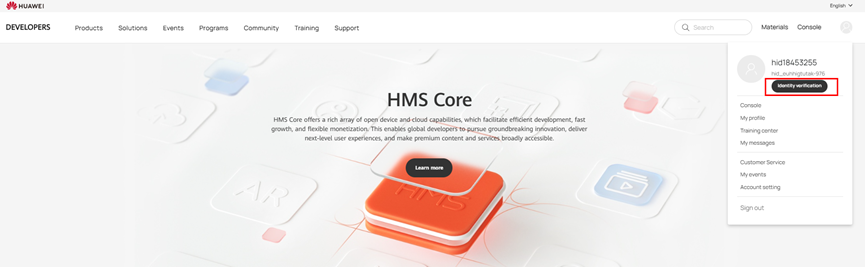
To get your identity verified, sign in to HUAWEI Developers with your HUAWEI ID and click Console or Identity verification in the upper right corner to go to the identity verification page.
The Data Universal Numbering System (DUNS or D-U-N-S) organizes commercial information by assigning each company a unique, internationally recognized 9-digit identifier. You can use the DUNS number of your company for identity verification.
To check what your company's DUNS number is, access the DUNS number lookup page at the official DUNS website and look up the DUNS number using your company name and address.
Pay attention to the following:
If your company does not have a DUNS number, apply for one on the official DUNS website.
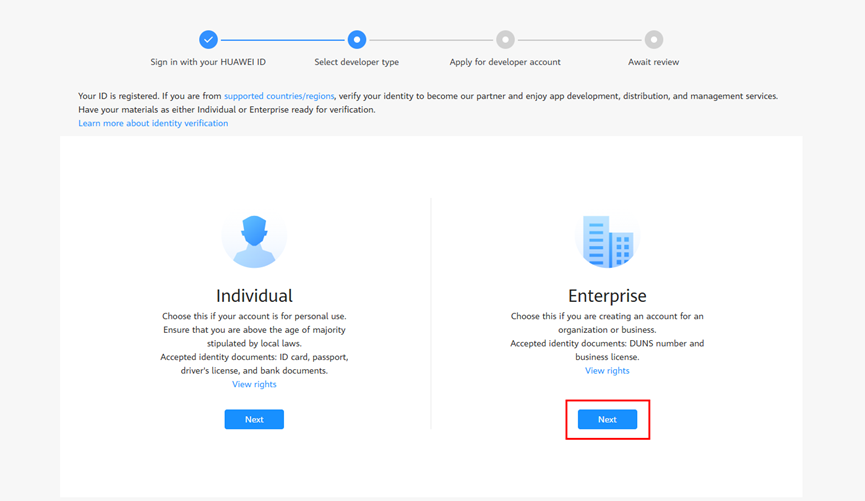
Step 1: On the page for selecting a developer type, click Next under Enterprise.
Step 2: Enter your identity information and contact information, read and confirm the Statement About HUAWEI Developer and Privacy and HUAWEI Developers Service Agreement, and click Submit. Parameters marked with a red asterisk (*) are mandatory.

Please note that some countries/regions may require enterprises to submit the identity document and proof of bank information of the enterprise contact person during identity verification. The specific materials required are subject to the instructions displayed on the page.
Currently, the required identity documents for the contact person include the following:
(All the preceding documents, including the ID card, passport, and other supporting materials, must be issued by the official authorities of the country/region selected for identity verification.)
HUAWEI Developers will complete the review within 1 to 2 working days and send the review result to your email address provided in the contact information. You can also check the review result in the notification banner at the top of the HUAWEI Developers console.
If you have any questions during identity verification, contact our customer service for assistance.