Use Cases
An app calls the getDeviceToken API of Device Security Kit to obtain a device token. The app server uses the device token to request the Device Security server to query and manage the app status on the device.
Based on the app status returned by the Device Security server, the app can determine whether it is installed on the device for the first time or whether the user has obtained coupons on the device, supporting new user acquisition campaigns.
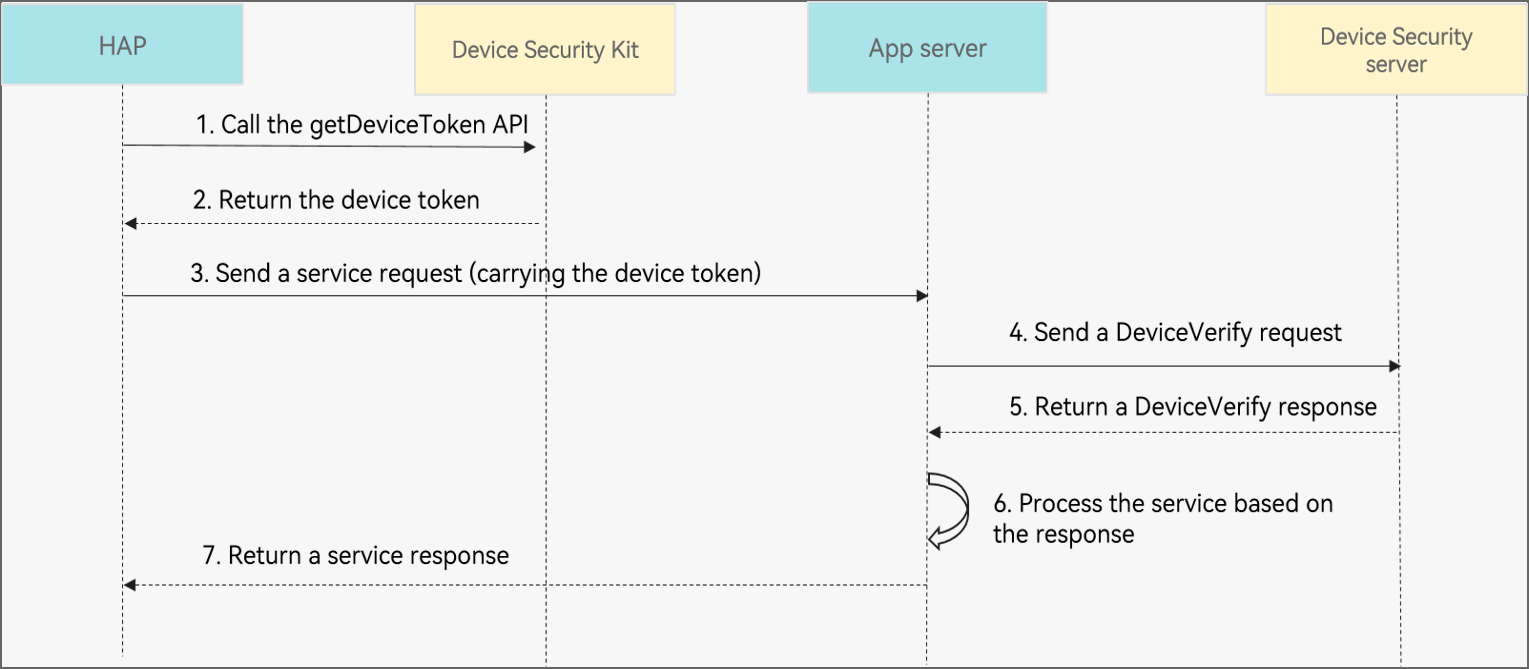
The process is as follows:
- Your app calls the getDeviceToken API of Device Security Kit to obtain a device token.
- Device Security Kit returns the device token.
- Your app sends the device token in a service request (for example, a coupon claiming request) to the app server.
- The app server sends DeviceVerify REST requests to the Device Security server to query the device marking status (for example, whether a coupon has been claimed) through the getDeviceStatus API and set the device marking status through the setDeviceStatus API.
- The Device Security server returns a DeviceVerify response.
- The app server processes the service based on the response returned by the Device Security server. For example, if a coupon has been claimed on the device, a failure message is returned.
- The app server returns a service response.
API Description
The following table lists DeviceVerify APIs, including ArkTS APIs and REST APIs. For more information about the APIs, please refer to API Reference.
| API | Description |
|---|---|
| Obtains the device token of a device. | |
| Checks the device token. | |
| Obtains the device marking status. | |
| Sets the device marking status. | |
| Deletes the device marking status. |
- Import the Device Security Kit module and related public modules.
import { deviceCertificate } from '@kit.DeviceSecurityKit';
import { BusinessError} from '@kit.BasicServicesKit';
import { hilog } from '@kit.PerformanceAnalysisKit';
- Obtain the device token.
const TAG = "DeviceCertificateJsTest";

// Request the device token and process the result.
try {
  deviceCertificate.getDeviceToken().then((token) => {
      hilog.info(0x0000, TAG, 'Succeeded in executing getDeviceToken');
      // You process the device token.
  }).catch((err: BusinessError) => {
	hilog.error(0x0000, TAG, 'getDeviceToken failed!  %{public}d %{public}s', err.code, err.message);
  });
} catch(err) {
  let error: BusinessError = err as BusinessError;
  hilog.error(0x0000, TAG, 'getDeviceToken failed!  %{public}d %{public}s', error.code, error.message);
}
The device token is valid for 10 minutes.
- Obtain the access token. For details, please refer to Generating an Access Token Based on a Service Account.
- Call the checkDeviceToken, getDeviceStatus, setDeviceStatus, and delDeviceStatus APIs to check the device token, obtain the device marking status, set the device marking status, and delete the device marking status, respectively. For details, please refer to REST APIs.

- The device marking status is valid for two years, counting from the last update time specified by lastUpdateTime.
- You can determine the validity period of the device marking status based on the lastUpdateTime field in the response to the getDeviceStatus call. For example, if you launch two promotional activities in May and June, you can determine which promotional activity the user has participated in based on the lastUpdateTime field. If the month in the value of lastUpdateTime is May, the user has participated in the promotional activity in May.