Overview
The barcode image generation capability can convert a byte array into a barcode image of a custom format.
Use Cases
The barcode image generation capability can convert a byte array into a barcode image of a custom format.
For example, you can use the capability to convert a byte array into a QR code of a transportation card.
Restrictions
This capability can generate only QR codes and has different restrictions on input parameters for different correction levels. The following table describes the parameter restrictions. For details about the API parameter restrictions, please refer to CreateOptions.
If the character array that Scan Kit recognizes from a barcode image is garbled characters, a dedicated decoder is required to decode the data. Such cases include barcode recognition of subway turnstiles.
| Correction Level | Parameter Restrictions |
|---|---|
| LEVEL_L | It is recommended that the number of bytes in the byte array do not exceed 2048. |
| LEVEL_M | It is recommended that the number of bytes in the byte array do not exceed 2048. |
| LEVEL_Q | It is recommended that the number of bytes in the byte array do not exceed 1536. |
| LEVEL_H | It is recommended that the number of bytes in the byte array do not exceed 1024. |
Suggestions on setting parameters for generating a barcode image:
- Background color and barcode color of the barcode image
You are advised to use the default background color (white) and barcode color (black). The barcode recognition rate will be deteriorated if the contrast between the background color and barcode color is small.
- Barcode image margin
You are advised to use the default margin, which is 1 px. The value ranges from 1 to 10.
- Barcode image size
The passed width and height must be the same and range from 200 to 4096. Otherwise, the generated image would be too small to recognize.
Flowchart
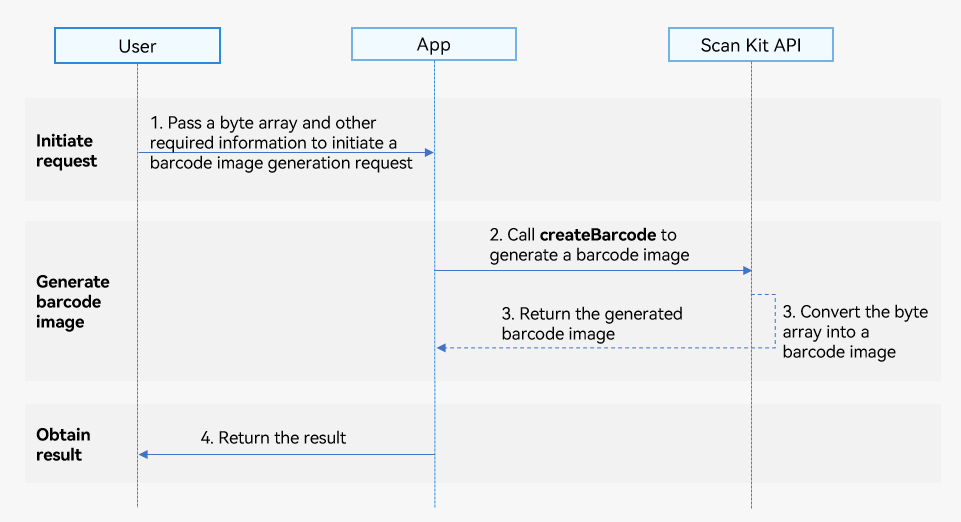
- A user sends a barcode image generation request to your app and inputs required information, such as the barcode type and the width and height of the barcode image.
- Your app calls the createBarcode API of Scan Kit to start barcode image generation.
- Scan Kit converts the input byte array into a barcode image and sends it to your app.
- Your app sends the generated barcode image to the user.
API Description
Generates a barcode image from a byte array and returns the result using a promise. For details about the APIs, please refer to the API document.
| API | Description |
|---|---|
| createBarcode(content: ArrayBuffer, options: CreateOptions): Promise<image.PixelMap> | Generates a barcode image. This API returns parameters of the image.PixelMap type, which can be rendered as an image using the Image component. This API returns the generated barcode image using a promise asynchronously. |
Development Procedure
The barcode image generation capability directly generates the required barcode image based on fixed parameters and optional parameters that are passed.
The following describes how to call the createBarcode API to generate a barcode image:
- Import the barcode image generation API module. This module provides parameters and methods for generating a barcode image.
// Import the image and error code modules required for generating a barcode image. import { scanCore, generateBarcode } from '@kit.ScanKit'; import { BusinessError } from '@kit.BasicServicesKit'; import { image } from '@kit.ImageKit'; import { hilog } from '@kit.PerformanceAnalysisKit'; import { buffer } from '@kit.ArkTS'; - Call the createBarcode API to generate a barcode image.
- Obtain the generated barcode image using a promise.
const TAG: string = 'Create barcode';

@Entry
@Component
struct Index {
  @State pixelMap: image.PixelMap | undefined = undefined
  build() {
    Flex({ direction: FlexDirection.Column, alignItems: ItemAlign.Center, justifyContent: FlexAlign.Center }) {
      Button('generateBarcode Promise').onClick(() => {
        this.pixelMap = undefined;
        let content: string =
'0177C10DD10F7768600202312110000063458FD14112345678FFFFD381012610b746365409210201b66636540ad0200020000000000110e617003201000000000000000000000000000000000000000000000000000000000000000000000000000000000000000000000000000000006645fbec664358ECF657CB40693c92da';
        let contentBuffer: ArrayBuffer = buffer.from(content, 'hex').buffer; // Create a buffer using a character string that contains hexadecimal characters.
        let options: generateBarcode.CreateOptions = {
          scanType: scanCore.ScanType.QR_CODE,
          height: 400,
          width: 400
        }
        try {
        // Return a PixelMap-format barcode image.
          generateBarcode.createBarcode(contentBuffer, options).then((pixelMap: image.PixelMap) => {
            this.pixelMap = pixelMap;
            hilog.info(0x0001, TAG, 'Succeeded in creating barCode.');
          }).catch((error: BusinessError) => {
            hilog.error(0x0001, TAG, `Failed to createBarCode. Code: ${error.code}, message: ${error.message}`);
          })
        } catch (error) {
          hilog.error(0x0001, TAG,
            `Failed to createBarcode by Promise with options. Code: ${error.code}, message: ${error.message}`);
        }
      })
      // Display the obtained barcode image.
      if (this.pixelMap) {
        Image(this.pixelMap).width(300).height(300).objectFit(ImageFit.Contain)
      }
    }
    .width('100%')
    .height('100%')
  }
}
- Obtain the generated barcode image using a promise.