For large apps, the process of rebuilding, pushing packages, and installing after each code modification can be time-consuming. To address this issue, incremental debugging is provided in both DevEco Studio and command line. After code is modified, the debugger can identify code differences and build and push only the incremental package for debugging.

Incremental debugging of C++ code is available for projects developed using API version 11 or later based on the stage model. Incremental debugging of ArkTS code, specifically for modifications to resource files, is available for projects developed using API version 12 or later based on the stage model.
[h2]Debugging C++ Code
- On the toolbar, select the device to be debugged and click
 Run or
 Debug.
- After modifying the C++ code, click
 Apply Changes.
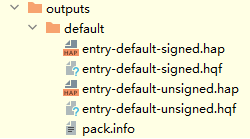
Then, DevEco Studio initiates an incremental build task, building an incremental package in HQF format. Once the incremental package is built, it will be pushed and installed on the device.

The Apply Changes feature temporarily does not support the creation and deletion of code files, modifications related to decorators, or adding new references using import statements in code files.
[h2]Debugging resfile Resource Files
- On the toolbar, select the device to be debugged and click
 Run or
 Debug.
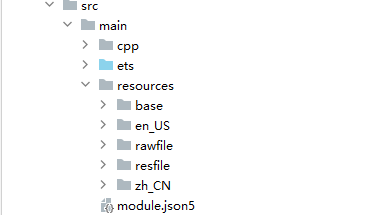
- Add or modify resource files in the resfile folder under resources of the project directory.
- Click
 Apply Changes to push the incremental package to the device.
Then, DevEco Studio initiates an incremental build task, building an incremental package in HQF format. Once the incremental package is built, it will be pushed and installed on the device.
[h2]Building an .hqf Package Using Hvigor
- Confirm the HAP/HSP modules required for the app to run and perform a full build.Based on the required modules for running and their products and targets, write commands to execute the HAP/HSP build tasks. For example, if the entry module depends on the HSP module library:
hvigorw --mode module -p module=entry@default,library@default -p product=default assembleHap assembleHsp --info --no-daemon
- Run the hdc command to install the HAP and HSP.
$ hdc shell mkdir data/local/tmp/99c24fdc44694c05be12491d0a48e139
$ hdc file send library-default-signed.hsp "data/local/tmp/99c24fdc44694c05be12491d0a48e139"
$ hdc file send entry-default-signed.hap "data/local/tmp/99c24fdc44694c05be12491d0a48e139"
$ hdc shell bm install -p "data/local/tmp/99c24fdc44694c05be12491d0a48e139"
- After modifying the code, run the .hqf packaging command. Once the command execution is completed, you can find the corresponding products entry-default-signed.hqf and library-default-signed.hqf in the build/default/outputs/default output directories of the entry and library modules.
hvigorw --mode module -p module=entry@default,library@default -p product=default assembleDevHqf --info --no-daemon
- Run the hdc command to install the .hqf package.
$ hdc shell mkdir data/local/tmp/3b7d97cdf4de41c4aecc465ff5069708
$ hdc file send library-default-signed.hqf "data/local/tmp/3b7d97cdf4de41c4aecc465ff5069708"
$ hdc file send entry-default-signed.hqf "data/local/tmp/3b7d97cdf4de41c4aecc465ff5069708"
$ bm quickfix -a -f "data/local/tmp/3b7d97cdf4de41c4aecc465ff5069708"
[h2]Building an .hqf Package Using the SDK Tool
- Perform a full build of the app and install the app on the device.
hdc bm install ***.hap (HAP/HSP path on the PC)
hdc shell bm install -p  hap_path (installation package directory on the device)
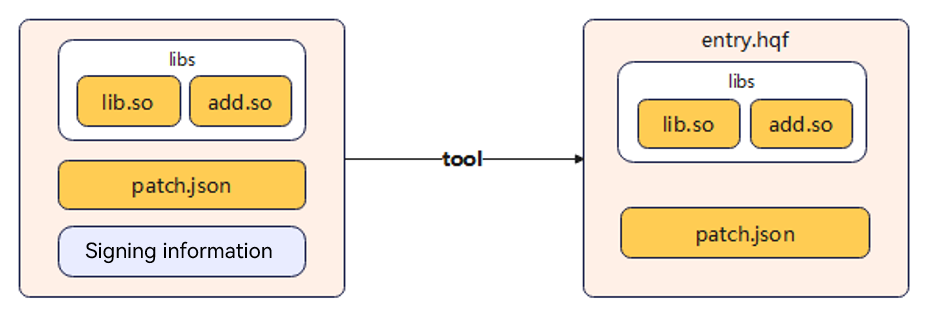
- Go through an independent build process to identify the .so files you want to include in the incremental .hqf package, and consolidate them into a directory, such as libs.
- Prepare a signature file consistent with the installed app.
You can obtain the corresponding signature file from the project's build-profile.json5 file.
- Prepare the patch.json file, with content as follows:
{ "app" : { "bundleName" : "com.ohos.quickfix", "versionCode" : 1000000, // App version "versionName" : "1.0.0.1", "patchVersionCode" : 1000000, // Patch version "patchVersionName" : "1.0.0.1" }, "module" : { "name" : "entry", "type" : "patch", "deviceTypes" : [ "default", "tablet" ], "originalModuleHash" : "" // SHA-256 value of the HAP to be fixed; leave it empty } } - Use the HQF packaging tool to package files.
java -jar app_packing_tool.jar --mode hqf --json-path patch.json --lib-path libs --out-path entry-default-unsigned.hqf --force true
--mode: packaging mode, the value being hqf here; mandatory.
--json-path: incremental package information, the value being patch.json here; mandatory. For details, see Step 4.
--lib-path: path to the .so files to be packaged. For details, see Step 2.
--out-path: output path for the .hqf package.
- Call the signing tool to sign the package and code.
java -jar hap-sign-tool.jar sign-app -keyAlias "OpenHarmony Application Release" -signAlg "SHA256withECDSA" -mode "localSign" -appCertFile "OpenHarmonyApplication.pem" -profileFile "ohos_provision_release.p7b" -inFile "entry-default-unsigned.hqf" -keystoreFile "OpenHarmony.p12" -outFile "entry-signed-release.hqf" -keyPwd "123456" -keystorePwd "123456" -signCode 1
In the preceding command, modify settings of the following parameters and keep the other parameters as they are:
- keyAlias: key alias.
- appCertFile: debug certificate file in .cer format.
- profileFile: debug profile file in .p7b format.
- inFile: HAP to sign.
- keystoreFile: keystore file in .p12 format.
- outFile: HAP that carries the signature information, to be generated after the signing.
- keyPwd: key password.
- keystorePwd: keystore password.
- signCode: whether to enable code signing. By default, this feature is enabled. The value 1 means to enable the feature, and 0 means the opposite. Since NEXT Beta1, code signing must be enabled. Otherwise, the built package cannot be installed on devices.
- Install the incremental .hqf package.
- Single-package installation:
bm quickfix -a -f /data/entry-signed-release.hqf
- Multi-package installation:
bm quickfix -f, --file-path <bundle-direction>
- Single-package installation:
[h2]Failed to Use Incremental Debugging of DevEco Studio
Symptom
If the .so file is modified and packed by using other development tools, the incremental debugging feature of DevEco Studio 4.1 Canary2 does not work.
Solution
In DevEco Studio 4.1 Canary2, if the native file exceeds 16 KB, the LLDB debugger holds the file handle by default when a breakpoint is hit. As a result, the file cannot be modified or saved during debugging.
You can use either of the following methods to solve the problem:
- Method 1: Run the following command to disable the source code caching mechanism for the LLDB debugger. As a result, the LLDB debugger will not hold file handles.
settings set use-source-cache false
- Method 2: Upgrade the DevEco Studio version to DevEco Studio NEXT Developer Preview2.