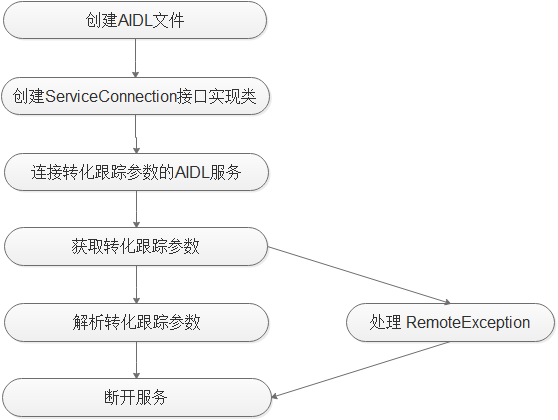
广告主APP开发者也可直接调用Ads Kit的AIDL接口获取华为设备上的转化跟踪参数,这种集成方式不需要集成任何华为SDK。AIDL接口获取到的转化跟踪参数与同一台设备上SDK接口获取到的转化跟踪参数相同。
1. 创建接口IPPSChannelInfoService的AIDL文件,放置在com.huawei.android.hms.ppskit包路径下,如下图:

2. 将以下内容复制到AIDL文件中。
- package com.huawei.android.hms.ppskit;
- /** 重要:请不要修改此AIDL文件的方法顺序 */
- interface IPPSChannelInfoService {
- String getChannelInfo();
- }
3. 创建一个类,实现Android原生的ServiceConnection接口。
步骤1 实现ServiceConnection的onServiceConnected方法。
步骤2 调用Android原生的IPPSChannelInfoService.Stub.asInterface方法获取IPPSChannelInfoService。
步骤3 调用getChannelInfo方法获取转化跟踪参数。
- private final class InstallReferrerServiceConnection implements ServiceConnection {
- private InstallReferrerServiceConnection() {
- }
- @Override
- public void onServiceConnected(ComponentName componentName, IBinder iBinder) {
- Log.i(TAG, "onServiceConnected");
- IPPSChannelInfoService service = IPPSChannelInfoService.Stub.asInterface(iBinder);
- if (null != service) {
- try {
- String json = service.getChannelInfo();
- parseChannelJson(json);
- } catch (RemoteException e) {
- Log.e(TAG, "getChannelInfo Excepition");
- } finally {
- mContext.unbindService(this);
- }
- }
- }
- @Override
- public void onServiceDisconnected(ComponentName componentName) {
- Log.i(TAG, "onServiceDisconnected");
- }
- }
- }
4. 连接转化跟踪参数的AIDL服务。
步骤1 创建一个InstallReferrerServiceConnection实例。
步骤2 创建一个Intent,Action是“com.huawei.android.hms.CHANNEL_SERVICE”。
步骤3 设置Intent的包名为”com.huawei.hwid”。
步骤4 调用bindService连接转化跟踪参数的AIDL服务。
- private boolean bindService() {
- InstallReferrerServiceConnection serviceConnection = new InstallReferrerServiceConnection();
- Intent intent = new Intent("com.huawei.android.hms.CHANNEL_SERVICE");
- intent.setPackage("com.huawei.hwid");
- boolean result = bindService(intent, serviceConnection , Context.BIND_AUTO_CREATE);
- Log.i(TAG, "bindService result: " + result);
- return result;
- }
5. 解析返回的JSON格式写转化跟踪参数。
- private ReferrerDetails parseChannelJson(String channelJson) {
- Log.i(TAG, "parseChannelJson: " + channelJson);
- try {
- JSONObject jsonObject = new JSONObject(channelJson);
- String channelInfo = jsonObject.optString("channelInfo");
- long installTimestamp = jsonObject.optLong("installTimestamp", 0);
- long clickTimestamp = jsonObject.optLong("clickTimestamp", 0);
- ReferrerDetails referrerDetails = new ReferrerDetails(channelInfo, clickTimestamp, installTimestamp);
- updateReferrerDetails(referrerDetails);
- return referrerDetails;
- } catch (JSONException e) {
- Log.e(TAG, "");
- }
- return null;
- }