本章节主要介绍接入华为应用内支付的客户端开发步骤,帮助您快速了解华为支付提供的客户端接口及其使用方法。
在使用应用内支付之前,您的应用需要向华为IAP发送isEnvReady请求,以此判断用户当前登录的华为帐号所在的服务地是否在华为IAP支持结算的国家或地区中。
如果您的应用未接入华为帐号的登录接口,您可以通过该接口完成登录操作。
开发步骤如下:
发起isEnvReady请求,并设置两个回调监听来接收接口请求的结果。
● 当接口请求成功时,您的应用将获取到一个IsEnvReadyResult实例对象,表示用户当前登录的华为帐号所在的服务地支持IAP。
● 当接口请求失败时,IAP会返回一个Exception对象,若该对象为IapApiException对象,可使用其getStatusCode()方法获取此次请求的返回码。
当返回帐号未登录(OrderStatusCode. ORDER_HWID_NOT_LOGIN)时,可使用IapApiException对象中的status拉起华为帐号登录页面,此后在Activity的onActivityResult方法中获取结果信息。从onActivityResult返回的intent中解析出returnCode,当returnCode = OrderStatusCode.SUCCESS时,则表示当前帐号所在服务地支持IAP,其他则表示此次请求有异常。
- // To get the Activity instance that calls this API.
- Activity activity = getActivity();
- Task<IsEnvReadyResult> task = Iap.getIapClient(activity).isEnvReady();
- task.addOnSuccessListener(new OnSuccessListener<IsEnvReadyResult>() {
- @Override
- public void onSuccess(IsEnvReadyResult result) {
- // Obtain the execution result.
- }
- }).addOnFailureListener(new OnFailureListener() {
- @Override
- public void onFailure(Exception e) {
- if (e instanceof IapApiException) {
- IapApiException apiException = (IapApiException) e;
- Status status = apiException.getStatus();
- if (status.getStatusCode() == OrderStatusCode.ORDER_HWID_NOT_LOGIN) {
- // Not logged in.
- if (status.hasResolution()) {
- try {
- // 6666 is an int constant defined by the developer.
- status.startResolutionForResult(getActivity(), 6666);
- } catch (IntentSender.SendIntentException exp) {
- }
- }
- } else if (status.getStatusCode() == OrderStatusCode.ORDER_ACCOUNT_AREA_NOT_SUPPORTED) {
- // The current region does not support HUAWEI IAP.
- }
- }
- }
- });
- @Override
- protected void onActivityResult(int requestCode, int resultCode, Intent data) {
- super.onActivityResult(requestCode, resultCode, data);
- if (requestCode == 6666) {
- if (data != null) {
- // Obtain the execution result.
- int returnCode = data.getIntExtra("returnCode", 1);
- }
- }
- }
若您使用在华为AppGallery Connect网站上配置的商品,则需要在您的应用中使用obtainProductInfo接口来获取此类商品的详细信息。
开发步骤如下:
1. 构建请求参数ProductInfoReq,发起obtainProductInfo请求并设置OnSuccessListener和OnFailureListener回调监听器以接收接口请求的结果。您需要在ProductInfoReq中携带您此前已在AGC网站定义并生效的商品ID,并根据实际配置的商品指定其priceType。
2. 当接口请求成功时,IAP将返回一个ProductInfoResult对象,您的应用可通过该对象的getProductInfoList方法获取到包含了单个商品信息的ProductInfo对象的列表。您可以使用ProductInfo对象包含的商品价格,名称,描述等信息,向用户展示可供购买的商品列表。
- // Pass in the productId list of products to be queried.
- List<String> productIdList = new ArrayList<>();
- // The product ID is the same as that set by a developer when configuring product information in AppGallery Connect.
- productIdList.add("ConsumeProduct1001");
- ProductInfoReq req = new ProductInfoReq();
- // priceType: 0: consumable; 1: non-consumable; 2: auto-renewable subscription
- req.setPriceType(0);
- req.setProductIds(productIdList);
- // to call the obtainProductInfo API.
- // To get the Activity instance that calls this API.
- Activity activity = getActivity();
- Task<ProductInfoResult> task = Iap.getIapClient(activity).obtainProductInfo(req);
- task.addOnSuccessListener(new OnSuccessListener<ProductInfoResult>() {
- @Override
- public void onSuccess(ProductInfoResult result) {
- // Obtain the result
- List<ProductInfo> productList = result.getProductInfoList();
- }
- }).addOnFailureListener(new OnFailureListener() {
- @Override
- public void onFailure(Exception e) {
- if (e instanceof IapApiException) {
- IapApiException apiException = (IapApiException)e;
- int returnCode = apiException.getStatusCode();
- } else {
- // Other external errors
- }
- }
- });
AppGallery Connect网站支持的商品包括消耗型商品,非消耗型商品和订阅型商品。针对此类商品,您的应用可通过createPurchaseIntent接口发起购买请求。
开发步骤如下:
1. 构建请求参数PurchaseIntentReq,发起createPurchaseIntent请求。您需要在PurchaseIntentReq中携带您此前已在AGC网站上定义并生效的商品ID。
当接口请求成功时,您可获取到一个PurchaseIntentResult对象,其getStatus方法返回了一个Status对象,您的应用需要通过Status对象的startResolutionForResult方法来启动华为IAP收银台。
- // Constructs a PurchaseIntentReq object.
- PurchaseIntentReq req = new PurchaseIntentReq();
- // The product ID is the same as that set by a developer when configuring product information in AppGallery Connect.
- req.setProductId("CProduct1");
- // In-app product type contains:
- // priceType: 0: consumable; 1: non-consumable; 2: auto-renewable subscription
- req.setPriceType(0);
- req.setDeveloperPayload("test");
- // to call the createPurchaseIntent API.
- // To get the Activity instance that calls this API.
- final Activity activity = getActivity();
- Task<PurchaseIntentResult> task = Iap.getIapClient(activity).createPurchaseIntent(req);
- task.addOnSuccessListener(new OnSuccessListener<PurchaseIntentResult>() {
- @Override
- public void onSuccess(PurchaseIntentResult result) {
- // Obtain the payment result.
- Status status = result.getStatus();
- if (status.hasResolution()) {
- try {
- // 6666 is an int constant defined by the developer.
- status.startResolutionForResult(activity, 6666);
- } catch (IntentSender.SendIntentException exp) {
- }
- }
- }
- }).addOnFailureListener(new OnFailureListener() {
- @Override
- public void onFailure(Exception e) {
- if (e instanceof IapApiException) {
- IapApiException apiException = (IapApiException)e;
- Status status = apiException.getStatus();
- int returnCode = apiException.getStatusCode();
- } else {
- // Other external errors
- }
- }
- });
2. 在您的应用拉起收银台并且当用户完成支付后(成功购买商品或取消购买),华为IAP会通过onActivityResult方式将此次支付结果返回给您的应用。您可以使用parsePurchaseResultInfoFromIntent方法获取包含结果信息的PurchaseResultInfo对象。
● 当用户购买成功时,可从PurchaseResultInfo对象中获取到购买数据InAppPurchaseData及其签名数据,您需要使用在华为AppGallery Connect分配的公钥进行签名验证,验证方法请参考对响应消息验签。
说明:IAP SDK 提供了解析InAppPurchaseData字符串的辅助工具类InAppPurchaseData,您也可使用该类构造一个InAppPurchaseData对象并从InAppPurchaseData对象中获取相关信息。
● 用户购买消耗型商品时,如果返回以下支付异常则需要检查是否存在掉单情况,具体参考消耗型商品的补单机制。
- 支付失败(OrderStatusCode.ORDER_STATE_FAILED, -1)
- 已拥有该商品(OrderStatusCode.ORDER_PRODUCT_OWNED, 60051)
- @Override
- protected void onActivityResult(int requestCode, int resultCode, Intent data) {
- super.onActivityResult(requestCode, resultCode, data);
- if (requestCode == 6666) {
- if (data == null) {
- Log.e("onActivityResult", "data is null");
- return;
- }
- PurchaseResultInfo purchaseResultInfo = Iap.getIapClient(this).parsePurchaseResultInfoFromIntent(data);
- switch(purchaseResultInfo.getReturnCode()) {
- case OrderStatusCode.ORDER_STATE_CANCEL:
- // User cancel payment.
- break;
- case OrderStatusCode.ORDER_STATE_FAILED:
- case OrderStatusCode.ORDER_PRODUCT_OWNED:
- // to check if there exists undelivered products.
- break;
- case OrderStatusCode.ORDER_STATE_SUCCESS:
- // pay success.
- String inAppPurchaseData = purchaseResultInfo.getInAppPurchaseData();
- String inAppPurchaseDataSignature = purchaseResultInfo.getInAppDataSignature();
- // use the public key of your app to verify the signature.
- // If ok, you can deliver your products.
- // If the user purchased a consumable product, call the consumeOwnedPurchase API to consume it after successfully delivering the product.
- break;
- default:
- break;
- }
- return;
- }
- }
若您的应用使用自定义价格的商品,可通过createPurchaseIntentWithPrice接口发起支付请求。
开发步骤如下:
1. 构建请求参数PurchaseIntentWithPriceReq,发起createPurchaseIntentWithPrice请求。
● 当接口请求成功时,IAP将返回一个PurchaseIntentResult对象,需要使用支付公钥对其包含的paymentData进行签名校验,具体请参考对响应消息验签的方法。公钥获取方法参考查询支付服务信息。验签成功之后您的应用可通过PurchaseResultInfo中携带的Status对象来启动华为IAP收银台。
● 当接口请求失败时,您的应用可获取到一个Exception对象。若该异常对象为IapApiException实例对象,使用IapApiException中的getStatusCode()可获取此次请求的返回码,具体参考异常处理及通用错误码。当返回下面的几种错误时,需要您进行处理:
- 未登录(OrderStatusCode.ORDER_HWID_NOT_LOGIN)
Iap在IapApiException中携带了一个status实例,可通过其startResolutionForResult方法拉起华为帐号登录页面,结果通过Activity的onActivityResult方法回调。从onActivityResult方法中返回的intent中携带的returnCode字段即为登录的结果。
- 未同意协议(OrderStatusCode.ORDER_NOT_ACCEPT_AGREEMENT)
可通过返回的IapApiException对象中的status拉起华为支付协议页面,方法同未登录场景。
- 已拥有该商品(OrderStatusCode.ORDER_PRODUCT_OWNED)
如果购买为消耗型商品,说明您的应用此前可能存在掉单的场景,需要触发补单操作,具体参考消耗型商品的补单机制。
如果购买为非消耗型商品,则不能再次进行购买,请确认应用是否已经发货成功。
2. 在您的应用拉起收银台并且当用户完成支付后(成功购买商品或取消购买),华为IAP会通过onActivityResult方式将这次支付结果返回给您的应用。可使用parsePurchaseResultInfoFromIntent方法获取包含结果信息的PurchaseResultInfo对象。
● 当用户购买成功时,可从PurchaseResultInfo对象中获取到相关的购买数据InAppPurchaseData及其签名数据,您需要使用在华为AppGallery Connect分配的公钥进行签名验证,验证方法请参考对响应消息验签的方法。
● 用户购买消耗型商品时,如果返回以下支付异常则需要检查是否存在掉单情况,具体可参考消耗型商品的补单流程。
- 支付失败(OrderStatusCode.ORDER_STATE_FAILED, -1)
- 已拥有该商品(OrderStatusCode.ORDER_PRODUCT_OWNED, 60051)
- // Constructs a PurchaseIntentWithPriceReq object.
- PurchaseIntentWithPriceReq req = new PurchaseIntentWithPriceReq();
- req.setCurrency("CNY");
- req.setDeveloperPayload("test");
- // In-app product type contains:
- // priceType: 0: consumable; 1: non-consumable;
- req.setPriceType(0);
- req.setSdkChannel("1");
- req.setProductName("test");
- req.setAmount("1.00");
- req.setProductId("ConsumableProduct1");
- req.setServiceCatalog("X38");
- req.setCountry("CN");
- // to call the createPurchaseIntentWithPrice API.
- // To get the Activity instance that calls this API.
- final Activity activity = getActivity();
- Task<PurchaseIntentResult> task = Iap.getIapClient(activity).createPurchaseIntentWithPrice(req);
- task.addOnSuccessListener(new OnSuccessListener<PurchaseIntentResult>() {
- @Override
- public void onSuccess(PurchaseIntentResult result) {
- // Obtain the payment result.
- String paymentData = result.getPaymentData();
- String paymentSignature = result.getPaymentSignature();
- // to verify signature of the paymentData
- String publicKey = "XXX";
- if (CipherUtil.doCheck(paymentData, paymentSignature, publicKey)) {
- // if success, to open the checkout page of HUAWEI IAP.
- Status status = result.getStatus();
- if (status.hasResolution()) {
- try {
- status.startResolutionForResult(activity, 6666);
- } catch (IntentSender.SendIntentException exp) {
- }
- }
- }
- }
- }).addOnFailureListener(new OnFailureListener() {
- @Override
- public void onFailure(Exception e) {
- if (e instanceof IapApiException) {
- IapApiException apiException = (IapApiException) e;
- int returnCode = apiException.getStatusCode();
- switch (returnCode) {
- case OrderStatusCode.ORDER_HWID_NOT_LOGIN:
- case OrderStatusCode.ORDER_NOT_ACCEPT_AGREEMENT:
- // Account is not logged in or the user does not agree to payment agreement.
- Status status = apiException.getStatus();
- if (status.hasResolution()) {
- try {
- status.startResolutionForResult(activity, 8888);
- } catch (IntentSender.SendIntentException exp) {
- }
- }
- break;
- case OrderStatusCode.ORDER_PRODUCT_OWNED:
- // to check if there exists undelivered products.
- break;
- default:
- break;
- }
- }
- }
- });
- // Payment result callback.
- @Override
- protected void onActivityResult(int requestCode, int resultCode, Intent data) {
- if (requestCode == 6666) {
- if (data == null) {
- Log.e("onActivityResult", "data is null");
- return;
- }
- PurchaseResultInfo purchaseResultInfo = Iap.getIapClient(this).parsePurchaseResultInfoFromIntent(data);
- switch(purchaseResultInfo.getReturnCode()) {
- case OrderStatusCode.ORDER_STATE_CANCEL:
- // User cancel payment.
- break;
- case OrderStatusCode.ORDER_STATE_FAILED:
- case OrderStatusCode.ORDER_PRODUCT_OWNED:
- // to check if there exists undelivered products.
- break;
- case OrderStatusCode.ORDER_STATE_SUCCESS:
- // pay success.
- String inAppPurchaseData = purchaseResultInfo.getInAppPurchaseData();
- String inAppPurchaseDataSignature = purchaseResultInfo.getInAppDataSignature();
- // use the public key of your app to verify the signature.
- // If ok, you can deliver your products.
- // If the user purchased a consumable product, call the consumeOwnedPurchase API to consume it after successfully delivering the product.
- break;
- default:
- break;
- }
- return;
- }
- if (requestCode == 8888) {
- int returnCode = IapClientHelper.parseRespCodeFromIntent(data);
- if (returnCode == OrderStatusCode.ORDER_STATE_SUCCESS) {
- // The request was successful, and then you need to make another createPurchaseIntentWithPrice request
- }
- return;
- }
- }
用户完成一次支付之后,您需要根据购买数据InAppPurchaseData的purchaseState字段来判断订单是否已成功支付。若purchaseState为已支付(取值为0),您需要发放相应的商品或提供相应的服务,此后需要向华为IAP发送发货确认请求。
1. 对于消耗型商品,您需要从InAppPurchaseData JSON字符串中解析出purchaseToken信息,用于确认商品的发货状态。
在成功发货并记录已发货的商品的purchaseToken之后,您的应用需要使用consumeOwnedPurchase接口消耗该商品,以此通知华为服务器更新商品的发货状态。发送consumeOwnedPurchase请求时,请在请求参数中携带purchaseToken。应用成功执行消耗之后,华为服务器会将相应商品重新设置为可购买状态,用户即可再次购买该商品。
- // Constructs a ConsumeOwnedPurchaseReq object.
- String purchaseToken = "";
- try {
- InAppPurchaseData inAppPurchaseDataBean = new InAppPurchaseData(inAppPurchaseData);
- purchaseToken = inAppPurchaseDataBean.getPurchaseToken();
- } catch (JSONException e) {
- }
- ConsumeOwnedPurchaseReq req = new ConsumeOwnedPurchaseReq();
- req.setPurchaseToken(purchaseToken);
- // to call the consumeOwnedPurchase API.
- // To get the Activity instance that calls this API.
- Activity activity = getActivity();
- Task<ConsumeOwnedPurchaseResult> task = Iap.getIapClient(activity).consumeOwnedPurchase(req);
- task.addOnSuccessListener(new OnSuccessListener<ConsumeOwnedPurchaseResult>() {
- @Override
- public void onSuccess(ConsumeOwnedPurchaseResult result) {
- // Obtain the result
- }
- }).addOnFailureListener(new OnFailureListener() {
- @Override
- public void onFailure(Exception e) {
- if (e instanceof IapApiException) {
- IapApiException apiException = (IapApiException)e;
- Status status = apiException.getStatus();
- int returnCode = apiException.getStatusCode();
- } else {
- // Other external errors
- }
- }
- });
2. 对于非消耗型商品,华为服务器默认返回已确认的订单数据,您需要在用户购买成功之后持续向用户提供相应的商品服务。具体可参考提供非消耗型商品对应的服务章节。
3. 订阅商品的处理请查阅订阅专用功能说明。
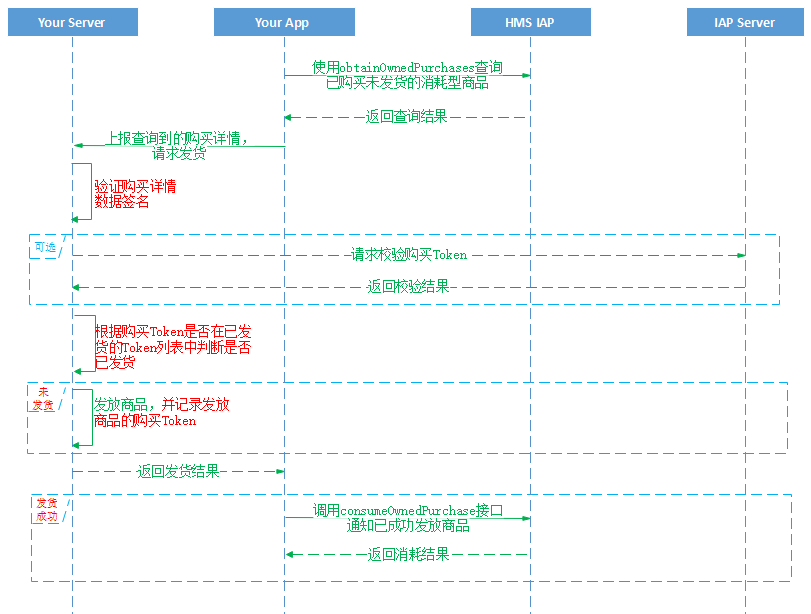
在用户支付之后可能由于出现异常(网络错误、进程被终止等等)导致应用无法知道用户实际是否支付成功,即出现掉单情况。华为应用内支付针对此场景,提供了消耗型商品的补单机制。您的应用可参考以下流程图进行处理:
开发步骤如下:
1. 在应用启动、购买请求返回错误码-1或60051时,使用obtainOwnedPurchases获取用户已购未发货的消耗型商品的购买信息。您的应用需要在请求参数OwnedPurchasesReq中指定查询的priceType为0。
当接口请求成功时,IAP将返回一个OwnedPurchasesResult对象,该对象包含用户所有已购但未发货的商品购买信息及其签名数据,您需要使用在华为AppGallery Connect分配的公钥进行签名验证,验证方法请参考对返回结果验签。
每个购买信息均以JSON格式的String形式呈现,包含的参数请参见InAppPurchaseData。您需要从InAppPurchaseData的字符串中解析出purchaseState字段,当purchaseState为0时表示此次交易是成功的,您的应用仅需要对这部分商品进行补发货操作。
- // Constructs a OwnedPurchasesReq object.
- OwnedPurchasesReq ownedPurchasesReq = new OwnedPurchasesReq();
- // In-app product type contains:
- // priceType: 0: consumable; 1: non-consumable; 2: auto-renewable subscription
- ownedPurchasesReq.setPriceType(0);
- // to call the obtainOwnedPurchases API
- // To get the Activity instance that calls this API.
- Activity activity = getActivity();
- Task<OwnedPurchasesResult> task = Iap.getIapClient(activity).obtainOwnedPurchases(ownedPurchasesReq);
- task.addOnSuccessListener(new OnSuccessListener<OwnedPurchasesResult>() {
- @Override
- public void onSuccess(OwnedPurchasesResult result) {
- // Obtain the execution result.
- if (result != null && result.getInAppPurchaseDataList() != null) {
- for (int i = 0; i < result.getInAppPurchaseDataList().size(); i++) {
- String inAppPurchaseData = result.getInAppPurchaseDataList().get(i);
- String InAppSignature = result.getInAppSignature().get(i);
- // use the payment public key to verify the signature of the inAppPurchaseData.
- // if success.
- try {
- InAppPurchaseData inAppPurchaseDataBean = new InAppPurchaseData(inAppPurchaseData);
- int purchaseState = inAppPurchaseDataBean.getPurchaseState();
- } catch (JSONException e) {
- }
- }
- }
- }
- }).addOnFailureListener(new OnFailureListener() {
- @Override
- public void onFailure(Exception e) {
- if (e instanceof IapApiException) {
- IapApiException apiException = (IapApiException)e;
- Status status = apiException.getStatus();
- int returnCode = apiException.getStatusCode();
- } else {
- // Other external errors
- }
- }
- });
2. 使用consumeOwnedPurchase接口对已发货商品进行消耗。
您需要对obtainOwnedPurchases返回的每个商品数据进行发货确认,确认已发货后使用consumeOwnedPurchase接口消耗所有已发货商品,以此通知华为服务器更新商品的发货状态。对于消耗型商品,应用成功执行消耗之后,华为服务器会将相应商品重新设置为可购买状态,用户即可再次购买该商品。
若您的应用为用户提供非消耗型商品,可在应用启动时通过obtainOwnedPurchases接口获取用户已购的非消耗型商品的购买信息,格式请参见InAppPurchaseData。若返回的购买信息列表不为空,请确认每个购买信息的purchaseState字段。若purchaseState为0,您需要提供相应的商品服务。
开发步骤如下:
使用obtainOwnedPurchases获取用户已购非消耗型商品的信息。
您的应用需要在请求参数OwnedPurchasesReq中指定查询的priceType为1。您可从返回的每个商品信息中解析出purchaseState,用于判断当前商品的购买状态,以此作为您的应用的发货标志。
IAP SDK 提供了解析InAppPurchaseData字符串的辅助工具类InAppPurchaseData,您也可使用该类构造一个InAppPurchaseData对象并从InAppPurchaseData对象中获取相关信息。
- // Constructs a OwnedPurchasesReq object.
- OwnedPurchasesReq ownedPurchasesReq = new OwnedPurchasesReq();
- // In-app product type contains:
- // priceType: 0: consumable; 1: non-consumable; 2: auto-renewable subscription
- ownedPurchasesReq.setPriceType(1);
- // to call the obtainOwnedPurchases API
- // To get the Activity instance that calls this API.
- Activity activity = getActivity();
- Task<OwnedPurchasesResult> task = Iap.getIapClient(activity).obtainOwnedPurchases(ownedPurchasesReq);
- task.addOnSuccessListener(new OnSuccessListener<OwnedPurchasesResult>() {
- @Override
- public void onSuccess(OwnedPurchasesResult result) {
- // Obtain the execution result.
- if (result != null && result.getInAppPurchaseDataList() != null) {
- for (int i = 0; i < result.getInAppPurchaseDataList().size(); i++) {
- String inAppPurchaseData = result.getInAppPurchaseDataList().get(i);
- String InAppSignature = result.getInAppSignature().get(i);
- // use the payment public key to verify the signature of the inAppPurchaseData.
- // if success.
- try {
- InAppPurchaseData inAppPurchaseDataBean = new InAppPurchaseData(inAppPurchaseData);
- int purchaseState = inAppPurchaseDataBean.getPurchaseState();
- } catch (JSONException e) {
- }
- }
- }
- }
- }).addOnFailureListener(new OnFailureListener() {
- @Override
- public void onFailure(Exception e) {
- if (e instanceof IapApiException) {
- IapApiException apiException = (IapApiException)e;
- Status status = apiException.getStatus();
- int returnCode = apiException.getStatusCode();
- } else {
- // Other external errors
- }
- }
- });
对于消耗型商品,可使用obtainOwnedPurchaseRecord接口获取用户所有已消耗即已发货的商品信息。
- // Constructs a OwnedPurchasesReq object.
- OwnedPurchasesReq req = new OwnedPurchasesReq();
- // In-app product type contains:
- // 0: consumable; 1: non-consumable; 2: auto-renewable subscription
- req.setPriceType(0);
- // to call the obtainOwnedPurchaseRecord API.
- // To get the Activity instance that calls this API.
- Activity activity = getActivity();
- Task<OwnedPurchasesResult> task = Iap.getIapClient(activity).obtainOwnedPurchaseRecord(req);
- task.addOnSuccessListener(new OnSuccessListener<OwnedPurchasesResult>() {
- @Override
- public void onSuccess(OwnedPurchasesResult result) {
- // Obtain the execution result.
- }
- }).addOnFailureListener(new OnFailureListener() {
- @Override
- public void onFailure(Exception e) {
- if (e instanceof IapApiException) {
- IapApiException apiException = (IapApiException)e;
- int returnCode = apiException.getStatusCode();
- } else {
- // Other external errors
- }
- }
- });