1. 基于实时风险分析引擎识别:API会在合法范围内采集相关数据并上传实时风险分析引擎来识别当前用户是否为虚假用户。
2. 提供验证码检测虚假用户:当前检测结果是可疑或风险用户,弹出验证码对用户进行二次验证。
可以帮助开发者 APP防范批量注册、撞库攻击、活动“薅羊毛”、内容爬虫等行为。
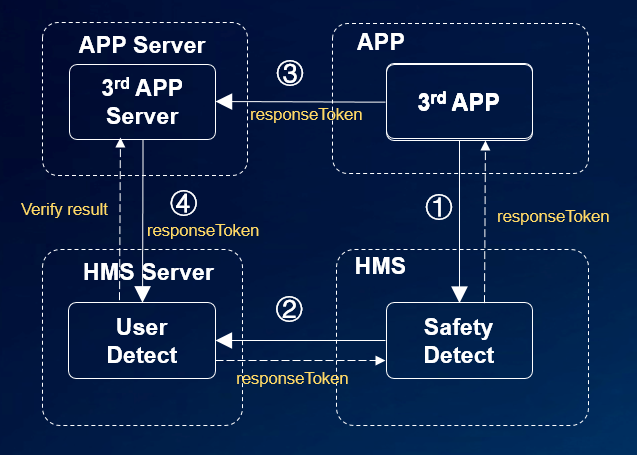
(1) app集成HMS SDK 调用HMS Safety Detect service。
(2) Safety Detect评估设备运行环境风险,如果风险等级为中或高,弹出验证码进行验证,并返回app一个responseToken。
(3) app提交responseToken至app服务端。
(4) app服务端发送responseToken至Safety Detect 服务端获取检测结果。
请参考:开发流程
调用UserDetect API分为两步:
1. 发起检测请求:调用UserDetect API的userDetection()方法以发起虚假用户检测请求,API会返回一个responseToken。
2. 获取检测结果:使用步骤1获取response token调用云端verify获取检测结果。
UserDetect提供了行为检测能力,如果您希望您的虚假用户检测功能具备该能力,可以通过调用initUserDetect()接口初始化虚假用户检测,示例代码如下:
- private void initUserDetect() {
- // Replace with your activity or context as a parameter.
- SafetyDetectClient client = SafetyDetect.getClient(MainActivity.this);
- client.initUserDetect().addOnSuccessListener(new OnSuccessListener<Void>() {
- @Override
- public void onSuccess(Void v) {
- // Indicates communication with the service was successful.
- }
- }).addOnFailureListener(new OnFailureListener() {
- @Override
- public void onFailure(Exception e) {
- // There was an error communicating with the service.
- }
- });
- }
您需要通过调用userDetection发起检测。通常在用户点击UI组件(如一个按钮)后触发调用该方法。调用userDetection方法时,您需要做以下事情:
1. 传入您申请的appId作为该方法的参数。
2. 分别添加OnSuccessListener和OnFailureListener实例作为监听器。
3. 重写onSuccess、onFailure,处理对应的结果。
调用该方法的示例代码如下所示:
- public void onClick(View v) {
- SafetyDetectClient client = SafetyDetect.getClient(getActivity());
- String appId = "your_app_id";
- client.userDetection(appId)
- .addOnSuccessListener(new OnSuccessListener<UserDetectResponse>() {
- @Override
- public void onSuccess(UserDetectResponse userDetectResponse) {
- // Indicates communication with the service was successful.
- String responseToken = userDetectResponse.getResponseToken();
- if (!responseToken.isEmpty()) {
- // Send the response token to your app server, and call the cloud API of HMS Core on your server to obtain the fake user detection result.
- }
- }
- })
- .addOnFailureListener(new OnFailureListener() {
- @Override
- public void onFailure(Exception e) {
- // There was an error communicating with the service.
- String errorMsg;
- if (e instanceof ApiException) {
- // An error with the HMS API contains some additional details.
- // You can use the apiException.getStatusCode() method to get the status code.
- ApiException apiException = (ApiException) e;
- errorMsg = SafetyDetectStatusCodes.getStatusCodeString(apiException.getStatusCode()) + ": "
- + apiException.getMessage();
- } else {
- // Unknown type of error has occurred.
- errorMsg = e.getMessage();
- }
- Log.i(TAG, "User detection fail. Error info: " + errorMsg);
- }
- });
- }
服务端主要分为两步:
1. 获取accessToken;
2. 调用云侧API获取检测结果。
具体步骤如下:
获取accessToken:详细请参考开放平台鉴权相关内容描述。
调用云侧API获取检测结果:调用云侧获取结果。消息请求示例如下所示。详细请参考:云侧API
- POST https://hirms.cloud.huawei.com/rms/v1/userRisks/verify?appId=123456 HTTP/1.1
- Content-Type: application/json;charset=utf-8
- {
- "accessToken":"AAWWHI94sgUR2RU5_P1ZptUiwLq7W8XWJO2LxaAPuXw4_HOJFXnBlN-q5_3bwlxVW_SHeDPx_s5bWW-9DjtWZsvcm9CwXe1FHJg0u-D2pcQPcb3sTxDTJeiwEb9WBPl_9w",
- "response":"1_55d74c04eab36a0a018bb7a879a6f49f072b023690cba936"
- }
您可以通过调用shutdownUserDetect()接口关闭虚假用户检测功能,释放资源,示例代码如下:
- private void shutdownUserDetect() {
- // Replace with your activity or context as a parameter.
- SafetyDetectClient client = SafetyDetect.getClient(MainActivity.this);
- client.shutdownUserDetect().addOnSuccessListener(new OnSuccessListener<Void>() {
- @Override
- public void onSuccess(Void v) {
- // Indicates communication with the service was successful.
- }
- }).addOnFailureListener(new OnFailureListener() {
- @Override
- public void onFailure(Exception e) {
- // There was an error communicating with the service.
- }
- });
- }
DETECT_FAIL:值19800
检测失败,建议重新调用User Detect API。
NETWORK_ERROR:值19002
未连接到互联网,建议在确保接入互联网后,再次调用User Detect API。