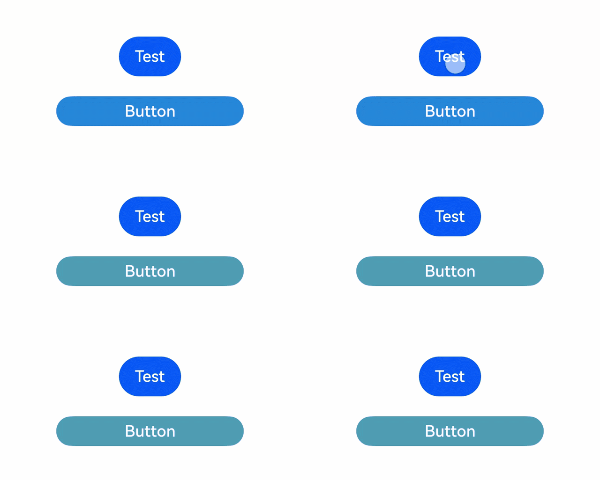
将属性直接设置给组件,无需标记为状态变量即可直接触发UI更新。适用于需要在不定义状态变量的情况下动态更新组件属性的场景,如动态修改组件构造参数、避免为一次性属性更新定义状态变量等。

-
从API version 12开始支持。后续版本如有新增内容,则采用上角标单独标记该内容的起始版本。
-
本模块接口仅可在Stage模型下使用。
导入模块
import { AttributeUpdater } from '@kit.ArkUI'; 
-
当与属性方法同时设置,或在AttributeUpdater中实现applyNormalAttribute等方法时,AttributeUpdater会与状态管理更新机制同时生效,易出现混淆。因此,不建议在同一组件上同时使用属性方法(状态管理机制)和AttributeUpdater属性直通更新两种方式设置相同属性。
-
当与属性方法同时设置时,属性生效的原则为:后设置的生效。
若先进行属性直通更新,后通过状态管理机制更新属性方法,则后更新的属性方法生效;
若先通过状态管理机制更新属性方法,后进行属性直通更新,则属性直通更新生效。
-
一个AttributeUpdater对象只能同时关联一个组件,否则将出现设置的属性只在一个组件上生效的现象。
-
开发者需要自行保障AttributeUpdater中T和C的类型匹配。比如T为ImageAttribute,C要对应为ImageInterface,否则可能导致
使用updateConstructorParams时功能异常。
-
updateConstructorParams当前只支持Button、Image、Text、Span、SymbolSpan和ImageSpan组件。
-
AttributeUpdater不支持深浅色切换等状态管理相关的操作。
-
在UI上下文不明确的场景中调用AttributeUpdater对象的接口时,建议使用UIContext的runScopedTask接口明确UI上下文,参考执行绑定UI实例的闭包示例。
Initializer<T>
type Initializer<T> = () => T
组件属性的初始化函数类型,用于创建并返回组件的属性实例。
元服务API: 从API version 12开始,该接口支持在元服务中使用。
系统能力: SystemCapability.ArkUI.ArkUI.Full
返回值:
| 类型 | 说明 |
|---|---|
| T | 返回当前组件的属性实例。 |
AttributeUpdater<T, C = Initializer<T>>
为AttributeModifier的实现类,开发者需要自定义class继承AttributeUpdater。
其中C代表组件的构造函数类型,比如Text组件的TextInterface,Image组件的ImageInterface等,仅在使用updateConstructorParams时才需要传递C类型。
元服务API: 从API version 12开始,该接口支持在元服务中使用。
系统能力: SystemCapability.ArkUI.ArkUI.Full
[h2]applyNormalAttribute
applyNormalAttribute?(instance: T): void
定义正常态更新属性函数,在AttributeUpdater后续更新属性时触发。不建议在同一组件上同时用属性直通更新和属性方法设置相同属性,否则易出现混淆。当与属性方法同时设置时,属性生效的原则为后设置的生效。
元服务API: 从API version 12开始,该接口支持在元服务中使用。
系统能力: SystemCapability.ArkUI.ArkUI.Full
参数:
| 参数名 | 类型 | 必填 | 说明 |
|---|---|---|---|
| instance | T | 是 | 组件的属性类实例,开发者通过调用该实例的属性方法来设置或更新组件的正常态属性,比如Button组件的ButtonAttribute,Text组件的TextAttribute等。 |
[h2]initializeModifier
initializeModifier(instance: T): void
AttributeUpdater首次设置给组件时提供的样式。不建议在同一组件上同时用属性直通更新和属性方法设置相同属性,否则易出现混淆。当与属性方法同时设置时,属性生效的原则为后设置的生效。
元服务API: 从API version 12开始,该接口支持在元服务中使用。
系统能力: SystemCapability.ArkUI.ArkUI.Full
参数:
| 参数名 | 类型 | 必填 | 说明 |
|---|---|---|---|
| instance | T | 是 | 组件的属性类实例,开发者通过调用该实例的属性方法来初始化设置组件的样式属性,比如Button组件的ButtonAttribute,Text组件的TextAttribute等。 |
示例:
通过initializeModifier方法初始化设置属性值。
// xxx.ets
import { AttributeUpdater } from '@kit.ArkUI';

class MyButtonModifier extends AttributeUpdater<ButtonAttribute> {
  // 该AttributeUpdater对象第一次使用的时候触发的回调
  initializeModifier(instance: ButtonAttribute): void {
    instance.backgroundColor('#ffd5d5d5')
      .labelStyle({ maxLines: 3 })
      .width('80%');
  }

  // 该AttributeUpdater对象后续使用或者更新的时候触发的回调
  applyNormalAttribute(instance: ButtonAttribute): void {
    instance.borderWidth(1);
  }
}

@Entry
@Component
struct Index {
  modifier: MyButtonModifier = new MyButtonModifier();
  @State flushTheButton: string = 'Button';

  build() {
    Row() {
      Column() {
        Button(this.flushTheButton)
          .attributeModifier(this.modifier)
          .onClick(() => {
            // 通过AttributeUpdater的attribute对属性进行修改
            // 需要注意先通过组件的attributeModifier属性方法建立组件与AttributeUpdater绑定关系
            this.modifier.attribute?.backgroundColor('#ff2787d9').labelStyle({ maxLines: 5 });
          })
          .margin('10%')
        Button('Trigger Button Update')
          .width('80%')
          .labelStyle({ maxLines: 2 })
          .onClick(() => {
            this.flushTheButton = this.flushTheButton + ' Updated';
          })
      }
      .width('100%')
    }
    .height('100%')
  }
} 
[h2]attribute
get attribute(): T | undefined
获取AttributeUpdater中组件对应的属性类实例,通过该实例实现属性直通更新。需先通过组件的attributeModifier属性方法建立组件与AttributeUpdater的绑定关系,绑定后方可获取到属性类实例。不建议在同一组件上同时用属性直通更新和属性方法设置相同属性;当与属性方法同时设置时,属性生效的原则为后设置的生效。
元服务API: 从API version 12开始,该接口支持在元服务中使用。
系统能力: SystemCapability.ArkUI.ArkUI.Full
返回值:
| 类型 | 说明 |
|---|---|
| T | undefined | 如果AttributeUpdater中组件的属性类实例存在,则返回对应组件的属性类实例,否则返回undefined。 |
示例:
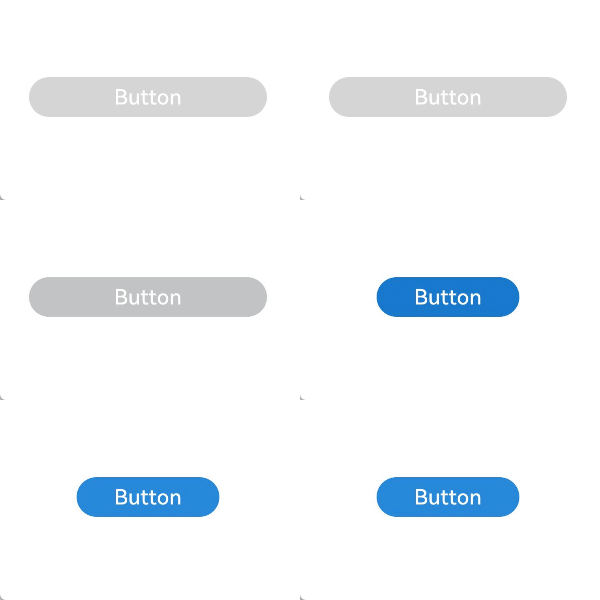
通过属性直通设置方式更新属性值。
// xxx.ets
import { AttributeUpdater } from '@kit.ArkUI';

class MyButtonModifier extends AttributeUpdater<ButtonAttribute> {
  initializeModifier(instance: ButtonAttribute): void {
    instance.backgroundColor('#ffd5d5d5')
      .width('50%')
      .height(30);
  }
}

@Entry
@Component
struct UpdaterDemo2 {
  modifier: MyButtonModifier = new MyButtonModifier();

  build() {
    Row() {
      Column() {
        Button('Button')
          .attributeModifier(this.modifier)
          .onClick(() => {
            this.modifier.attribute?.backgroundColor('#ff2787d9').width('30%');
          })
      }
      .width('100%')
    }
    .height('100%')
  }
} 
[h2]属性
元服务API: 从API version 12开始,该接口支持在元服务中使用。
系统能力: SystemCapability.ArkUI.ArkUI.Full
| 名称 | 类型 | 只读 | 可选 | 说明 |
|---|---|---|---|---|
| updateConstructorParams | C | 否 | 否 | C代表组件的构造函数类型,比如Text组件的TextInterface,Image组件的ImageInterface等。用于更改组件的构造函数入参。需先通过组件的attributeModifier属性方法建立组件与AttributeUpdater的绑定关系,绑定后方可使用。当前仅支持Button、Image、Text、Span、SymbolSpan和ImageSpan组件,使用前需确保T和C类型匹配,否则可能导致功能异常。 |
示例:
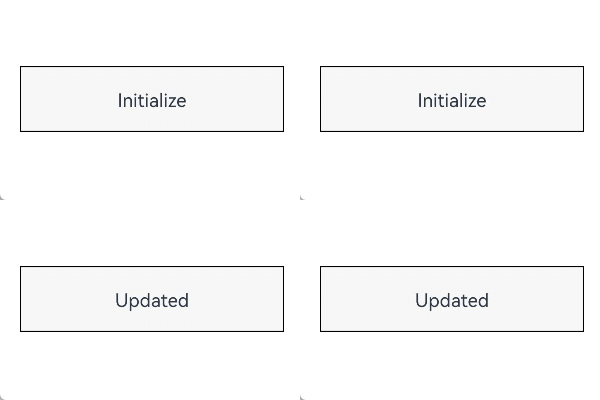
使用updateConstructorParams更新组件的构造入参。
// xxx.ets
import { AttributeUpdater } from '@kit.ArkUI';

class MyTextModifier extends AttributeUpdater<TextAttribute, TextInterface> {
  initializeModifier(instance: TextAttribute): void {
  }
}

@Entry
@Component
struct AttributeDemo3 {
  private modifier: MyTextModifier = new MyTextModifier();

  build() {
    Row() {
      Column() {
        Text('Initialize')
          .attributeModifier(this.modifier)
          .fontSize(14).border({ width: 1 }).textAlign(TextAlign.Center).lineHeight(20)
          .width(200).height(50)
          .backgroundColor('#fff7f7f7')
          .onClick(() => {
            this.modifier.updateConstructorParams('Updated');
          })
      }
      .width('100%')
    }
    .height('100%')
  }
} 
[h2]onComponentChanged
onComponentChanged(component: T): void
当多个组件绑定同一个自定义AttributeUpdater对象,且绑定的组件发生切换时,通过该接口通知应用。需注意一个AttributeUpdater对象只能同时关联一个组件,否则将出现设置的属性只在一个组件上生效的现象。
元服务API: 从API version 12开始,该接口支持在元服务中使用。
系统能力: SystemCapability.ArkUI.ArkUI.Full
参数:
| 参数名 | 类型 | 必填 | 说明 |
|---|---|---|---|
| component | T | 是 | 组件的属性类实例,开发者通过调用该实例的属性方法来设置切换后组件的属性,比如Button组件的ButtonAttribute,Text组件的TextAttribute等。 |
示例:
// xxx.ets
import { AttributeUpdater } from '@kit.ArkUI';

class MyButtonModifier extends AttributeUpdater<ButtonAttribute> {
  initializeModifier(instance: ButtonAttribute): void {
    instance.backgroundColor('#ff2787d9')
      .width('50%')
      .height(30);
  }

  onComponentChanged(component: ButtonAttribute): void {
    component.backgroundColor('#ff519db4')
      .width('50%')
      .height(30);
  }
}

@Entry
@Component
struct UpdaterDemo4 {
  @State btnState: boolean = false;
  modifier: MyButtonModifier = new MyButtonModifier();

  build() {
    Row() {
      Column() {
        Button('Test')
          .onClick(() => {
            this.btnState = !this.btnState;
          }).margin({ bottom: 20 })

        if (this.btnState) {
          Button('Button')
            .attributeModifier(this.modifier)
        } else {
          Button('Button')
            .attributeModifier(this.modifier)
        }
      }
      .width('100%')
    }
    .height('100%')
  }
}