通过不同的uri访问不同的页面。

从API version 8 开始,该接口不再维护,推荐使用新接口@ohos.router。
本模块首批接口从API version 3开始支持。后续版本的新增接口,采用上角标单独标记接口的起始版本。
router.push
push(options: RouterOptions): void
跳转到应用内的指定页面。
系统能力: SystemCapability.ArkUI.ArkUI.Full
参数:
| 参数名 | 类型 | 必填 | 说明 |
|---|---|---|---|
| options | RouterOptions | 是 | 页面路由参数,详细请参考RouterOptions。 |
示例:
// 在当前页面中
import router from '@system.router';
class A{
  pushPage() {
    router.push({
      uri: 'pages/routerpage2/routerpage2',
      params: {
        data1: 'message',
        data2: {
          data3: [123, 456, 789]
        }
      }
    });
  }
}
export default new A()
// 在routerpage2页面中
class B{
data:Record<string,string> = {'data1': 'default'}
data2:Record<string,number[]> = {'data3': [1, 2, 3]}
onInit() {
console.info('showData1:' + this.data.data1);
console.info('showData3:' + this.data2.data3);
}
}
export default new B() 
页面路由栈支持的最大Page数量为32。
router.replace
replace(options: RouterOptions): void
用应用内的某个页面替换当前页面,并销毁被替换的页面。
系统能力: SystemCapability.ArkUI.ArkUI.Lite
参数:
| 参数名 | 类型 | 必填 | 说明 |
|---|---|---|---|
| options | RouterOptions | 是 | 页面路由参数,详细请参考RouterOptions。 |
示例:
// 在当前页面中
import router from '@system.router';
class C{
  replacePage() {
    router.replace({
      uri: 'pages/detail/detail',
      params: {
        data1: 'message'
      }
    });
  }
}
export default new C()
// 在detail页面中
class Area {
data:Record<string,string> = {'data1': 'default'}
onInit() {
console.info(`showData1: ${JSON.stringify(this.data)}`);
}
}
export default new Area() router.back
back(options?: BackRouterOptions): void
返回上一页面或指定的页面。
系统能力: SystemCapability.ArkUI.ArkUI.Full
参数:
| 参数名 | 类型 | 必填 | 说明 |
|---|---|---|---|
| options | BackRouterOptions | 否 | 详细请参考BackRouterOptions。 |
示例:
// index页面
import router from '@system.router';
class D{
  indexPushPage() {
    router.push({
      uri: 'pages/detail/detail'
    });
  }
}
export default new D()
// detail页面
import router from '@system.router';
class E{
detailPushPage() {
router.push({
uri: 'pages/mall/mall'
});
}
}
export default new E() // mall页面通过back,将返回detail页面
import router from '@system.router';
class F{
mallBackPage() {
router.back();
}
}
export default new F() // detail页面通过back,将返回index页面
import router from '@system.router';
class G{
defaultBack() {
router.back();
}
}
export default new G() // 通过back,返回到detail页面
import router from '@system.router';
class H{
backToDetail() {
router.back({uri:'pages/detail/detail'});
}
}
export default new H() 
示例中的uri字段是页面路由,由配置文件中的pages列表指定。
router.getParams7+
getParams(): ParamsInterface
获取当前页面的参数信息。
系统能力: SystemCapability.ArkUI.ArkUI.Full
返回值:
| 类型 | 说明 |
|---|---|
| ParamsInterface | 详细请参见ParamsInterface。 |
router.clear
clear(): void
清空页面栈中的所有历史页面,仅保留当前页面作为栈顶页面。
系统能力: SystemCapability.ArkUI.ArkUI.Full
示例:
import router from '@system.router';
class I{
  clearPage() {
    router.clear();
  }
}
export default new I()
router.getLength
getLength(): string
获取当前在页面栈内的页面数量。
系统能力: SystemCapability.ArkUI.ArkUI.Full
返回值:
| 类型 | 说明 |
|---|---|
| string | 页面数量,页面栈支持最大数值是32。 |
示例:
import router from '@system.router';
class J{
  getLength() {
    let size = router.getLength();
    console.info('pages stack size = ' + size);
  }
}
export default new J()
router.getState
getState(): RouterState
获取当前页面的状态信息。
系统能力: SystemCapability.ArkUI.ArkUI.Full
返回值:
| 参数类型 | 说明 |
|---|---|
| RouterState | 详细请参见RouterState。 |
示例:
import router from '@system.router';
class K{
  getState() {
    let page = router.getState();
    console.info('current index = ' + page.index);
    console.info('current name = ' + page.name);
    console.info('current path = ' + page.path);
  }
}
export default new K() router.enableAlertBeforeBackPage6+
enableAlertBeforeBackPage(options: EnableAlertBeforeBackPageOptions): void
开启页面返回询问对话框。
系统能力: SystemCapability.ArkUI.ArkUI.Full
参数:
| 参数名 | 类型 | 必填 | 说明 |
|---|---|---|---|
| options | EnableAlertBeforeBackPageOptions | 是 | 详细请参见EnableAlertBeforeBackPageOptions。 |
示例:
import router from '@system.router';
class L{
  enableAlertBeforeBackPage() {
    router.enableAlertBeforeBackPage({
      message: 'Message Info',
      success: ()=> {
        console.info('success');
      },
      cancel: ()=> {
        console.info('cancel');
      }
    });
  }
}
export default new L() router.disableAlertBeforeBackPage6+
disableAlertBeforeBackPage(options?: DisableAlertBeforeBackPageOptions): void
禁用页面返回询问对话框。
系统能力: SystemCapability.ArkUI.ArkUI.Full
参数:
| 参数名 | 类型 | 必填 | 说明 |
|---|---|---|---|
| options | DisableAlertBeforeBackPageOptions | 否 | 详细请参见DisableAlertBeforeBackPageOptions。 |
示例:
import router from '@system.router';
class Z{
  disableAlertBeforeBackPage() {
    router.disableAlertBeforeBackPage({
      success: ()=> {
        console.info('success');
      },
      cancel: ()=> {
        console.info('cancel');
      }
    });
  }
}
export default new Z()
RouterOptions
定义路由器的选项。
系统能力: 以下各项对应的系统能力均为SystemCapability.ArkUI.ArkUI.Lite
| 名称 | 类型 | 必填 | 说明 |
|---|---|---|---|
| uri | string | 是 | 目标页面的uri,可以是以下的两种格式: 1. 页面的绝对路径,由config.json文件中的页面列表提供。例如: - pages/index/index - pages/detail/detail 2. 特定路径。如果URI为斜杠(/),则显示主页。 |
| params | Object | 否 | 表示路由跳转时要同时传递到目标页面的数据。跳转到目标页面后,使用router.getParams()获取传递的参数,此外,在类web范式中,参数也可以在页面中直接使用,如this.keyValue(keyValue为跳转时params参数中的key值),如果目标页面中已有该字段,则其值会被传入的字段值覆盖。 |
BackRouterOptions
定义路由器返回的选项。
系统能力: 以下各项对应的系统能力有所不同,详见下表。
| 名称 | 类型 | 必填 | 说明 |
|---|---|---|---|
| uri7+ | string | 否 | 返回到指定uri的界面,如果页面栈上没有uri页面,则不响应该情况。如果uri未设置,则返回上一页。 系统能力: SystemCapability.ArkUI.ArkUI.Full |
| params7+ | Object | 否 | 返回时要同时传递到目标页面的数据。 系统能力: SystemCapability.ArkUI.ArkUI.Lite |
RouterState
定义路由器的状态。
系统能力: 以下各项对应的系统能力均为SystemCapability.ArkUI.ArkUI.Full
| 名称 | 类型 | 必填 | 说明 |
|---|---|---|---|
| index | number | 是 | 表示当前页面在页面栈中的索引。从栈底到栈顶,index从1开始递增。 |
| name | string | 是 | 表示当前页面的名称,即对应文件名。 |
| path | string | 是 | 表示当前页面的路径。 |
EnableAlertBeforeBackPageOptions6+
定义EnableAlertBeforeBackPage选项。
系统能力: 以下各项对应的系统能力均为SystemCapability.ArkUI.ArkUI.Full
| 名称 | 类型 | 必填 | 说明 |
|---|---|---|---|
| message | string | 是 | 询问对话框内容。 |
| success | (errMsg: string) => void | 否 | 用户选择对话框确认按钮时触发,errMsg表示返回信息。 |
| cancel | (errMsg: string) => void | 否 | 用户选择对话框取消按钮时触发,errMsg表示返回信息。 |
| complete | () => void | 否 | 当对话框关闭时触发该回调。 |
DisableAlertBeforeBackPageOptions6+
定义DisableAlertBeforeBackPage参数选项。
系统能力: 以下各项对应的系统能力均为SystemCapability.ArkUI.ArkUI.Full
| 名称 | 类型 | 必填 | 说明 |
|---|---|---|---|
| success | (errMsg: string) => void | 否 | 关闭询问对话框成功时触发,errMsg表示返回信息。 |
| cancel | (errMsg: string) => void | 否 | 关闭询问对话框失败时触发,errMsg表示返回信息。 |
| complete | () => void | 否 | 当对话框关闭时触发该回调。 |
示例
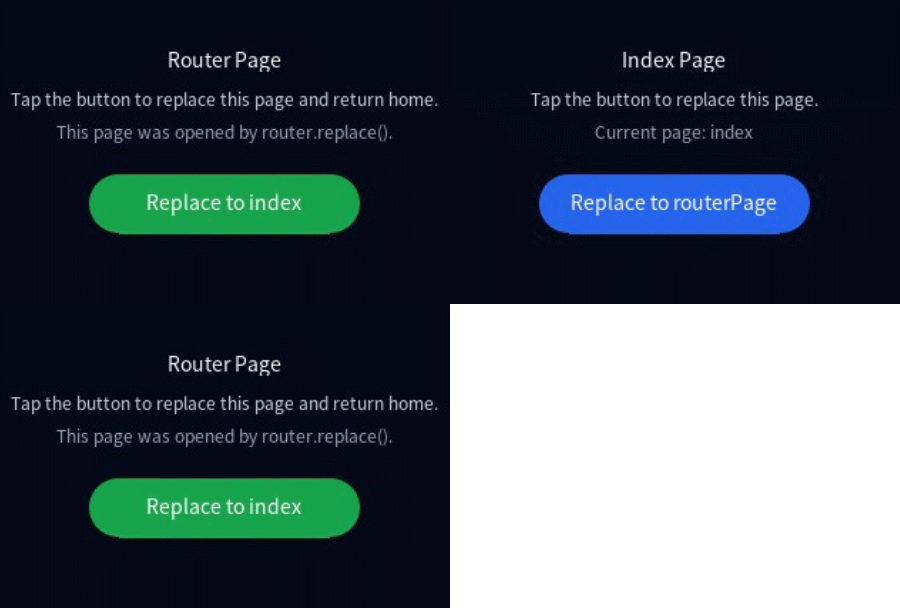
该示例展示了类Web范式下router.replace接口的跳转功能。
示例树状结构如下:
pages
├─ index
│  ├─ index.css
│  ├─ index.hml
│  └─ index.js
└─ routerPages
   ├─ routerPage.css
   ├─ routerPage.hml
   └─ routerPage.js
/* index.css */
.page {
  width: 100%;
  height: 100%;
  flex-direction: column;
  justify-content: center;
  align-items: center;
  padding-left: 20px;
  padding-right: 20px;
  background-color: #050816;
}

.page-name {
  width: 78%;
  margin-top: 10px;
  font-size: 14px;
  text-align: center;
  color: #f8fafc;
}

.tips {
  width: 82%;
  margin-top: 12px;
  font-size: 12px;
  text-align: center;
  color: #cbd5e1;
}

.status {
  width: 82%;
  margin-top: 8px;
  font-size: 12px;
  text-align: center;
  color: #94a3b8;
}

.action-button {
  width: 190px;
  height: 42px;
  margin-top: 22px;
  border-radius: 21px;
  background-color: #2563eb;
  color: #ffffff;
  font-size: 14px;
  text-align: center;
}
<!--index.hml-->
<div class="page">
<text class="page-name">{{ pageName }}</text>
<text class="tips">{{ tips }}</text>
<text class="status">{{ statusText }}</text>
<input class="action-button" type="button" value="Replace to routerPage" onclick="replaceToRouterPage"></input>
</div> // index.js
import router from '@system.router';
export default {
data: {
pageName: 'Index Page',
tips: 'Tap the button to replace this page.',
statusText: 'Current page: index'
},
replaceToRouterPage: function() {
router.replace({
uri: 'pages/routerPages/routerPage',
params: {
data1: 'This page was opened by router.replace().'
}
});
}
} /* routerPage.css */
.page {
width: 100%;
height: 100%;
flex-direction: column;
justify-content: center;
align-items: center;
padding-left: 20px;
padding-right: 20px;
background-color: #050816;
}
.page-name {
width: 78%;
margin-top: 10px;
font-size: 14px;
text-align: center;
color: #f8fafc;
}
.tips {
width: 82%;
margin-top: 12px;
font-size: 12px;
text-align: center;
color: #cbd5e1;
}
.status {
width: 82%;
margin-top: 8px;
font-size: 12px;
text-align: center;
color: #94a3b8;
}
.action-button {
width: 190px;
height: 42px;
margin-top: 22px;
border-radius: 21px;
background-color: #16a34a;
color: #ffffff;
font-size: 14px;
text-align: center;
} <!--routerPage.hml-->
<div class="page">
<text class="page-name">{{ pageName }}</text>
<text class="tips">{{ tips }}</text>
<text class="status">{{ statusText }}</text>
<input class="action-button" type="button" value="Replace to index" onclick="replaceToIndex"></input>
</div> // routerPage.js
import router from '@system.router';
export default {
data: {
pageName: 'Router Page',
tips: 'Tap the button to replace this page and return home.',
statusText: 'Current page: routerPage',
data1: 'Waiting for router.replace params.'
},
onInit: function() {
if (this.data1) {
this.statusText = this.data1;
}
},
replaceToIndex: function() {
router.replace({
uri: 'pages/index/index'
});
}
}