使用CanvasRenderingContext2D在canvas画布组件上进行绘制,绘制对象可以是矩形、文本。

从API版本23开始,预览器已取消JS文件48KB的大小限制。对于API版本22及之前,JS文件大小不能超过48KB。
由于轻量级设备的资源受限,canvas能力不适用于需要进行重复绘制图形的场景(如不断旋转的指针、不断变幻位置的图形),大量的绘制指令会导致内存不足问题,不建议使用。如需实现组件的旋转或平移效果,可使用CSS动画,具体请参见动画样式。
示例:
<!-- xxx.hml -->
<div>
    <canvas ref="canvas1" style="width: 200px; height: 150px; background-color: #ffff00;"></canvas>
    <input type="button" style="width: 180px; height: 60px;" value="fillStyle" onclick="handleClick" />
</div>
// xxx.js
export default {
handleClick() {
const el = this.$refs.canvas1;
const ctx = el.getContext('2d');
ctx.beginPath();
ctx.arc(100, 75, 50, 0, 6.28);
ctx.stroke();
},
} 
fillRect()
填充一个矩形。
参数:
| 参数 | 类型 | 描述 |
|---|---|---|
| x | number | 指定矩形左上角点的x坐标。 |
| y | number | 指定矩形左上角点的y坐标。 |
| width | number | 指定矩形的宽度。 |
| height | number | 指定矩形的高度。 |
示例:

ctx.fillRect(20, 20, 200, 150);
fillStyle
指定绘制的填充色。
参数:
| 参数 | 类型 | 描述 |
|---|---|---|
| color | <color> | 设置填充区域的颜色。 |
示例:

ctx.fillStyle = '#0000ff';
ctx.fillRect(20, 20, 150, 100);
strokeRect()
绘制具有边框的矩形,矩形内部不填充。
参数:
| 参数 | 类型 | 描述 |
|---|---|---|
| x | number | 指定矩形的左上角x坐标。 |
| y | number | 指定矩形的左上角y坐标。 |
| width | number | 指定矩形的宽度。 |
| height | number | 指定矩形的高度。 |
示例:

ctx.strokeRect(30, 30, 200, 150);
fillText()
绘制填充类文本。
参数:
| 参数 | 类型 | 描述 |
|---|---|---|
| text | string | 需要绘制的文本内容。 |
| x | number | 需要绘制的文本的左下角x坐标。 |
| y | number | 需要绘制的文本的左下角y坐标。 |
示例:

ctx.font = '35px sans-serif';
ctx.fillText("Hello World!", 20, 60);
lineWidth
指定绘制线条的宽度值。
参数:
| 参数 | 类型 | 描述 |
|---|---|---|
| lineWidth | number | 设置绘制线条的宽度。 |
示例:
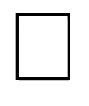
ctx.lineWidth = 5;
ctx.strokeRect(25, 25, 85, 105);
strokeStyle
设置描边的颜色。
参数:
| 参数 | 类型 | 描述 |
|---|---|---|
| color | <color> | 指定描边使用的颜色 |
示例:

ctx.lineWidth = 10;
ctx.strokeStyle = '#0000ff';
ctx.strokeRect(25, 25, 155, 105);
[h2]stroke()5+
进行边框绘制操作。
示例:

ctx.moveTo(25, 25);
ctx.lineTo(25, 105);
ctx.strokeStyle = 'rgb(0,0,255)';
ctx.stroke();
[h2]beginPath()5+
创建一个新的绘制路径。
示例:

ctx.beginPath();
ctx.lineWidth = 6;
ctx.strokeStyle = '#0000ff';
ctx.moveTo(15, 80);
ctx.lineTo(280, 80);
ctx.stroke();
[h2]moveTo()5+
路径从当前点移动到指定点。
参数:
| 参数 | 类型 | 描述 |
|---|---|---|
| x | number | 指定位置的x坐标。 |
| y | number | 指定位置的y坐标。 |
示例:
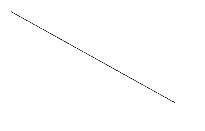
ctx.beginPath();
ctx.moveTo(10, 10);
ctx.lineTo(280, 160);
ctx.stroke();
[h2]lineTo()5+
从当前点到指定点进行路径连接。
参数:
| 参数 | 类型 | 描述 |
|---|---|---|
| x | number | 指定位置的x坐标。 |
| y | number | 指定位置的y坐标。 |
示例:

ctx.beginPath();
ctx.moveTo(10, 10);
ctx.lineTo(280, 160);
ctx.stroke();
[h2]closePath()5+
结束当前路径形成一个封闭路径。
示例:

ctx.beginPath();
ctx.moveTo(30, 30);
ctx.lineTo(110, 30);
ctx.lineTo(70, 90);
ctx.closePath();
ctx.stroke();
font
设置文本绘制中的字体样式。
参数:
| 参数 | 类型 | 描述 |
|---|---|---|
| value | string | 字体样式支持:sans-serif, serif, monospace,该属性默认值为30px HYQiHei-65S。 |
示例:

ctx.font = '30px sans-serif';
ctx.fillText("Hello World", 20, 60);
textAlign
设置文本绘制中的文本对齐方式。
参数:
| 参数 | 类型 | 描述 |
|---|---|---|
| align | string | 可选值为: - left(默认):文本左对齐; - right:文本右对齐; - center:文本居中对齐; |
示例:
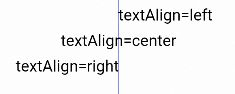
ctx.strokeStyle = '#0000ff';
ctx.moveTo(140, 10);
ctx.lineTo(140, 160);
ctx.stroke();

ctx.font = '18px sans-serif';

// Show the different textAlign values
ctx.textAlign = 'left';
ctx.fillText('textAlign=left', 140, 100);
ctx.textAlign = 'center';
ctx.fillText('textAlign=center',140, 120);
ctx.textAlign = 'right';
ctx.fillText('textAlign=right',140, 140); arc()5+
绘制弧线路径。
参数:
| 参数 | 类型 | 必填 | 描述 |
|---|---|---|---|
| x | number | 是 | 弧线圆心的x坐标值,单位:vp。 |
| y | number | 是 | 弧线圆心的y坐标值,单位:vp。 |
| radius | number | 是 | 弧线的圆半径,单位:vp。 |
| startAngle | number | 是 | 弧线的起始弧度,单位:弧度。 |
| endAngle | number | 是 | 弧线的终止弧度,单位:弧度。 |
| anticlockwise | boolean | 否 | 是否逆时针绘制圆弧。 true:逆时针方向绘制弧线。 false:顺时针方向绘制弧线。 默认值:false。 |
示例:

ctx.beginPath();
ctx.arc(100, 75, 50, 0, 6.28);
ctx.stroke();
