本模块提供一系列用于文本布局和字体管理的编程接口。文本布局相关的接口旨在提供高质量的排版,包括字符到字形的转换、字距调整、换行、对齐、文本测量等。字体管理接口提供字体注册、字体描述符、字体集管理等功能。
该模块提供以下创建复杂样式的文本段落的常用类:
- TextStyle:文本样式,控制文本的字体类型、大小、间距等属性。
- FontCollection:字体集,控制各种不同的字体。
- FontDescriptor:字体描述符信息。
- ParagraphStyle:段落样式,控制整个段落的断行策略、断词策略等属性。
- ParagraphBuilder:段落生成器,控制生成不同的段落对象。
- Paragraph:段落,由ParagraphBuilder类调用build()接口构建而成。
- LineTypeset:行排版器,由ParagraphBuilder类调用buildLineTypeset()接口构建而成。
- TextLine:以行为单位的段落文本的载体,由Paragraph类调用getTextLines()接口获取。
- Run:文本排版单元,由TextLine类调用getGlyphRuns()接口获取。

本模块首批接口从API version 12开始支持。后续版本的新增接口,采用上角标单独标记接口的起始版本。
text.setTextHighContrast20+
setTextHighContrast(action: TextHighContrast): void
用于设置文字渲染高对比度模式。
该接口设置后整个进程都会生效,进程内所有页面共用相同模式。
可调用此接口设置,也可通过系统设置界面中高对比度文字配置开关进行开启/关闭。使用此接口设置开启/关闭文字渲染高对比度配置的优先级高于系统开关设置。
该接口针对应用通过Canvas等接口自行绘制文字的场景不生效,仅对使用系统文本组件渲染的场景生效。
系统能力:SystemCapability.Graphics.Drawing
元服务API:从API version 22开始,该接口支持在元服务中使用。
参数:
| 参数名 | 类型 | 必填 | 说明 |
|---|---|---|---|
| action | TextHighContrast | 是 | 文字渲染高对比度模式。 |
示例:
text.setTextHighContrast(text.TextHighContrast.TEXT_APP_DISABLE_HIGH_CONTRAST)
text.setTextUndefinedGlyphDisplay20+
setTextUndefinedGlyphDisplay(noGlyphShow: TextUndefinedGlyphDisplay): void
设置字符映射到.notdef(未定义)字形时要使用的字形类型。
调用此接口后,后续渲染的文本若包含未定义字形,均按此设置显示。
此配置会影响显示字体中未定义字符的方式:
- 默认使用字体的.notdef字形设计。
- 开启后,缺失字形的字符将以豆腐块形式显示。
系统能力:SystemCapability.Graphics.Drawing
元服务API:从API version 22开始,该接口支持在元服务中使用。
参数:
| 参数名 | 类型 | 必填 | 说明 |
|---|---|---|---|
| noGlyphShow | TextUndefinedGlyphDisplay | 是 | 无法塑形字符的显示方式。 |
示例:
text.setTextUndefinedGlyphDisplay(text.TextUndefinedGlyphDisplay.USE_TOFU)
text.matchFontDescriptors18+
matchFontDescriptors(desc: FontDescriptor): Promise<Array<FontDescriptor>>
根据指定的字体描述符返回所有符合要求的系统字体描述符,使用Promise异步回调。
系统能力:SystemCapability.Graphics.Drawing
元服务API:从API version 22开始,该接口支持在元服务中使用。
参数:
| 参数名 | 类型 | 必填 | 说明 |
|---|---|---|---|
| desc | FontDescriptor | 是 | 指定需要用来做匹配的字体描述符。如果不指定任何字段,则返回系统的所有字体描述符。如果填写了指定字段,则按照指定字段进行匹配。如果匹配失败,返回空数组。 |
返回值:
| 类型 | 说明 |
|---|---|
| Promise<Array<FontDescriptor>> | Promise对象,返回所有匹配到的系统字体描述符。 |
错误码:
以下错误码的详细介绍请参见通用错误码。
| 错误码ID | 错误信息 |
|---|---|
| 401 | Parameter error. Possible causes: 1. Mandatory parameters are left unspecified; 2. Incorrect parameter types; 3. Parameter verification failed. |
示例:
import { text } from '@kit.ArkGraphics2D'
import { BusinessError } from '@kit.BasicServicesKit'

@Entry
@Component
struct Index {
  build() {
    Row() {
      Column() {
        Button("font descriptor")
          .fontSize(30)
          .fontWeight(FontWeight.Bold)
          .width(300)
          .height(80)
          .onClick(() => {
            console.info(`Get font descriptor start`)
            let promise = text.matchFontDescriptors({
              weight: text.FontWeight.W400,
            })
            promise.then((data) => {
              console.info(`Font descriptor array size: ${data.length}`);
              console.info(`Font descriptor result: ${JSON.stringify(data)}`)
            }).catch((error: BusinessError) => {
              console.error(`Failed to match the font descriptor, error: ${JSON.stringify(error)}`);
            });
          })
      }
      .width('100%')
    }
    .height('100%')
  }
} text.getSystemFontFullNamesByType14+
getSystemFontFullNamesByType(fontType: SystemFontType): Promise<Array<string>>
根据字体类型返回该类型对应的所有字体的字体名称,使用Promise异步回调。
系统能力: SystemCapability.Graphics.Drawing
元服务API:从API version 22开始,该接口支持在元服务中使用。
参数:
| 参数名 | 类型 | 必填 | 说明 |
|---|---|---|---|
| fontType | SystemFontType | 是 | 指定的字体类型。 |
返回值:
| 类型 | 说明 |
|---|---|
| Promise<Array<string>> | Promise对象,返回相应字体类型的所有字体的fullName。 |
错误码:
以下错误码的详细介绍请参见通用错误码。
| 错误码ID | 错误信息 |
|---|---|
| 401 | Parameter error. Possible causes: 1. Mandatory parameters are left unspecified; 2. Incorrect parameter types; 3. Parameter verification failed. |
示例:
import { text } from '@kit.ArkGraphics2D'
import { BusinessError } from '@kit.BasicServicesKit'

@Entry
@Component
struct Index {
  build() {
    Row() {
      Column() {
        Button("get font list")
          .fontSize(30)
          .fontWeight(FontWeight.Bold)
          .width(300)
          .height(80)
          .onClick(() => {
            let fontType:text.SystemFontType = text.SystemFontType.GENERIC
            let promise = text.getSystemFontFullNamesByType(fontType)
            promise.then((data) => {
              console.info(`then font list size: ${data.length}`)
              data.forEach((fontItem) => {
                console.info(fontItem)
              })
            }).catch((error: BusinessError) => {
              console.error(`Failed to get font fullNames by type, error: ${JSON.stringify(error)}`);
            });
          })
      }
      .width('100%')
    }
    .height('100%')
  }
} text.getFontDescriptorByFullName14+
getFontDescriptorByFullName(fullName: string, fontType: SystemFontType): Promise<FontDescriptor>
根据字体名称和类型获取字体描述符,使用Promise异步回调。
字体描述符是描述字体特征的数据结构,包含字体外观和属性的详细信息。
系统能力: SystemCapability.Graphics.Drawing
元服务API:从API version 22开始,该接口支持在元服务中使用。
参数:
| 参数名 | 类型 | 必填 | 说明 |
|---|---|---|---|
| fullName | string | 是 | 指定的字体名称。可以使用getSystemFontFullNamesByType获取。 |
| fontType | SystemFontType | 是 | 指定的字体类型。 |
返回值:
| 类型 | 说明 |
|---|---|
| Promise<FontDescriptor> | Promise对象,返回指定的字体描述符。 |
错误码:
以下错误码的详细介绍请参见通用错误码。
| 错误码ID | 错误信息 |
|---|---|
| 401 | Parameter error. Possible causes: 1. Mandatory parameters are left unspecified; 2. Incorrect parameter types. |
示例:
import { text } from '@kit.ArkGraphics2D'
import { BusinessError } from '@kit.BasicServicesKit'

@Entry
@Component
struct Index {
  build() {
    Row() {
      Column() {
        Button("get fontDescriptor")
          .fontSize(30)
          .fontWeight(FontWeight.Bold)
          .width(300)
          .height(80)
          .onClick(() => {
            let fontType:text.SystemFontType = text.SystemFontType.GENERIC
            let promise = text.getFontDescriptorByFullName("HarmonyOS Sans", fontType)
            promise.then((fontDescriptor) => {
              console.info(`desc: ${JSON.stringify(fontDescriptor)}`)
            }).catch((error: BusinessError) => {
              console.error(`Failed to get fontDescriptor by fullName, error: ${JSON.stringify(error)}`);
            });
          })
      }
      .width('100%')
    }
    .height('100%')
  }
} text.getFontDescriptorsFromPath22+
getFontDescriptorsFromPath(path: string | Resource): Promise<Array<FontDescriptor>>
根据字体文件路径获取字体描述符数组。使用Promise异步回调。

-
如果字体文件未找到、字体文件路径无效、字体文件无权限或者文件非字体格式,返回空数组。
-
FontDescriptor中的weight字段并不精准对应字体文件内部的字重数值,而是将字体文件中的实际字重四舍五入映射到FontWeight枚举值后的结果。例如,字体文件字重350会映射为400,对应枚举为W400。
系统能力:SystemCapability.Graphics.Drawing
元服务API:从API version 22开始,该接口支持在元服务中使用。
参数:
| 参数名 | 类型 | 必填 | 说明 |
|---|---|---|---|
| path | string | Resource | 是 | 需要查询的字体文件的路径。支持两种格式: 1. 以"file://"开头的字体文件绝对路径,如"file:///system/fonts/test.ttf"。 2. 工程resources/rawfile目录下的文件,格式为$rawfile('文件名称'),如$rawfile('test.ttf')。 |
返回值:
| 类型 | 说明 |
|---|---|
| Promise<Array<FontDescriptor>> | Promise对象,返回所有的字体描述符。如果找不到字体文件、路径无效、无权限或非字体文件,则返回空数组。 |
示例:
import { text } from '@kit.ArkGraphics2D'

@Entry
@Component
struct GetFontDescriptorsFromPathTest {
  build() {
    Column({ space: 10 }) {
      Button("get fontDescriptors")
        .onClick(() => {
          let promise = text.getFontDescriptorsFromPath("file:///system/fonts/NotoSansCJK-Regular.ttc")
          promise.then((fontDescriptors) => {
            fontDescriptors.forEach((fontDescriptor) => {
              console.info("Path:" + fontDescriptor.path +
                          "\npostScriptName:" + fontDescriptor.postScriptName +
                          "\nfullName:" + fontDescriptor.fullName +
                          "\nfamilyName:" + fontDescriptor.fontFamily +
                          "\nfontSubfamily:" + fontDescriptor.fontSubfamily +
                          "\nweight:" + fontDescriptor.weight +
                          "\nwidth:" + fontDescriptor.width +
                          "\nitalic:" + fontDescriptor.italic +
                          "\nmonoSpace:" + fontDescriptor.monoSpace +
                          "\nsymbolic:" + fontDescriptor.symbolic)
            })
          })
        })
    }.width("100%")
    .height("100%")
    .justifyContent(FlexAlign.Center)
  }
} text.getFontUnicodeSet23+
getFontUnicodeSet(path: string | Resource, index: number): Promise<Array<number>>
根据字体文件路径获取字体unicode数组。使用Promise异步回调。
如果字体文件未找到、字体文件路径无效、字体文件无权限或者文件非字体格式,返回空数组。
系统能力:SystemCapability.Graphics.Drawing
元服务API:从API version 23开始,该接口支持在元服务中使用。
参数:
| 参数名 | 类型 | 必填 | 说明 |
|---|---|---|---|
| path | string | Resource | 是 | 需要查询的字体文件的路径,应为 "file:// + 字体文件绝对路径" 或 $rawfile('工程中resources/rawfile目录下的文件名称')。 |
| index | number | 是 | 字体文件格式为ttc/otc时,指定加载的字体索引,取值范围为[0, count-1],其中count为字体文件包含的字体数量。非ttc/otc格式文件索引值只能指定为0。如果该参数为负数或超出字体文件实际索引范围,将返回空数组。 |
返回值:
| 类型 | 说明 |
|---|---|
| Promise<Array<number>> | Promise对象,返回字体文件对应的unicode码数组。 |
示例:
import { text } from '@kit.ArkGraphics2D'

@Entry
@Component
struct GetFontUnicodeSetTest {
  build() {
    Column({ space: 10 }) {
      Button("get fontUnicode")
        .onClick(() => {
          let promise = text.getFontUnicodeSet("file:///system/fonts/HMSymbolVF.ttf", 0)
          promise.then((unicodeCodes) => {
            unicodeCodes.forEach((unicode) => {
              console.info(unicode.toString(16))
            })
          })
        })
    }.width("100%")
    .height("100%")
    .justifyContent(FlexAlign.Center)
  }
} text.getFontCount23+
getFontCount(path: string | Resource): number
根据字体文件路径获取包含的字体文件数。
如果字体文件未找到、字体文件路径无效、字体文件无权限或者文件非字体格式,返回0。
系统能力:SystemCapability.Graphics.Drawing
元服务API:从API version 23开始,该接口支持在元服务中使用。
模型约束: 此接口仅可在Stage模型下使用。
参数:
| 参数名 | 类型 | 必填 | 说明 |
|---|---|---|---|
| path | string | Resource | 是 | 需要查询的字体文件的路径,应为 "file:// + 字体文件绝对路径" 或 $rawfile('工程中resources/rawfile目录下的文件名称')。 |
返回值:
| 类型 | 说明 |
|---|---|
| number | 包含字体数量。 |
示例:
import { text } from '@kit.ArkGraphics2D'

@Entry
@Component
struct GetFontCountTest {
  build() {
    Column({ space: 10 }) {
      Button("get fontCount")
        .onClick(() => {
          let fontCount = text.getFontCount("file:///system/fonts/NotoSansCJK-Regular.ttc")
          console.info("file count: " + fontCount)
        })
    }.width("100%")
    .height("100%")
    .justifyContent(FlexAlign.Center)
  }
} text.getFontPathsByType23+
getFontPathsByType(fontType: SystemFontType): Array<string>
获取指定字体类型的所有字体文件路径。
系统能力:SystemCapability.Graphics.Drawing
元服务API:从API version 23开始,该接口支持在元服务中使用。
参数:
| 参数名 | 类型 | 必填 | 说明 |
|---|---|---|---|
| fontType | SystemFontType | 是 | 指定的字体类型。 |
返回值:
| 类型 | 说明 |
|---|---|
| Array<string> | 字体文件路径列表。 |
示例:
import { text } from '@kit.ArkGraphics2D'

@Entry
@Component
struct GetFontPathsByTypeTest {
  build() {
    Column({ space: 10 }) {
      Button("get font path")
        .onClick(() => {
          let fontList = text.getFontPathsByType(text.SystemFontType.ALL)
          console.info("file count: " + fontList.length)
          fontList.forEach((fontPath) => {
            console.info("file path: " + fontPath)
          })
        })
    }.width("100%")
    .height("100%")
    .justifyContent(FlexAlign.Center)
  }
} text.isFontSupported23+
isFontSupported(fontURL: string | Resource): boolean
检查系统是否支持指定的字体文件。可在加载自定义字体前预先验证字体文件的可用性,避免因字体不支持导致文本渲染异常。
系统能力:SystemCapability.Graphics.Drawing
元服务API:从API version 23开始,该接口支持在元服务中使用。
参数:
| 参数名 | 类型 | 必填 | 说明 |
|---|---|---|---|
| fontURL | string | Resource | 是 | 需要检查的字体文件的路径,应为 "file:// + 字体文件绝对路径" 或 "rawfile/目录or文件名"。 |
返回值:
| 类型 | 说明 |
|---|---|
| boolean | 系统是否支持指定的字体文件。返回true表示支持,返回false表示不支持。 |
示例:
import { text } from '@kit.ArkGraphics2D'

@Entry
@Component
struct isFontSupportedTest {
  build() {
    Column({ space: 10 }) {
      Button("is font supported")
        .onClick(() => {
          let filePath = "file:///system/fonts/NotoSansCJK-Regular.ttc"
          let isSupported = text.isFontSupported(filePath)
          console.info("is font supported: " + isSupported)
        })
    }.width("100%")
    .height("100%")
    .justifyContent(FlexAlign.Center)
  }
} TextHighContrast20+
文字渲染高对比度配置类型枚举。
系统能力: SystemCapability.Graphics.Drawing
元服务API:从API version 22开始,该接口支持在元服务中使用。
| 名称 | 值 | 说明 |
|---|---|---|
| TEXT_FOLLOW_SYSTEM_HIGH_CONTRAST | 0 | 跟随系统设置中的高对比度文字配置。 |
| TEXT_APP_DISABLE_HIGH_CONTRAST | 1 | 关闭APP的文字渲染高对比度配置,该模式的优先级要高于系统设置中的高对比度文字配置。 |
| TEXT_APP_ENABLE_HIGH_CONTRAST | 2 | 开启APP的文字渲染高对比度配置,该模式的优先级要高于系统设置中的高对比度文字配置。 |
TextUndefinedGlyphDisplay20+
文本未定义字形时的显示方式枚举。
系统能力: SystemCapability.Graphics.Drawing
元服务API:从API version 22开始,该接口支持在元服务中使用。
| 名称 | 值 | 说明 |
|---|---|---|
| USE_DEFAULT | 0 | 使用字体的内部.notdef字形。遵循字体的内部.notdef字形设计,可以是空框、空格或自定义符号。 |
| USE_TOFU | 1 | 总是用显式的豆腐块替换未定义的字形,覆盖字体的默认行为。用于调试缺失字符或强制一致的缺失符号显示。 |
TextProcessState
文本处理状态的枚举。
系统能力: SystemCapability.Graphics.Drawing
元服务API:从API版本26.0.0开始,该接口支持在元服务中使用。
模型约束: 此接口仅可在Stage模型下使用。
起始版本: 26.0.0
| 名称 | 值 | 说明 |
|---|---|---|
| INIT | 0 | 初始状态,文本处理尚未开始。 |
| INDEXED | 1 | 已生成索引状态,文本索引已生成。 |
| SHAPED | 2 | 已塑形状态,文本已完成塑形。 |
| LINE_BROKEN | 3 | 已换行状态,文本已换行。 |
| FORMATTED | 4 | 已格式化状态,文本已完成格式化。 |
| PAINT | 5 | 已绘制状态,文本已完成绘制。 |
| UPDATE_ATTRIBUTE | 6 | 已更新属性状态,文本属性已更新。 |
TextDisplayState
文本显示状态的枚举。表示文本排版后的原生结果,与外部画布裁切、溢出屏幕等外部显示因素无关。
系统能力: SystemCapability.Graphics.Drawing
元服务API:从API版本26.0.0开始,该接口支持在元服务中使用。
模型约束: 此接口仅可在Stage模型下使用。
起始版本: 26.0.0
| 名称 | 值 | 说明 |
|---|---|---|
| UNKNOWN | 0 | 未知显示状态,默认状态。 |
| ALL | 1 | 完整显示状态,文本无截断、无省略,全部内容正常显示。 |
| CLIP | 2 | 裁剪显示状态,文本超出排版区域的部分被直接裁剪隐藏。 |
| OMITTED | 3 | 省略显示状态,文本超出排版区域后,部分内容以指定字符(如省略号 '...')替代展示。 |
TextAlign
文本对齐方式枚举。
系统能力: SystemCapability.Graphics.Drawing
元服务API:从API version 22开始,该接口支持在元服务中使用。
| 名称 | 值 | 说明 |
|---|---|---|
| LEFT | 0 | 文本靠左对齐。 |
| RIGHT | 1 | 文本靠右对齐。 |
| CENTER | 2 | 文本居中对齐。 |
| JUSTIFY | 3 | 文本两侧对齐,对最后一行无效。 |
| START | 4 | 基于文本的方向TextDirection,文本靠开头方向对齐。 |
| END | 5 | 基于文本的方向TextDirection,文本以结束方向对齐。 |
TextVerticalAlign20+
文本垂直对齐方式枚举。
系统能力: SystemCapability.Graphics.Drawing
元服务API:从API version 22开始,该接口支持在元服务中使用。
| 名称 | 值 | 说明 |
|---|---|---|
| BASELINE | 0 | 文本基线对齐。 |
| BOTTOM | 1 | 文本底部对齐。 |
| CENTER | 2 | 文本居中对齐。 |
| TOP | 3 | 文本顶部对齐。 |
TextDirection
文本排版方向枚举。
系统能力: SystemCapability.Graphics.Drawing
元服务API:从API version 22开始,该接口支持在元服务中使用。
| 名称 | 值 | 说明 |
|---|---|---|
| RTL | 0 | 文本从右到左排版。 |
| LTR | 1 | 文本从左到右排版。 |
BreakStrategy
断行策略枚举。
系统能力: SystemCapability.Graphics.Drawing
元服务API:从API version 22开始,该接口支持在元服务中使用。
| 名称 | 值 | 说明 |
|---|---|---|
| GREEDY | 0 | 尽可能将当前行填满,不会自动添加连词符。 |
| HIGH_QUALITY | 1 | 布局优化,必要时会自动添加连词符。 |
| BALANCED | 2 | 保证一个段落的每一行的宽度相同,必要时会添加连词符。 |
WordBreak
断词策略枚举。
系统能力: SystemCapability.Graphics.Drawing
元服务API:从API version 22开始,该接口支持在元服务中使用。
| 名称 | 值 | 说明 |
|---|---|---|
| NORMAL | 0 | 默认的换行规则。依据各自语言的规则,允许在字间发生换行。 |
| BREAK_ALL | 1 | 对于Non-CJK(非中文,日文,韩文)文本允许在任意字符内发生换行。该值适合包含一些非亚洲文本的亚洲文本,比如使连续的英文字符断行。 |
| BREAK_WORD | 2 | 对于Non-CJK的文本可在任意2个字符间断行,一行文本中有断行点(如空白符)时,优先按断行点换行,保障单词优先完整显示。若整一行文本均无断行点时,则在任意2个字符间断行。对于CJK文本,此策略与NORMAL效果一致。 |
| BREAK_HYPHEN18+ | 3 | 每行末尾单词尝试通过连字符“-”进行断行,若无法添加连字符“-”,则跟BREAK_WORD保持一致。 使用此断词策略时,需与TextStyle中locale属性配合使用,通过locale定义语言环境共同作用影响断词效果。 |
Decoration
文本装饰线。
系统能力: SystemCapability.Graphics.Drawing
元服务API:从API version 22开始,该接口支持在元服务中使用。
| 名称 | 类型 | 只读 | 可选 | 说明 |
|---|---|---|---|---|
| textDecoration | TextDecorationType | 否 | 是 | 装饰线类型,默认为NONE。 |
| color | common2D.Color | 否 | 是 | 装饰线颜色,默认为跟随文本颜色。 |
| decorationStyle | TextDecorationStyle | 否 | 是 | 装饰线样式,默认为SOLID。 |
| decorationThicknessScale | number | 否 | 是 | 装饰线粗细系数,浮点数,默认为1.0。如果设置的值小于等于0,则不会绘制装饰线。 |
TextDecorationType
装饰线类型枚举。
系统能力: SystemCapability.Graphics.Drawing
元服务API:从API version 22开始,该接口支持在元服务中使用。
| 名称 | 值 | 说明 |
|---|---|---|
| NONE | 0 | 无装饰线。 |
| UNDERLINE | 1 | 下划线。 |
| OVERLINE | 2 | 上划线。 |
| LINE_THROUGH | 4 | 删除线。 |
TextDecorationStyle
装饰线样式枚举。
系统能力: SystemCapability.Graphics.Drawing
元服务API:从API version 22开始,该接口支持在元服务中使用。
| 名称 | 值 | 说明 |
|---|---|---|
| SOLID | 0 | 实线。 |
| DOUBLE | 1 | 双层线。 |
| DOTTED | 2 | 点状线。 |
| DASHED | 3 | 虚线。 |
| WAVY | 4 | 波浪线。 |
FontWeight
字重枚举。
系统能力: SystemCapability.Graphics.Drawing
元服务API:从API version 22开始,该接口支持在元服务中使用。
| 名称 | 值 | 说明 |
|---|---|---|
| W100 | 0 | 100字重。 |
| W200 | 1 | 200字重。 |
| W300 | 2 | 300字重。 |
| W400 | 3 | 400字重。 |
| W500 | 4 | 500字重。 |
| W600 | 5 | 600字重。 |
| W700 | 6 | 700字重。 |
| W800 | 7 | 800字重。 |
| W900 | 8 | 900字重。 |
FontWidth
字体宽度的枚举。
系统能力: SystemCapability.Graphics.Drawing
元服务API:从API version 22开始,该接口支持在元服务中使用。
| 名称 | 值 | 说明 |
|---|---|---|
| ULTRA_CONDENSED | 1 | 超窄字宽。 |
| EXTRA_CONDENSED | 2 | 特窄字宽。 |
| CONDENSED | 3 | 窄的字宽。 |
| SEMI_CONDENSED | 4 | 半窄字宽。 |
| NORMAL | 5 | 常规字宽。 |
| SEMI_EXPANDED | 6 | 半宽字宽。 |
| EXPANDED | 7 | 宽的字宽。 |
| EXTRA_EXPANDED | 8 | 特宽字宽。 |
| ULTRA_EXPANDED | 9 | 超宽的字宽。 |
FontStyle
字体样式枚举。
系统能力: SystemCapability.Graphics.Drawing
元服务API:从API version 22开始,该接口支持在元服务中使用。
| 名称 | 值 | 说明 |
|---|---|---|
| NORMAL | 0 | 常规样式。 |
| ITALIC | 1 | 斜体。如果当前字体没有可用的斜体版本,会选用倾斜体替代。 |
| OBLIQUE | 2 | 倾斜体。如果当前字体没有可用的倾斜体版本,会选用斜体替代。 |
TextHeightBehavior
文本高度修饰符模式枚举。
系统能力: SystemCapability.Graphics.Drawing
元服务API:从API version 22开始,该接口支持在元服务中使用。
| 名称 | 值 | 说明 |
|---|---|---|
| ALL | 0x0 | 高度修饰符设置为段落中第一行上升、最后一行下降。 |
| DISABLE_FIRST_ASCENT | 0x1 | 高度修饰符设置为禁止段落中第一行上升。 |
| DISABLE_LAST_ASCENT | 0x2 | 高度修饰符设置为禁止段落中最后一行下降。 |
| DISABLE_ALL | 0x1 | 0x2 | 高度修饰符设置为禁止段落中第一行上升、最后一行下降。 |
TextBaseline
文本基线类型枚举。
系统能力: SystemCapability.Graphics.Drawing
元服务API:从API version 22开始,该接口支持在元服务中使用。
| 名称 | 值 | 说明 |
|---|---|---|
| ALPHABETIC | 0 | 用于拉丁字母的文本基线对齐。 |
| IDEOGRAPHIC | 1 | 用于CJK(中文,日文,韩文)的文本基线对齐。 |
EllipsisMode
省略号类型枚举。
EllipsisMode.START和EllipsisMode.MIDDLE仅在单行超长文本生效。
系统能力: SystemCapability.Graphics.Drawing
| 名称 | 值 | 说明 |
|---|---|---|
| START | 0 | 开头省略号,该枚举值只在ParagraphStyle中设置maxLines为1时生效。 元服务API:从API version 22开始,该接口支持在元服务中使用。 |
| MIDDLE | 1 | 中间省略号,该枚举值只在ParagraphStyle中设置maxLines为1时生效。 元服务API:从API version 22开始,该接口支持在元服务中使用。 |
| END | 2 | 末尾省略号,该枚举值在ParagraphStyle中maxLines设置为任何值时均有效。 元服务API:从API version 22开始,该接口支持在元服务中使用。 |
| MULTILINE_START24+ | 3 | 开头省略号,该枚举值在ParagraphStyle中maxLines设置为任何值时均有效。 元服务API:从API version 24开始,该接口支持在元服务中使用。 |
| MULTILINE_MIDDLE24+ | 4 | 中间省略号,该枚举值在ParagraphStyle中maxLines设置为任何值时均有效。 元服务API:从API version 24开始,该接口支持在元服务中使用。 |
TextShadow
文本阴影。
系统能力: SystemCapability.Graphics.Drawing
元服务API:从API version 22开始,该接口支持在元服务中使用。
| 名称 | 类型 | 只读 | 可选 | 说明 |
|---|---|---|---|---|
| color | common2D.Color | 否 | 是 | 文本阴影的颜色,默认为黑色Color(255, 0, 0, 0)。 |
| point | common2D.Point | 否 | 是 | 文本阴影基于当前文本的偏移位置,横、纵坐标要大于等于零,单位为物理像素px,默认为common2D.Point(0, 0)。 |
| blurRadius | number | 否 | 是 | 模糊半径,浮点数,单位为物理像素px,默认为0.0。 |
RectStyle
矩形框样式。
系统能力: SystemCapability.Graphics.Drawing
元服务API:从API version 22开始,该接口支持在元服务中使用。
| 名称 | 类型 | 只读 | 可选 | 说明 |
|---|---|---|---|---|
| color | common2D.Color | 否 | 否 | 矩形框的颜色。 |
| leftTopRadius | number | 否 | 否 | 矩形框的左上半径,单位为物理像素px。 |
| rightTopRadius | number | 否 | 否 | 矩形框的右上半径,单位为物理像素px。 |
| rightBottomRadius | number | 否 | 否 | 矩形框的右下半径,单位为物理像素px。 |
| leftBottomRadius | number | 否 | 否 | 矩形框的左下半径,单位为物理像素px。 |
FontFeature
文本字体特征。
系统能力: SystemCapability.Graphics.Drawing
元服务API:从API version 22开始,该接口支持在元服务中使用。
| 名称 | 类型 | 只读 | 可选 | 说明 |
|---|---|---|---|---|
| name | string | 否 | 否 | 字体特征键值对中的关键字标识,如'liga'(标准连字)、'kern'(字距调整)等。 |
| value | number | 否 | 否 | 字体特征键值对的值。 |
FontVariation
可变字体属性。
卡片能力: 从API版本26.0.1开始,该接口支持在ArkTS卡片中使用。
系统能力: SystemCapability.Graphics.Drawing
| 名称 | 类型 | 只读 | 可选 | 说明 |
|---|---|---|---|---|
| axis | string | 否 | 否 | 可变字体属性键值对中的关键字标识,如'wght'(字重)、'wdth'(字宽)和'ital'(斜体)等。 元服务API:从API version 22开始,该接口支持在元服务中使用。 |
| value | number | 否 | 否 | 可变字体属性键值对的值。 元服务API:从API version 22开始,该接口支持在元服务中使用。 |
| isNormalized24+ | boolean | 否 | 是 | 是否归一化。值为true时,value字段取值范围为-1~1,映射字体文件中配置的最小值到最大值范围,0表示字体文件中配置的默认值;值为false时,value字段取值范围为字体文件本身支持调节的范围;默认为false。 元服务API:从API version 24开始,该接口支持在元服务中使用。 |
TextBadgeType20+
文本上下标枚举。
系统能力: SystemCapability.Graphics.Drawing
元服务API:从API version 22开始,该接口支持在元服务中使用。
| 名称 | 值 | 说明 |
|---|---|---|
| TEXT_BADGE_NONE | 0 | 不使能上下标。 |
| TEXT_SUPERSCRIPT | 1 | 使能上标。 |
| TEXT_SUBSCRIPT | 2 | 使能下标。 |
LineHeightStyle21+
行高缩放基数枚举。
系统能力: SystemCapability.Graphics.Drawing
元服务API:从API version 22开始,该接口支持在元服务中使用。
TextStyle
文本样式,用于控制文本的视觉表现属性,包括字体、颜色、字号、间距、装饰线和阴影等。TextStyle通过ParagraphBuilder的pushStyle方法应用到后续添加的文本内容,与ParagraphStyle(控制段落级别属性)配合使用。同一段落中可通过多次pushStyle实现对不同文本片段应用不同样式。
系统能力: SystemCapability.Graphics.Drawing
| 名称 | 类型 | 只读 | 可选 | 说明 |
|---|---|---|---|---|
| decoration | Decoration | 否 | 是 | 装饰线设置,默认不使用装饰线。 元服务API:从API version 22开始,该接口支持在元服务中使用。 |
| color | common2D.Color | 否 | 是 | 文字颜色,默认为白色。 元服务API:从API version 22开始,该接口支持在元服务中使用。 |
| fontWeight | FontWeight | 否 | 是 | 字重,默认为W400。 在HarmonyOS 6.1.1之前,仅系统字体中的可变字体支持字重调节;从HarmonyOS 6.1.1开始,系统字体与三方注册字体中的可变字体均支持字重调节。非可变字体设置字重值小于semi-bold(即W600)时字体粗细无变化,设置字重值大于等于semi-bold(即W600)时可能会触发伪加粗效果。 元服务API:从API version 22开始,该接口支持在元服务中使用。 |
| fontWidth21+ | FontWidth | 否 | 是 | 字体宽度,默认为NORMAL。 元服务API:从API version 22开始,该接口支持在元服务中使用。 |
| fontStyle | FontStyle | 否 | 是 | 字体样式,默认为常规样式。 元服务API:从API version 22开始,该接口支持在元服务中使用。 |
| baseline | TextBaseline | 否 | 是 | 文本基线类型,默认为ALPHABETIC。 元服务API:从API version 22开始,该接口支持在元服务中使用。 |
| fontFamilies | Array<string> | 否 | 是 | 字体家族名称列表,默认为空,匹配系统字体。使用自定义字体时,需将加载字体时指定的名称填入此列表中。当与fontTypefaces同时设置时,fontTypefaces优先级更高,fontFamilies不生效。 元服务API:从API version 22开始,该接口支持在元服务中使用。 |
| fontTypefaces | Array<drawing.Typeface> | 否 | 是 | 指定排版字体对象数组,用于优先使用指定的字体对象进行文本塑形,跳过字体匹配流程。当数组中某个字体对象无法塑形部分文字时,未能塑形的文字将使用系统字体进行塑形。默认为空数组,表示不指定字体对象,使用默认字体匹配流程。 当fontTypefaces与TextStyle.fontFamilies同时设置时,fontTypefaces优先级更高。 起始版本: 26.0.0 元服务API: 从API版本26.0.0开始,该接口支持在元服务中使用。 模型约束: 此接口仅可在Stage模型下使用。 |
| fontSize | number | 否 | 是 | 字体大小,浮点数,默认为14.0,单位为物理像素px。 元服务API:从API version 22开始,该接口支持在元服务中使用。 |
| letterSpacing | number | 否 | 是 | 字符间距,正数拉开字符距离,如果为负数则拉近字符距离,浮点数,单位为物理像素px,默认为0.0。 元服务API:从API version 22开始,该接口支持在元服务中使用。 |
| wordSpacing | number | 否 | 是 | 单词间距,浮点数,单位为物理像素px,默认为0.0。 元服务API:从API version 22开始,该接口支持在元服务中使用。 |
| heightScale | number | 否 | 是 | 行高缩放倍数,浮点数,默认为1.0,heightOnly为true时生效。 元服务API:从API version 22开始,该接口支持在元服务中使用。 |
| heightOnly | boolean | 否 | 是 | true表示根据字体大小和heightScale设置文本框的高度,false表示根据行高和行距设置文本框高度,默认为false。 元服务API:从API version 22开始,该接口支持在元服务中使用。 |
| halfLeading | boolean | 否 | 是 | true表示将行间距平分至行的顶部与底部,false则不平分,默认为false。 元服务API:从API version 22开始,该接口支持在元服务中使用。 |
| ellipsis | string | 否 | 是 | 省略号文本,表示省略号生效后使用该字段值替换省略号部分,默认为空字符串,即使用系统默认省略号…(U+2026)。与ParagraphStyle的tab属性共同配置时,tab属性无效。 元服务API:从API version 22开始,该接口支持在元服务中使用。 |
| ellipsisMode | EllipsisMode | 否 | 是 | 省略号类型,默认为END,行尾省略号。 元服务API:从API version 22开始,该接口支持在元服务中使用。 |
| locale | string | 否 | 是 | 语言类型,例如'en-Latn'代表英文(拉丁文字),'zh-Hans'代表简体中文,'zh-Hant'代表繁体中文。支持language-script格式的两段式语言标签,language遵循ISO 639-1规范,script遵循ISO 15924规范。未指定locale或者设置为空字符串或为undefined时,默认locale为'zh-Hans'。 元服务API:从API version 22开始,该接口支持在元服务中使用。 |
| baselineShift | number | 否 | 是 | 文本基线的垂直偏移距离,浮点数,单位为物理像素px,默认为0.0。 元服务API:从API version 22开始,该接口支持在元服务中使用。 |
| fontFeatures | Array<FontFeature> | 否 | 是 | 文本字体特征数组。当需要启用或禁用特定字体特性(如连字、字距调整等)时传入。 元服务API:从API version 22开始,该接口支持在元服务中使用。 |
| fontVariations | Array<FontVariation> | 否 | 是 | 可变字体属性数组。当需要调整可变字体的可变轴参数(如字重轴、字宽轴等)时传入。 元服务API:从API version 22开始,该接口支持在元服务中使用。 |
| textShadows | Array<TextShadow> | 否 | 是 | 文本阴影数组。当需要为文本添加阴影效果时传入。 元服务API:从API version 22开始,该接口支持在元服务中使用。 |
| backgroundRect | RectStyle | 否 | 是 | 文本矩形框样式。当需要为文本添加背景矩形框(如设置背景色、圆角等)时传入。 元服务API:从API version 22开始,该接口支持在元服务中使用。 |
| badgeType20+ | TextBadgeType | 否 | 是 | 设置文本排版时是否使能上标或下标。TEXT_SUPERSCRIPT表示使能上标,TEXT_SUBSCRIPT表示使能下标,默认值为TEXT_BADGE_NONE表示不使能。 元服务API:从API version 22开始,该接口支持在元服务中使用。 |
| lineHeightMaximum21+ | number | 否 | 是 | 行高上限,单位为物理像素px。若同时应用行高缩放,行高上限在TextStyle.heightScale大于0时生效。取值为正数浮点数,默认值为Number.MAX_VALUE。 元服务API:从API version 22开始,该接口支持在元服务中使用。 |
| lineHeightMinimum21+ | number | 否 | 是 | 行高下限,单位为物理像素px。若同时应用行高缩放,行高下限在TextStyle.heightScale大于0时生效。取值范围为非负浮点数,默认值为0。 元服务API:从API version 22开始,该接口支持在元服务中使用。 |
| lineHeightStyle21+ | LineHeightStyle | 否 | 是 | 行高缩放基数样式。默认为FONT_SIZE。 元服务API:从API version 22开始,该接口支持在元服务中使用。 |
| fontEdging24+ | drawing.FontEdging | 否 | 是 | 绘制文本的边缘处理方式,默认值为ANTI_ALIAS。 元服务API:从API version 24开始,该接口支持在元服务中使用。 模型约束: 此接口仅可在Stage模型下使用。 |
StrutStyle
支柱样式,用于控制绘制文本的行间距、基线对齐方式以及其他与行高相关的属性,默认不开启。
系统能力: SystemCapability.Graphics.Drawing
元服务API:从API version 22开始,该接口支持在元服务中使用。
| 名称 | 类型 | 只读 | 可选 | 说明 |
|---|---|---|---|---|
| fontFamilies | Array<string> | 否 | 是 | 字体家族名称列表,默认为空,匹配系统字体。 |
| fontStyle | FontStyle | 否 | 是 | 字体样式,默认为常规样式。 |
| fontWidth | FontWidth | 否 | 是 | 字体宽度,默认为NORMAL。 |
| fontWeight | FontWeight | 否 | 是 | 字重,默认为W400。在HarmonyOS 6.1.1之前,仅系统字体中的可变字体支持字重调节;从HarmonyOS 6.1.1开始,系统字体与三方注册字体中的可变字体均支持字重调节。非可变字体设置字重值小于W600时字体粗细无变化,设置字重值大于等于W600时可能会触发伪加粗效果。 |
| fontSize | number | 否 | 是 | 字体大小,浮点数,默认14.0,单位为物理像素px。 |
| height | number | 否 | 是 | 行高缩放倍数,浮点数,默认为1.0。 |
| leading | number | 否 | 是 | 自定义应用于支柱的行距,浮点数,单位为物理像素px,默认为-1.0。 |
| forceHeight | boolean | 否 | 是 | 是否所有行都将使用支柱的高度,true表示使用,false表示不使用,默认为false。 |
| enabled | boolean | 否 | 是 | 是否启用支柱样式,true表示使用,false表示不使用,默认为false。 |
| heightOverride | boolean | 否 | 是 | 是否覆盖高度,true表示覆盖,false表示不覆盖,默认为false。 |
| halfLeading | boolean | 否 | 是 | true表示将行间距平分至行的顶部与底部,false则不平分,默认为false。 |
FontDescriptor14+
字体描述符信息。
系统能力:SystemCapability.Graphics.Drawing
| 名称 | 类型 | 只读 | 可选 | 说明 |
|---|---|---|---|---|
| path | string | 否 | 是 | 字体绝对路径,可取遵循系统限制的任意字符串,默认为空字符串。 元服务API:从API version 22开始,该接口支持在元服务中使用。 |
| postScriptName | string | 否 | 是 | 字体唯一标识名称,可取任意字符串,默认为空字符串。 元服务API:从API version 22开始,该接口支持在元服务中使用。 |
| fullName | string | 否 | 是 | 字体名称,可取任意字符串,默认为空字符串。 元服务API:从API version 22开始,该接口支持在元服务中使用。 |
| fontFamily | string | 否 | 是 | 字体家族,可取任意字符串,默认为空字符串。 元服务API:从API version 22开始,该接口支持在元服务中使用。 |
| fontSubfamily | string | 否 | 是 | 子字体家族,可取任意字符串,默认为空字符串。 元服务API:从API version 22开始,该接口支持在元服务中使用。 |
| weight | FontWeight | 否 | 是 | 字体字重,默认值为0。 元服务API:从API version 22开始,该接口支持在元服务中使用。 |
| width | number | 否 | 是 | 字体宽度,取值范围1-9整数,默认值为0,0表示未指定字体宽度。 元服务API:从API version 22开始,该接口支持在元服务中使用。 |
| italic | number | 否 | 是 | 是否是斜体字体,0表示非斜体,1表示斜体,默认值为0。 元服务API:从API version 22开始,该接口支持在元服务中使用。 |
| monoSpace | boolean | 否 | 是 | 是否是等宽字体,true表示等宽,false表示非等宽,默认值为false。 元服务API:从API version 22开始,该接口支持在元服务中使用。 |
| symbolic | boolean | 否 | 是 | 是否支持符号,true表示支持,false表示不支持,默认值为false。 元服务API:从API version 22开始,该接口支持在元服务中使用。 |
| localPostscriptName23+ | string | 否 | 是 | 根据系统语言配置提取字体唯一标识,字体文件中若无当前语言对应配置则取“en”对应信息。 元服务API:从API version 23开始,该接口支持在元服务中使用。 |
| localFullName23+ | string | 否 | 是 | 根据系统语言配置提取字体全名,字体文件中若无当前语言对应配置则取“en”对应信息。 元服务API:从API version 23开始,该接口支持在元服务中使用。 |
| localFamilyName23+ | string | 否 | 是 | 根据系统语言配置提取字体家族名称,字体文件中若无当前语言对应配置则取“en”对应信息。 元服务API:从API version 23开始,该接口支持在元服务中使用。 |
| localSubFamilyName23+ | string | 否 | 是 | 根据系统语言配置提取子字体家族名称,字体文件中若无当前语言对应配置则取“en”对应信息。 元服务API:从API version 23开始,该接口支持在元服务中使用。 |
| version23+ | string | 否 | 是 | 字体版本,可取任意字符串,默认为空字符串。 元服务API:从API version 23开始,该接口支持在元服务中使用。 |
| manufacture23+ | string | 否 | 是 | 字体制造商信息,可取任意字符串,默认为空字符串。 元服务API:从API version 23开始,该接口支持在元服务中使用。 |
| copyright23+ | string | 否 | 是 | 字体版权信息,可取任意字符串,默认为空字符串。 元服务API:从API version 23开始,该接口支持在元服务中使用。 |
| trademark23+ | string | 否 | 是 | 字体商标信息,可取任意字符串,默认为空字符串。 元服务API:从API version 23开始,该接口支持在元服务中使用。 |
| license23+ | string | 否 | 是 | 字体许可证信息,可取任意字符串,默认为空字符串。 元服务API:从API version 23开始,该接口支持在元服务中使用。 |
| variationAxisRecords24+ | Array<FontVariationAxis> | 否 | 是 | 字体可变轴记录数组,用于描述字体支持的可变轴信息。非可变字体此字段为undefined。 元服务API:从API version 24开始,该接口支持在元服务中使用。 |
| variationInstanceRecords24+ | Array<FontVariationInstance> | 否 | 是 | 字体可变实例记录数组,用于描述字体支持的可变实例信息。非可变字体此字段为undefined。 元服务API:从API version 24开始,该接口支持在元服务中使用。 |
| index23+ | number | 否 | 是 | 字体索引,字体文件为ttc类型时有效,ttf类型统一为0。 元服务API:从API version 23开始,该接口支持在元服务中使用。 模型约束: 此接口仅可在Stage模型下使用。 |
| languages | Array<string> | 否 | 是 | 字体支持的语言列表,默认为空数组。数组中每个元素为BCP 47格式的语言标签字符串(如'en'、'zh-Hans'),表示该字体支持的书写语言。 起始版本: 26.0.0 元服务API:从API版本26.0.0开始,该接口支持在元服务中使用。 模型约束: 此接口仅可在Stage模型下使用。 |
| fontFeatures | Array<string> | 否 | 是 | 字体支持的OpenType特性标签数组,默认为空数组。数组中每个元素为特性标签字符串(如'liga'表示标准连字、'kern'表示字距调整),表示该字体支持的字体特性。 起始版本: 26.0.0 元服务API:从API版本26.0.0开始,该接口支持在元服务中使用。 模型约束: 此接口仅可在Stage模型下使用。 |
FontVariationAxis24+
字体可变轴信息。
系统能力:SystemCapability.Graphics.Drawing
元服务API:从API version 24开始,该接口支持在元服务中使用。
| 名称 | 类型 | 只读 | 可选 | 说明 |
|---|---|---|---|---|
| key | string | 否 | 否 | 字体可变轴的关键字标识。 |
| minValue | number | 否 | 否 | 字体可变轴的最小值。 |
| maxValue | number | 否 | 否 | 字体可变轴的最大值。 |
| defaultValue | number | 否 | 否 | 字体可变轴的默认值。 |
| flags | number | 否 | 否 | 字体可变轴的标志位,用于标记某个可变轴是否应该对用户隐藏,值为0或1。值为0时表示该轴对用户可见,值为1时表示该轴应隐藏。 |
| name | string | 否 | 否 | 字体可变轴的英文名称。 |
| localName | string | 否 | 否 | 字体可变轴的本地化名称,可以为空。 |
FontVariationInstance24+
字体可变实例信息,存放预设的可变字体样式信息。
系统能力:SystemCapability.Graphics.Drawing
元服务API:从API version 24开始,该接口支持在元服务中使用。
| 名称 | 类型 | 只读 | 可选 | 说明 |
|---|---|---|---|---|
| name | string | 否 | 否 | 字体可变实例的英文名称。 |
| localName | string | 否 | 否 | 字体可变实例的本地化名称,可以为空。 |
| coordinates | Array<FontVariation> | 否 | 否 | 可变字体属性数组。 |
FontCollection
字体集,用于管理文本排版所需的字体资源。FontCollection为ParagraphBuilder提供字体匹配和字形查找能力,是文本排版管线的基础组件。提供全局实例(getGlobalInstance)和本地实例(getLocalInstance),全局实例加载的字体在应用内共享,适用于普通应用场景;本地实例各实例独立,加载的字体仅对当前实例生效、实例间互不影响,推荐卡片场景使用。支持通过loadFontSync或loadFont加载自定义字体。
[h2]getGlobalInstance
static getGlobalInstance(): FontCollection
获取应用全局FontCollection实例。
系统能力:SystemCapability.Graphics.Drawing
元服务API:从API version 22开始,该接口支持在元服务中使用。
返回值:
| 类型 | 说明 |
|---|---|
| FontCollection | 应用全局FontCollection实例对象,可用于管理字体加载、卸载和排版等操作。 |
示例:
import { text } from '@kit.ArkGraphics2D'

function textFunc() {
  let fontCollection = text.FontCollection.getGlobalInstance();
}

@Entry
@Component
struct Index {
  fun: Function = textFunc;
  build() {
    Column() {
      Button().onClick(() => {
        this.fun();
      })
    }
  }
} [h2]getLocalInstance22+
static getLocalInstance(): FontCollection
获取本地FontCollection实例,推荐卡片场景使用。
卡片能力: 从API version 22开始,该接口支持在ArkTS卡片中使用。
系统能力:SystemCapability.Graphics.Drawing
元服务API:从API version 22开始,该接口支持在元服务中使用。
返回值:
| 类型 | 说明 |
|---|---|
| FontCollection | 本地FontCollection实例对象,推荐卡片场景使用,可用于管理字体加载、卸载和排版等操作。 |
示例:
import { text } from '@kit.ArkGraphics2D'
let fontCollection = text.FontCollection.getLocalInstance();
[h2]loadFontSync
loadFontSync(name: string, path: string | Resource): void
同步接口,加载自定义字体。其中参数name对应的值需要在TextStyle中的fontFamilies属性配置,才能显示自定义字体效果。支持的字体文件格式包含:ttf、otf。
卡片能力: 从API version 22开始,该接口支持在ArkTS卡片中使用。
系统能力:SystemCapability.Graphics.Drawing
元服务API:从API version 22开始,该接口支持在元服务中使用。
参数:
| 参数名 | 类型 | 必填 | 说明 |
|---|---|---|---|
| name | string | 是 | 加载字体后,调用该字体所使用的名称。 |
| path | string | Resource | 是 | 需要导入的字体文件的路径,应为 "file:// + 字体文件绝对路径" 或 "rawfile/目录or文件名"。 |
示例:
import { text } from '@kit.ArkGraphics2D'

let fontCollection: text.FontCollection = new text.FontCollection();

@Entry
@Component
struct RenderTest {
  LoadFontSyncTest() {
    fontCollection.loadFontSync('Clock_01', 'file:///system/fonts/HarmonyClock_01.ttf')
    let fontFamilies: Array<string> = ["Clock_01"]
    let myTextStyle: text.TextStyle = {
      fontFamilies: fontFamilies
    };
    let myParagraphStyle: text.ParagraphStyle = {
      textStyle: myTextStyle,
    }
    let paragraphBuilder: text.ParagraphBuilder = new text.ParagraphBuilder(myParagraphStyle, fontCollection);

    let textData = "测试 loadFontSync 加载字体HarmonyClock_01.ttf";
    paragraphBuilder.addText(textData);
    let paragraph: text.Paragraph = paragraphBuilder.build();
    paragraph.layoutSync(600);
  }

  aboutToAppear() {
    this.LoadFontSyncTest();
  }

  build() {
  }
} [h2]loadFont18+
loadFont(name: string, path: string | Resource): Promise<void>
加载自定义字体。使用Promise异步回调。其中参数name对应的值需要在TextStyle中的fontFamilies属性配置,才能显示自定义字体效果,支持的字体文件格式包含:ttf、otf。
卡片能力: 从API version 22开始,该接口支持在ArkTS卡片中使用。
系统能力:SystemCapability.Graphics.Drawing
元服务API:从API version 22开始,该接口支持在元服务中使用。
参数:
| 参数名 | 类型 | 必填 | 说明 |
|---|---|---|---|
| name | string | 是 | 加载字体后,调用该字体所使用的别名,可填写任意字符串,可使用该别名指定并使用该字体。 |
| path | string | Resource | 是 | 需要加载的字体文件的路径,支持两种格式: "file:// + 字体文件绝对路径" 或 "rawfile/目录or文件名"。 |
返回值:
| 类型 | 说明 |
|---|---|
| Promise<void> | Promise对象,无返回结果。 |
错误码:
以下错误码的详细介绍请参见通用错误码。
| 错误码ID | 错误信息 |
|---|---|
| 401 | Parameter error. Possible causes: 1. Mandatory parameters are left unspecified; 2. Incorrect parameter types; 3. Parameter verification failed. |
示例:
import { text } from '@kit.ArkGraphics2D'

let fontCollection: text.FontCollection = new text.FontCollection();

@Entry
@Component
struct RenderTest {
  async loadFontPromise() {
    fontCollection.loadFont('testName', 'file:///system/fonts/a.ttf').then((data) => {
      console.info(`Succeeded in doing loadFont ${JSON.stringify(data)} `);
    }).catch((error: BusinessError) => {
      console.error(`Failed to do loadFont, error: ${error.code} message: ${error.message}`);
    });
  }

  aboutToAppear() {
    this.loadFontPromise();
  }

  build() {
  }
} [h2]loadFontSyncWithCheck23+
loadFontSyncWithCheck(name: string, path: string | Resource, index?: number): void
同步接口,加载自定义字体。其中参数name对应的值需要在TextStyle中的fontFamilies属性配置,才能显示自定义字体效果。支持的字体文件格式包含:ttf、otf、ttc。
卡片能力: 从API version 23开始,该接口支持在ArkTS卡片中使用。
系统能力:SystemCapability.Graphics.Drawing
元服务API:从API version 23开始,该接口支持在元服务中使用。
参数:
| 参数名 | 类型 | 必填 | 说明 |
|---|---|---|---|
| name | string | 是 | 加载字体成功后,该字体对应的名称,可填写任意字符串,可使用该名称指定并使用该字体。 |
| path | string | Resource | 是 | 需要加载的字体文件的路径,支持两种格式: "file:// + 字体文件绝对路径" 或 $rawfile('字体文件路径')。 |
| index | number | 否 | 字体文件格式为ttc时,指定加载的字体索引。默认为0:表示加载ttc的第一个字体。 非ttc格式文件索引值无意义,若指定索引,只能为0。 |
错误码:
以下错误码的详细介绍请参见图形绘制与显示错误码。
| 错误码ID | 错误信息 |
|---|---|
| 25900001 | Parameter error. |
| 25900002 | File not found. |
| 25900003 | Failed to open the file. |
| 25900004 | File seek failed. |
| 25900005 | Failed to get the file size. |
| 25900006 | Failed to read the file. |
| 25900007 | Empty file. |
| 25900008 | Corrupted file. |
示例:
import { text } from '@kit.ArkGraphics2D'

let fc: text.FontCollection = text.FontCollection.getGlobalInstance();

@Entry
@Component
struct Index {
  message: string = 'Hello World';
  fontFamily: string = 'family';

  build() {
    RelativeContainer() {
      Text(this.message)
        .fontFamily(this.fontFamily)
        .fontSize(50)
        .fontWeight(FontWeight.Bold)
        .alignRules({
          center: { anchor: '__container__', align: VerticalAlign.Center },
          middle: { anchor: '__container__', align: HorizontalAlign.Center }
        })
        .onClick(() => {
          fc.loadFontSyncWithCheck(this.fontFamily, 'file:///system/fonts/NotoSansCJK-Regular.ttc', 1);
          try {
            fc.loadFontSyncWithCheck(this.fontFamily, '/system/fonts/NotoSansCJK-Regular.ttc', 1);
          } catch (error) {
            let err: BusinessError = error as BusinessError;
            console.error(`Failed to do loadFontWithCheck, error: ${err.code} message: ${err.message}`);
          }
        })
    }
    .height('100%')
    .width('100%')
  }
} [h2]loadFontWithCheck23+
loadFontWithCheck(name: string, path: string | Resource, index?: number): Promise<void>
加载自定义字体,使用Promise异步回调。其中参数name对应的值需要在TextStyle中的fontFamilies属性配置,才能显示自定义字体效果,支持的字体文件格式包含:ttf、otf、ttc。
卡片能力: 从API version 23开始,该接口支持在ArkTS卡片中使用。
系统能力:SystemCapability.Graphics.Drawing
元服务API:从API version 23开始,该接口支持在元服务中使用。
参数:
| 参数名 | 类型 | 必填 | 说明 |
|---|---|---|---|
| name | string | 是 | 加载字体成功后,该字体对应的名称,可填写任意字符串,可使用该名称指定并使用该字体。 |
| path | string | Resource | 是 | 需要加载的字体文件的路径,支持两种格式: "file:// + 字体文件绝对路径" 或 $rawfile('字体文件路径')。 |
| index | number | 否 | 字体文件格式为ttc时,指定加载的字体索引。默认为0:表示加载ttc的第一个字体。 非ttc格式文件索引值无意义,若指定索引,只能为0。 |
返回值:
| 类型 | 说明 |
|---|---|
| Promise<void> | Promise对象,无返回结果。 |
错误码:
以下错误码的详细介绍请参见图形绘制与显示错误码。
| 错误码ID | 错误信息 |
|---|---|
| 25900001 | Parameter error. |
| 25900002 | File not found. |
| 25900003 | Failed to open the file. |
| 25900004 | File seek failed. |
| 25900005 | Failed to get the file size. |
| 25900006 | Failed to read the file. |
| 25900007 | Empty file. |
| 25900008 | Corrupted file. |
示例:
import { text } from '@kit.ArkGraphics2D'

let fc: text.FontCollection = text.FontCollection.getGlobalInstance();

@Entry
@Component
struct Index {
  message: string = 'Hello World';
  fontFamily: string = 'family';

  build() {
    RelativeContainer() {
      Text(this.message)
        .fontFamily(this.fontFamily)
        .fontSize(50)
        .fontWeight(FontWeight.Bold)
        .alignRules({
          center: { anchor: '__container__', align: VerticalAlign.Center },
          middle: { anchor: '__container__', align: HorizontalAlign.Center }
        })
        .onClick(() => {
          fc.loadFontWithCheck(this.fontFamily, 'file:///system/fonts/NotoSansCJK-Regular.ttc', 1).then((data) => {
            console.info(`Succeeded in doing loadFontWithCheck ${JSON.stringify(data)} `);
          }).catch((error: BusinessError) => {
            console.error(`Failed to do loadFontWithCheck, error: ${error.code} message: ${error.message}`);
          });
          fc.loadFontWithCheck(this.fontFamily, '/system/fonts/NotoSansCJK-Regular.ttc', 1).then((data) => {
            console.info(`Succeeded in doing loadFontWithCheck ${JSON.stringify(data)} `);
          }).catch((error: BusinessError) => {
            console.error(`Failed to do loadFontWithCheck, error: ${error.code} message: ${error.message}`);
          });
        })
    }
    .height('100%')
    .width('100%')
  }
} [h2]unloadFontSync20+
unloadFontSync(name: string): void
卸载指定的自定义字体,此接口为同步接口。
使用此接口卸载字体别名所对应的自定义字体后,对应的自定义字体将不再可用。
所有使用该字体别名的排版对象都应该被销毁重建。
- 卸载不存在的字体别名不会产生任何效果且不会抛出错误。
- 此操作仅影响后续字体使用。
- 卸载正在使用的字体可能导致文本渲染异常(如乱码或字形缺失)。
卡片能力: 从API version 22开始,该接口支持在ArkTS卡片中使用。
系统能力:SystemCapability.Graphics.Drawing
元服务API:从API version 22开始,该接口支持在元服务中使用。
参数:
| 参数名 | 类型 | 必填 | 说明 |
|---|---|---|---|
| name | string | 是 | 需要取消注册的字体别名,与加载字体时使用的别名相同。 |
示例:
import { text } from '@kit.ArkGraphics2D'

@Entry
@Component
struct UnloadFontSyncTest {
  private fc: text.FontCollection = text.FontCollection.getGlobalInstance();
  @State content: string = "默认字体"

  build() {
    Column({ space: 10 }) {
      Text(this.content)
        .fontFamily("custom")
      Button("load font")
        .onClick(() => {
          this.fc.loadFontSync("custom", "file:///system/fonts/NotoSansCJK-Regular.ttc")
          this.content = "自定义字体"
        })
      Button("unload font")
        .onClick(() => {
          this.fc.unloadFontSync("custom")
          this.content = "默认字体"
        })
    }.width("100%")
    .height("100%")
    .justifyContent(FlexAlign.Center)
  }
} [h2]unloadFont20+
unloadFont(name: string): Promise<void>
卸载指定的自定义字体。使用Promise异步回调。
使用此接口卸载字体别名所对应的自定义字体后,对应的自定义字体将不再可用。
所有使用该字体别名的排版对象都应该被销毁重建。
- 卸载不存在的字体别名不会产生任何效果且不会抛出错误。
- 此操作仅影响后续字体使用。
- 卸载正在使用的字体可能导致文本渲染异常(如乱码或字形缺失)。
卡片能力: 从API version 22开始,该接口支持在ArkTS卡片中使用。
系统能力:SystemCapability.Graphics.Drawing
元服务API:从API version 22开始,该接口支持在元服务中使用。
参数:
| 参数名 | 类型 | 必填 | 说明 |
|---|---|---|---|
| name | string | 是 | 需要卸载的字体的别名,与加载字体时使用的别名相同。 |
返回值:
| 类型 | 说明 |
|---|---|
| Promise<void> | Promise对象,无返回结果。 |
示例:
import { text } from '@kit.ArkGraphics2D'

@Entry
@Component
struct UnloadFontTest {
  private fc: text.FontCollection = text.FontCollection.getGlobalInstance();
  @State content: string = "默认字体"

  build() {
    Column({ space: 10 }) {
      Text(this.content)
        .fontFamily("custom")
      Button("load font")
        .onClick(async () => {
          await this.fc.loadFont("custom", "file:///system/fonts/NotoSansCJK-Regular.ttc")
          this.content = "自定义字体"
        })
      Button("unload font")
        .onClick(async () => {
          await this.fc.unloadFont("custom")
          this.content = "默认字体"
        })
    }.width("100%")
    .height("100%")
    .justifyContent(FlexAlign.Center)
  }
}
[h2]clearCaches
clearCaches(): void
清理字体排版缓存。字体排版缓存本身设有内存上限和自动清理机制,所占内存有限。如无特殊内存要求,不建议清理。
卡片能力: 从API version 22开始,该接口支持在ArkTS卡片中使用。
系统能力:SystemCapability.Graphics.Drawing
元服务API:从API version 22开始,该接口支持在元服务中使用。
示例:
import { text } from '@kit.ArkGraphics2D'

@Entry
@Component
struct Index {
  build() {
    Column() {
      Button().onClick(() => {
        text.FontCollection.getGlobalInstance().clearCaches();
      })
    }
  }
}
[h2]setParagraphCachesEnabled
setParagraphCachesEnabled(enable: boolean): void
设置是否启用排版段落缓存。排版段落缓存可以加速重复文本的排版速度,但会占用额外的内存。未调用此接口前,系统默认开启排版段落缓存。
系统能力: SystemCapability.Graphics.Drawing
元服务API: 从API版本26.0.0开始,该接口支持在元服务中使用。
模型约束: 此接口仅可在Stage模型下使用。
起始版本: 26.0.0
参数:
| 参数名 | 类型 | 必填 | 说明 |
|---|---|---|---|
| enable | boolean | 是 | 是否启用排版段落缓存。true表示启用,false表示禁用。 |
示例:
import { text } from '@kit.ArkGraphics2D'

@Entry
@Component
struct Index {
  build() {
    Column() {
      Button('启用段落缓存').onClick(() => {
        text.FontCollection.getGlobalInstance().setParagraphCachesEnabled(true);
      })
      Button('禁用段落缓存').onClick(() => {
        text.FontCollection.getGlobalInstance().setParagraphCachesEnabled(false);
      })
    }
  }
}
ParagraphStyle
段落样式,用于控制段落的整体布局行为,包括对齐方式、断行策略和最大行数等属性。ParagraphStyle作为ParagraphBuilder构造函数的必要参数,与TextStyle(控制文本级别样式)分工协作,共同决定段落的最终排版效果。
系统能力: SystemCapability.Graphics.Drawing
| 名称 | 类型 | 只读 | 可选 | 说明 |
|---|---|---|---|---|
| textStyle | TextStyle | 否 | 是 | 作用于整个段落的文本样式,默认为初始的文本样式。 元服务API: 从API version 22开始,该接口支持在元服务中使用。 |
| textDirection | TextDirection | 否 | 是 | 文本方向,默认为LTR。 元服务API: 从API version 22开始,该接口支持在元服务中使用。 |
| align | TextAlign | 否 | 是 | 文本对齐方式,默认为START。若同时配置tab属性,制表符对齐方式将失效。 元服务API: 从API version 22开始,该接口支持在元服务中使用。 |
| wordBreak | WordBreak | 否 | 是 | 断词类型,默认为BREAK_WORD。 元服务API: 从API version 22开始,该接口支持在元服务中使用。 |
| maxLines | number | 否 | 是 | 最大行数限制,整数,默认为1e9。 元服务API: 从API version 22开始,该接口支持在元服务中使用。 |
| breakStrategy | BreakStrategy | 否 | 是 | 断行策略,默认为GREEDY。 元服务API: 从API version 22开始,该接口支持在元服务中使用。 |
| strutStyle | StrutStyle | 否 | 是 | 支柱样式,默认为初始的StrutStyle。 元服务API: 从API version 22开始,该接口支持在元服务中使用。 |
| textHeightBehavior | TextHeightBehavior | 否 | 是 | 文本高度修饰符模式,默认为ALL。 元服务API: 从API version 22开始,该接口支持在元服务中使用。 |
| tab18+ | TextTab | 否 | 是 | 表示段落中文本制表符后的文本对齐方式及位置,默认将制表符替换为一个空格。此参数与文本对齐方式(align属性)或省略号样式(TextStyle中的ellipsis属性)共同配置时无效。 元服务API: 从API version 22开始,该接口支持在元服务中使用。 |
| trailingSpaceOptimized20+ | boolean | 否 | 是 | 表示文本排版时是否考虑行尾空格的对齐影响。true表示忽略行尾空格的对齐影响,false表示考虑行尾空格的对齐影响,默认值为false。 元服务API: 从API version 22开始,该接口支持在元服务中使用。 |
| autoSpace20+ | boolean | 否 | 是 | 设置文本排版时是否使能自动间距。true表示使能自动间距,则会在文本排版时自动调整CJK(中文字符、日文字符、韩文字符)与西文(拉丁字母、西里尔字母、希腊字母)、CJK与数字、CJK与版权符号、版权符号与数字、版权符号与西文之间的间距。false表示不使能自动间距,默认值为false。 元服务API: 从API version 22开始,该接口支持在元服务中使用。 |
| verticalAlign20+ | TextVerticalAlign | 否 | 是 | 文本垂直对齐方式,默认为BASELINE,即文本基线对齐。开启行高缩放(即设置TextStyle的heightScale)或行内不同字号(即设置TextStyle的fontSize)文本混排时生效。若行内有上下标文本(即设置TextStyle的badgeType属性文本),上下标文本将与普通文本一样参与垂直对齐。 元服务API: 从API version 22开始,该接口支持在元服务中使用。 |
| lineSpacing21+ | number | 否 | 是 | 行间距,单位为物理像素px,默认值为0。lineSpacing不受TextStyle中lineHeightMaximum和lineHeightMinimum限制。尾行默认保留行间距,可通过设置ParagraphStyle的textHeightBehavior为DISABLE_ALL或DISABLE_LAST_ASCENT禁用尾行行间距。 元服务API: 从API version 22开始,该接口支持在元服务中使用。 |
| compressHeadPunctuation23+ | boolean | 否 | 是 | 设置文本排版时是否使能行首标点压缩。true表示使能行首标点压缩,false表示不使能行首标点压缩,默认值为false。 说明: 1. 需要字体文件支持FontFeature中的"ss08"特性,否则无法压缩。 2. 在行首标点压缩范围内的标点才在本特性作用范围内。 元服务API: 从API version 23开始,该接口支持在元服务中使用。 |
| includeFontPadding23+ | boolean | 否 | 是 | 设置文本排版时是否使能首尾行padding。true表示使能首尾行padding,false表示不使能首尾行padding,默认值为false。 元服务API: 从API version 23开始,该接口支持在元服务中使用。 |
| fallbackLineSpacing23+ | boolean | 否 | 是 | 设置文本排版时是否使能行高回退,当设置的行高小于实际行高时,将行高回退为实际行高。true表示使能行高回退,false表示不使能行高回退,默认值为false。 元服务API: 从API version 23开始,该接口支持在元服务中使用。 |
| punctuationOverflow | boolean | 否 | 是 | 设置文本排版时是否使能行尾标点悬挂。true表示使能行尾标点悬挂,允许行尾单个标点超出排版宽度而不换行,false表示不使能行尾标点悬挂,默认值为false。 起始版本: 26.0.0 元服务API: 从API版本26.0.0开始,该接口支持在元服务中使用。 模型约束: 此接口仅可在Stage模型下使用。 |
| orphanCharOptimization | boolean | 否 | 是 | 设置文本排版时是否使能孤字优化。孤字优化通过更高效地处理孤立字符(段落尾行首字符)来改善文本布局。使能后,它会调整换行点以尽可能避免孤立字符。孤字优化特性需在wordBreak为非BREAK_ALL并且待排版文本首个TextStyle的locale为“zh-Hans”或“zh-Hant”时生效。true表示使能孤字优化,false表示不使能孤字优化,默认值为false。 起始版本: 26.0.0 元服务API: 从API版本26.0.0开始,该接口支持在元服务中使用。 模型约束: 此接口仅可在Stage模型下使用。 |
| firstLineHeadIndent | number | 否 | 是 | 设置段落首行缩进,缩进值需大于等于0,单位为物理像素px,默认值为0。 起始版本: 26.0.0 元服务API: 从API版本26.0.0开始,该接口支持在元服务中使用。 模型约束: 此接口仅可在Stage模型下使用。 |
| tailIndents | Array<number> | 否 | 是 | 设置行尾缩进数组,数组中每个元素代表一行缩进值,当实际文本行数超过缩进数组个数时,超过行的缩进为数组最后一个值,缩进值需全大于等于0,单位为物理像素px,默认为空数组。 起始版本: 26.0.0 元服务API: 从API版本26.0.0开始,该接口支持在元服务中使用。 模型约束: 此接口仅可在Stage模型下使用。 |
| headIndents | Array<number> | 否 | 是 | 设置行首缩进数组,数组中每个元素代表一行缩进值,当实际文本行数超过缩进数组个数时,超过行的缩进为数组最后一个值,缩进值需全大于等于0,单位为物理像素px,默认为空数组。 起始版本: 26.0.0 元服务API: 从API版本26.0.0开始,该接口支持在元服务中使用。 模型约束: 此接口仅可在Stage模型下使用。 |
行首压缩的标点范围:
| 标点 | Unicode码位 | Unicode名称 |
|---|---|---|
| 「 | U+300C | LEFT CORNER BRACKET |
| 『 | U+300E | LEFT WHITE CORNER BRACKET |
| " | U+201C | LEFT DOUBLE QUOTATION MARK |
| ' | U+2018 | LEFT SINGLE QUOTATION MARK |
| ( | U+FF08 | FULLWIDTH LEFT PARENTHESIS |
| 《 | U+300A | LEFT DOUBLE ANGLE BRACKET |
| 〈 | U+3008 | LEFT ANGLE BRACKET |
| 【 | U+3010 | LEFT BLACK LENTICULAR BRACKET |
| 〖 | U+3016 | LEFT WHITE LENTICULAR BRACKET |
| 〔 | U+3014 | LEFT TORTOISE SHELL BRACKET |
| [ | U+FF3B | FULLWIDTH LEFT SQUARE BRACKET |
| { | U+FF5B | FULLWIDTH LEFT CURLY BRACKET |
PlaceholderAlignment
占位符相对于周围文本的纵向对齐方式。
系统能力: SystemCapability.Graphics.Drawing
元服务API:从API version 22开始,该接口支持在元服务中使用。
| 名称 | 值 | 说明 |
|---|---|---|
| OFFSET_AT_BASELINE | 0 | 基线与文本基线对齐。 |
| ABOVE_BASELINE | 1 | 底部与文本基线对齐。 |
| BELOW_BASELINE | 2 | 顶部与文本基线对齐。 |
| TOP_OF_ROW_BOX | 3 | 顶部与文本顶部对齐。 |
| BOTTOM_OF_ROW_BOX | 4 | 底部与文本底部对齐。 |
| CENTER_OF_ROW_BOX | 5 | 居中对齐。 |
| FOLLOW_PARAGRAPH20+ | 6 | 跟随文本排版对齐。 |
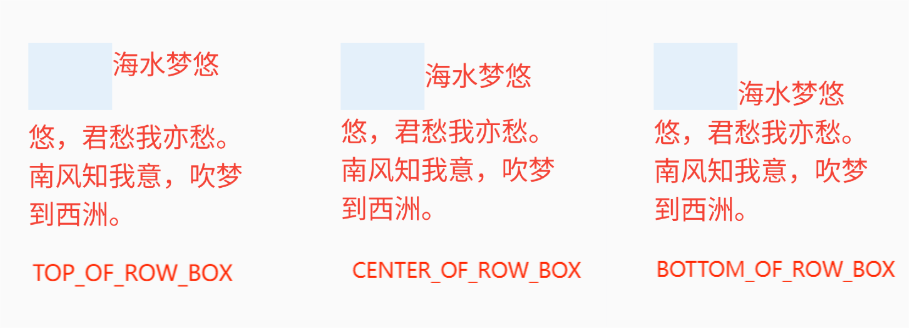

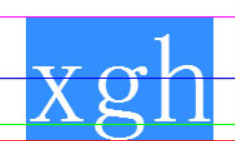
示意图展示了后三种对齐方式,前三种对齐方式在文本基线对齐方式上类似,比较位置是文本基线,即绿色线条部分。
PlaceholderSpan
描述占位符样式。
系统能力: SystemCapability.Graphics.Drawing
元服务API:从API version 22开始,该接口支持在元服务中使用。
| 名称 | 类型 | 只读 | 可选 | 说明 |
|---|---|---|---|---|
| width | number | 否 | 否 | 占位符的宽度,浮点数,单位为物理像素px。 |
| height | number | 否 | 否 | 占位符的高度,浮点数,单位为物理像素px。 |
| align | PlaceholderAlignment | 否 | 否 | 相对于周围文本的纵向对齐方式。 |
| baseline | TextBaseline | 否 | 否 | 基线类型。 |
| baselineOffset | number | 否 | 否 | 基线偏移量,浮点数,单位为物理像素px。 |
Range
描述左闭右开区间。
系统能力: SystemCapability.Graphics.Drawing
元服务API:从API version 22开始,该接口支持在元服务中使用。
| 名称 | 类型 | 只读 | 可选 | 说明 |
|---|---|---|---|---|
| start | number | 否 | 否 | 区间左侧端点索引,整数。 |
| end | number | 否 | 否 | 区间右侧端点索引,整数。 |
TextRectSize24+
文本矩形尺寸,用于描述文本的矩形宽高属性。值为浮点数,单位为物理像素px。
系统能力:SystemCapability.Graphics.Drawing
元服务API:从API version 24开始,该接口支持在元服务中使用。
模型约束: 此接口仅可在Stage模型下使用。
| 名称 | 类型 | 只读 | 可选 | 说明 |
|---|---|---|---|---|
| width | number | 否 | 否 | 文本矩形的宽度,浮点数,单位为物理像素px。 |
| height | number | 否 | 否 | 文本矩形的高度,浮点数,单位为物理像素px。 |
TextLayoutResult24+
文本布局结果。
系统能力:SystemCapability.Graphics.Drawing
元服务API:从API version 24开始,该接口支持在元服务中使用。
模型约束: 此接口仅可在Stage模型下使用。
| 名称 | 类型 | 只读 | 可选 | 说明 |
|---|---|---|---|---|
| fitStrRange | Array<Range> | 否 | 否 | 文本布局计算完成后能够完整显示的字符范围数组。 |
| correctRect | TextRectSize | 否 | 否 | 布局后段落的矩形尺寸。 |
Paragraph
保存文本内容及样式的载体,支持排版与绘制操作。
下列API示例中都需先使用ParagraphBuilder类的build()接口获取到Paragraph对象实例,再通过此实例调用对应方法。
[h2]layoutSync
layoutSync(width: number): void
进行排版并计算所有字形位置。
系统能力:SystemCapability.Graphics.Drawing
元服务API:从API version 22开始,该接口支持在元服务中使用。
参数:
| 参数名 | 类型 | 必填 | 说明 |
|---|---|---|---|
| width | number | 是 | 单行的最大宽度,浮点数,单位为物理像素px。 |
示例:
paragraph.layoutSync(100);
[h2]layout18+
layout(width: number): Promise<void>
进行排版并计算所有字形位置,使用Promise异步回调。
系统能力:SystemCapability.Graphics.Drawing
元服务API:从API version 22开始,该接口支持在元服务中使用。
参数:
| 参数名 | 类型 | 必填 | 说明 |
|---|---|---|---|
| width | number | 是 | 单行的最大宽度,浮点数,单位为物理像素px。 |
返回值:
| 类型 | 说明 |
|---|---|
| Promise<void> | Promise对象,无返回结果。 |
错误码:
以下错误码的详细介绍请参见通用错误码。
| 错误码ID | 错误信息 |
|---|---|
| 401 | Parameter error. Possible causes: 1. Mandatory parameters are left unspecified; 2. Incorrect parameter types; 3. Parameter verification failed. |
示例:
import { drawing, text } from '@kit.ArkGraphics2D'
import { image } from '@kit.ImageKit'

let textStyle: text.TextStyle = {
  color: {
    alpha: 255,
    red: 255,
    green: 0,
    blue: 0
  },
  fontSize: 30,
};
let paragraphStyle: text.ParagraphStyle = {
  textStyle: textStyle,
};
let fontCollection: text.FontCollection = new text.FontCollection();
let paragraphBuilder = new text.ParagraphBuilder(paragraphStyle, fontCollection);
// 添加文本字符串
paragraphBuilder.addText("test");
// 生成排版对象
let paragraph = paragraphBuilder.build();

function textFunc(pixelmap: PixelMap) {
  // 通过图片对象构造画布
  let canvas = new drawing.Canvas(pixelmap);
  // 进行绘制文本字符串
  paragraph.paint(canvas, 100, 10);
}

@Entry
@Component
struct Index {
  @State pixelmap?: PixelMap = undefined;
  fun: Function = textFunc;

async prepareLayoutPromise() {
    try {
      await paragraph.layout(200);
      console.info('Succeeded in doing layout');
    } catch (error) {
      let err: BusinessError = error as BusinessError;
      console.error(`Failed to do layout, error: ${err.code} message: ${err.message}`);
    }
  }

  aboutToAppear() {
    this.prepareLayoutPromise();
  }

  build() {
    Column() {
      Image(this.pixelmap).width(200).height(200);
      Button("layout")
        .width(100)
        .height(50)
        .onClick(() => {
          const color: ArrayBuffer = new ArrayBuffer(160000);
          let opts: image.InitializationOptions = { editable: true, pixelFormat: 3, size: { height: 200, width: 200 } }
          if (this.pixelmap == undefined) {
            // 构造图片对象
            this.pixelmap = image.createPixelMapSync(color, opts);
          }
          // 进行绘制文字
          this.fun(this.pixelmap);
        })
    }
  }
} 
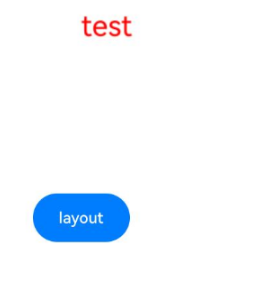
示意图展示了点击按钮后layout接口示例代码的运行结果。
[h2]layoutWithConstraints24+
layoutWithConstraints(size: TextRectSize): TextLayoutResult
使用给定的高度和宽度进行排版并计算所有字形的位置。
系统能力:SystemCapability.Graphics.Drawing
元服务API:从API version 24开始,该接口支持在元服务中使用。
模型约束: 此接口仅可在Stage模型下使用。
参数:
| 参数名 | 类型 | 必填 | 说明 |
|---|---|---|---|
| size | TextRectSize | 是 | 约束的高度和宽度,单位为物理像素px。 |
返回值:
| 类型 | 说明 |
|---|---|
| TextLayoutResult | 布局后的实际尺寸和排版后容下的字符范围。 |
示例:
let size: text.TextRectSize = { width: 200, height: 100 };
let result = paragraph.layoutWithConstraints(size); // 功能增强的 layoutSync
console.info('Width: ' + result.correctRect.width + ', Height: ' + result.correctRect.height);
result.fitStrRange.forEach((range) => {
  console.info('fitRange: [' + range.start + ', ' + range.end + ']');
});
[h2]paint
paint(canvas: drawing.Canvas, x: number, y: number): void
在画布上以 (x, y) 为左上角绘制文本。调用前必须先调用layout()接口进行排版,否则无法正确显示文本内容。
系统能力:SystemCapability.Graphics.Drawing
元服务API:从API version 22开始,该接口支持在元服务中使用。
参数:
| 参数名 | 类型 | 必填 | 说明 |
|---|---|---|---|
| canvas | drawing.Canvas | 是 | 绘制的目标画布。 |
| x | number | 是 | 绘制的左上角位置的横坐标,浮点数,单位为物理像素px。 |
| y | number | 是 | 绘制的左上角位置的纵坐标,浮点数,单位为物理像素px。 |
示例:
const color: ArrayBuffer = new ArrayBuffer(160000);
let opts: image.InitializationOptions = { editable: true, pixelFormat: 3, size: { height: 200, width: 200 } }
let pixelMap: image.PixelMap = image.createPixelMapSync(color, opts);
let canvas = new drawing.Canvas(pixelMap);
paragraph.paint(canvas, 0, 0);
[h2]paintOnPath
paintOnPath(canvas: drawing.Canvas, path: drawing.Path, hOffset: number, vOffset: number): void
在画布上沿路径绘制文本。调用前必须先调用layout()接口进行排版,否则无法正确显示文本内容。
系统能力:SystemCapability.Graphics.Drawing
元服务API:从API version 22开始,该接口支持在元服务中使用。
参数:
| 参数名 | 类型 | 必填 | 说明 |
|---|---|---|---|
| canvas | drawing.Canvas | 是 | 绘制的目标画布。 |
| path | drawing.Path | 是 | 确认文字位置的路径。 |
| hOffset | number | 是 | 沿路径方向偏置,从路径起点向前为正,向后为负,单位为物理像素px。 |
| vOffset | number | 是 | 沿路径垂直方向偏置,沿路径方向左侧为负,右侧为正,单位为物理像素px。 |
示例:
const color: ArrayBuffer = new ArrayBuffer(160000);
let opts: image.InitializationOptions = { editable: true, pixelFormat: 3, size: { height: 200, width: 200 } }
let pixelMap: image.PixelMap = image.createPixelMapSync(color, opts);
let canvas = new drawing.Canvas(pixelMap);
let path = new drawing.Path();
path.arcTo(20, 20, 180, 180, 180, 90);
paragraph.paintOnPath(canvas, path, 0, 0);
[h2]getMaxWidth
getMaxWidth(): number
获取文本最大行宽。
系统能力:SystemCapability.Graphics.Drawing
元服务API:从API version 22开始,该接口支持在元服务中使用。
返回值:
| 类型 | 说明 |
|---|---|
| number | 最大的行宽,浮点数,单位为物理像素px。 |
示例:
let maxWidth = paragraph.getMaxWidth();
[h2]getHeight
getHeight(): number
获取文本总高度。
系统能力:SystemCapability.Graphics.Drawing
元服务API:从API version 22开始,该接口支持在元服务中使用。
返回值:
| 类型 | 说明 |
|---|---|
| number | 总高度,浮点数,单位为物理像素px。 |
示例:
let height = paragraph.getHeight();
[h2]getLongestLine
getLongestLine(): number
获取文本最长行宽。
系统能力:SystemCapability.Graphics.Drawing
元服务API:从API version 22开始,该接口支持在元服务中使用。
返回值:
| 类型 | 说明 |
|---|---|
| number | 最长一行的宽度,浮点数,单位为物理像素px。 |
示例:
let longestLine = paragraph.getLongestLine();
[h2]getLongestLineWithIndent13+
getLongestLineWithIndent(): number
获取文本最长一行的宽度(包含缩进),建议向上取整。文本内容为空时返回0。
系统能力:SystemCapability.Graphics.Drawing
元服务API:从API version 22开始,该接口支持在元服务中使用。
返回值:
| 类型 | 说明 |
|---|---|
| number | 最长一行的宽度(该宽度包含当前行缩进的宽度),浮点数,单位为物理像素px。 |
示例:
let longestLineWithIndent = paragraph.getLongestLineWithIndent();
[h2]getMinIntrinsicWidth
getMinIntrinsicWidth(): number
获取段落最小固有宽度。
系统能力:SystemCapability.Graphics.Drawing
元服务API:从API version 22开始,该接口支持在元服务中使用。
返回值:
| 类型 | 说明 |
|---|---|
| number | 该段落所占水平空间的最小固有宽度,浮点数,单位为物理像素px。 |
示例:
let minIntrinsicWidth = paragraph.getMinIntrinsicWidth();
[h2]getMaxIntrinsicWidth
getMaxIntrinsicWidth(): number
获取段落最大固有宽度。
系统能力:SystemCapability.Graphics.Drawing
元服务API:从API version 22开始,该接口支持在元服务中使用。
返回值:
| 类型 | 说明 |
|---|---|
| number | 该段落所占水平空间的最大固有宽度,浮点数,单位为物理像素px。 |
示例:
let maxIntrinsicWidth = paragraph.getMaxIntrinsicWidth();
[h2]getAlphabeticBaseline
getAlphabeticBaseline(): number
获取拉丁字母的基线位置。
系统能力:SystemCapability.Graphics.Drawing
元服务API:从API version 22开始,该接口支持在元服务中使用。
返回值:
| 类型 | 说明 |
|---|---|
| number | 拉丁字母的基线位置,浮点数,单位为物理像素px。 |
示例:
let alphabeticBaseline = paragraph.getAlphabeticBaseline();
[h2]getIdeographicBaseline
getIdeographicBaseline(): number
获取表意字(如CJK(中文,日文,韩文))的基线位置。
系统能力:SystemCapability.Graphics.Drawing
元服务API:从API version 22开始,该接口支持在元服务中使用。
返回值:
| 类型 | 说明 |
|---|---|
| number | 表意字的基线位置,浮点数,单位为物理像素px。 |
示例:
let ideographicBaseline = paragraph.getIdeographicBaseline();
[h2]getRectsForRange
getRectsForRange(range: Range, widthStyle: RectWidthStyle, heightStyle: RectHeightStyle): Array<TextBox>
获取给定的矩形区域宽度以及矩形区域高度的规格下,文本中该区间范围内的字符所占的矩形区域。
系统能力:SystemCapability.Graphics.Drawing
元服务API:从API version 22开始,该接口支持在元服务中使用。
参数:
| 参数名 | 类型 | 必填 | 说明 |
|---|---|---|---|
| range | Range | 是 | 需要获取的区域的文本区间。 |
| widthStyle | RectWidthStyle | 是 | 返回的矩形区域的宽度的规格。 |
| heightStyle | RectHeightStyle | 是 | 返回的矩形区域的高度的规格。 |
返回值:
| 类型 | 说明 |
|---|---|
| Array<TextBox> | 矩形区域数组。 |
示例:
let range: text.Range = { start: 0, end: 1};
let rects = paragraph.getRectsForRange(range, text.RectWidthStyle.TIGHT, text.RectHeightStyle.TIGHT);
[h2]getRectsForPlaceholders
getRectsForPlaceholders(): Array<TextBox>
获取文本中所有占位符所占的矩形区域。
系统能力:SystemCapability.Graphics.Drawing
元服务API:从API version 22开始,该接口支持在元服务中使用。
返回值:
| 类型 | 说明 |
|---|---|
| Array<TextBox> | 矩形区域数组。 |
示例:
let placeholderRects = paragraph.getRectsForPlaceholders();
[h2]getGlyphPositionAtCoordinate
getGlyphPositionAtCoordinate(x: number, y: number): PositionWithAffinity
获取与给定坐标最接近的字形位置信息。
系统能力:SystemCapability.Graphics.Drawing
元服务API:从API version 22开始,该接口支持在元服务中使用。
参数:
| 参数名 | 类型 | 必填 | 说明 |
|---|---|---|---|
| x | number | 是 | 横坐标,浮点数,单位为物理像素px。 |
| y | number | 是 | 纵坐标,浮点数,单位为物理像素px。 |
返回值:
| 类型 | 说明 |
|---|---|
| PositionWithAffinity | 字形位置信息。 |
示例:
let positionWithAffinity = paragraph.getGlyphPositionAtCoordinate(0, 0);
[h2]getWordBoundary
getWordBoundary(offset: number): Range
返回给定offset的字形所在单词的索引区间。
系统能力:SystemCapability.Graphics.Drawing
元服务API:从API version 22开始,该接口支持在元服务中使用。
参数:
| 参数名 | 类型 | 必填 | 说明 |
|---|---|---|---|
| offset | number | 是 | 字形的偏移量,整数。 |
返回值:
| 类型 | 说明 |
|---|---|
| Range | 单词的索引区间。 |
示例:
let wordRange = paragraph.getWordBoundary(0);
[h2]getLineCount
getLineCount(): number
返回文本行数。
系统能力:SystemCapability.Graphics.Drawing
元服务API:从API version 22开始,该接口支持在元服务中使用。
返回值:
| 类型 | 说明 |
|---|---|
| number | 文本行数量,整数。 |
示例:
let lineCount = paragraph.getLineCount();
[h2]getLineHeight
getLineHeight(line: number): number
返回指定行的行高。
系统能力:SystemCapability.Graphics.Drawing
元服务API:从API version 22开始,该接口支持在元服务中使用。
参数:
| 参数名 | 类型 | 必填 | 说明 |
|---|---|---|---|
| line | number | 是 | 文本行索引,整数,范围为0~getLineCount-1。 |
返回值:
| 类型 | 说明 |
|---|---|
| number | 行高,单位为物理像素px。 |
示例:
let lineHeight = paragraph.getLineHeight(0);
[h2]getLineWidth
getLineWidth(line: number): number
返回指定行的行宽。
系统能力:SystemCapability.Graphics.Drawing
元服务API:从API version 22开始,该接口支持在元服务中使用。
参数:
| 参数名 | 类型 | 必填 | 说明 |
|---|---|---|---|
| line | number | 是 | 文本行索引,整数,范围为0~getLineCount-1。 |
返回值:
| 类型 | 说明 |
|---|---|
| number | 行宽,单位为物理像素px。 |
示例:
let lineWidth = paragraph.getLineWidth(0);
[h2]didExceedMaxLines
didExceedMaxLines(): boolean
返回段落是否超过最大行数。
系统能力:SystemCapability.Graphics.Drawing
元服务API:从API version 22开始,该接口支持在元服务中使用。
返回值:
| 类型 | 说明 |
|---|---|
| boolean | true表示段落超出了最大行限制,false则表示没有超出最大行限制。 |
示例:
let didExceed = paragraph.didExceedMaxLines();
[h2]getTextLines
getTextLines(): Array<TextLine>
返回所有的文本行。
系统能力:SystemCapability.Graphics.Drawing
元服务API:从API version 22开始,该接口支持在元服务中使用。
返回值:
| 类型 | 说明 |
|---|---|
| Array<TextLine> | 文本行载体数组。 |
示例:
let lines = paragraph.getTextLines();
[h2]getActualTextRange
getActualTextRange(lineNumber: number, includeSpaces: boolean): Range
获取指定行的实际可见文本范围,不包括溢出的省略号。
系统能力:SystemCapability.Graphics.Drawing
元服务API:从API version 22开始,该接口支持在元服务中使用。
参数:
| 参数名 | 类型 | 必填 | 说明 |
|---|---|---|---|
| lineNumber | number | 是 | 要获取文本范围的行索引,行索引从0开始。该接口只能获取已有行的边界,即输入行索引从0开始。最大行索引为文本行数量-1,文本行数量可通过getLineCount接口获取。 |
| includeSpaces | boolean | 是 | 表示是否应包含空白字符。true表示包含空白字符,false表示不包含空白字符。 |
返回值:
| 类型 | 说明 |
|---|---|
| Range | 返回对应行数的实际文本范围。如果行索引非法,返回的start和end均为0。 |
示例:
let rang = paragraph.getActualTextRange(0, true);
[h2]getLineMetrics
getLineMetrics(): Array<LineMetrics>
获取文本行的行度量数组。
系统能力:SystemCapability.Graphics.Drawing
元服务API:从API version 22开始,该接口支持在元服务中使用。
返回值:
| 类型 | 说明 |
|---|---|
| Array<LineMetrics> | 文本行的行度量数组。 |
示例:
let arrLineMetric = paragraph.getLineMetrics();
[h2]getLineMetrics
getLineMetrics(lineNumber: number): LineMetrics | undefined
获取特定行号的行度量信息。
系统能力:SystemCapability.Graphics.Drawing
元服务API:从API version 22开始,该接口支持在元服务中使用。
参数:
| 参数名 | 类型 | 必填 | 说明 |
|---|---|---|---|
| lineNumber | number | 是 | 要查询度量信息的行的编号,行号从0开始,最大行索引为文本行数量-1,文本行数量可通过getLineCount接口获取。 |
返回值:
| 类型 | 说明 |
|---|---|
| LineMetrics | undefined | 如果指定的行号有效且度量信息存在,则返回一个包含该行度量数据的LineMetrics对象;如果行号无效或无法获取度量信息,则返回undefined。 |
示例:
let lineMetrics = paragraph.getLineMetrics(0);
[h2]updateColor20+
updateColor(color: common2D.Color): void
更新整个文本段落的颜色。如果当前装饰线未设置颜色,使用该接口也会同时更新装饰线的颜色。
系统能力:SystemCapability.Graphics.Drawing
元服务API:从API version 22开始,该接口支持在元服务中使用。
参数:
| 参数名 | 类型 | 必填 | 说明 |
|---|---|---|---|
| color | common2D.Color | 是 | 更新后的字体色。 |
示例:
paragraph.updateColor({ alpha: 255, red: 255, green: 0, blue: 0 }); [h2]updateDecoration20+
updateDecoration(decoration: Decoration): void
更新整个文本段落的装饰线。
系统能力:SystemCapability.Graphics.Drawing
元服务API:从API version 22开始,该接口支持在元服务中使用。
参数:
| 参数名 | 类型 | 必填 | 说明 |
|---|---|---|---|
| decoration | Decoration | 是 | 更新后的装饰线。 |
示例:
paragraph.updateDecoration({
  textDecoration: text.TextDecorationType.OVERLINE,
  color: { alpha: 255, red: 255, green: 0, blue: 0 },
  decorationStyle: text.TextDecorationStyle.WAVY,
  decorationThicknessScale: 2.0,
});
[h2]getVisibleTextRanges
getVisibleTextRanges(): Array<Range>
获取段落中在屏幕上可见的文本范围。不包含因最大行数(ParagraphStyle的maxLines属性)截断或省略号模式(EllipsisMode)替换而未显示的文本。
起始版本:26.0.0
系统能力:SystemCapability.Graphics.Drawing
元服务API:从API版本26.0.0开始,该接口支持在元服务中使用。
模型约束: 此接口仅可在Stage模型下使用。
返回值:
| 类型 | 说明 |
|---|---|
| Array<Range> | 段落可见文本范围数组,范围为UTF-16编码单元索引。 |
返回的范围取决于段落的具体截断情况(如是否设置最大行数或省略号等):
| 场景 | 说明 |
|---|---|
| 文本未被截断 | 范围包含全部已排版文本 |
| 仅设置maxLines截断(未设置省略号) | 范围为实际显示的文本,即第一行至第maxLines行末尾的文本。 |
| 尾部省略(EllipsisMode.END) | 范围为省略号之前的文本。 |
| 头部省略(EllipsisMode.START) | 范围为省略号之后的文本。 |
| 中部省略(EllipsisMode.MIDDLE) | 第一个范围为省略号之前的文本,第二个范围为省略号之后的文本。 |
| 多行头部省略(EllipsisMode.MULTILINE_START) | 同中部省略,返回省略号前后的文本范围。 |
| 多行中部省略(EllipsisMode.MULTILINE_MIDDLE) | 同中部省略,返回省略号前后的文本范围。 |
示例:
let visibleRanges = paragraph.getVisibleTextRanges();
[h2]getCharacterRangeForGlyphRange24+
getCharacterRangeForGlyphRange(glyphRange: Range, encoding: drawing.TextEncoding): Array<Range>
获取指定字形范围对应的字符范围。
系统能力:SystemCapability.Graphics.Drawing
元服务API:从API version 24开始,该接口支持在元服务中使用。
模型约束: 此接口仅可在Stage模型下使用。
参数:
| 参数名 | 类型 | 必填 | 说明 |
|---|---|---|---|
| glyphRange | Range | 是 | 字形范围。 |
| encoding | drawing.TextEncoding | 是 | 文本编码类型。目前仅支持UTF-8和UTF-16编码类型。对于UTF-8编码,返回的字符范围表示字节范围。对于UTF-16编码,返回的字符范围表示UTF-16编码单元范围。 |
返回值:
| 类型 | 说明 |
|---|---|
| Array<Range> | 字符范围。如果数组包含一个元素,它表示字符范围。如果包含两个元素,第一个是字符范围,第二个是实际的字形范围。 |
错误码:
以下错误码的详细介绍请参见图形绘制与显示错误码。
| 错误码ID | 错误信息 |
|---|---|
| 25900001 | Parameter error. Possible causes: Incorrect parameter range. |
示例:
import { drawing, text } from '@kit.ArkGraphics2D'

@Entry
@Component
struct Index {
  build() {
    Column() {
      Button("get character range")
        .onClick(() => {
          let glyphRange: text.Range = { start: 0, end: 5 };
          let encoding: drawing.TextEncoding = drawing.TextEncoding.TEXT_ENCODING_UTF8;
          let textData = "Heน้ำllo1️⃣World";
          let myTextStyle: text.TextStyle = {
            color: { alpha: 255, red: 255, green: 0, blue: 0 },
            fontSize: 33,
          };
          let myParagraphStyle: text.ParagraphStyle = {
            textStyle: myTextStyle,
            align: text.TextAlign.END,
          };
          let fontCollection = new text.FontCollection();
          let paragraphBuilder = new text.ParagraphBuilder(myParagraphStyle, fontCollection);
          paragraphBuilder.addText(textData);
          let paragraph = paragraphBuilder.build();
          paragraph.layoutSync(200);
          let ranges = paragraph.getCharacterRangeForGlyphRange(glyphRange, encoding);
        })
    }
  }
} [h2]getGlyphRangeForCharacterRange24+
getGlyphRangeForCharacterRange(characterRange: Range, encoding: drawing.TextEncoding): Array<Range>
获取指定字符范围对应的字形范围。
系统能力:SystemCapability.Graphics.Drawing
元服务API:从API version 24开始,该接口支持在元服务中使用。
模型约束: 此接口仅可在Stage模型下使用。
参数:
| 参数名 | 类型 | 必填 | 说明 |
|---|---|---|---|
| characterRange | Range | 是 | 字符范围。 |
| encoding | drawing.TextEncoding | 是 | 文本编码类型。目前仅支持UTF-8和UTF-16编码类型。对于UTF-8编码,返回的实际字符范围表示字节范围。对于UTF-16编码,返回的实际字符范围表示UTF-16编码单元范围。 |
返回值:
| 类型 | 说明 |
|---|---|
| Array<Range> | 字形范围。数组包含两个元素,第一个是字形范围,第二个是实际的字符范围。 |
错误码:
以下错误码的详细介绍请参见图形绘制与显示错误码。
| 错误码ID | 错误信息 |
|---|---|
| 25900001 | Parameter error. Possible causes: Incorrect parameter range. |
示例:
import { drawing, text } from '@kit.ArkGraphics2D'

@Entry
@Component
struct Index {
  build() {
    Column() {
      Button("get glyph range")
        .onClick(() => {
          let characterRange: text.Range = { start: 0, end: 5 };
          let encoding: drawing.TextEncoding = drawing.TextEncoding.TEXT_ENCODING_UTF8;
          let textData = "Heน้ำllo1️⃣World";
          let myTextStyle: text.TextStyle = {
            color: { alpha: 255, red: 255, green: 0, blue: 0 },
            fontSize: 33,
          };
          let myParagraphStyle: text.ParagraphStyle = {
            textStyle: myTextStyle,
            align: text.TextAlign.END,
          };
          let fontCollection = new text.FontCollection();
          let paragraphBuilder = new text.ParagraphBuilder(myParagraphStyle, fontCollection);
          paragraphBuilder.addText(textData);
          let paragraph = paragraphBuilder.build();
          paragraph.layoutSync(200);
          let ranges = paragraph.getGlyphRangeForCharacterRange(characterRange, encoding);
        })
    }
  }
} [h2]getCharacterPositionAtCoordinate24+
getCharacterPositionAtCoordinate(x: number, y: number, encoding: drawing.TextEncoding): PositionWithAffinity
获取与给定坐标最接近的字符位置信息。
系统能力:SystemCapability.Graphics.Drawing
元服务API:从API version 24开始,该接口支持在元服务中使用。
模型约束: 此接口仅可在Stage模型下使用。
参数:
| 参数名 | 类型 | 必填 | 说明 |
|---|---|---|---|
| x | number | 是 | 文本排版区域内的水平坐标,单位为物理像素(px)。相对于文本排版区域左上角的x偏移量,向右为正方向。支持浮点数,可取负值(表示在文本区域左侧)。坐标超出文本区域范围时,将返回最近的字符位置。可通过触摸事件或点击事件获取。 |
| y | number | 是 | 文本排版区域内的垂直坐标,单位为物理像素(px)。相对于文本排版区域左上角的y偏移量,向下为正方向。支持浮点数,可取负值(表示在文本区域上方)。坐标超出文本区域范围时,将返回最近的字符位置。可通过触摸事件或点击事件获取。 |
| encoding | drawing.TextEncoding | 是 | 文本编码类型。目前仅支持UTF-8和UTF-16编码类型。对于UTF-8编码,返回的字符位置表示字节偏移量。对于UTF-16编码,返回的字符位置表示UTF-16编码单元偏移量。 |
返回值:
| 类型 | 说明 |
|---|---|
| PositionWithAffinity | 字符位置信息。 |
错误码:
以下错误码的详细介绍请参见图形绘制与显示错误码。
| 错误码ID | 错误信息 |
|---|---|
| 25900001 | Parameter error. Possible causes: Incorrect parameter range. |
示例:
import { drawing, text } from '@kit.ArkGraphics2D'

@Entry
@Component
struct Index {
  build() {
    Column() {
      Button("get character position")
        .onClick(() => {
          let encoding: drawing.TextEncoding = drawing.TextEncoding.TEXT_ENCODING_UTF8;
          let textData = "Heน้ำllo1️⃣World";
          let myTextStyle: text.TextStyle = {
            color: { alpha: 255, red: 255, green: 0, blue: 0 },
            fontSize: 33,
          };
          let myParagraphStyle: text.ParagraphStyle = {
            textStyle: myTextStyle,
            align: text.TextAlign.END,
          };
          let fontCollection = new text.FontCollection();
          let paragraphBuilder = new text.ParagraphBuilder(myParagraphStyle, fontCollection);
          paragraphBuilder.addText(textData);
          let paragraph = paragraphBuilder.build();
          paragraph.layoutSync(200);
          let x = 10;
          let y = 5;
          let position = paragraph.getCharacterPositionAtCoordinate(x, y, encoding);
        })
    }
  }
}
[h2]getProcessState
getProcessState(): TextProcessState
获取段落的文本处理状态。
系统能力:SystemCapability.Graphics.Drawing
元服务API:从API版本26.0.0开始,该接口支持在元服务中使用。
模型约束: 此接口仅可在Stage模型下使用。
起始版本: 26.0.0
返回值:
| 类型 | 说明 |
|---|---|
| TextProcessState | 段落的文本处理状态。 |
示例:
import { text } from '@kit.ArkGraphics2D'

@Entry
@Component
struct Index {
  build() {
    Column() {
      Button("Click")
        .onClick(() => {
          let textData = "Hello World";
          let myTextStyle: text.TextStyle = {
            color: { alpha: 255, red: 255, green: 0, blue: 0 },
            fontSize: 33,
          };
          let myParagraphStyle: text.ParagraphStyle = {
            textStyle: myTextStyle
          };
          let fontCollection = new text.FontCollection();
          let paragraphBuilder = new text.ParagraphBuilder(myParagraphStyle, fontCollection);
          paragraphBuilder.addText(textData);
          let paragraph = paragraphBuilder.build();
          let processState = paragraph.getProcessState(); // Now it is INIT
          console.info("Print state: " + processState);
          paragraph.layoutSync(200);
          processState = paragraph.getProcessState(); // Now it is FORMATTED
          console.info("Print state: " + processState);
        })
    }
  }
}
[h2]getTextDisplayState
getTextDisplayState(): TextDisplayState
获取段落的文本显示状态。
系统能力:SystemCapability.Graphics.Drawing
元服务API:从API版本26.0.0开始,该接口支持在元服务中使用。
模型约束: 此接口仅可在Stage模型下使用。
起始版本: 26.0.0
返回值:
| 类型 | 说明 |
|---|---|
| TextDisplayState | 段落的文本显示状态。 |
示例:
import { text } from '@kit.ArkGraphics2D'

@Entry
@Component
struct Index {
  build() {
    Column() {
      Button("Click")
        .onClick(() => {
          let textData = "Hello World";
          let myTextStyle: text.TextStyle = {
            color: { alpha: 255, red: 255, green: 0, blue: 0 },
            fontSize: 33,
          };
          let myParagraphStyle: text.ParagraphStyle = {
            textStyle: myTextStyle
          };
          let fontCollection = new text.FontCollection();
          let paragraphBuilder = new text.ParagraphBuilder(myParagraphStyle, fontCollection);
          paragraphBuilder.addText(textData);
          let paragraph = paragraphBuilder.build();
          let displayState = paragraph.getTextDisplayState(); // Now it is UNKNOWN
          console.info("Print state: " + displayState);
          paragraph.layoutSync(200);
          displayState = paragraph.getTextDisplayState(); // Now it is CLIP
          console.info("Print state: " + displayState);
        })
    }
  }
}
[h2]getParagraphStyle
getParagraphStyle(): ParagraphStyle
获取段落的样式配置。
系统能力:SystemCapability.Graphics.Drawing
元服务API:从API版本26.0.0开始,该接口支持在元服务中使用。
模型约束: 此接口仅可在Stage模型下使用。
起始版本: 26.0.0
返回值:
| 类型 | 说明 |
|---|---|
| ParagraphStyle | 段落的样式配置。 其中textStyle.color、textStyle.textShadows.color、textStyle.backgroundRect.color、textStyle.decoration.color属性:返回32位无符号整型颜色数值。示例:返回值4278190080,对应纯黑色十六进制颜色值0xFF000000,等价于common2D.Color对象参数:alpha=255、red=0、green=0、blue=0,示例中提供numberToRGBA转换方法作为参考。 |
示例:
import { text } from '@kit.ArkGraphics2D'
import { common2D } from '@kit.ArkGraphics2D'

@Entry
@Component
struct Index {
  build() {
    Column() {
      Button("Click")
        .onClick(() => {
          let textData = "Hello World";
          let myTextStyle: text.TextStyle = {
            color: { alpha: 255, red: 255, green: 0, blue: 0 },
            fontSize: 33,
          };
          let myParagraphStyle: text.ParagraphStyle = {
            textStyle: myTextStyle
          };
          let fontCollection = new text.FontCollection();
          let paragraphBuilder = new text.ParagraphBuilder(myParagraphStyle, fontCollection);
          paragraphBuilder.addText(textData);
          let paragraph = paragraphBuilder.build();
          paragraph.layoutSync(200);
          let paragraphStyle = paragraph.getParagraphStyle();
          if (paragraphStyle.textStyle != undefined) {
            console.info("Print fontSize: " + paragraphStyle.textStyle?.fontSize);
            if (paragraphStyle.textStyle?.color != undefined && typeof paragraphStyle.textStyle?.color == 'number') {
              let textColor: common2D.Color = numberToRGBA(paragraphStyle.textStyle?.color);
              console.info(`Print text color ARGB: ${textColor.alpha}, ${textColor.red}, ${textColor.green}, ${textColor.blue}`);
            }
          }
        })
    }
  }
}

function numberToRGBA(colorNum: number): common2D.Color {
  const a = (colorNum >>> 24) & 0xFF;
  const r = (colorNum >>> 16) & 0xFF;
  const g = (colorNum >>> 8) & 0xFF;
  const b = colorNum & 0xFF;
  return { alpha: a, red: r, green: g, blue: b };
}
[h2]forceReuseRasterResult
forceReuseRasterResult(isForce: boolean): void
设置是否强制复用光栅化结果。不调用此接口时,系统默认允许更新光栅化结果。
适用于文本内容未发生变化但需要多次调用paint绘制的场景,通过复用光栅化结果可避免重复光栅化计算以提升绘制性能。设置后,在下次调用paint绘制时生效。
系统能力:SystemCapability.Graphics.Drawing
元服务API:从API版本26.0.0开始,该接口支持在元服务中使用。
模型约束: 此接口仅可在Stage模型下使用。
起始版本: 26.0.0
参数:
| 参数名 | 类型 | 必填 | 说明 |
|---|---|---|---|
| isForce | boolean | 是 | 是否强制复用光栅化结果。true表示强制复用光栅化结果,false表示允许更新光栅化结果。 |
示例:
// Index.ets
import { text, drawing } from '@kit.ArkGraphics2D'
import { image } from '@kit.ImageKit'

function textFunc(pixelmap: PixelMap) {
  let canvas = new drawing.Canvas(pixelmap);
  let textData = "Hello World";
  let myTextStyle: text.TextStyle = {
    color: { alpha: 255, red: 255, green: 0, blue: 0 },
    fontSize: 33,
  };
  let myParagraphStyle: text.ParagraphStyle = {
    textStyle: myTextStyle
  };
  let fontCollection = new text.FontCollection();
  let paragraphBuilder = new text.ParagraphBuilder(myParagraphStyle, fontCollection);
  paragraphBuilder.addText(textData);
  let paragraph = paragraphBuilder.build();
  paragraph.layoutSync(200);
  paragraph.forceReuseRasterResult(true);
  paragraph.paint(canvas, 0, 0);
}

@Entry
@Component
struct Index {
  @State pixelmap?: PixelMap = undefined;
  fun: Function = textFunc;
  build() {
    Column() {
      Image(this.pixelmap).width(200).height(200);
      Button("Click").onClick(() => {
        if (this.pixelmap == undefined) {
          const color: ArrayBuffer = new ArrayBuffer(160000);
          let opts: image.InitializationOptions = { editable: true, pixelFormat: 3, size: { height: 200, width: 200 } }
          this.pixelmap = image.createPixelMapSync(color, opts);
        }
        this.fun(this.pixelmap);
      })
    }
  }
} LineTypeset18+
保存文本内容及样式的载体,可用于计算单行排版信息。
下列API示例中都需先使用ParagraphBuilder类的buildLineTypeset()接口获取到LineTypeset对象实例,再通过此实例调用对应方法。
[h2]getLineBreak18+
getLineBreak(startIndex: number, width: number): number
计算在限定宽度下,从指定位置开始可以排版的字符数。
系统能力:SystemCapability.Graphics.Drawing
元服务API:从API version 22开始,该接口支持在元服务中使用。
参数:
| 参数名 | 类型 | 必填 | 说明 |
|---|---|---|---|
| startIndex | number | 是 | 开始计算排版的起始位置(包括起始位置)。取值范围需要为[0,文本字符总数)的整数,当参数超出范围时抛出异常。 |
| width | number | 是 | 可用于排版的宽度,大于0的浮点数,单位为物理像素px。 |
返回值:
| 类型 | 说明 |
|---|---|
| number | 返回在限定排版宽度下,从指定位置开始可排版的字符总数,取值为整数。 |
错误码:
以下错误码的详细介绍请参见通用错误码。
| 错误码ID | 错误信息 |
|---|---|
| 401 | Parameter error. Possible causes: 1. Mandatory parameters are left unspecified; 2. Incorrect parameter types; 3. Parameter verification failed. |
示例:
let startIndex = 0;
let width = 100.0;
let count = lineTypeset.getLineBreak(startIndex, width);
[h2]createLine18+
createLine(startIndex: number, count: number): TextLine
根据指定的排版区间生成文本行对象。
系统能力:SystemCapability.Graphics.Drawing
元服务API:从API version 22开始,该接口支持在元服务中使用。
参数:
| 参数名 | 类型 | 必填 | 说明 |
|---|---|---|---|
| startIndex | number | 是 | 开始计算排版的起始位置,整数,取值范围为[0, 文本字符总数)。 |
| count | number | 是 | 从指定起始位置开始进行排版的字符个数,取值为[0,文本字符总数)的整数,startIndex和count之和不能大于文本字符总数。当count为0时,表示排版区间为[startIndex, 文本的最后一个字符位置]。可以先使用getLineBreak获取合理的排版字符总数。 |
返回值:
| 类型 | 说明 |
|---|---|
| TextLine | 根据文本区间字符生成的TextLine对象。 |
错误码:
以下错误码的详细介绍请参见通用错误码。
| 错误码ID | 错误信息 |
|---|---|
| 401 | Parameter error. Possible causes: 1. Mandatory parameters are left unspecified; 2. Incorrect parameter types; 3. Parameter verification failed. |
示例:
let startIndex = 0;
let width = 100.0;
let count = lineTypeset.getLineBreak(startIndex, width);
let line : text.TextLine = lineTypeset.createLine(startIndex, count);
RunMetrics
描述文本行中连续文本块的布局信息和度量数据。
系统能力: SystemCapability.Graphics.Drawing
元服务API:从API version 22开始,该接口支持在元服务中使用。
| 名称 | 类型 | 只读 | 可选 | 说明 |
|---|---|---|---|---|
| textStyle | TextStyle | 否 | 否 | 字体的样式信息。 |
| fontMetrics | drawing.FontMetrics | 否 | 否 | 字体度量信息。 |
LineMetrics
描述文本布局中单行文字的度量信息。
系统能力: SystemCapability.Graphics.Drawing
元服务API:从API version 22开始,该接口支持在元服务中使用。
| 名称 | 类型 | 只读 | 可选 | 说明 |
|---|---|---|---|---|
| startIndex | number | 否 | 否 | 文本缓冲区中该行开始的索引位置。 |
| endIndex | number | 否 | 否 | 文本缓冲区中该行结束的索引位置。 |
| ascent | number | 否 | 否 | 文字上升高度,即从基线到字符顶部的距离,单位为物理像素px。 |
| descent | number | 否 | 否 | 文字下降高度,即从基线到字符底部的距离,单位为物理像素px。 |
| height | number | 否 | 否 | 当前行的高度,单位为物理像素px,计算方式为 Math.round(ascent + descent) |
| width | number | 否 | 否 | 行的宽度,单位为物理像素px。 |
| left | number | 否 | 否 | 行的左边缘位置,单位为物理像素px。右边缘可通过 left+width 计算得出。 |
| baseline | number | 否 | 否 | 该行基线相对于段落顶部的 Y 坐标位置,单位为物理像素px。 |
| lineNumber | number | 否 | 否 | 行号,从0开始计数。 |
| topHeight | number | 否 | 否 | 从顶部到当前行的高度,单位为物理像素px。 |
| runMetrics | Map<number, RunMetrics> | 否 | 否 | 文本索引范围与关联的字体度量信息之间的映射。 |
TextBox
文本矩形区域,表示文本在布局时所占用的矩形空间。
系统能力: SystemCapability.Graphics.Drawing
元服务API:从API version 22开始,该接口支持在元服务中使用。
| 名称 | 类型 | 只读 | 可选 | 说明 |
|---|---|---|---|---|
| rect | common2D.Rect | 否 | 否 | 矩形区域信息,单位为物理像素px。 |
| direction | TextDirection | 否 | 否 | 文本方向。 |
PositionWithAffinity
位置和亲和度。
系统能力: SystemCapability.Graphics.Drawing
元服务API:从API version 22开始,该接口支持在元服务中使用。
| 名称 | 类型 | 只读 | 可选 | 说明 |
|---|---|---|---|---|
| position | number | 否 | 否 | 字形相对于段落的索引,整数。 |
| affinity | Affinity | 否 | 否 | 位置亲和度。 |
RectWidthStyle
矩形区域宽度规格枚举。
系统能力: SystemCapability.Graphics.Drawing
元服务API:从API version 22开始,该接口支持在元服务中使用。
| 名称 | 值 | 说明 |
|---|---|---|
| TIGHT | 0 | 不设置letterSpacing时,与字形紧贴,否则包含letterSpacing的宽度。 |
| MAX | 1 | 扩展宽度,以匹配所有行上最宽矩形的位置。 |
RectHeightStyle
矩形区域高度规格枚举。
系统能力: SystemCapability.Graphics.Drawing
元服务API:从API version 22开始,该接口支持在元服务中使用。
| 名称 | 值 | 说明 |
|---|---|---|
| TIGHT | 0 | 与字形紧贴。 |
| MAX | 1 | 扩展高度,以匹配所有行上最高矩形的位置。 |
| INCLUDE_LINE_SPACE_MIDDLE | 2 | 每个矩形的顶部和底部将覆盖行上方和行下方的一半空间。 |
| INCLUDE_LINE_SPACE_TOP | 3 | 行间距将被添加到矩形的顶部。 |
| INCLUDE_LINE_SPACE_BOTTOM | 4 | 行间距将被添加到矩形的底部。 |
| STRUT | 5 | 高度按照文本的样式设置。 |
Affinity
位置亲和度枚举。
系统能力: SystemCapability.Graphics.Drawing
元服务API:从API version 22开始,该接口支持在元服务中使用。
| 名称 | 值 | 说明 |
|---|---|---|
| UPSTREAM | 0 | 该位置与文本位置的前一位有关联。 |
| DOWNSTREAM | 1 | 该位置与文本位置的后一位有关联。 |
ParagraphBuilder
段落生成器,采用建造者模式构建段落对象。开发者通过构造函数传入ParagraphStyle和FontCollection初始化ParagraphBuilder,然后通过pushStyle设置文本样式、addText添加文本内容,最终调用build()接口生成Paragraph对象进行排版和绘制。
[h2]constructor
constructor(paragraphStyle: ParagraphStyle, fontCollection: FontCollection)
ParagraphBuilder对象的构造函数。
系统能力:SystemCapability.Graphics.Drawing
元服务API:从API version 22开始,该接口支持在元服务中使用。
参数:
| 参数名 | 类型 | 必填 | 说明 |
|---|---|---|---|
| paragraphStyle | ParagraphStyle | 是 | 段落样式。 |
| fontCollection | FontCollection | 是 | 字体集对象,提供文本排版所需的字体资源,用于在段落构建过程中进行字形匹配和文本渲染。 |
示例:
import { text } from '@kit.ArkGraphics2D'

function textFunc() {
  let myTextStyle: text.TextStyle = {
    color: { alpha: 255, red: 255, green: 0, blue: 0 },
    fontSize: 33,
  };
  let myParagraphStyle: text.ParagraphStyle = {
    textStyle: myTextStyle,
    align: text.TextAlign.END,
  };
  let fontCollection = new text.FontCollection();
  let paragraphBuilder = new text.ParagraphBuilder(myParagraphStyle, fontCollection);
}

@Entry
@Component
struct Index {
  fun: Function = textFunc;
  build() {
    Column() {
      Button().onClick(() => {
        this.fun();
      })
    }
  }
}
[h2]pushStyle
pushStyle(textStyle: TextStyle): void
更新当前文本块的样式。

更新当前文本块的样式,之后添加文字均采用该样式。
系统能力:SystemCapability.Graphics.Drawing
元服务API:从API version 22开始,该接口支持在元服务中使用。
参数:
| 参数名 | 类型 | 必填 | 说明 |
|---|---|---|---|
| textStyle | TextStyle | 是 | 包含了对文本的各种视觉属性的定义,如字体、字号、颜色、字重、字间距、行距、装饰(如下划线、删除线)、文本阴影等。 |
示例:
import { text } from '@kit.ArkGraphics2D'

function textFunc() {
  let myTextStyle: text.TextStyle = {
    color: { alpha: 255, red: 255, green: 0, blue: 0 },
    fontSize: 33,
  };
  let myParagraphStyle: text.ParagraphStyle = {
    textStyle: myTextStyle,
    align: text.TextAlign.CENTER,
  };
  let fontCollection = new text.FontCollection();
  let paragraphBuilder = new text.ParagraphBuilder(myParagraphStyle, fontCollection);
  paragraphBuilder.pushStyle(myTextStyle);
}

@Entry
@Component
struct Index {
  fun: Function = textFunc;
  build() {
    Column() {
      Button().onClick(() => {
        this.fun();
      })
    }
  }
}
[h2]popStyle
popStyle(): void
弹出当前文本样式。

系统能力:SystemCapability.Graphics.Drawing
元服务API:从API version 22开始,该接口支持在元服务中使用。
示例:
import { text } from '@kit.ArkGraphics2D'

function textFunc() {
  let myTextStyle: text.TextStyle = {
    color: { alpha: 255, red: 255, green: 0, blue: 0 },
    fontSize: 33,
  };
  let myParagraphStyle: text.ParagraphStyle = {
    textStyle: myTextStyle,
    align: text.TextAlign.END,
  };
  let fontCollection = new text.FontCollection();
  let paragraphBuilder = new text.ParagraphBuilder(myParagraphStyle, fontCollection);
  paragraphBuilder.pushStyle(myTextStyle);
  paragraphBuilder.popStyle();
}

@Entry
@Component
struct Index {
  fun: Function = textFunc;
  build() {
    Column() {
      Button().onClick(() => {
        this.fun();
      })
    }
  }
}
[h2]addText
addText(text: string): void
向正在构建的文本段落中插入具体的文本字符串。
系统能力:SystemCapability.Graphics.Drawing
元服务API:从API version 22开始,该接口支持在元服务中使用。
参数:
| 参数名 | 类型 | 必填 | 说明 |
|---|---|---|---|
| text | string | 是 | 段落中插入的具体文本字符串,传入非法Unicode时会显示�。 |
示例:
import { text } from '@kit.ArkGraphics2D'

function textFunc() {
  let myTextStyle: text.TextStyle = {
    color: { alpha: 255, red: 255, green: 0, blue: 0 },
    fontSize: 33,
  };
  let myParagraphStyle: text.ParagraphStyle = {
    textStyle: myTextStyle,
    align: text.TextAlign.END,
  };
  let fontCollection = new text.FontCollection();
  let paragraphBuilder = new text.ParagraphBuilder(myParagraphStyle, fontCollection);
  paragraphBuilder.addText("123666");
}

@Entry
@Component
struct Index {
  fun: Function = textFunc;
  build() {
    Column() {
      Button().onClick(() => {
        this.fun();
      })
    }
  }
}
[h2]addPlaceholder
addPlaceholder(placeholderSpan: PlaceholderSpan): void
用于构建文本段落时插入占位符。插入后,占位符将在段落排版中按照指定的宽度、高度和对齐方式占据相应空间,并影响文本的换行和布局。
系统能力:SystemCapability.Graphics.Drawing
元服务API:从API version 22开始,该接口支持在元服务中使用。
参数:
| 参数名 | 类型 | 必填 | 说明 |
|---|---|---|---|
| placeholderSpan | PlaceholderSpan | 是 | 定义了占位符的尺寸、对齐方式、基线类型以及基线偏移量。 |
示例:
import { text } from '@kit.ArkGraphics2D'

function textFunc() {
  let myParagraphStyle: text.ParagraphStyle = {
    align: text.TextAlign.END,
  };
  let myPlaceholderSpan: text.PlaceholderSpan = {
    width: 100,
    height: 100,
    align: text.PlaceholderAlignment.ABOVE_BASELINE,
    baseline: text.TextBaseline.ALPHABETIC,
    baselineOffset: 100
  };
  let fontCollection = new text.FontCollection();
  let paragraphBuilder = new text.ParagraphBuilder(myParagraphStyle, fontCollection);
  paragraphBuilder.addPlaceholder(myPlaceholderSpan);
}

@Entry
@Component
struct Index {
  fun: Function = textFunc;
  build() {
    Column() {
      Button().onClick(() => {
        this.fun();
      })
    }
  }
}
[h2]build
build(): Paragraph
用于构建段落,生成可用于后续排版渲染的段落对象。调用build()后,如需再次构建文本,必须创建新的ParagraphBuilder实例。
系统能力:SystemCapability.Graphics.Drawing
元服务API:从API version 22开始,该接口支持在元服务中使用。
返回值:
| 类型 | 说明 |
|---|---|
| Paragraph | 可用于后续渲染的 Paragraph 对象。 |
示例:
import { text } from '@kit.ArkGraphics2D'

function textFunc() {
  let myTextStyle: text.TextStyle = {
    color : {alpha: 255, red: 255, green: 0, blue: 0},
    fontSize : 20,
  };
  let myParagraphStyle: text.ParagraphStyle = {
    textStyle : myTextStyle,
  };
  let fontCollection = new text.FontCollection();
  let paragraphBuilder = new text.ParagraphBuilder(myParagraphStyle, fontCollection);
  paragraphBuilder.addText("123456789");
  let paragraph = paragraphBuilder.build();
  paragraph.layoutSync(200);
}

@Entry
@Component
struct Index {
  fun: Function = textFunc;
  build() {
    Column() {
      Button().onClick(() => {
        this.fun();
      })
    }
  }
} [h2]buildLineTypeset18+
buildLineTypeset(): LineTypeset
构建行排版器,生成可用于逐行排版计算的LineTypeset对象。
系统能力:SystemCapability.Graphics.Drawing
元服务API:从API version 22开始,该接口支持在元服务中使用。
返回值:
| 类型 | 说明 |
|---|---|
| LineTypeset | 可用于后续渲染的LineTypeset对象。 |
示例:
import { text } from '@kit.ArkGraphics2D'

function test() {
  let myParagraphStyle: text.ParagraphStyle = {
    align: text.TextAlign.JUSTIFY,
  };
  let fontCollection = new text.FontCollection();
  let paragraphBuilder = new text.ParagraphBuilder(myParagraphStyle, fontCollection);
  paragraphBuilder.addText("123456789");
  let lineTypeset = paragraphBuilder.buildLineTypeset();
}

@Entry
@Component
struct Index {
  fun: Function = test;
  build() {
    Column() {
      Button().onClick(() => {
        this.fun();
      })
    }
  }
}
[h2]addSymbol
addSymbol(symbolId: number): void
向正在构建的文本段落中插入具体符号。
系统能力:SystemCapability.Graphics.Drawing
元服务API:从API version 22开始,该接口支持在元服务中使用。
参数:
| 参数名 | 类型 | 必填 | 说明 |
|---|---|---|---|
| symbolId | number | 是 | 要设置的symbol码位,十六进制,当前支持的取值范围为:0xF0000-0xF0C97。可设置的symbol码位(即列表视图下的unicode值)请见主题图标库。 |
示例:
import { text } from '@kit.ArkGraphics2D'

function textFunc() {
  let myTextStyle: text.TextStyle = {
    color: { alpha: 255, red: 255, green: 0, blue: 0 },
    fontSize: 33,
  };
  let myParagraphStyle: text.ParagraphStyle = {
    textStyle: myTextStyle,
    align: text.TextAlign.END,
  };
  let fontCollection = new text.FontCollection();
  let paragraphBuilder = new text.ParagraphBuilder(myParagraphStyle, fontCollection);
  paragraphBuilder.addSymbol(0xF0000);
  let paragraph = paragraphBuilder.build();
}

@Entry
@Component
struct Index {
  fun: Function = textFunc;
  build() {
    Column() {
      Button().onClick(() => {
        this.fun();
      })
    }
  }
} TypographicBounds18+
文本行的排版边界。文本行排版边界与排版字体、排版字号有关,与字符本身无关,例如字符串为" a b ",'a'字符前面有1个空格,'b'字符后面有1个空格,排版边界就包括行首和末尾空格的边界。例如字符串为"j"或"E",排版边界相同,即与字符本身无关。
系统能力: SystemCapability.Graphics.Drawing
元服务API:从API version 22开始,该接口支持在元服务中使用。
| 名称 | 类型 | 只读 | 可选 | 说明 |
|---|---|---|---|---|
| ascent | number | 否 | 否 | 文本行的上升高度,浮点数,单位为物理像素px。 |
| descent | number | 否 | 否 | 文本行的下降高度,浮点数,单位为物理像素px。 |
| leading | number | 否 | 否 | 文本行的行间距,浮点数,单位为物理像素px。 |
| width | number | 否 | 否 | 排版边界的总宽度,浮点数,单位为物理像素px。 |

示意图展示文本行排版参数:width(包含左右空格的文本行宽度)、ascent(上升高度最高点)、descent(下降高度最低点)、leading(行间距)、top(当前行最高点)、baseline(字符基线)、bottom(当前行最低点)、next line top(下一行最高点)。
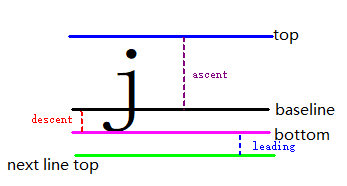
示意图展示了字符串为" a b "的排版边界。
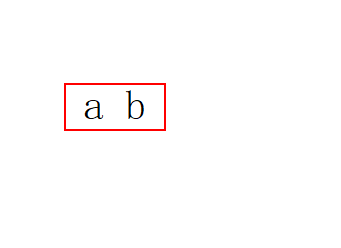
示意图展示了字符串为"j"或"E"的排版边界。
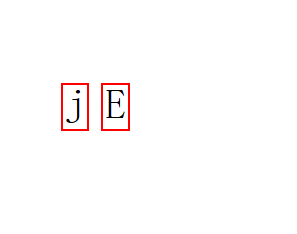
CaretOffsetsCallback18+
type CaretOffsetsCallback = (offset: number, index: number, leadingEdge: boolean) => boolean
将文本行中每个字符的偏移量和索引值作为参数的回调方法。
系统能力: SystemCapability.Graphics.Drawing
元服务API:从API version 22开始,该接口支持在元服务中使用。
参数:
| 参数名 | 类型 | 必填 | 说明 |
|---|---|---|---|
| offset | number | 是 | 文本行中每个字符的偏移量,浮点数,单位为物理像素px。 |
| index | number | 是 | 文本行中每个字符的索引值,整数。 |
| leadingEdge | boolean | 是 | 光标是否位于字符的前缘,true表示位于字符前缘,即偏移量不包含该字符宽度,false表示位于字符后缘,即偏移量包含该字符宽度。 |
返回值:
| 类型 | 说明 |
|---|---|
| boolean | 表示是否停止调用该回调函数,true表示停止调用该回调函数,false表示继续调用该回调函数。 |
TextLine
描述段落基础文本行结构的载体。
下列API示例中都需先使用Paragraph类的getTextLines()接口或者LineTypeset类的createLine()接口获取到TextLine对象实例,再通过此实例调用对应方法。
[h2]getGlyphCount
getGlyphCount(): number
获取文本行中字形的数量。
系统能力:SystemCapability.Graphics.Drawing
元服务API:从API version 22开始,该接口支持在元服务中使用。
返回值:
| 类型 | 说明 |
|---|---|
| number | 该文本行中字形数量,整数。 |
示例:
let glyphCount = lines[0].getGlyphCount();
[h2]getTextRange
getTextRange(): Range
获取该行文本在整个段落文本中的索引区间。
系统能力:SystemCapability.Graphics.Drawing
元服务API:从API version 22开始,该接口支持在元服务中使用。
返回值:
| 类型 | 说明 |
|---|---|
| Range | 该行文本在整个段落文本中的索引区间。 |
示例:
let textRange = lines[0].getTextRange();
[h2]getGlyphRuns
getGlyphRuns(): Array<Run>
获取文本行的排版单元数组。
系统能力:SystemCapability.Graphics.Drawing
元服务API:从API version 22开始,该接口支持在元服务中使用。
返回值:
| 类型 | 说明 |
|---|---|
| Array<Run> | 该文本行中的文本排版单元数组。 |
示例:
let runs = lines[0].getGlyphRuns();
[h2]paint
paint(canvas: drawing.Canvas, x: number, y: number): void
在画布上以坐标点(x, y)为左上角位置绘制该文本行。
系统能力:SystemCapability.Graphics.Drawing
元服务API:从API version 22开始,该接口支持在元服务中使用。
参数:
| 参数名 | 类型 | 必填 | 说明 |
|---|---|---|---|
| canvas | drawing.Canvas | 是 | 绘制的目标canvas。 |
| x | number | 是 | 绘制的左上角位置的横坐标,浮点数,单位为物理像素px。 |
| y | number | 是 | 绘制的左上角位置的纵坐标,浮点数,单位为物理像素px。 |
示例:
import { drawing } from '@kit.ArkGraphics2D'
import { image } from '@kit.ImageKit'

function textFunc(pixelmap: PixelMap) {
  let canvas = new drawing.Canvas(pixelmap);
  lines[0].paint(canvas, 0, 0);
}

@Entry
@Component
struct Index {
  @State pixelmap?: PixelMap = undefined;
  fun: Function = textFunc;
  build() {
    Column() {
      Image(this.pixelmap).width(200).height(200);
      Button().onClick(() => {
        if (this.pixelmap == undefined) {
          const color: ArrayBuffer = new ArrayBuffer(160000);
          let opts: image.InitializationOptions = { editable: true, pixelFormat: 3, size: { height: 200, width: 200 } }
          this.pixelmap = image.createPixelMapSync(color, opts);
        }
        this.fun(this.pixelmap);
      })
    }
  }
} [h2]createTruncatedLine18+
createTruncatedLine(width: number, ellipsisMode: EllipsisMode, ellipsis: string): TextLine
创建一个截断的文本行对象。
系统能力:SystemCapability.Graphics.Drawing
元服务API:从API version 22开始,该接口支持在元服务中使用。
参数:
| 参数名 | 类型 | 必填 | 说明 |
|---|---|---|---|
| width | number | 是 | 截断后的行宽度,浮点数,单位为物理像素px。 |
| ellipsisMode | EllipsisMode | 是 | 截断的类型,当前仅支持头部截断START和尾部截断END。 |
| ellipsis | string | 是 | 截断的标记字符串。 |
返回值:
| 类型 | 说明 |
|---|---|
| TextLine | 截断的文本行对象。 |
示例:
import { drawing, text } from '@kit.ArkGraphics2D'
import { image } from '@kit.ImageKit'

function textFunc(pixelmap: PixelMap) {
  let canvas = new drawing.Canvas(pixelmap);
  let truncatedTextLine = lines[0].createTruncatedLine(100, text.EllipsisMode.START, "...");
  truncatedTextLine.paint(canvas, 0, 100);
}

@Entry
@Component
struct Index {
  @State pixelmap?: PixelMap = undefined;
  fun: Function = textFunc;
  build() {
    Column() {
      Image(this.pixelmap).width(200).height(200);
      Button().onClick(() => {
        if (this.pixelmap == undefined) {
          const color: ArrayBuffer = new ArrayBuffer(160000);
          let opts: image.InitializationOptions = { editable: true, pixelFormat: 3, size: { height: 200, width: 200 } }
          this.pixelmap = image.createPixelMapSync(color, opts);
        }
        this.fun(this.pixelmap);
      })
    }
  }
} [h2]getTypographicBounds18+
getTypographicBounds(): TypographicBounds
获取文本行的排版边界。文本行排版边界与排版字体、排版字号有关,与字符本身无关。例如字符串为" a b ",'a'字符前面有1个空格,'b'字符后面有1个空格,排版边界就包括行首和末尾空格的边界。例如字符串为"j"或"E",排版边界相同,即与字符本身无关。

示意图展示了字符串为" a b "的排版边界。
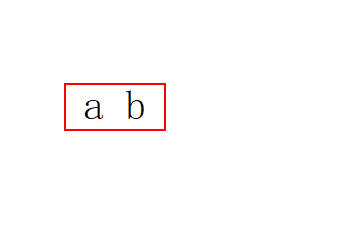
示意图展示了字符串为"j"或"E"的排版边界。
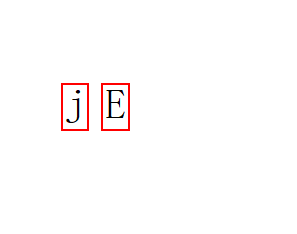
系统能力:SystemCapability.Graphics.Drawing
元服务API:从API version 22开始,该接口支持在元服务中使用。
返回值:
| 类型 | 说明 |
|---|---|
| TypographicBounds | 文本行的排版边界。 |
示例:
let bounds = lines[0].getTypographicBounds();
console.info('textLine ascent:' + bounds.ascent + ', descent:' + bounds.descent + ', leading:' + bounds.leading + ', width:' + bounds.width); [h2]getImageBounds18+
getImageBounds(): common2D.Rect
获取文本行的图像边界。文本行图像边界与排版字体、排版字号、字符本身都有关,相当于视觉边界。例如字符串为" a b ",'a'字符前面有1个空格,'b'字符后面有1个空格,用户在界面上只能看到"a b",图像边界即为不包括带行首和末尾空格的边界。例如字符串为"j"或"E",视觉边界不同,即与字符本身有关,"j"字符串的视觉边界宽度小于"E"字符串的视觉边界宽度,"j"字符串的视觉边界高度大于"E"字符串的视觉边界高度。

示意图展示了字符串为" a b "的图像边界。
示意图展示了字符串为"j"或"E"的图像边界。
系统能力:SystemCapability.Graphics.Drawing
元服务API:从API version 22开始,该接口支持在元服务中使用。
返回值:
| 类型 | 说明 |
|---|---|
| common2D.Rect | 文本行的图像边界,单位为物理像素px。 |
示例:
let imageBounds = lines[0].getImageBounds();
[h2]getTrailingSpaceWidth18+
getTrailingSpaceWidth(): number
获取文本行尾部空白字符的宽度。
系统能力:SystemCapability.Graphics.Drawing
元服务API:从API version 22开始,该接口支持在元服务中使用。
返回值:
| 类型 | 说明 |
|---|---|
| number | 文本行尾部空白字符的宽度,浮点数,单位为物理像素px。 |
示例:
let trailingSpaceWidth = lines[0].getTrailingSpaceWidth();
[h2]getStringIndexForPosition18+
getStringIndexForPosition(point: common2D.Point): number
获取给定位置在原始字符串中的字符索引。
系统能力:SystemCapability.Graphics.Drawing
元服务API:从API version 22开始,该接口支持在元服务中使用。
参数:
| 参数名 | 类型 | 必填 | 说明 |
|---|---|---|---|
| point | common2D.Point | 是 | 要查找字符索引的坐标位置,坐标相对于文本行的左上角原点,单位为物理像素px。其中x为水平坐标,y为垂直坐标。 |
返回值:
| 类型 | 说明 |
|---|---|
| number | 给定位置在文本行中对应的字符串索引,整数。 |
示例:
import { common2D } from '@kit.ArkGraphics2D'
let point : common2D.Point = { x: 15.0, y: 2.0 };
let index = lines[0].getStringIndexForPosition(point); [h2]getOffsetForStringIndex18+
getOffsetForStringIndex(index: number): number
获取文本行中给定字符串索引处的偏移量。
系统能力:SystemCapability.Graphics.Drawing
元服务API:从API version 22开始,该接口支持在元服务中使用。
参数:
| 参数名 | 类型 | 必填 | 说明 |
|---|---|---|---|
| index | number | 是 | 要获取偏移量的字符串索引,整数。 |
返回值:
| 类型 | 说明 |
|---|---|
| number | 给定字符串索引处的偏移量,浮点数,单位为物理像素px。 |
示例:
let offset = lines[0].getOffsetForStringIndex(3);
[h2]enumerateCaretOffsets18+
enumerateCaretOffsets(callback: CaretOffsetsCallback): void
枚举文本行中每个字符的偏移量和索引值。
系统能力:SystemCapability.Graphics.Drawing
元服务API:从API version 22开始,该接口支持在元服务中使用。
参数:
| 参数名 | 类型 | 必填 | 说明 |
|---|---|---|---|
| callback | CaretOffsetsCallback | 是 | 用户自定义函数。回调方法参数包括文本行中每个字符的偏移量和索引值。 |
示例:
lines[0].enumerateCaretOffsets((offset: number, index: number, leadingEdge: boolean): boolean => {
  console.info('textLine: offset: ' + offset + ', index: ' + index + ', leadingEdge: ' + leadingEdge);
  return index > 50;
}); [h2]getAlignmentOffset18+
getAlignmentOffset(alignmentFactor: number, alignmentWidth: number): number
获取文本行根据对齐因子和对齐宽度计算的对齐所需偏移量。
系统能力:SystemCapability.Graphics.Drawing
元服务API:从API version 22开始,该接口支持在元服务中使用。
参数:
| 参数名 | 类型 | 必填 | 说明 |
|---|---|---|---|
| alignmentFactor | number | 是 | 对齐因子,即对齐的程度,浮点数。小于等于0.0表示左对齐,大于0.0小于0.5表示偏左对齐,0.5表示居中对齐,大于0.5小于1.0表示偏右对齐,大于等于1.0表示右对齐。 |
| alignmentWidth | number | 是 | 对齐宽度,即文本行的宽度,浮点数,单位为物理像素px。小于文本行的实际宽度时,返回0。 |
返回值:
| 类型 | 说明 |
|---|---|
| number | 计算得到的对齐所需偏移量,浮点数,单位为物理像素px。 |
示例:
let alignmentOffset = lines[0].getAlignmentOffset(0.5, 500);
Run
文本排版单元,表示一段具有相同样式属性的连续文本片段。Run由TextLine类的getGlyphRuns()接口获取。
下列API示例中都需先使用TextLine类的getGlyphRuns()接口获取Run对象实例,再通过此实例调用对应方法。
[h2]getGlyphCount
getGlyphCount(): number
获取该排版单元中字形的数量。
系统能力:SystemCapability.Graphics.Drawing
元服务API:从API version 22开始,该接口支持在元服务中使用。
返回值:
| 类型 | 说明 |
|---|---|
| number | 该排版单元中字形数量,整数。 |
示例:
let glyphs = runs[0].getGlyphCount();
[h2]getGlyphs
getGlyphs(): Array<number>
获取该排版单元中每个字符的字形序号。
系统能力:SystemCapability.Graphics.Drawing
元服务API:从API version 22开始,该接口支持在元服务中使用。
返回值:
| 类型 | 说明 |
|---|---|
| Array<number> | 该排版单元中每个字符对应的字形序号。 |
示例:
let glyph = runs[0].getGlyphs();
[h2]getGlyphs18+
getGlyphs(range: Range): Array<number>
获取该排版单元指定范围内每个字符的字形序号。
系统能力:SystemCapability.Graphics.Drawing
元服务API:从API version 22开始,该接口支持在元服务中使用。
参数:
| 参数名 | 类型 | 必填 | 说明 |
|---|---|---|---|
| range | Range | 是 | 要获取的字形序号范围,range.start表示范围开始的位置,range.end表示范围的长度,当range.end为0时表示从range.start开始获取到渲染块结束。当range.end、range.start为负数,或者传入null、undefined时,该方法将返回undefined。 |
返回值:
| 类型 | 说明 |
|---|---|
| Array<number> | 该排版单元中每个字符对应的字形序号。 |
示例:
import { text } from '@kit.ArkGraphics2D'

function textFunc() {
  let glyphs = runs[0].getGlyphs(); // 获取渲染块全部字形序号
  let glyphsRange = runs[0].getGlyphs({start:1, end:2}); // 获取渲染块从起始位置1开始,长度为2范围内的字形序号
  glyphsRange = runs[0].getGlyphs({start:-1, end:2}); // -1是非法参数,将返回undefined
  glyphsRange = runs[0].getGlyphs({start:0, end:-10}); // -10是非法参数,将返回undefined
  let glyphsNull = runs[0].getGlyphs(null); // null是非法参数,将返回undefined
  let glyphsUndefined = runs[0].getGlyphs(undefined); // undefined是非法参数,将返回undefined
}

@Entry
@Component
struct Index {
  fun: Function = textFunc;
  build() {
    Column() {
      Button().onClick(() => {
        this.fun();
      })
    }
  }
}
[h2]getPositions
getPositions(): Array<common2D.Point>
获取该排版单元中每个字形相对于每行的字形位置。
系统能力:SystemCapability.Graphics.Drawing
元服务API:从API version 22开始,该接口支持在元服务中使用。
返回值:
| 类型 | 说明 |
|---|---|
| Array<common2D.Point> | 该排版单元中每个字形相对于每行的字形位置。 |
示例:
let positions = runs[0].getPositions();
[h2]getPositions18+
getPositions(range: Range): Array<common2D.Point>
获取该排版单元指定范围内每个字形相对于每行的字形位置数组。
系统能力:SystemCapability.Graphics.Drawing
元服务API:从API version 22开始,该接口支持在元服务中使用。
参数:
| 参数名 | 类型 | 必填 | 说明 |
|---|---|---|---|
| range | Range | 是 | 要获取的字形位置范围,range.start表示范围开始的位置,range.end表示范围的长度,如果长度是0表示从范围range.start开始获取到渲染块结束。当range.end、range.start为负数,或者传入null、undefined时,该方法将返回undefined。 |
返回值:
| 类型 | 说明 |
|---|---|
| Array<common2D.Point> | 该排版单元中每个字形相对于每行的字形位置。 |
示例:
import { text } from '@kit.ArkGraphics2D'

function textFunc() {
  let positions = runs[0].getPositions(); // 获取渲染块全部字形位置
  let positionsRange = runs[0].getPositions({start:1, end:2}); // 获取渲染块从起始位置1开始, 长度为2范围内的字形位置
  positionsRange = runs[0].getPositions({start:-1, end:2}); // -1是非法参数,将返回undefined
  positionsRange = runs[0].getPositions({start:0, end:-10}); // -10是非法参数,将返回undefined
  let positionsNull = runs[0].getPositions(null); // null是非法参数,将返回undefined
  let positionsUndefined = runs[0].getPositions(undefined); // undefined是非法参数,将返回undefined
}

@Entry
@Component
struct Index {
  fun: Function = textFunc;
  build() {
    Column() {
      Button().onClick(() => {
        this.fun();
      })
    }
  }
}
[h2]getOffsets
getOffsets(): Array<common2D.Point>
获取该排版单元中每个字形的索引偏移量。
系统能力:SystemCapability.Graphics.Drawing
元服务API:从API version 22开始,该接口支持在元服务中使用。
返回值:
| 类型 | 说明 |
|---|---|
| Array<common2D.Point> | 该排版单元中每个字形相对于其索引的偏移量。 |
示例:
let offsets = runs[0].getOffsets();
[h2]getFont
getFont(): drawing.Font
获取排版单元的字体属性对象。
系统能力:SystemCapability.Graphics.Drawing
元服务API:从API version 22开始,该接口支持在元服务中使用。
返回值:
| 类型 | 说明 |
|---|---|
| drawing.Font | 该排版单元的字体属性对象实例。 |
示例:
let font = runs[0].getFont();
[h2]paint
paint(canvas: drawing.Canvas, x: number, y: number): void
在画布上以(x, y)为左上角位置绘制排版单元。
系统能力:SystemCapability.Graphics.Drawing
元服务API:从API version 22开始,该接口支持在元服务中使用。
参数:
| 参数名 | 类型 | 必填 | 说明 |
|---|---|---|---|
| canvas | drawing.Canvas | 是 | 绘制的目标 canvas。 |
| x | number | 是 | 绘制的左上角位置的横坐标,浮点数,单位为物理像素px。 |
| y | number | 是 | 绘制的左上角位置的纵坐标,浮点数,单位为物理像素px。 |
示例:
import { drawing } from '@kit.ArkGraphics2D'
import { text } from '@kit.ArkGraphics2D'
import { image } from '@kit.ImageKit'

function textFunc(pixelmap: PixelMap) {
  let canvas = new drawing.Canvas(pixelmap);
  runs[0].paint(canvas, 0, 0);
}

@Entry
@Component
struct Index {
  @State pixelmap?: PixelMap = undefined;
  fun: Function = textFunc;
  build() {
    Column() {
      Image(this.pixelmap).width(200).height(200);
      Button().onClick(() => {
        if (this.pixelmap == undefined) {
          const color: ArrayBuffer = new ArrayBuffer(160000);
          let opts: image.InitializationOptions = { editable: true, pixelFormat: 3, size: { height: 200, width: 200 } }
          this.pixelmap = image.createPixelMapSync(color, opts);
        }
        this.fun(this.pixelmap);
      })
    }
  }
} [h2]getStringRange18+
getStringRange(): Range
获取排版单元生成字形的字符范围。
系统能力:SystemCapability.Graphics.Drawing
元服务API:从API version 22开始,该接口支持在元服务中使用。
返回值:
| 类型 | 说明 |
|---|---|
| Range | 排版单元生成字形的字符范围,Range类型中的start表示字符范围的开始位置,该位置是相对于整个段落的索引,Range类型中的end表示字符范围的长度。 |
示例:
let runStringRange = runs[0].getStringRange();
let location = runStringRange.start;
let length = runStringRange.end;
[h2]getStringIndices18+
getStringIndices(range?: Range): Array<number>
获取排版单元指定范围内字形的字符索引,该索引是相对于整个段落的偏移。
系统能力:SystemCapability.Graphics.Drawing
元服务API:从API version 22开始,该接口支持在元服务中使用。
参数:
| 参数名 | 类型 | 必填 | 说明 |
|---|---|---|---|
| range | Range | 否 | 要获取的字符索引范围,range.start表示范围开始的位置,range.end表示范围的长度,如果长度是0表示从范围range.start开始获取到渲染块结束。当range.end、range.start为负数,或者传入null、undefined时,该方法将返回undefined。不传该参数时,默认获取整个渲染块。 |
返回值:
| 类型 | 说明 |
|---|---|
| Array<number> | 返回每个字符的索引。 |
示例:
import { text } from '@kit.ArkGraphics2D'

function textFunc() {
  let indices = runs[0].getStringIndices(); // 获取渲染块全部字符索引
  let indicesRange = runs[0].getStringIndices({start:1, end:2}); // 获取渲染块从起始位置1开始, 长度为2范围内的字符索引
  indicesRange = runs[0].getStringIndices({start:-1, end:2}); // -1是非法参数,将返回undefined
  indicesRange = runs[0].getStringIndices({start:0, end:-10}); // -10是非法参数,将返回undefined
  let indicesNull = runs[0].getStringIndices(null); // null是非法参数,将返回undefined
  let indicesUndefined = runs[0].getStringIndices(undefined); // undefined是非法参数,将返回undefined
}

@Entry
@Component
struct Index {
  fun: Function = textFunc;
  build() {
    Column() {
      Button().onClick(() => {
        this.fun();
      })
    }
  }
} [h2]getImageBounds18+
getImageBounds(): common2D.Rect
获取该排版单元的图像边界,图像边界与排版字体、排版字号、字符本身都有关,相当于视觉边界,例如字符串为" a b ",'a'字符前面有1个空格,'b'字符后面有1个空格,用户在界面上只能看到"a b",图像边界即为不包括带行首和末尾空格的边界。

示意图展示了字符串为" a b "的图像边界。
示意图展示了字符串为"j"或"E"的图像边界。
系统能力:SystemCapability.Graphics.Drawing
元服务API:从API version 22开始,该接口支持在元服务中使用。
返回值:
| 类型 | 说明 |
|---|---|
| common2D.Rect | 该排版单元的图像边界,单位为物理像素px。 |
示例:
let bounds = runs[0].getImageBounds();
[h2]getTypographicBounds18+
getTypographicBounds(): TypographicBounds
获取该排版单元的排版边界,排版边界与排版字体、排版字号有关,与字符本身无关,例如字符串为" a b ",'a'字符前面有1个空格,'b'字符后面有1个空格,排版边界就包括行首和末尾空格的边界。例如字符串为"j"或"E",排版边界相同,即与字符本身无关。

示意图展示了字符串为" a b "的排版边界。
示意图展示了字符串为"j"或"E"的排版边界。
系统能力:SystemCapability.Graphics.Drawing
元服务API:从API version 22开始,该接口支持在元服务中使用。
返回值:
| 类型 | 说明 |
|---|---|
| TypographicBounds | 该排版单元的排版边界。 |
示例:
let typographicBounds = runs[0].getTypographicBounds();
[h2]getTextDirection20+
getTextDirection(): TextDirection
获取该排版单元的文本方向。
系统能力:SystemCapability.Graphics.Drawing
元服务API:从API version 22开始,该接口支持在元服务中使用。
返回值:
| 类型 | 说明 |
|---|---|
| TextDirection | 返回该排版单元的文本方向。 |
示例:
let textDirection = runs[0].getTextDirection();
[h2]getAdvances20+
getAdvances(range: Range): Array<common2D.Point>
获取该排版单元指定范围内每个字形的字形宽度数组。
系统能力:SystemCapability.Graphics.Drawing
元服务API:从API version 22开始,该接口支持在元服务中使用。
参数:
| 参数名 | 类型 | 必填 | 说明 |
|---|---|---|---|
| range | Range | 是 | 要获取的字形位置范围。range.start表示范围开始的位置,range.end表示范围的长度。如果长度是0表示从range.start开始获取到渲染块结束。当range.end、range.start为负数,或者传入null、undefined时,该方法将返回undefined。 |
返回值:
| 类型 | 说明 |
|---|---|
| Array<common2D.Point> | 返回该排版单元中每个字形相对于水平方向的字形宽度数组。其中,common2D.Point中的x值代表每个字形相对于水平方向的字形宽度,单位为物理像素px,y值为保留字段,默认返回0。 |
示例:
let advancesRange = runs[0].getAdvances({start:1, end:2}); // 获取渲染块从起始位置1开始, 长度为2范围内的字形宽度
advancesRange = runs[0].getAdvances({start:-1, end:2}); // -1是非法参数,将返回undefined
advancesRange = runs[0].getAdvances({start:0, end:-10}); // -10是非法参数,将返回undefined
let advancesNull = runs[0].getAdvances(null); // null是非法参数,将返回undefined
[h2]getTextStyle
getTextStyle(): TextStyle
获取该排版单元的文本样式。
系统能力:SystemCapability.Graphics.Drawing
元服务API:从API版本26.0.0开始,该接口支持在元服务中使用。
模型约束: 此接口仅可在Stage模型下使用。
起始版本: 26.0.0
返回值:
| 类型 | 说明 |
|---|---|
| TextStyle | 该排版单元的文本样式。 说明: 1.textStyle.color、textStyle.textShadows.color、textStyle.backgroundRect.color、textStyle.decoration.color属性:返回32位无符号整型颜色数值。示例:返回值4278190080,对应纯黑色十六进制颜色值0xFF000000,等价于common2D.Color对象参数:alpha=255、red=0、green=0、blue=0,示例中提供numberToRGBA转换方法作为参考。 2.textStyle.ellipsis和textStyle.ellipsisMode为段落属性,不支持通过本接口获取,应使用getParagraphStyle()。 |
示例:
// Index.ets
import { text } from "@kit.ArkGraphics2D"
import { common2D } from '@kit.ArkGraphics2D'
import { JSON } from "@kit.ArkTS";

function textFunc() {
  let textStyle: text.TextStyle = {
    color: { alpha: 255, red: 255, green: 0, blue: 0 },
    fontSize: 33,
  };
  let paragraphStyle: text.ParagraphStyle = {
    textStyle: textStyle,
    align: text.TextAlign.END,
  };
  let fontCollection = new text.FontCollection();
  let paragraphBuilder = new text.ParagraphBuilder(paragraphStyle, fontCollection);
  paragraphBuilder.addText("Hello World");
  let paragraph = paragraphBuilder.build();
  paragraph.layoutSync(50);
  let lines = paragraph.getTextLines();
  lines.forEach((line, i) => {
    let runs = line.getGlyphRuns();
    runs.forEach((run, j) => {
      const runStyle = run.getTextStyle();
      console.info(`print line [${i}] run [${j}] textStyle: ${JSON.stringify(runStyle)}`);
      if (runStyle?.color != undefined && typeof runStyle?.color == 'number') {
        let textColor: common2D.Color = numberToRGBA(runStyle?.color);
        console.info(`Print text color ARGB: ${textColor.alpha}, ${textColor.red}, ${textColor.green}, ${textColor.blue}`);
      }
    });
  });
}

@Entry
@Component
struct Index {
  build() {
    Column() {
      Button("Click").onClick((e: ClickEvent) => {
        textFunc();
      })
    }
  }
}

function numberToRGBA(colorNum: number): common2D.Color {
  const alpha = (colorNum >>> 24) & 0xFF;
  const red = (colorNum >>> 16) & 0xFF;
  const green = (colorNum >>> 8) & 0xFF;
  const blue = colorNum & 0xFF;
  return { alpha: alpha, red: red, green: green, blue: blue };
} TextTab18+
段落风格的文本制表符,储存了对齐方式和位置。
系统能力: SystemCapability.Graphics.Drawing
元服务API:从API version 22开始,该接口支持在元服务中使用。
| 名称 | 类型 | 只读 | 可选 | 说明 |
|---|---|---|---|---|
| alignment | TextAlign | 否 | 否 | 段落中制表符之后的文本对齐方式,支持设置TextAlign的LEFT左对齐、RIGHT右对齐和CENTER居中对齐方式,未列出的枚举值将视为左对齐,默认为左对齐。 |
| location | number | 否 | 否 | 制表符之后的文本对齐位置,浮点数,单位为物理像素px,最小值为1.0,当该值小于1.0时,该制表符会被替换为一个空格。 |
示例:
alignment为CENTER,location为200,文本为"12/t345":

alignment为LEFT,location为100,文本为"abccccccccc/tdef":

alignment为RIGHT,location为100,文本为"aabcdef/tg hi/tjkl/tmno/tp qr":
