智能客服
你问我答,随时在线为你解决问题















XComponent组件作为一种渲染组件,可用于EGL/OpenGLES和媒体数据写入,通过使用XComponent持有的“NativeWindow”来渲染画面,通常用于满足开发者较为复杂的自定义渲染需求,例如相机预览流的显示和游戏画面的渲染。其可通过指定type字段来实现不同的渲染方式,分别为XComponentType.SURFACE和XComponentType.TEXTURE。对于SURFACE类型,开发者将定制的绘制内容单独展示到屏幕上。对于TEXTURE类型,开发者将定制的绘制内容和XComponent组件的内容合成后展示到屏幕上。
目前XComponent组件主要有两个应用场景。一个是Native XComponent场景,在native层获取Native XComponent实例,在native侧注册XComponent的生命周期回调,以及触摸、鼠标、按键等事件回调。另一个是ArkTS XComponent场景,在ArkTS侧获取SurfaceId,生命周期回调、触摸、鼠标、按键等事件回调等均在ArkTS侧触发。
在XComponent组件构造函数的libraryname中定义需要加载的动态库,而后应用就可以在Native层获取Native XComponent实例,其是XComponent组件提供在Native层的实例,可作为ArkTS层和Native层XComponent绑定的桥梁。XComponent所提供的NDK接口都依赖于该实例。接口能力包括获取NativeWindow实例、获取XComponent的布局/事件信息、注册XComponent的生命周期回调、注册XComponent的触摸、鼠标、按键等事件回调。针对Native XComponent,主要的开发场景如下:
接口说明
| 接口名 | 描述 |
|---|---|
| OH_NativeXComponent_GetXComponentId(OH_NativeXComponent* component, char* id, uint64_t* size) | 获取XComponent的id。 |
| OH_NativeXComponent_GetXComponentSize(OH_NativeXComponent* component, const void* window, uint64_t* width, uint64_t* height) | 获取XComponent持有的surface的大小。 |
| OH_NativeXComponent_GetXComponentOffset(OH_NativeXComponent* component, const void* window, double* x, double* y) | 获取XComponent持有的surface相对其父组件左顶点的偏移量。 |
| OH_NativeXComponent_GetTouchEvent(OH_NativeXComponent* component, const void* window, OH_NativeXComponent_TouchEvent* touchEvent) | 获取由XComponent触发的触摸事件。touchEvent内的具体属性值可参考OH_NativeXComponent_TouchEvent。 |
| OH_NativeXComponent_GetTouchPointToolType(OH_NativeXComponent* component, uint32_t pointIndex, OH_NativeXComponent_TouchPointToolType* toolType) | 获取XComponent触摸点的工具类型。 |
| OH_NativeXComponent_GetTouchPointTiltX(OH_NativeXComponent* component, uint32_t pointIndex, float* tiltX) | 获取XComponent触摸点处相对X轴的倾斜角度。 |
| OH_NativeXComponent_GetTouchPointTiltY(OH_NativeXComponent* component, uint32_t pointIndex, float* tiltY) | 获取XComponent触摸点处相对Y轴的倾斜角度。 |
| OH_NativeXComponent_GetMouseEvent(OH_NativeXComponent* component, const void* window, OH_NativeXComponent_MouseEvent* mouseEvent) | 获取由XComponent触发的鼠标事件。 |
| OH_NativeXComponent_RegisterCallback(OH_NativeXComponent* component, OH_NativeXComponent_Callback* callback) | 为此OH_NativeXComponent实例注册生命周期和触摸事件回调。 |
| OH_NativeXComponent_RegisterMouseEventCallback(OH_NativeXComponent* component, OH_NativeXComponent_MouseEvent_Callback* callback) | 为此OH_NativeXComponent实例注册鼠标事件回调。 |
| OH_NativeXComponent_RegisterFocusEventCallback(OH_NativeXComponent* component, void (*callback)(OH_NativeXComponent* component, void* window)) | 为此OH_NativeXComponent实例注册获得焦点事件回调。 |
| OH_NativeXComponent_RegisterKeyEventCallback(OH_NativeXComponent* component, void (*callback)(OH_NativeXComponent* component, void* window)) | 为此OH_NativeXComponent实例注册按键事件回调。 |
| OH_NativeXComponent_RegisterBlurEventCallback(OH_NativeXComponent* component, void (*callback)(OH_NativeXComponent* component, void* window)) | 为此OH_NativeXComponent实例注册失去焦点事件回调。 |
| OH_NativeXComponent_GetKeyEvent(OH_NativeXComponent* component, OH_NativeXComponent_KeyEvent** keyEvent) | 获取由XComponent触发的按键事件。 |
| OH_NativeXComponent_GetKeyEventAction(OH_NativeXComponent_KeyEvent* keyEvent, OH_NativeXComponent_KeyAction* action) | 获取按键事件的动作。 |
| OH_NativeXComponent_GetKeyEventCode(OH_NativeXComponent_KeyEvent* keyEvent, OH_NativeXComponent_KeyCode* code) | 获取按键事件的键码值。 |
| OH_NativeXComponent_GetKeyEventSourceType(OH_NativeXComponent_KeyEvent* keyEvent, OH_NativeXComponent_EventSourceType* sourceType) | 获取按键事件的输入源类型。 |
| OH_NativeXComponent_GetKeyEventDeviceId(OH_NativeXComponent_KeyEvent* keyEvent, int64_t* deviceId) | 获取按键事件的设备ID。 |
| OH_NativeXComponent_GetKeyEventTimestamp(OH_NativeXComponent_KeyEvent* keyEvent, int64_t* timestamp) | 获取按键事件的时间戳。 |
上述接口不支持跨线程访问。
XComponent销毁(onSurfaceDestroyed回调触发后)时会释放上述接口中获取的OH_NativeXComponent和window对象。如果在之后再次使用获取的这些对象有可能会导致出现使用野指针或空指针的崩溃问题,需要开发者避免。
开发步骤
以下步骤以SURFACE类型为例,描述了如何使用XComponent组件调用Node-API接口来创建EGL/GLES环境,实现在主页面绘制图形,并可以改变图形的颜色。
在界面中定义XComponent。
- //在ets/interface/XComponentContext.ts中声明native侧接口
- export default interface XComponentContext {
- drawPattern(): void;
-
- getStatus(): XComponentContextStatus;
- };
-
- type XComponentContextStatus = {
- hasDraw: boolean,
- hasChangeColor: boolean,
- };
- import XComponentContext from "../interface/XComponentContext"
-
- @Entry
- @Component
- struct Index {
- xComponentContext: XComponentContext | undefined = undefined;
- xComponentAttrs: XComponentAttrs = {
- id: 'xcomponentId',
- type: XComponentType.SURFACE,
- libraryname: 'nativerender'
- }
-
- build() {
- Row() {
- // ...
- // 在xxx.ets 中定义 XComponent
- XComponent(this.xComponentAttrs)
- .focusable(true) // 可响应键盘事件
- .onLoad((xComponentContext) => {
- console.log("onLoad");
- this.xComponentContext = xComponentContext as XComponentContext;
-
- // 调用drawPattern绘制内容
- if (this.xComponentContext) {
- this.xComponentContext.drawPattern();
- if (this.xComponentContext.getStatus()) {
- this.xComponentContext.getStatus().hasDraw;
- }
- }
- })
- .onDestroy(() => {
- console.log("onDestroy");
- })
- // ...
- }
- .onClick(() => {
- // 调用getStatus改变绘制内容
- if (this.xComponentContext && this.xComponentContext.getStatus()) {
- this.xComponentContext.getStatus().hasChangeColor;
- }
- })
- .height('100%')
- }
- }
-
- interface XComponentAttrs {
- id: string;
- type: number;
- libraryname: string;
- }
Node-API模块注册,具体使用请参考Native API在应用工程中的使用指导。
- #include <hilog/log.h>
- #include "common/common.h"
- #include "manager/plugin_manager.h"
-
- // 在napi_init.cpp文件中,Init方法注册接口函数,从而将封装的C++方法传递出来,供ArkTS侧调用
- EXTERN_C_START
- static napi_value Init(napi_env env, napi_value exports) {
- // ...
- // 向ArkTS侧暴露接口getContext()
- napi_property_descriptor desc[] = {
- { "getContext", nullptr, PluginManager::GetContext, nullptr, nullptr, nullptr, napi_default, nullptr }
- };
- if (napi_define_properties(env, exports, sizeof(desc) / sizeof(desc[0]), desc) != napi_ok) {
- OH_LOG_Print(LOG_APP, LOG_ERROR, LOG_PRINT_DOMAIN, "Init", "napi_define_properties failed");
- return nullptr;
- }
- // 方法内检查环境变量是否包含XComponent组件实例,若实例存在则导出绘制相关接口
- PluginManager::GetInstance()->Export(env, exports);
- return exports;
- }
- EXTERN_C_END
-
- // 编写接口的描述信息,根据实际需要可以修改对应参数
- static napi_module nativerenderModule = {
- .nm_version = 1,
- .nm_flags = 0,
- .nm_filename = nullptr,
- // 入口函数
- .nm_register_func = Init,// 指定加载对应模块时的回调函数
- // 模块名称
- .nm_modname =
- "nativerender", // 指定模块名称,对于XComponent相关开发,这个名称必须和ArkTS侧XComponent中libraryname的值保持一致
- .nm_priv = ((void *)0),
- .reserved = {0}};
-
- // __attribute__((constructor))修饰的方法由系统自动调用,使用Node-API接口napi_module_register()传入模块描述信息进行模块注册
- extern "C" __attribute__((constructor)) void RegisterModule(void) { napi_module_register(&nativerenderModule); }
- // 检查环境变量是否包含XComponent组件实例,若实例存在则导出绘制相关接口
- void PluginManager::Export(napi_env env, napi_value exports)
- {
- if ((env == nullptr) || (exports == nullptr)) {
- OH_LOG_Print(LOG_APP, LOG_ERROR, LOG_PRINT_DOMAIN, "PluginManager", "Export: env or exports is null");
- return;
- }
-
- napi_value exportInstance = nullptr;
- if (napi_get_named_property(env, exports, OH_NATIVE_XCOMPONENT_OBJ, &exportInstance) != napi_ok) {
- OH_LOG_Print(LOG_APP, LOG_ERROR, LOG_PRINT_DOMAIN, "PluginManager", "Export: napi_get_named_property fail");
- }
-
- // 获取nativeXComponent
- OH_NativeXComponent* nativeXComponent = nullptr;
- if (napi_unwrap(env, exportInstance, reinterpret_cast<void**>(&nativeXComponent)) != napi_ok) {
- OH_LOG_Print(LOG_APP, LOG_ERROR, LOG_PRINT_DOMAIN, "PluginManager", "Export: napi_unwrap fail");
- return;
- }
-
- // 获取XComponent的id,即ArkTS侧XComponent组件构造中的id参数
- char idStr[OH_XCOMPONENT_ID_LEN_MAX + 1] = {'\0'};
- uint64_t idSize = OH_XCOMPONENT_ID_LEN_MAX + 1;
- if (OH_NativeXComponent_GetXComponentId(nativeXComponent, idStr, &idSize) != OH_NATIVEXCOMPONENT_RESULT_SUCCESS) {
- OH_LOG_Print(LOG_APP, LOG_ERROR, LOG_PRINT_DOMAIN, "PluginManager",
- "Export: OH_NativeXComponent_GetXComponentId fail");
- return;
- }
-
- std::string id(idStr);
- auto context = PluginManager::GetInstance();
- if ((context != nullptr) && (nativeXComponent != nullptr)) {
- context->SetNativeXComponent(id, nativeXComponent);
- auto render = context->GetRender(id);
- if (render != nullptr) {
- // 注册回调函数
- render->RegisterCallback(nativeXComponent);
- // 方法内使用Node-API,导出绘制相关接口,向ArkTS侧暴露绘制相关方法
- render->Export(env, exports);
- }
- }
- }
- // 使用Node-API中的napi_define_properties方法,向ArkTS侧暴露drawPattern()和getStatus()方法,在ArkTS侧调用drawPattern()来绘制内容,
- // 调用getStatus()来改变绘制内容
- void PluginRender::Export(napi_env env, napi_value exports)
- {
- // ...
- // 将接口函数注册为ArkTS侧接口drawPattern和getStatus
- napi_property_descriptor desc[] = {
- {"drawPattern", nullptr, PluginRender::NapiDrawPattern, nullptr, nullptr, nullptr, napi_default, nullptr},
- {"getStatus", nullptr, PluginRender::TestGetXComponentStatus, nullptr, nullptr, nullptr, napi_default,
- nullptr}};
- if (napi_define_properties(env, exports, sizeof(desc) / sizeof(desc[0]), desc) != napi_ok) {
- OH_LOG_Print(LOG_APP, LOG_ERROR, LOG_PRINT_DOMAIN, "PluginRender", "Export: napi_define_properties failed");
- }
- }
注册XComponent事件回调,使用Node-API实现XComponent事件回调函数。
(1) 定义surface创建成功,发生改变,销毁和XComponent的touch事件回调接口。
- // 在头文件中定义PluginRender类
- class PluginRender {
- public:
- explicit PluginRender(std::string& id);
- ~PluginRender() {
- if (eglCore_ != nullptr) {
- eglCore_->Release();
- delete eglCore_;
- eglCore_ = nullptr;
- }
- }
- static PluginRender* GetInstance(std::string& id);
- static void Release(std::string& id);
- static napi_value NapiDrawPattern(napi_env env, napi_callback_info info);
- static napi_value TestGetXComponentStatus(napi_value env, napi_callback_info info);
- void Export(napi_env env, napi_value exports);
- void OnSurfaceChanged(OH_NativeXComponent* component, void* window);
- void OnTouchEvent(OH_NativeXComponent* component, void* window);
- void OnMouseEvent(OH_NativeXComponent* component, void* window);
- void OnHoverEvent(OH_NativeXComponent* component, bool isHover);
- void OnFocusEvent(OH_NativeXComponent* component, void* window);
- void OnBlurEvent(OH_NativeXComponent* component, void* window);
- void OnKeyEvent(OH_NativeXComponent* component, void* window);
- void RegisterCallback(OH_NativeXComponent* NativeXComponent);
-
- public:
- static std::unordered_map<std::string, PluginRender*> instance_;
- EGLCore* eglCore_;
- std::string id_;
- static int32_t hasDraw_;
- static int32_t hasChangeColor_;
-
- private:
- OH_NativeXComponent_Callback renderCallback_;
- OH_NativeXComponent_MouseEvent_Callback mouseCallback_;
- };
- // 在源文件中实现PluginRender类中方法
- std::unordered_map<std::string, PluginRender *> PluginRender::instance_;
- int32_t PluginRender::hasDraw_ = 0;
- int32_t PluginRender::hasChangeColor_ = 0;
-
- PluginRender::PluginRender(std::string& id) {
- this->id_ = id;
- this->eglCore_ = new EGLCore();
- }
-
- PluginRender* PluginRender::GetInstance(std::string& id) {
- if (instance_.find(id) == instance_.end()) {
- PluginRender* instance = new PluginRender(id);
- instance_[id] = instance;
- return instance;
- } else {
- return instance_[id];
- }
- }
-
- // 定义一个函数OnSurfaceCreatedCB(),封装初始化环境与绘制背景
- void OnSurfaceCreatedCB(OH_NativeXComponent *component, void *window) {
- // ...
- // 获取XComponent的id,即ArkTS侧XComponent组件构造中的id参数
- char idStr[OH_XCOMPONENT_ID_LEN_MAX + 1] = {'\0'};
- uint64_t idSize = OH_XCOMPONENT_ID_LEN_MAX + 1;
- if (OH_NativeXComponent_GetXComponentId(component, idStr, &idSize) != OH_NATIVEXCOMPONENT_RESULT_SUCCESS) {
- OH_LOG_Print(LOG_APP, LOG_ERROR, LOG_PRINT_DOMAIN, "Callback",
- "OnSurfaceCreatedCB: Unable to get XComponent id");
- return;
- }
-
- // 初始化环境与绘制背景
- std::string id(idStr);
- auto render = PluginRender::GetInstance(id);
- uint64_t width;
- uint64_t height;
- // 获取XComponent拥有的surface的大小
- int32_t xSize = OH_NativeXComponent_GetXComponentSize(component, window, &width, &height);
- if ((xSize == OH_NATIVEXCOMPONENT_RESULT_SUCCESS) && (render != nullptr)) {
- if (render->eglCore_->EglContextInit(window, width, height)) {
- render->eglCore_->Background();
- }
- }
- }
-
- // 定义一个函数OnSurfaceChangedCB()
- void OnSurfaceChangedCB(OH_NativeXComponent *component, void *window) {
- // ...
- // 获取XComponent的id
- char idStr[OH_XCOMPONENT_ID_LEN_MAX + 1] = {'\0'};
- uint64_t idSize = OH_XCOMPONENT_ID_LEN_MAX + 1;
- if (OH_NativeXComponent_GetXComponentId(component, idStr, &idSize) != OH_NATIVEXCOMPONENT_RESULT_SUCCESS) {
- OH_LOG_Print(LOG_APP, LOG_ERROR, LOG_PRINT_DOMAIN, "Callback",
- "OnSurfaceChangedCB: Unable to get XComponent id");
- return;
- }
-
- std::string id(idStr);
- auto render = PluginRender::GetInstance(id);
- if (render != nullptr) {
- // 封装OnSurfaceChanged方法
- render->OnSurfaceChanged(component, window);
- }
- }
-
- // 定义一个函数OnSurfaceDestroyedCB(),将PluginRender类内释放资源的方法Release()封装在其中
- void OnSurfaceDestroyedCB(OH_NativeXComponent *component, void *window) {
- // ...
- // 获取XComponent的id
- char idStr[OH_XCOMPONENT_ID_LEN_MAX + 1] = {'\0'};
- uint64_t idSize = OH_XCOMPONENT_ID_LEN_MAX + 1;
- if (OH_NativeXComponent_GetXComponentId(component, idStr, &idSize) != OH_NATIVEXCOMPONENT_RESULT_SUCCESS) {
- OH_LOG_Print(LOG_APP, LOG_ERROR, LOG_PRINT_DOMAIN, "Callback",
- "OnSurfaceDestroyedCB: Unable to get XComponent id");
- return;
- }
-
- std::string id(idStr);
- // 释放资源
- PluginRender::Release(id);
- }
-
- // 定义一个函数DispatchTouchEventCB(),响应触摸事件时触发该回调
- void DispatchTouchEventCB(OH_NativeXComponent *component, void *window) {
- // ...
- // 获取XComponent的id
- char idStr[OH_XCOMPONENT_ID_LEN_MAX + 1] = { '\0' };
- uint64_t idSize = OH_XCOMPONENT_ID_LEN_MAX + 1;
- if (OH_NativeXComponent_GetXComponentId(component, idStr, &idSize) != OH_NATIVEXCOMPONENT_RESULT_SUCCESS) {
- OH_LOG_Print(LOG_APP, LOG_ERROR, LOG_PRINT_DOMAIN, "Callback",
- "DispatchTouchEventCB: Unable to get XComponent id");
- return;
- }
-
- std::string id(idStr);
- PluginRender *render = PluginRender::GetInstance(id);
- if (render != nullptr) {
- // 封装OnTouchEvent方法
- render->OnTouchEvent(component, window);
- }
- }
-
- // 定义一个函数DispatchMouseEventCB(),响应鼠标事件时触发该回调
- void DispatchMouseEventCB(OH_NativeXComponent *component, void *window) {
- // ...
- int32_t ret;
- char idStr[OH_XCOMPONENT_ID_LEN_MAX + 1] = {};
- uint64_t idSize = OH_XCOMPONENT_ID_LEN_MAX + 1;
- ret = OH_NativeXComponent_GetXComponentId(component, idStr, &idSize);
- if (ret != OH_NATIVEXCOMPONENT_RESULT_SUCCESS) {
- return;
- }
-
- std::string id(idStr);
- auto render = PluginRender::GetInstance(id);
- if (render) {
- // 封装OnMouseEvent方法
- render->OnMouseEvent(component, window);
- }
- }
-
- // 定义一个函数DispatchHoverEventCB(),响应鼠标悬停事件时触发该回调
- void DispatchHoverEventCB(OH_NativeXComponent *component, bool isHover) {
- // ...
- int32_t ret;
- char idStr[OH_XCOMPONENT_ID_LEN_MAX + 1] = {};
- uint64_t idSize = OH_XCOMPONENT_ID_LEN_MAX + 1;
- ret = OH_NativeXComponent_GetXComponentId(component, idStr, &idSize);
- if (ret != OH_NATIVEXCOMPONENT_RESULT_SUCCESS) {
- return;
- }
-
- std::string id(idStr);
- auto render = PluginRender::GetInstance(id);
- if (render) {
- // 封装OnHoverEvent方法
- render->OnHoverEvent(component, isHover);
- }
- }
-
- // 定义一个函数OnFocusEventCB(),响应获焦事件时触发该回调
- void OnFocusEventCB(OH_NativeXComponent *component, void *window) {
- // ...
- int32_t ret;
- char idStr[OH_XCOMPONENT_ID_LEN_MAX + 1] = {};
- uint64_t idSize = OH_XCOMPONENT_ID_LEN_MAX + 1;
- ret = OH_NativeXComponent_GetXComponentId(component, idStr, &idSize);
- if (ret != OH_NATIVEXCOMPONENT_RESULT_SUCCESS) {
- return;
- }
-
- std::string id(idStr);
- auto render = PluginRender::GetInstance(id);
- if (render) {
- // 封装OnFocusEvent方法
- render->OnFocusEvent(component, window);
- }
- }
-
- // 定义一个函数OnBlurEventCB(),响应失去焦点事件时触发该回调
- void OnBlurEventCB(OH_NativeXComponent *component, void *window) {
- // ...
- int32_t ret;
- char idStr[OH_XCOMPONENT_ID_LEN_MAX + 1] = {};
- uint64_t idSize = OH_XCOMPONENT_ID_LEN_MAX + 1;
- ret = OH_NativeXComponent_GetXComponentId(component, idStr, &idSize);
- if (ret != OH_NATIVEXCOMPONENT_RESULT_SUCCESS) {
- return;
- }
-
- std::string id(idStr);
- auto render = PluginRender::GetInstance(id);
- if (render) {
- // 封装OnBlurEvent方法
- render->OnBlurEvent(component, window);
- }
- }
-
- // 定义一个函数OnKeyEventCB(),响应按键事件时触发该回调
- void OnKeyEventCB(OH_NativeXComponent *component, void *window) {
- // ...
- int32_t ret;
- char idStr[OH_XCOMPONENT_ID_LEN_MAX + 1] = {};
- uint64_t idSize = OH_XCOMPONENT_ID_LEN_MAX + 1;
- ret = OH_NativeXComponent_GetXComponentId(component, idStr, &idSize);
- if (ret != OH_NATIVEXCOMPONENT_RESULT_SUCCESS) {
- return;
- }
-
- std::string id(idStr);
- auto render = PluginRender::GetInstance(id);
- if (render) {
- // 封装OnKeyEvent方法
- render->OnKeyEvent(component, window);
- }
- }
-
- // 定义一个OnSurfaceChanged()方法
- void PluginRender::OnSurfaceChanged(OH_NativeXComponent* component, void* window) {
- char idStr[OH_XCOMPONENT_ID_LEN_MAX + 1] = { '\0' };
- uint64_t idSize = OH_XCOMPONENT_ID_LEN_MAX + 1;
- if (OH_NativeXComponent_GetXComponentId(component, idStr, &idSize) != OH_NATIVEXCOMPONENT_RESULT_SUCCESS) {
- OH_LOG_Print(LOG_APP, LOG_ERROR, LOG_PRINT_DOMAIN, "Callback", "OnSurfaceChanged: Unable to get XComponent id");
- return;
- }
-
- std::string id(idStr);
- PluginRender* render = PluginRender::GetInstance(id);
- double offsetX;
- double offsetY;
- // 获取XComponent持有的surface相对其父组件左顶点的偏移量
- OH_NativeXComponent_GetXComponentOffset(component, window, &offsetX, &offsetY);
- OH_LOG_Print(LOG_APP, LOG_INFO, LOG_PRINT_DOMAIN, "OH_NativeXComponent_GetXComponentOffset",
- "offsetX = %{public}lf, offsetY = %{public}lf", offsetX, offsetY);
- uint64_t width;
- uint64_t height;
- OH_NativeXComponent_GetXComponentSize(component, window, &width, &height);
- if (render != nullptr) {
- render->eglCore_->UpdateSize(width, height);
- }
- }
-
- // 定义一个OnTouchEvent()方法
- void PluginRender::OnTouchEvent(OH_NativeXComponent* component, void* window) {
- char idStr[OH_XCOMPONENT_ID_LEN_MAX + 1] = { '\0' };
- uint64_t idSize = OH_XCOMPONENT_ID_LEN_MAX + 1;
- if (OH_NativeXComponent_GetXComponentId(component, idStr, &idSize) != OH_NATIVEXCOMPONENT_RESULT_SUCCESS) {
- OH_LOG_Print(LOG_APP, LOG_ERROR, LOG_PRINT_DOMAIN, "Callback",
- "OnTouchEvent: Unable to get XComponent id");
- return;
- }
-
- OH_NativeXComponent_TouchEvent touchEvent;
- // 获取由XComponent触发的触摸事件
- OH_NativeXComponent_GetTouchEvent(component, window, &touchEvent);
- // 获取XComponent触摸点相对于XComponent组件左边缘的坐标x和相对于XComponent组件上边缘的坐标y
- OH_LOG_Print(LOG_APP, LOG_INFO, LOG_PRINT_DOMAIN, "OnTouchEvent", "touch info: x = %{public}lf, y = %{public}lf",
- touchEvent.x, touchEvent.y);
- // 获取XComponent触摸点相对于XComponent所在应用窗口左上角的x坐标和相对于XComponent所在应用窗口左上角的y坐标
- OH_LOG_Print(LOG_APP, LOG_INFO, LOG_PRINT_DOMAIN, "OnTouchEvent",
- "touch info: screenX = %{public}lf, screenY = %{public}lf", touchEvent.screenX, touchEvent.screenY);
- std::string id(idStr);
- PluginRender* render = PluginRender::GetInstance(id);
- if (render != nullptr && touchEvent.type == OH_NativeXComponent_TouchEventType::OH_NATIVEXCOMPONENT_UP) {
- render->eglCore_->ChangeColor();
- hasChangeColor_ = 1;
- }
- float tiltX = 0.0f;
- float tiltY = 0.0f;
- OH_NativeXComponent_TouchPointToolType toolType =
- OH_NativeXComponent_TouchPointToolType::OH_NATIVEXCOMPONENT_TOOL_TYPE_UNKNOWN;
- // 获取XComponent触摸点的工具类型
- OH_NativeXComponent_GetTouchPointToolType(component, 0, &toolType);
- // 获取XComponent触摸点处相对X轴的倾斜角度
- OH_NativeXComponent_GetTouchPointTiltX(component, 0, &tiltX);
- // 获取XComponent触摸点处相对Y轴的倾斜角度
- OH_NativeXComponent_GetTouchPointTiltY(component, 0, &tiltY);
- OH_LOG_Print(LOG_APP, LOG_INFO, LOG_PRINT_DOMAIN, "OnTouchEvent",
- "touch info: toolType = %{public}d, tiltX = %{public}lf, tiltY = %{public}lf", toolType, tiltX, tiltY);
- }
-
- // 定义一个OnMouseEvent()方法
- void PluginRender::OnMouseEvent(OH_NativeXComponent *component, void *window) {
- OH_LOG_Print(LOG_APP, LOG_INFO, LOG_PRINT_DOMAIN, "PluginRender", "OnMouseEvent");
- OH_NativeXComponent_MouseEvent mouseEvent;
- // 获取由XComponent触发的鼠标事件
- int32_t ret = OH_NativeXComponent_GetMouseEvent(component, window, &mouseEvent);
- if (ret == OH_NATIVEXCOMPONENT_RESULT_SUCCESS) {
- OH_LOG_Print(LOG_APP, LOG_INFO, LOG_PRINT_DOMAIN, "PluginRender",
- "MouseEvent Info: x = %{public}f, y = %{public}f, action = %{public}d, button = %{public}d",
- mouseEvent.x, mouseEvent.y, mouseEvent.action, mouseEvent.button);
- } else {
- OH_LOG_Print(LOG_APP, LOG_ERROR, LOG_PRINT_DOMAIN, "PluginRender", "GetMouseEvent error");
- }
- }
-
- // 定义一个OnHoverEvent()方法
- void PluginRender::OnHoverEvent(OH_NativeXComponent* component, bool isHover) {
- OH_LOG_Print(LOG_APP, LOG_INFO, LOG_PRINT_DOMAIN, "PluginRender", "OnHoverEvent isHover_ = %{public}d", isHover);
- }
-
- // 定义一个OnFocusEvent()方法
- void PluginRender::OnFocusEvent(OH_NativeXComponent* component, void* window) {
- OH_LOG_Print(LOG_APP, LOG_INFO, LOG_PRINT_DOMAIN, "PluginRender", "OnFocusEvent");
- }
-
- // 定义一个OnBlurEvent()方法
- void PluginRender::OnBlurEvent(OH_NativeXComponent* component, void* window) {
- OH_LOG_Print(LOG_APP, LOG_INFO, LOG_PRINT_DOMAIN, "PluginRender", "OnBlurEvent");
- }
-
- // 定义一个OnKeyEvent()方法
- void PluginRender::OnKeyEvent(OH_NativeXComponent *component, void *window) {
- OH_LOG_Print(LOG_APP, LOG_INFO, LOG_PRINT_DOMAIN, "PluginRender", "OnKeyEvent");
-
- OH_NativeXComponent_KeyEvent *keyEvent = nullptr;
- // 获取由XComponent触发的按键事件
- if (OH_NativeXComponent_GetKeyEvent(component, &keyEvent) >= 0) {
- OH_NativeXComponent_KeyAction action;
- // 获取按键事件的动作
- OH_NativeXComponent_GetKeyEventAction(keyEvent, &action);
- OH_NativeXComponent_KeyCode code;
- // 获取按键事件的键码值
- OH_NativeXComponent_GetKeyEventCode(keyEvent, &code);
- OH_NativeXComponent_EventSourceType sourceType;
- // 获取按键事件的输入源类型
- OH_NativeXComponent_GetKeyEventSourceType(keyEvent, &sourceType);
- int64_t deviceId;
- // 获取按键事件的设备ID
- OH_NativeXComponent_GetKeyEventDeviceId(keyEvent, &deviceId);
- int64_t timeStamp;
- // 获取按键事件的时间戳
- OH_NativeXComponent_GetKeyEventTimestamp(keyEvent, &timeStamp);
- OH_LOG_Print(LOG_APP, LOG_INFO, LOG_PRINT_DOMAIN, "PluginRender",
- "KeyEvent Info: action=%{public}d, code=%{public}d, sourceType=%{public}d, deviceId=%{public}ld, "
- "timeStamp=%{public}ld",
- action, code, sourceType, deviceId, timeStamp);
- } else {
- OH_LOG_Print(LOG_APP, LOG_ERROR, LOG_PRINT_DOMAIN, "PluginRender", "GetKeyEvent error");
- }
- }
(2) 注册XComponent事件回调函数,在XComponent事件触发时调用3.1步骤中定义的方法。
- void PluginRender::RegisterCallback(OH_NativeXComponent *NativeXComponent) {
- // 设置组件创建事件的回调函数,组件创建时触发相关操作,初始化环境与绘制背景
- renderCallback_.OnSurfaceCreated = OnSurfaceCreatedCB;
- // 设置组件改变事件的回调函数,组件改变时触发相关操作
- renderCallback_.OnSurfaceChanged = OnSurfaceChangedCB;
- // 设置组件销毁事件的回调函数,组件销毁时触发相关操作,释放申请的资源
- renderCallback_.OnSurfaceDestroyed = OnSurfaceDestroyedCB;
- // 设置触摸事件的回调函数,在触摸事件触发时调用Node-API接口函数,从而调用原C++方法
- renderCallback_.DispatchTouchEvent = DispatchTouchEventCB;
- // 将OH_NativeXComponent_Callback注册给NativeXComponent
- OH_NativeXComponent_RegisterCallback(NativeXComponent, &renderCallback_);
-
- // 设置鼠标事件的回调函数,在触摸事件触发时调用Node-API接口函数,从而调用原C++方法
- mouseCallback_.DispatchMouseEvent = DispatchMouseEventCB;
- // 设置鼠标悬停事件的回调函数,在触摸事件触发时调用Node-API接口函数,从而调用原C++方法
- mouseCallback_.DispatchHoverEvent = DispatchHoverEventCB;
- // 将OH_NativeXComponent_MouseEvent_Callback注册给NativeXComponent
- OH_NativeXComponent_RegisterMouseEventCallback(NativeXComponent, &mouseCallback_);
-
- // 将OnFocusEventCB方法注册给NativeXComponent
- OH_NativeXComponent_RegisterFocusEventCallback(NativeXComponent, OnFocusEventCB);
- // 将OnKeyEventCB方法注册给NativeXComponent
- OH_NativeXComponent_RegisterKeyEventCallback(NativeXComponent, OnKeyEventCB);
- // 将OnBlurEventCB方法注册给 NativeXComponent
- OH_NativeXComponent_RegisterBlurEventCallback(NativeXComponent, OnBlurEventCB);
- }
(3) 定义NapiDrawPattern方法,暴露到ArkTS侧的drawPattern()方法会执行该方法。
- napi_value PluginRender::NapiDrawPattern(napi_env env, napi_callback_info info) {
- // ...
- // 获取环境变量参数
- napi_value thisArg;
- if (napi_get_cb_info(env, info, nullptr, nullptr, &thisArg, nullptr) != napi_ok) {
- OH_LOG_Print(LOG_APP, LOG_ERROR, LOG_PRINT_DOMAIN, "PluginRender", "NapiDrawPattern: napi_get_cb_info fail");
- return nullptr;
- }
-
- // 获取环境变量中XComponent实例
- napi_value exportInstance;
- if (napi_get_named_property(env, thisArg, OH_NATIVE_XCOMPONENT_OBJ, &exportInstance) != napi_ok) {
- OH_LOG_Print(LOG_APP, LOG_ERROR, LOG_PRINT_DOMAIN, "PluginRender",
- "NapiDrawPattern: napi_get_named_property fail");
- return nullptr;
- }
-
- // 通过napi_unwrap接口,获取XComponent的实例指针
- OH_NativeXComponent *NativeXComponent = nullptr;
- if (napi_unwrap(env, exportInstance, reinterpret_cast<void **>(&NativeXComponent)) != napi_ok) {
- OH_LOG_Print(LOG_APP, LOG_ERROR, LOG_PRINT_DOMAIN, "PluginRender", "NapiDrawPattern: napi_unwrap fail");
- return nullptr;
- }
-
- // 获取XComponent实例的id
- char idStr[OH_XCOMPONENT_ID_LEN_MAX + 1] = { '\0' };
- uint64_t idSize = OH_XCOMPONENT_ID_LEN_MAX + 1;
- if (OH_NativeXComponent_GetXComponentId(NativeXComponent, idStr, &idSize) != OH_NATIVEXCOMPONENT_RESULT_SUCCESS) {
- OH_LOG_Print(LOG_APP, LOG_ERROR, LOG_PRINT_DOMAIN, "PluginRender",
- "NapiDrawPattern: Unable to get XComponent id");
- return nullptr;
- }
-
- std::string id(idStr);
- PluginRender *render = PluginRender::GetInstance(id);
- if (render) {
- // 调用绘制方法
- render->eglCore_->Draw();
- OH_LOG_Print(LOG_APP, LOG_INFO, LOG_PRINT_DOMAIN, "PluginRender", "render->eglCore_->Draw() executed");
- }
- return nullptr;
- }
(4) 定义TestGetXComponentStatus方法,暴露到ArkTS侧的getStatus()方法会执行该方法。
- napi_value PluginRender::TestGetXComponentStatus(napi_env env, napi_callback_info info) {
- napi_value hasDraw;
- napi_value hasChangeColor;
-
- napi_create_int32(env, hasDraw_, &(hasDraw));
- napi_create_int32(env, hasChangeColor_, &(hasChangeColor));
-
- napi_value obj;
- napi_create_object(env, &obj);
- napi_set_named_property(env, obj, "hasDraw", hasDraw);
- napi_set_named_property(env, obj, "hasChangeColor", hasChangeColor);
-
- return obj;
- }
初始化环境,包括初始化可用的EGLDisplay、确定可用的surface配置、创建渲染区域surface、创建并关联上下文等。
- void EGLCore::UpdateSize(int width, int height) {
- // width_和height_在头文件中定义
- width_ = width;
- height_ = height;
- }
-
- bool EGLCore::EglContextInit(void *window, int width, int height) {
- // ...
- UpdateSize(width, height);
- eglWindow_ = static_cast<EGLNativeWindowType>(window);
-
- // 初始化display
- eglDisplay_ = eglGetDisplay(EGL_DEFAULT_DISPLAY);
- if (eglDisplay_ == EGL_NO_DISPLAY) {
- OH_LOG_Print(LOG_APP, LOG_ERROR, LOG_PRINT_DOMAIN, "EGLCore", "eglGetDisplay: unable to get EGL display");
- return false;
- }
-
- // 初始化EGL
- EGLint majorVersion;
- EGLint minorVersion;
- if (!eglInitialize(eglDisplay_, &majorVersion, &minorVersion)) {
- OH_LOG_Print(LOG_APP, LOG_ERROR, LOG_PRINT_DOMAIN, "EGLCore",
- "eglInitialize: unable to get initialize EGL display");
- return false;
- }
-
- // 选择配置
- const EGLint maxConfigSize = 1;
- EGLint numConfigs;
- if (!eglChooseConfig(eglDisplay_, ATTRIB_LIST, &eglConfig_, maxConfigSize, &numConfigs)) {
- OH_LOG_Print(LOG_APP, LOG_ERROR, LOG_PRINT_DOMAIN, "EGLCore", "eglChooseConfig: unable to choose configs");
- return false;
- }
-
- // 创建环境
- return CreateEnvironment();
- }
- bool EGLCore::CreateEnvironment() {
- // ...
- // 创建surface
- eglSurface_ = eglCreateWindowSurface(eglDisplay_, eglConfig_, eglWindow_, NULL);
-
- // ...
- // 创建context
- eglContext_ = eglCreateContext(eglDisplay_, eglConfig_, EGL_NO_CONTEXT, CONTEXT_ATTRIBS);
- if (!eglMakeCurrent(eglDisplay_, eglSurface_, eglSurface_, eglContext_)) {
- OH_LOG_Print(LOG_APP, LOG_ERROR, LOG_PRINT_DOMAIN, "EGLCore", "eglMakeCurrent failed");
- return false;
- }
-
- // 创建program
- program_ = CreateProgram(VERTEX_SHADER, FRAGMENT_SHADER);
- if (program_ == PROGRAM_ERROR) {
- OH_LOG_Print(LOG_APP, LOG_ERROR, LOG_PRINT_DOMAIN, "EGLCore", "CreateProgram: unable to create program");
- return false;
- }
- return true;
- }
-
- GLuint EGLCore::CreateProgram(const char* vertexShader, const char* fragShader) {
- if ((vertexShader == nullptr) || (fragShader == nullptr)) {
- OH_LOG_Print(LOG_APP, LOG_ERROR, LOG_PRINT_DOMAIN, "EGLCore",
- "createProgram: vertexShader or fragShader is null");
- return PROGRAM_ERROR;
- }
-
- GLuint vertex = LoadShader(GL_VERTEX_SHADER, vertexShader);
- if (vertex == PROGRAM_ERROR) {
- OH_LOG_Print(LOG_APP, LOG_ERROR, LOG_PRINT_DOMAIN, "EGLCore", "createProgram vertex error");
- return PROGRAM_ERROR;
- }
-
- GLuint fragment = LoadShader(GL_FRAGMENT_SHADER, fragShader);
- if (fragment == PROGRAM_ERROR) {
- OH_LOG_Print(LOG_APP, LOG_ERROR, LOG_PRINT_DOMAIN, "EGLCore", "createProgram fragment error");
- return PROGRAM_ERROR;
- }
-
- GLuint program = glCreateProgram();
- if (program == PROGRAM_ERROR) {
- OH_LOG_Print(LOG_APP, LOG_ERROR, LOG_PRINT_DOMAIN, "EGLCore", "createProgram program error");
- glDeleteShader(vertex);
- glDeleteShader(fragment);
- return PROGRAM_ERROR;
- }
-
- // The gl function has no return value.
- glAttachShader(program, vertex);
- glAttachShader(program, fragment);
- glLinkProgram(program);
-
- GLint linked;
- glGetProgramiv(program, GL_LINK_STATUS, &linked);
- if (linked != 0) {
- glDeleteShader(vertex);
- glDeleteShader(fragment);
- return program;
- }
-
- OH_LOG_Print(LOG_APP, LOG_ERROR, LOG_PRINT_DOMAIN, "EGLCore", "createProgram linked error");
- GLint infoLen = 0;
- glGetProgramiv(program, GL_INFO_LOG_LENGTH, &infoLen);
- if (infoLen > 1) {
- char* infoLog = (char*)malloc(sizeof(char) * (infoLen + 1));
- memset(infoLog, 0, infoLen + 1);
- glGetProgramInfoLog(program, infoLen, nullptr, infoLog);
- OH_LOG_Print(LOG_APP, LOG_ERROR, LOG_PRINT_DOMAIN, "EGLCore", "glLinkProgram error = %s", infoLog);
- free(infoLog);
- infoLog = nullptr;
- }
- glDeleteShader(vertex);
- glDeleteShader(fragment);
- glDeleteProgram(program);
- return PROGRAM_ERROR;
- }
-
- GLuint EGLCore::LoadShader(GLenum type, const char* shaderSrc) {
- if ((type <= 0) || (shaderSrc == nullptr)) {
- OH_LOG_Print(LOG_APP, LOG_ERROR, LOG_PRINT_DOMAIN, "EGLCore", "glCreateShader type or shaderSrc error");
- return PROGRAM_ERROR;
- }
-
- GLuint shader = glCreateShader(type);
- if (shader == 0) {
- OH_LOG_Print(LOG_APP, LOG_ERROR, LOG_PRINT_DOMAIN, "EGLCore", "glCreateShader unable to load shader");
- return PROGRAM_ERROR;
- }
-
- // The gl function has no return value.
- glShaderSource(shader, 1, &shaderSrc, nullptr);
- glCompileShader(shader);
-
- GLint compiled;
- glGetShaderiv(shader, GL_COMPILE_STATUS, &compiled);
- if (compiled != 0) {
- return shader;
- }
-
- GLint infoLen = 0;
- glGetShaderiv(shader, GL_INFO_LOG_LENGTH, &infoLen);
- if (infoLen <= 1) {
- glDeleteShader(shader);
- return PROGRAM_ERROR;
- }
-
- char *infoLog = (char*)malloc(sizeof(char) * (infoLen + 1));
- if (infoLog != nullptr) {
- memset(infoLog, 0, infoLen + 1);
- glGetShaderInfoLog(shader, infoLen, nullptr, infoLog);
- OH_LOG_Print(LOG_APP, LOG_ERROR, LOG_PRINT_DOMAIN, "EGLCore", "glCompileShader error = %s", infoLog);
- free(infoLog);
- infoLog = nullptr;
- }
- glDeleteShader(shader);
- return PROGRAM_ERROR;
- }
渲染功能实现。
(1) 绘制背景。
- // ...
- // 绘制背景颜色 #f4f4f4
- const GLfloat BACKGROUND_COLOR[] = { 244.0f / 255, 244.0f / 255, 244.0f / 255, 1.0f };
-
- // 绘制图案颜色
- const GLfloat DRAW_COLOR[] = {126.0f / 255, 143.0f / 255, 251.0f / 255, 1.0f};
-
- // 绘制图案改变后的颜色
- const GLfloat CHANGE_COLOR[] = {146.0f / 255, 214.0f / 255, 204.0f / 255, 1.0f};
-
- // 绘制背景顶点
- const GLfloat BACKGROUND_RECTANGLE_VERTICES[] = {
- -1.0f, 1.0f,
- 1.0f, 1.0f,
- 1.0f, -1.0f,
- -1.0f, -1.0f
- };
- // ...
- // 绘制背景颜色
- void EGLCore::Background() {
- GLint position = PrepareDraw();
- if (position == POSITION_ERROR) {
- OH_LOG_Print(LOG_APP, LOG_ERROR, LOG_PRINT_DOMAIN, "EGLCore", "Background get position failed");
- return;
- }
-
- if (!ExecuteDraw(position, BACKGROUND_COLOR, BACKGROUND_RECTANGLE_VERTICES,
- sizeof(BACKGROUND_RECTANGLE_VERTICES))) {
- OH_LOG_Print(LOG_APP, LOG_ERROR, LOG_PRINT_DOMAIN, "EGLCore", "Background execute draw failed");
- return;
- }
-
- if (!FinishDraw()) {
- OH_LOG_Print(LOG_APP, LOG_ERROR, LOG_PRINT_DOMAIN, "EGLCore", "Background FinishDraw failed");
- return;
- }
- }
-
- // 绘前准备,获取position,创建成功时position值从0开始
- GLint EGLCore::PrepareDraw() {
- if ((eglDisplay_ == nullptr) || (eglSurface_ == nullptr) || (eglContext_ == nullptr) ||
- (!eglMakeCurrent(eglDisplay_, eglSurface_, eglSurface_, eglContext_))) {
- OH_LOG_Print(LOG_APP, LOG_ERROR, LOG_PRINT_DOMAIN, "EGLCore", "PrepareDraw: param error");
- return POSITION_ERROR;
- }
-
- glViewport(DEFAULT_X_POSITION, DEFAULT_Y_POSITION, width_, height_);
- glClearColor(GL_RED_DEFAULT, GL_GREEN_DEFAULT, GL_BLUE_DEFAULT, GL_ALPHA_DEFAULT);
- glClear(GL_COLOR_BUFFER_BIT);
- glUseProgram(program_);
-
- return glGetAttribLocation(program_, POSITION_NAME);
- }
-
- // 依据传入参数在指定区域绘制指定颜色
- bool EGLCore::ExecuteDraw(GLint position, const GLfloat *color, const GLfloat shapeVertices[], unsigned long vertSize) {
- if ((position > 0) || (color == nullptr) || (vertSize / sizeof(shapeVertices[0]) != SHAPE_VERTICES_SIZE)) {
- OH_LOG_Print(LOG_APP, LOG_ERROR, LOG_PRINT_DOMAIN, "EGLCore", "ExecuteDraw: param error");
- return false;
- }
-
- glVertexAttribPointer(position, POINTER_SIZE, GL_FLOAT, GL_FALSE, 0, shapeVertices);
- glEnableVertexAttribArray(position);
- glVertexAttrib4fv(1, color);
- glDrawArrays(GL_TRIANGLE_FAN, 0, TRIANGLE_FAN_SIZE);
- glDisableVertexAttribArray(position);
-
- return true;
- }
-
- // 结束绘制操作
- bool EGLCore::FinishDraw() {
- // 强制刷新缓冲
- glFlush();
- glFinish();
- return eglSwapBuffers(eglDisplay_, eglSurface_);
- }
(2) 绘制图形。
- void EGLCore::Draw() {
- flag_ = false;
- OH_LOG_Print(LOG_APP, LOG_INFO, LOG_PRINT_DOMAIN, "EGLCore", "Draw");
- GLint position = PrepareDraw();
- if (position == POSITION_ERROR) {
- OH_LOG_Print(LOG_APP, LOG_ERROR, LOG_PRINT_DOMAIN, "EGLCore", "Draw get position failed");
- return;
- }
-
- // 绘制背景
- if (!ExecuteDraw(position, BACKGROUND_COLOR, BACKGROUND_RECTANGLE_VERTICES,
- sizeof(BACKGROUND_RECTANGLE_VERTICES))) {
- OH_LOG_Print(LOG_APP, LOG_ERROR, LOG_PRINT_DOMAIN, "EGLCore", "Draw execute draw background failed");
- return;
- }
-
- // 将五角星分为五个四边形,计算其中一个四边形的四个顶点
- GLfloat rotateX = 0;
- GLfloat rotateY = FIFTY_PERCENT * height_;
- GLfloat centerX = 0;
- GLfloat centerY = -rotateY * (M_PI / 180 * 54) * (M_PI / 180 * 18);
- GLfloat leftX = -rotateY * (M_PI / 180 * 18);
- GLfloat leftY = 0;
- GLfloat rightX = rotateY * (M_PI / 180 * 18);
- GLfloat rightY = 0;
-
- // 确定绘制四边形的顶点,使用绘制区域的百分比表示
- const GLfloat shapeVertices[] = {
- centerX / width_, centerY / height_,
- leftX / width_, leftY / height_,
- rotateX / width_, rotateY / height_,
- rightX / width_, rightY / height_
- };
-
- if (!ExecuteDrawStar(position, DRAW_COLOR, shapeVertices, sizeof(shapeVertices))) {
- OH_LOG_Print(LOG_APP, LOG_ERROR, LOG_PRINT_DOMAIN, "EGLCore", "Draw execute draw star failed");
- return;
- }
-
- GLfloat rad = M_PI / 180 * 72;
- for (int i = 0; i < 4; ++i)
- {
- // 旋转得其他四个四边形的顶点
- rotate2d(centerX, centerY, &rotateX, &rotateY,rad);
- rotate2d(centerX, centerY, &leftX, &leftY,rad);
- rotate2d(centerX, centerY, &rightX, &rightY,rad);
-
- // 确定绘制四边形的顶点,使用绘制区域的百分比表示
- const GLfloat shapeVertices[] = {
- centerX / width_, centerY / height_,
- leftX / width_, leftY / height_,
- rotateX / width_, rotateY / height_,
- rightX / width_, rightY / height_
- };
-
- // 绘制图形
- if (!ExecuteDrawStar(position, DRAW_COLOR, shapeVertices, sizeof(shapeVertices))) {
- OH_LOG_Print(LOG_APP, LOG_ERROR, LOG_PRINT_DOMAIN, "EGLCore", "Draw execute draw star failed");
- return;
- }
- }
-
- // 结束绘制
- if (!FinishDraw()) {
- OH_LOG_Print(LOG_APP, LOG_ERROR, LOG_PRINT_DOMAIN, "EGLCore", "Draw FinishDraw failed");
- return;
- }
-
- flag_ = true;
- }
(3) 改变颜色,重新画一个大小相同颜色不同的图形,与原图形替换,达到改变颜色的效果。
- void EGLCore::ChangeColor() {
- if (!flag_) {
- return;
- }
- OH_LOG_Print(LOG_APP, LOG_INFO, LOG_PRINT_DOMAIN, "EGLCore", "ChangeColor");
- GLint position = PrepareDraw();
- if (position == POSITION_ERROR) {
- OH_LOG_Print(LOG_APP, LOG_ERROR, LOG_PRINT_DOMAIN, "EGLCore", "ChangeColor get position failed");
- return;
- }
-
- // 绘制背景
- if (!ExecuteDraw(position, BACKGROUND_COLOR, BACKGROUND_RECTANGLE_VERTICES,
- sizeof(BACKGROUND_RECTANGLE_VERTICES))) {
- OH_LOG_Print(LOG_APP, LOG_ERROR, LOG_PRINT_DOMAIN, "EGLCore", "ChangeColor execute draw background failed");
- return;
- }
-
- // 确定绘制四边形的顶点,使用绘制区域的百分比表示
- GLfloat rotateX = 0;
- GLfloat rotateY = FIFTY_PERCENT * height_;
- GLfloat centerX = 0;
- GLfloat centerY = -rotateY * (M_PI / 180 * 54) * (M_PI / 180 * 18);
- GLfloat leftX = -rotateY * (M_PI / 180 * 18);
- GLfloat leftY = 0;
- GLfloat rightX = rotateY * (M_PI / 180 * 18);
- GLfloat rightY = 0;
-
- // 确定绘制四边形的顶点,使用绘制区域的百分比表示
- const GLfloat shapeVertices[] = {
- centerX / width_, centerY / height_,
- leftX / width_, leftY / height_,
- rotateX / width_, rotateY / height_,
- rightX / width_, rightY / height_
- };
-
- // 使用新的颜色绘制
- if (!ExecuteDrawNewStar(position, CHANGE_COLOR, shapeVertices, sizeof(shapeVertices))) {
- OH_LOG_Print(LOG_APP, LOG_ERROR, LOG_PRINT_DOMAIN, "EGLCore", "Draw execute draw star failed");
- return;
- }
-
- GLfloat rad = M_PI / 180 * 72;
- for (int i = 0; i < 4; ++i) {
- // 旋转得其他四个四边形的顶点
- rotate2d(centerX, centerY, &rotateX, &rotateY,rad);
- rotate2d(centerX, centerY, &leftX, &leftY,rad);
- rotate2d(centerX, centerY, &rightX, &rightY,rad);
-
- // 确定绘制四边形的顶点,使用绘制区域的百分比表示
- const GLfloat shapeVertices[] = {
- centerX / width_, centerY / height_,
- leftX / width_, leftY / height_,
- rotateX / width_, rotateY / height_,
- rightX / width_, rightY / height_
- };
-
- // 使用新的颜色绘制
- if (!ExecuteDrawNewStar(position, CHANGE_COLOR, shapeVertices, sizeof(shapeVertices))) {
- OH_LOG_Print(LOG_APP, LOG_ERROR, LOG_PRINT_DOMAIN, "EGLCore", "Draw execute draw star failed");
- return;
- }
- }
-
- // 结束绘制
- if (!FinishDraw()) {
- OH_LOG_Print(LOG_APP, LOG_ERROR, LOG_PRINT_DOMAIN, "EGLCore", "ChangeColor FinishDraw failed");
- }
- }
-
- bool EGLCore::ExecuteDrawNewStar(
- GLint position, const GLfloat* color, const GLfloat shapeVertices[], unsigned long vertSize) {
- if ((position > 0) || (color == nullptr) || (vertSize / sizeof(shapeVertices[0])) != SHAPE_VERTICES_SIZE) {
- OH_LOG_Print(LOG_APP, LOG_ERROR, LOG_PRINT_DOMAIN, "EGLCore", "ExecuteDraw: param error");
- return false;
- }
-
- // The gl function has no return value.
- glVertexAttribPointer(position, POINTER_SIZE, GL_FLOAT, GL_FALSE, 0, shapeVertices);
- glEnableVertexAttribArray(position);
- glVertexAttrib4fv(1, color);
- glDrawArrays(GL_TRIANGLE_FAN, 0, TRIANGLE_FAN_SIZE);
- glDisableVertexAttribArray(position);
-
- return true;
- }
释放相关资源。
(1) EGLCore类下创建Release()方法,释放初始化环境时申请的资源,包含窗口display、渲染区域surface、环境上下文context等。
- void EGLCore::Release() {
- // 释放surface
- if ((eglDisplay_ == nullptr) || (eglSurface_ == nullptr) || (!eglDestroySurface(eglDisplay_, eglSurface_))) {
- OH_LOG_Print(LOG_APP, LOG_ERROR, LOG_PRINT_DOMAIN, "EGLCore", "Release eglDestroySurface failed");
- }
- // 释放context
- if ((eglDisplay_ == nullptr) || (eglContext_ == nullptr) || (!eglDestroyContext(eglDisplay_, eglContext_))) {
- OH_LOG_Print(LOG_APP, LOG_ERROR, LOG_PRINT_DOMAIN, "EGLCore", "Release eglDestroyContext failed");
- }
- // 释放display
- if ((eglDisplay_ == nullptr) || (!eglTerminate(eglDisplay_))) {
- OH_LOG_Print(LOG_APP, LOG_ERROR, LOG_PRINT_DOMAIN, "EGLCore", "Release eglTerminate failed");
- }
- }
(2) PluginRender类添加Release()方法,释放EGLCore实例及PluginRender实例。
- void PluginRender::Release(std::string &id) {
- PluginRender *render = PluginRender::GetInstance(id);
- if (render != nullptr) {
- render->eglCore_->Release();
- delete render->eglCore_;
- render->eglCore_ = nullptr;
- instance_.erase(instance_.find(id));
- }
- }
CMakeLists,使用CMake工具链将C++源代码编译成动态链接库文件。
- # 设置CMake最小版本
- cmake_minimum_required(VERSION 3.4.1)
- # 项目名称
- project(XComponent)
-
- set(NATIVERENDER_ROOT_PATH ${CMAKE_CURRENT_SOURCE_DIR})
- add_definitions(-DOHOS_PLATFORM)
- # 设置头文件搜索目录
- include_directories(
- ${NATIVERENDER_ROOT_PATH}
- ${NATIVERENDER_ROOT_PATH}/include
- )
- # 添加名为nativerender的动态库,库文件名为libnativerender.so,添加cpp文件
- add_library(nativerender SHARED
- render/egl_core.cpp
- render/plugin_render.cpp
- manager/plugin_manager.cpp
- napi_init.cpp
- )
-
- find_library(
- EGL-lib
- EGL
- )
-
- find_library(
- GLES-lib
- GLESv3
- )
-
- find_library(
- hilog-lib
- hilog_ndk.z
- )
-
- find_library(
- libace-lib
- ace_ndk.z
- )
-
- find_library(
- libnapi-lib
- ace_napi.z
- )
-
- find_library(
- libuv-lib
- uv
- )
- # 添加构建需要链接的库
- target_link_libraries(nativerender PUBLIC
- ${EGL-lib} ${GLES-lib} ${hilog-lib} ${libace-lib} ${libnapi-lib} ${libuv-lib})
与Native XComponent不同,ArkTS XComponent不再需要libraryname参数。通过在ArkTS侧获取SurfaceId,布局信息、生命周期回调、触摸、鼠标、按键等事件回调等均在ArkTS侧触发,按需传递到Native侧进行处理。主要开发场景如下:
接口说明
ArkTS侧的XComponentController
| 接口名 | 描述 |
|---|---|
| getXComponentSurfaceId(): string | 获取XComponent对应Surface的ID。 |
| onSurfaceCreated(surfaceId: string): void | 当XComponent持有的Surface创建后进行该回调。 |
| onSurfaceChanged(surfaceId: string, rect: SurfaceRect): void | 当XComponent持有的Surface大小改变后(包括首次创建时的大小改变)进行该回调。 |
| onSurfaceDestroyed(surfaceId: string): void | 当XComponent持有的Surface销毁后进行该回调。 |
Native侧
| 接口名 | 描述 |
|---|---|
| int32_t OH_NativeWindow_CreateNativeWindowFromSurfaceId (uint64_t surfaceId, OHNativeWindow **window ) | 通过surfaceId创建对应的OHNativeWindow。 |
| void OH_NativeWindow_DestroyNativeWindow (OHNativeWindow* window) | 将OHNativeWindow对象的引用计数减1,当引用计数为0的时候,该OHNativeWindow对象会被析构掉。 |
开发步骤
以下步骤以SURFACE类型为例,描述了如何使用XComponent组件在ArkTS侧传入SurfaceId,在native侧创建NativeWindow实例,然后创建EGL/GLES环境,实现在主页面绘制图形,并可以改变图形的颜色。
在界面中定义XComponent。
- // 函数声明,在cpp/types/libnativerender/Index.d.ts中定义
- type XComponentContextStatus = {
- hasDraw: boolean,
- hasChangeColor: boolean,
- };
- export const SetSurfaceId: (id: BigInt) => any;
- export const ChangeSurface: (id: BigInt, w: number, h: number) =>any;
- export const DrawPattern: (id: BigInt) => any;
- export const GetXComponentStatus: (id: BigInt) => XComponentContextStatus
- export const ChangeColor: (id: BigInt) => any;
- export const DestroySurface: (id: BigInt) => any;
- import nativeRender from 'libnativerender.so'
-
- // 重写XComponentController,设置生命周期回调
- class MyXComponentController extends XComponentController {
- onSurfaceCreated(surfaceId: string): void {
- console.log(`onSurfaceCreated surfaceId: ${surfaceId}`)
- nativeRender.SetSurfaceId(BigInt(surfaceId));
- }
-
- onSurfaceChanged(surfaceId: string, rect: SurfaceRect): void {
- console.log(`onSurfaceChanged surfaceId: ${surfaceId}, rect: ${JSON.stringify(rect)}}`)
- // 在onSurfaceChanged中调用ChangeSurface绘制内容
- nativeRender.ChangeSurface(BigInt(surfaceId), rect.surfaceWidth, rect.surfaceHeight)
- }
-
- onSurfaceDestroyed(surfaceId: string): void {
- console.log(`onSurfaceDestroyed surfaceId: ${surfaceId}`)
- nativeRender.DestroySurface(BigInt(surfaceId))
- }
- }
-
- @Entry
- @Component
- struct Index {
- @State currentStatus: string = "index";
- xComponentController: XComponentController = new MyXComponentController();
-
- build() {
- Column() {
- //...
- //在xxx.ets 中定义 XComponent
- Column({ space: 10 }) {
- XComponent({
- type: XComponentType.SURFACE,
- controller: this.xComponentController
- })
- Text(this.currentStatus)
- .fontSize('24fp')
- .fontWeight(500)
- }
- .onClick(() => {
- let surfaceId = this.xComponentController.getXComponentSurfaceId()
- nativeRender.ChangeColor(BigInt(surfaceId))
- let hasChangeColor: boolean = false;
- if (nativeRender.GetXComponentStatus(BigInt(surfaceId))) {
- hasChangeColor = nativeRender.GetXComponentStatus(BigInt(surfaceId)).hasChangeColor;
- }
- if (hasChangeColor) {
- this.currentStatus = "change color";
- }
- })
-
- //...
- Row() {
- Button('Draw Star')
- .fontSize('16fp')
- .fontWeight(500)
- .margin({ bottom: 24 })
- .onClick(() => {
- let surfaceId = this.xComponentController.getXComponentSurfaceId()
- nativeRender.DrawPattern(BigInt(surfaceId))
- let hasDraw: boolean = false;
- if (nativeRender.GetXComponentStatus(BigInt(surfaceId))) {
- hasDraw = nativeRender.GetXComponentStatus(BigInt(surfaceId)).hasDraw;
- }
- if (hasDraw) {
- this.currentStatus = "draw star"
- }
- })
- .width('53.6%')
- .height(40)
- }
- .width('100%')
- .justifyContent(FlexAlign.Center)
- .alignItems(VerticalAlign.Bottom)
- .layoutWeight(1)
- }
- .width('100%')
- .height('100%')
- }
- }
Node-API模块注册,具体使用请参考Native API在应用工程中的使用指导。
- #include <hilog/log.h>
- #include "common/common.h"
- #include "manager/plugin_manager.h"
- namespace NativeXComponentSample {
- // 在napi_init.cpp文件中,Init方法注册接口函数,从而将封装的C++方法传递出来,供ArkTS侧调用
- EXTERN_C_START
- static napi_value Init(napi_env env, napi_value exports) {
- // ...
- // 向ArkTS侧暴露接口SetSurfaceId(),ChangeSurface(),DestroySurface(),
- // DrawPattern(),ChangeColor(),GetXComponentStatus()
- napi_property_descriptor desc[] = {
- {"SetSurfaceId", nullptr, PluginManager::SetSurfaceId, nullptr, nullptr, nullptr, napi_default, nullptr},
- {"ChangeSurface", nullptr, PluginManager::ChangeSurface, nullptr, nullptr, nullptr, napi_default, nullptr},
- {"DestroySurface", nullptr, PluginManager::DestroySurface, nullptr, nullptr, nullptr, napi_default, nullptr},
- {"DrawPattern", nullptr, PluginManager::DrawPattern, nullptr, nullptr, nullptr, napi_default, nullptr},
- {"ChangeColor", nullptr, PluginManager::ChangeColor, nullptr, nullptr, nullptr, napi_default, nullptr},
- {"GetXComponentStatus", nullptr, PluginManager::GetXComponentStatus, nullptr, nullptr, nullptr, napi_default,
- nullptr}};
- if (napi_define_properties(env, exports, sizeof(desc) / sizeof(desc[0]), desc) != napi_ok) {
- OH_LOG_Print(LOG_APP, LOG_ERROR, LOG_PRINT_DOMAIN, "Init", "napi_define_properties failed");
- return nullptr;
- }
- return exports;
- }
- EXTERN_C_END
- // 编写接口的描述信息,根据实际需要可以修改对应参数
- static napi_module nativerenderModule = {.nm_version = 1,
- .nm_flags = 0,
- .nm_filename = nullptr,
- // 入口函数
- .nm_register_func = Init,
- // 模块名称
- .nm_modname = "nativerender",
- .nm_priv = ((void *)0),
- .reserved = {0}};
- } // namespace NativeXComponentSample
- // __attribute__((constructor))修饰的方法由系统自动调用,使用Node-API接口napi_module_register()传入模块描述信息进行模块注册
- extern "C" __attribute__((constructor)) void RegisterModule(void) {
- napi_module_register(&NativeXComponentSample::nativerenderModule);
- }
上述注册的六个函数在native侧具体实现。
- // PluginManager类定义
- class PluginManager {
- public:
- ~PluginManager();
- static PluginRender *GetPluginRender(int64_t &id);
- static napi_value ChangeColor(napi_env env, napi_callback_info info);
- static napi_value DrawPattern(napi_env env, napi_callback_info info);
- static napi_value SetSurfaceId(napi_env env, napi_callback_info info);
- static napi_value ChangeSurface(napi_env env, napi_callback_info info);
- static napi_value DestroySurface(napi_env env, napi_callback_info info);
- static napi_value GetXComponentStatus(napi_env env, napi_callback_info info);
-
- public:
- static std::unordered_map<int64_t, PluginRender *> pluginRenderMap_;
- static std::unordered_map<int64_t, OHNativeWindow *> windowMap_;
- };
-
- // 解析从ArkTS侧传入的surfaceId,此处surfaceId是一个64位int值
- int64_t ParseId(napi_env env, napi_callback_info info) {
- if ((env == nullptr) || (info == nullptr)) {
- OH_LOG_Print(LOG_APP, LOG_ERROR, LOG_PRINT_DOMAIN, "ParseId", "env or info is null");
- return -1;
- }
- size_t argc = 1;
- napi_value args[1] = {nullptr};
- if (napi_ok != napi_get_cb_info(env, info, &argc, args, nullptr, nullptr)) {
- OH_LOG_Print(LOG_APP, LOG_ERROR, LOG_PRINT_DOMAIN, "ParseId", "GetContext napi_get_cb_info failed");
- return -1;
- }
- int64_t value = 0;
- bool lossless = true;
- if (napi_ok != napi_get_value_bigint_int64(env, args[0], &value, &lossless)) {
- OH_LOG_Print(LOG_APP, LOG_ERROR, LOG_PRINT_DOMAIN, "ParseId", "Get value failed");
- return -1;
- }
- return value;
- }
-
- // 设置SurfaceId,基于SurfaceId完成对NativeWindow的初始化
- napi_value PluginManager::SetSurfaceId(napi_env env, napi_callback_info info) {
- int64_t surfaceId = ParseId(env, info);
- OHNativeWindow *nativeWindow;
- PluginRender *pluginRender;
- if (windowMap_.find(surfaceId) == windowMap_.end()) {
- OH_NativeWindow_CreateNativeWindowFromSurfaceId(surfaceId, &nativeWindow);
- windowMap_[surfaceId] = nativeWindow;
- }
- if (pluginRenderMap_.find(surfaceId) == pluginRenderMap_.end()) {
- pluginRender = new PluginRender(surfaceId);
- pluginRenderMap_[surfaceId] = pluginRender;
- }
- pluginRender->InitNativeWindow(nativeWindow);
- return nullptr;
- }
-
- void PluginRender::InitNativeWindow(OHNativeWindow *window) {
- eglCore_->EglContextInit(window); // 参考Native XComponent场景 EglContextInit的实现
- }
-
- // 根据传入的surfaceId、width、height实现surface大小的变动
- napi_value PluginManager::ChangeSurface(napi_env env, napi_callback_info info) {
- if ((env == nullptr) || (info == nullptr)) {
- OH_LOG_Print(LOG_APP, LOG_ERROR, LOG_PRINT_DOMAIN, "PluginManager",
- "ChangeSurface: OnLoad env or info is null");
- return nullptr;
- }
- int64_t surfaceId = 0;
- size_t argc = 3;
- napi_value args[3] = {nullptr};
-
- if (napi_ok != napi_get_cb_info(env, info, &argc, args, nullptr, nullptr)) {
- OH_LOG_Print(LOG_APP, LOG_ERROR, LOG_PRINT_DOMAIN, "PluginManager",
- "ChangeSurface: GetContext napi_get_cb_info failed");
- return nullptr;
- }
- bool lossless = true;
- int index = 0;
- if (napi_ok != napi_get_value_bigint_int64(env, args[index++], &surfaceId, &lossless)) {
- OH_LOG_Print(LOG_APP, LOG_ERROR, LOG_PRINT_DOMAIN, "PluginManager", "ChangeSurface: Get value failed");
- return nullptr;
- }
- double width;
- if (napi_ok != napi_get_value_double(env, args[index++], &width)) {
- OH_LOG_Print(LOG_APP, LOG_ERROR, LOG_PRINT_DOMAIN, "PluginManager", "ChangeSurface: Get width failed");
- return nullptr;
- }
- double height;
- if (napi_ok != napi_get_value_double(env, args[index++], &height)) {
- OH_LOG_Print(LOG_APP, LOG_ERROR, LOG_PRINT_DOMAIN, "PluginManager", "ChangeSurface: Get height failed");
- return nullptr;
- }
- auto pluginRender = GetPluginRender(surfaceId);
- if (pluginRender == nullptr) {
- OH_LOG_Print(LOG_APP, LOG_ERROR, LOG_PRINT_DOMAIN, "PluginManager", "ChangeSurface: Get pluginRender failed");
- return nullptr;
- }
- pluginRender->UpdateNativeWindowSize(width, height);
- return nullptr;
- }
-
- void PluginRender::UpdateNativeWindowSize(int width, int height) {
- eglCore_->UpdateSize(width, height); // 参考Native XComponent场景 UpdateSize的实现
- if (!hasChangeColor_ && !hasDraw_) {
- eglCore_->Background(); // 参考Native XComponent场景 Background的实现
- }
- }
-
- // 销毁surface
- napi_value PluginManager::DestroySurface(napi_env env, napi_callback_info info) {
- int64_t surfaceId = ParseId(env, info);
- auto pluginRenderMapIter = pluginRenderMap_.find(surfaceId);
- if (pluginRenderMapIter != pluginRenderMap_.end()) {
- delete pluginRenderMapIter->second;
- pluginRenderMap_.erase(pluginRenderMapIter);
- }
- auto windowMapIter = windowMap_.find(surfaceId);
- if (windowMapIter != windowMap_.end()) {
- OH_NativeWindow_DestroyNativeWindow(windowMapIter->second);
- windowMap_.erase(windowMapIter);
- }
- return nullptr;
- }
-
- // 实现EGL绘画逻辑
- napi_value PluginManager::DrawPattern(napi_env env, napi_callback_info info) {
- int64_t surfaceId = ParseId(env, info);
- auto pluginRender = GetPluginRender(surfaceId);
- if (pluginRender == nullptr) {
- OH_LOG_Print(LOG_APP, LOG_ERROR, LOG_PRINT_DOMAIN, "PluginManager", "DrawPattern: Get pluginRender failed");
- return nullptr;
- }
- pluginRender->DrawPattern();
- return nullptr;
- }
-
- PluginRender *PluginManager::GetPluginRender(int64_t &id) {
- if (pluginRenderMap_.find(id) != pluginRenderMap_.end()) {
- return pluginRenderMap_[id];
- }
- return nullptr;
- }
-
- void PluginRender::DrawPattern() {
- eglCore_->Draw(hasDraw_); // 参考Native XComponent场景 Draw实现
- }
-
- // 实现改变绘制图形颜色的功能
- napi_value PluginManager::ChangeColor(napi_env env, napi_callback_info info) {
- int64_t surfaceId = ParseId(env, info);
- auto pluginRender = GetPluginRender(surfaceId);
- if (pluginRender == nullptr) {
- OH_LOG_Print(LOG_APP, LOG_ERROR, LOG_PRINT_DOMAIN, "PluginManager", "ChangeColor: Get pluginRender failed");
- return nullptr;
- }
- pluginRender->ChangeColor(); // 参考Native XComponent场景 ChangeColor实现
- return nullptr;
- }
-
- void PluginRender::ChangeColor() { eglCore_->ChangeColor(hasChangeColor_); }
-
- // 获得xcomponent状态,并返回至ArkTS侧
- napi_value PluginManager::GetXComponentStatus(napi_env env, napi_callback_info info) {
- int64_t surfaceId = ParseId(env, info);
- auto pluginRender = GetPluginRender(surfaceId);
- if (pluginRender == nullptr) {
- OH_LOG_Print(LOG_APP, LOG_ERROR, LOG_PRINT_DOMAIN, "PluginManager",
- "GetXComponentStatus: Get pluginRender failed");
- return nullptr;
- }
- napi_value hasDraw;
- napi_value hasChangeColor;
- napi_status ret = napi_create_int32(env, pluginRender->HasDraw(), &(hasDraw));
- if (ret != napi_ok) {
- OH_LOG_Print(LOG_APP, LOG_ERROR, LOG_PRINT_DOMAIN, "PluginManager",
- "GetXComponentStatus: napi_create_int32 hasDraw_ error");
- return nullptr;
- }
- ret = napi_create_int32(env, pluginRender->HasChangedColor(), &(hasChangeColor));
- if (ret != napi_ok) {
- OH_LOG_Print(LOG_APP, LOG_ERROR, LOG_PRINT_DOMAIN, "PluginManager",
- "GetXComponentStatus: napi_create_int32 hasChangeColor_ error");
- return nullptr;
- }
- napi_value obj;
- ret = napi_create_object(env, &obj);
- if (ret != napi_ok) {
- OH_LOG_Print(LOG_APP, LOG_ERROR, LOG_PRINT_DOMAIN, "PluginManager",
- "GetXComponentStatus: napi_create_object error");
- return nullptr;
- }
- ret = napi_set_named_property(env, obj, "hasDraw", hasDraw);
- if (ret != napi_ok) {
- OH_LOG_Print(LOG_APP, LOG_ERROR, LOG_PRINT_DOMAIN, "PluginManager",
- "GetXComponentStatus: napi_set_named_property hasDraw error");
- return nullptr;
- }
- ret = napi_set_named_property(env, obj, "hasChangeColor", hasChangeColor);
- if (ret != napi_ok) {
- OH_LOG_Print(LOG_APP, LOG_ERROR, LOG_PRINT_DOMAIN, "PluginManager",
- "GetXComponentStatus: napi_set_named_property hasChangeColor error");
- return nullptr;
- }
- return obj;
- }
-
- int32_t PluginRender::HasDraw() { return hasDraw_; }
-
- int32_t PluginRender::HasChangedColor() { return hasChangeColor_; }
配置具体的CMakeLists,使用CMake工具链将C++源代码编译成动态链接库文件。
- # 设置CMake最小版本.
- cmake_minimum_required(VERSION 3.4.1)
- # 项目名称
- project(XComponent)
-
- set(NATIVERENDER_ROOT_PATH ${CMAKE_CURRENT_SOURCE_DIR})
- add_definitions(-DOHOS_PLATFORM)
- # 设置头文件搜索目录
- include_directories(
- ${NATIVERENDER_ROOT_PATH}
- ${NATIVERENDER_ROOT_PATH}/include
- )
- # 添加名为nativerender的动态库,库文件名为libnativerender.so,添加cpp文件
- add_library(nativerender SHARED
- render/egl_core.cpp
- render/plugin_render.cpp
- manager/plugin_manager.cpp
- napi_init.cpp
- )
-
- find_library(
- # Sets the name of the path variable.
- EGL-lib
- # Specifies the name of the NDK library that
- # you want CMake to locate.
- EGL
- )
-
- find_library(
- # Sets the name of the path variable.
- GLES-lib
- # Specifies the name of the NDK library that
- # you want CMake to locate.
- GLESv3
- )
-
- find_library(
- # Sets the name of the path variable.
- hilog-lib
- # Specifies the name of the NDK library that
- # you want CMake to locate.
- hilog_ndk.z
- )
-
- find_library(
- # Sets the name of the path variable.
- libace-lib
- # Specifies the name of the NDK library that
- # you want CMake to locate.
- ace_ndk.z
- )
-
- find_library(
- # Sets the name of the path variable.
- libnapi-lib
- # Specifies the name of the NDK library that
- # you want CMake to locate.
- ace_napi.z
- )
-
- find_library(
- # Sets the name of the path variable.
- libuv-lib
- # Specifies the name of the NDK library that
- # you want CMake to locate.
- uv
- )
- # 添加构建需要链接的库
- target_link_libraries(nativerender PUBLIC
- ${EGL-lib} ${GLES-lib} ${hilog-lib} ${libace-lib} ${libnapi-lib} ${libuv-lib} libnative_window.so)
XComponent持有一个surface,开发者能通过调用NativeWindow等接口,申请并提交Buffer至图形队列,以此方式将自绘制内容传送至该surface。XComponent负责将此surface整合进UI界面,其中展示的内容正是开发者传送的自绘制内容。surface的默认位置与大小与XComponent组件一致,开发者可利用setXComponentSurfaceRect接口自定义调整surface的位置和大小。
当开发者传输的绘制内容包含透明元素时,surface区域的显示效果会与下方内容进行合成展示。例如,若传输的内容完全透明,且XComponent的背景色被设置为黑色,同时Surface保持默认的大小与位置,则最终显示的将是一片黑色区域。
开发者在ArkTS侧使用如下代码即可用XComponent组件进行利用EGL/OpenGLES渲染的开发。
- @Builder
- function myComponent() {
- XComponent({ id: 'xcomponentId1', type: XComponentType.SURFACE, libraryname: 'nativerender' })
- .onLoad((context) => {})
- .onDestroy(() => {})
- }
触发时刻:XComponent准备好surface后触发。
参数context:其上面挂载了暴露在模块上的Native方法,使用方法类似于利用 import context from "libnativerender.so" 直接加载模块后获得的context实例。
时序:
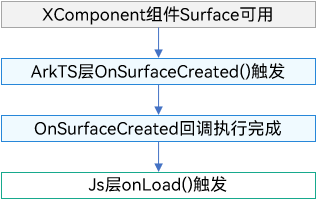
Native XComponent场景:
onLoad事件的触发和surface相关,其和Native侧的OnSurfaceCreated的时序如下图:
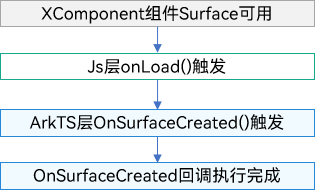
ArkTS XComponent场景:
onLoad事件的触发和surface相关,其和ArkTS侧的OnSurfaceCreated的时序如下图:
触发时刻:XComponent组件被销毁时触发,与一般ArkUI的组件销毁时机一致。
时序:
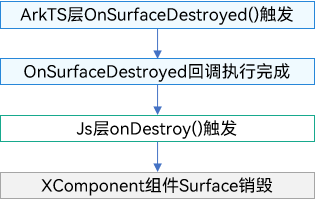
Native XComponent场景:
onDestroy事件的触发和surface相关,其和Native侧的OnSurfaceDestroyed的时序如下图:
ArkTS XComponent场景:
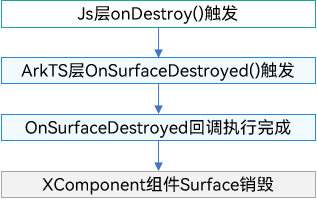
onDestroy事件的触发和surface相关,其和ArkTS侧的OnSurfaceDestroyed的时序如下图: