


Intelligent Assistant
Chat with our virtual assistant to get answers promptly.
A card is a new service form that provides service capabilities with finer granularity than apps. The card, which is interactive, directly displays the services or content that users are most concerned about. The card can be embedded in various apps or interaction scenarios to better meet user requirements and provide intelligent services.
The card and main program of the quick app are packaged together in the RPK, which will be uploaded for release.
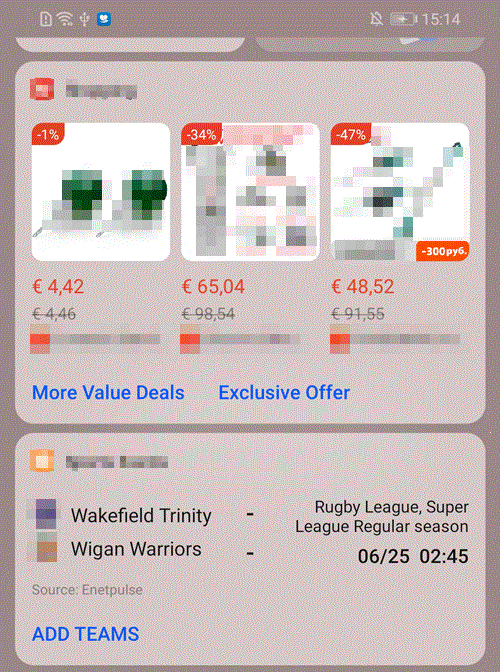
The following figures show the application scenarios of cards.
Complete the following preparations:
Cards are a part of a quick app. One quick app may contain multiple cards, and one card maps only a single page. A card is defined by the widgets field in the manifest.json file. This field is an array of up to 100 numbers, including attributes listed in the following table. You need to associate the path field of a card with its counterpart of the page so that the page definition will be complete. For details, please refer to router in the manifest file.
Attribute | Type | Mandatory/Optional | Description |
|---|---|---|---|
name | String | Mandatory | Name of a card. |
id | String | Mandatory | Identifier of a card. This identifier consists of a string of up to 255 letters or digits and is unique in the quick app package. |
path | String | Mandatory | Path to a card page, which corresponds to the path field in router.page. One card maps only a single page. |
component | String | Optional | Name of a card page. |
targetManufactorys | Array[100] | Mandatory | Each vendor has its own UI style requirements and an app developer may provide different cards for different vendors. Therefore, a field is required to specify the vendors to which the card applies. This helps prevent unnecessary reviews and rejections. Example: ["huawei"] |
desc | String | Optional | Card details, including its functions and how to set input parameters. |
params | list[100] | Optional | Input parameters necessary for card running, including attributes listed below. Operations personnel or automated testing tools can adjust the settings and run the card or verify card functions. |
minPlatformVersion | Integer | Mandatory | Minimum platform version number. |
params description:
Attribute | Type | Mandatory/Optional | Description |
|---|---|---|---|
name | String | Mandatory | Parameter name. |
mandatory | Boolean | Optional | Indicates whether information is mandatory. The default value is true. |
valueSample | String | Mandatory | Sample value, providing references for automated testing tools, as well as operations personnel in testing and verification. |
desc | String | Mandatory | Parameter description. |
The sample code is as follows:
- "router": {
- "entry": "Hello",
- "pages": {
- "Hello": {
- "component": "hello"
- },
- "widget1": {
- "component": "Widget1",
- "path": "/widget1"
- },
- "widget2": {
- "component": "Widget2",
- "path": "/widget2"
- }
- }
- },
- "widgets":[
- {
- "id":"ExpressInfor",
- "name":"Logistics information display",
- "path":"/widget1",
- "component":"Widget1",
- "targetManufactorys":["huawei"],
- "params":[{"name":"keyName1", "mandatory": true, "valueSample": "BMW X5", "desc": "Parameter description"},{"name": "keyName2", "mandatory": true, "valueSample": "Shenzhen", "desc": "Parameter description"}],
- "uses-permission":["ACCESS_FINE_LOCATION", "WRITE_CALENDAR"],
- "minPlatformVersion": 1050
- },
- {
- "id":"OrderInfo",
- "name":"Real-time order display",
- "path":"/widget2",
- "component":"Widget2",
- "targetManufactorys":["huawei"],
- "uses-permission":["ACCESS_FINE_LOCATION"],
- "minPlatformVersion": 1050
- }
- ]
In addition to attributes of its own, a widget, as a part of the quick app, shares information listed in the following table with the quick app.
Attribute | Type | Default Value | Mandatory/Optional | Description |
|---|---|---|---|---|
package | String | - | Mandatory | Unique name of an app package. The com.company.module format is recommended, for example, com.deviceunion.demo. |
name | String | - | Mandatory | App name, which is displayed on the home screen icon or in a pop-up. |
icon | String | - | Mandatory | App icon, with a size of 192 x 192 pixels. |
versionName | String | - | Optional | Version name of an app. |
versionCode | Integer | - | Mandatory | Version code of an app. |
Cards are additional attributes of a quick app. A quick app package contains a main program and multiple optional card programs.
Cards are scripts embedded in other apps for independent execution and rendering. Cards cannot provide capabilities beyond the quick app and must be restricted based on the negative list.
General rules for card development are as follows:
Restrictions on common objects:
Attribute | Type | Description |
|---|---|---|
$app | Object | In this attribute, app is a global object of the quick app and is unavailable to cards. |
$page | Object | Common function provided for a quick app page object. This attribute is unavailable to cards. |
Restrictions on the page lifecycle:
Attribute | Type | Description |
|---|---|---|
onBackPress | Function | Cards are embedded in super apps and are inapplicable to the listening of the back event. |
onMenuPress | Function | Cards are embedded in super apps and are inapplicable to the listening of menu click events. |
onMenuButtonPress | Function | Cards are embedded in super apps and are inapplicable to the listening of remote control menu click events. |
Restrictions on the app lifecycle:
Attribute | Type | Description |
|---|---|---|
onCreate | Function | Cards are embedded in super apps and are inapplicable to the onCreate event of a quick app. |
onDestroy | Function | Cards are embedded in super apps and are inapplicable to the onDestroy event of a quick app. |
Restrictions on the message channel:
Attribute | Type | Description |
|---|---|---|
onmessage | Function | This attribute belongs to BroadcastChannel and applies to inter-page communication rather than cards. |
postMessage | Function | This attribute belongs to BroadcastChannel and applies to inter-page communication rather than cards. |
close | Function | This attribute belongs to BroadcastChannel and applies to inter-page communication rather than cards. |
Restrictions on common events:
Event | Type | Description |
|---|---|---|
appear | Event | Not supported currently due to framework restrictions. |
disappear | Event | Not supported currently due to framework restrictions. |
swipe | Event | Not supported currently due to framework restrictions. |
Restrictions on common styles:
Style | Type | Description |
|---|---|---|
position | none | fixed | The fixed type is not supported currently due to framework restrictions. |
Restrictions on UI elements
Currently, only the elements listed in the following table can be used in cards.
Element | Description |
|---|---|
div | - |
image | Restricted use. Images in the local path cannot be loaded. |
input | Only the button type is supported in quick app specification versions earlier than 1070. In 1070 and later versions, the text, email, date, time, number and password types are supported. |
list | Restricted use. If an app integrated with a card has a sliding effect, using the list in the card may cause a sliding conflict. In this case, you must notify the card integrator and instruct them to perform debugging. |
list-item | Same as above. |
marquee | Supported. |
picker | The activity context can be displayed and used. |
popup | Supported. |
progress | Supported. |
rating | Restricted use. Only Base64 images are supported. |
span | Restricted use. Used only as a subelement of text-item. |
stack | Supported. |
swiper | Supported. |
text | Cards do not support the letter-spacing style in the text element unless you update the version to 1030. |
video (1078+) | Restricted use. The poster attribute cannot be used to load local images. |
API | Description |
|---|---|
system.app | The app.getPackageInfo API is applicable to cards and the app.getInfo API is not. |
system.router:back | This API is inapplicable to cards. |
system.router:replace | This API is inapplicable to cards. |
system.router:clear | This API is inapplicable to cards. |
system.router:getLength | This API is inapplicable to cards. |
system.router:getPages | This API is inapplicable to cards. |
system.router:getState | This API is inapplicable to cards. |
system.decode:decode | This API is inapplicable to cards. |
system.notification | This API is inapplicable to the sending of status notifications. |
system.fetch:fetch(OBJECT) | If data in OBJECT is an ArrayBuffer, this API is inapplicable to cards. |
system.request | This API is inapplicable to cards temporarily. |
system.websocket:send(OBJECT) | If data in OBJECT is an ArrayBuffer, this API is inapplicable to cards. |
system.websocket:onmessage(OBJECT) | If data in OBJECT is an ArrayBuffer, this API is inapplicable to cards. |
system.requesttask:request | This API is inapplicable to cards. |
system.file | This API is called in the main program and therefore inapplicable to cards. |
system.webview | This API opens WebView from the main program. |
system.sensor | This API is inapplicable to cards. |
system.shortcut | This API is inapplicable to creation and query of home screen icons for cards. |
system.device:getId | This API is inapplicable to cards. |
system.device:device:getDeviceId | This API is inapplicable to cards. |
system.device:device:getUserId | This API is inapplicable to cards. |
system.record | This API can be called in the main program, considering recording is related to personal affairs. |
system.bluetooth:getDevices | This API is inapplicable to cards. |
system.bluetooth:writeBLECharacteristicValue | This API is inapplicable to cards. |
system.bluetooth:onblecharacteristicvaluechange | This API is inapplicable to cards. |
system.cipher:aes | This API is inapplicable to cards. |
system.media | This API is called in the main program and therefore inapplicable to cards. |
system.sms | This API is called in the main program and therefore inapplicable to cards. |
system.share | This API is called in the main program and therefore inapplicable to cards. |
system.wifi | This API is called in the main program and therefore inapplicable to cards. |
system.contact | This API is called in the main program and therefore inapplicable to cards. |
system.package:hasInstalled | Restricted use for cards. You can only query whether HarmonyOS apps or Android apps are installed but cannot query whether quick apps are installed. |
system.storage | Implementation varies depending on vendors. Some vendors have their card storage shared with quick apps on Quick App Center, namely, values written through this API in the quick app can be read and written in the corresponding cards. Other vendors have their card storage embedded in the host app, which is separate from quick apps. Huawei adopts the isolation mode. |
system.device:getSerial | This API is called in the main program and therefore inapplicable to cards. |
system.geolocation | This API is used with restrictions. Before using this API, contact Huawei technical support for security evaluation. |
system.image:pickColor | This API is used with restrictions, and version 1045 and later are recommended. |
service.account | This API is called in the main program and therefore inapplicable to cards. |
service.pay | This API is called in the main program and therefore inapplicable to cards. |
service.push | This API is called in the main program and therefore inapplicable to cards. |
service.ad | This API is called in the main program and therefore inapplicable to cards. |
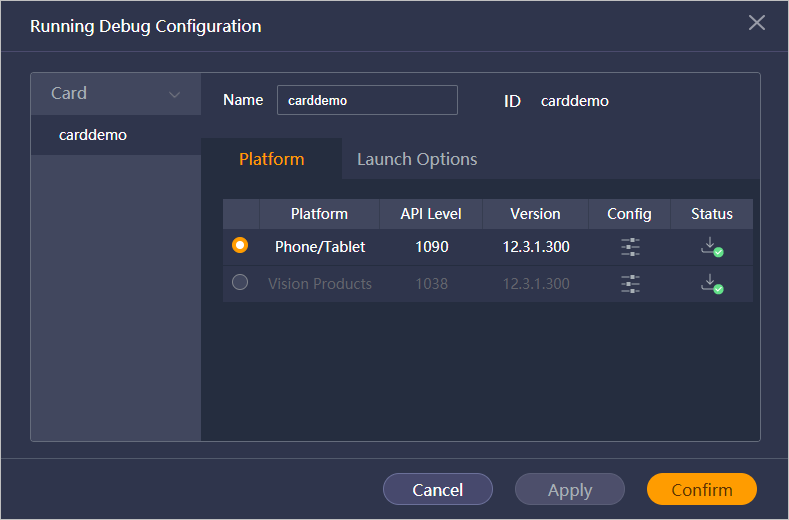
To use Quick App IDE to develop a card, perform the following steps. For details, please refer to Card Ability Access Guide.



After ensuring that the developed card functions are normal, you can use Huawei Quick App IDE to package your quick app into an RPK and submit it in AppGallery Connect for review.