


Intelligent Assistant
Chat with our virtual assistant to get answers promptly.
Quick apps are a new form of installation-free apps developed based on industry standards formulated by Quick App Alliance. They can run on various devices, such as mobile phones, tablets, head units, and Vision products. Quick apps can also be accessed through various entries, such as the home screen icon, HUAWEI Assistant·TODAY, Quick App Center, and AppGallery, greatly facilitating the use of quick apps.
You are advised to download the flowchart and view it on your local device. For the documents involved in the process, please refer to References.
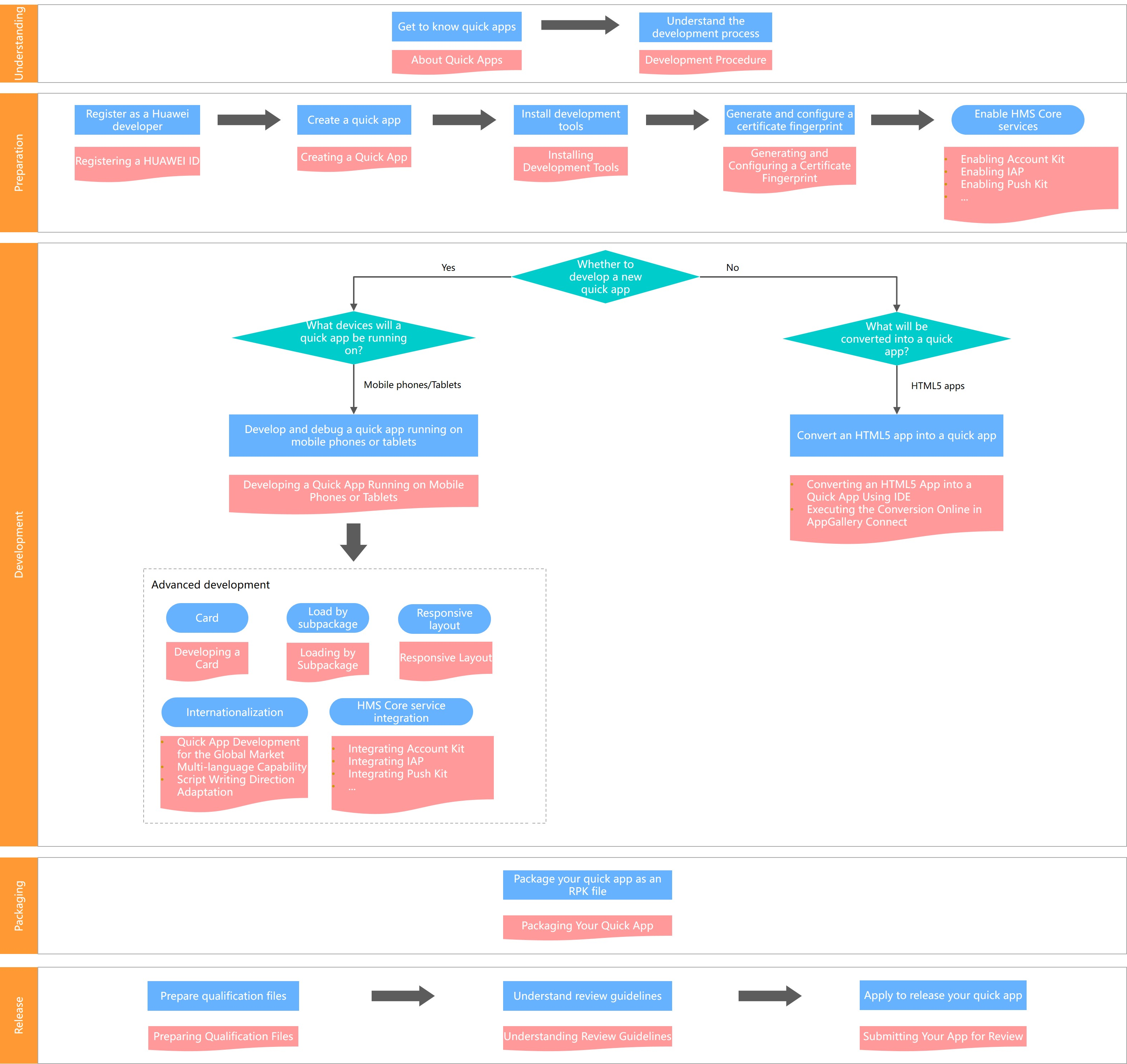
Scenario | Task | Links | Description |
|---|---|---|---|
Development preparations | Register as a developer | - | |
Create a quick app | - | ||
Install development tools | - | ||
Generate and configure a certificate fingerprint | The certificate fingerprint is the unique authentication identifier of an app. Keep it secure after it is generated. Once the certificate fingerprint is lost, it cannot be retrieved. | ||
(Optional) Enable Account Kit | Required only when a quick app needs to be integrated with Account Kit. | ||
(Optional) Enable IAP | Required only when a quick app needs to be integrated with IAP. | ||
(Optional) Enable Push Kit | Required only when a quick app needs to be integrated with Push Kit. | ||
(Optional) Enable ML Kit | Required only when a quick app needs to be integrated with ML Kit. | ||
(Optional) Enable Awareness Kit | Required only when a quick app needs to be integrated with Awareness Kit. | ||
Develop a new quick app | Learn about the development process of a quick app | The Hello World project helps you quickly understand the development and release processes of quick apps. | |
Develop quick apps that adapt to different devices | - | ||
(Optional) Display quick app content to users in the form of cards | Required only when services or content that users are most concerned about need to be displayed in cards in Global Search and on HUAWEI Assistant∙TODAY. | ||
(Optional) Internationalize quick apps | If you want to release a quick app to countries and regions outside the Chinese mainland, the languages supported by the quick app must include all languages involved in the target countries and regions. If a right-to-left language (for example, Arabic) is used in a target country or region, script writing direction adaptation is required. | ||
(Optional) Load an oversized quick app in subpackages | When a quick app is too large, it can be divided into multiple subpackages to accelerate page rendering.
| ||
(Optional) Enable quick apps to be well displayed on screens in different sizes | Required when quick apps need to be displayed on screens of different sizes | ||
(Optional) Use Huawei Mobile Services | Integrate Huawei Mobile Services as needed.
| ||
Convert existing HTML5 apps | Quickly convert an existing HTML5 app into a quick app | Offline conversion in IDE is recommended. Because the quick app that is converted in AppGallery Connect uses the certificate fingerprint generated by AppGallery Connect, you need to modify the HTML5 app and then convert it to a quick app again to update this app. | |
Package your quick app | Package a quick app into an RPK | - | |
Release a quick app | Prepare qualification files and submit a release request in AppGallery Connect | Prepare qualification files in advance because you may need a long period to prepare some of them. |