
This topic describes only module-specific error codes. For details about universal error codes, please refer to Universal Error Codes.
1002600001 System Internal Error
Message
System internal error.
Description
This error code is reported when a system internal error occurs.
Possible causes
Another unknown error occurs.
Solution
Try again or submit a ticket online.
1002600002 App Failed to Connect to Map Kit
Message
Failed to connect to the Map Kit server.
Description
This error code is reported when an app fails to connect to Map Kit.
Possible causes
The app fails to connect to Map Kit.
Solution
Submit a ticket online for assistance.
1002600003 App Identity Verification Failure
Message
App authentication failed.
Description
This error code is reported when identity verification fails for an app.
Possible causes
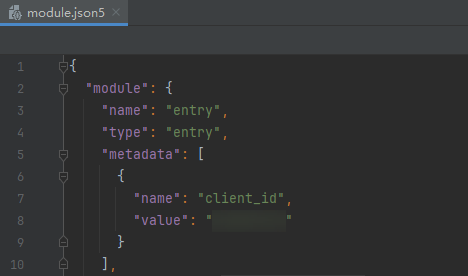
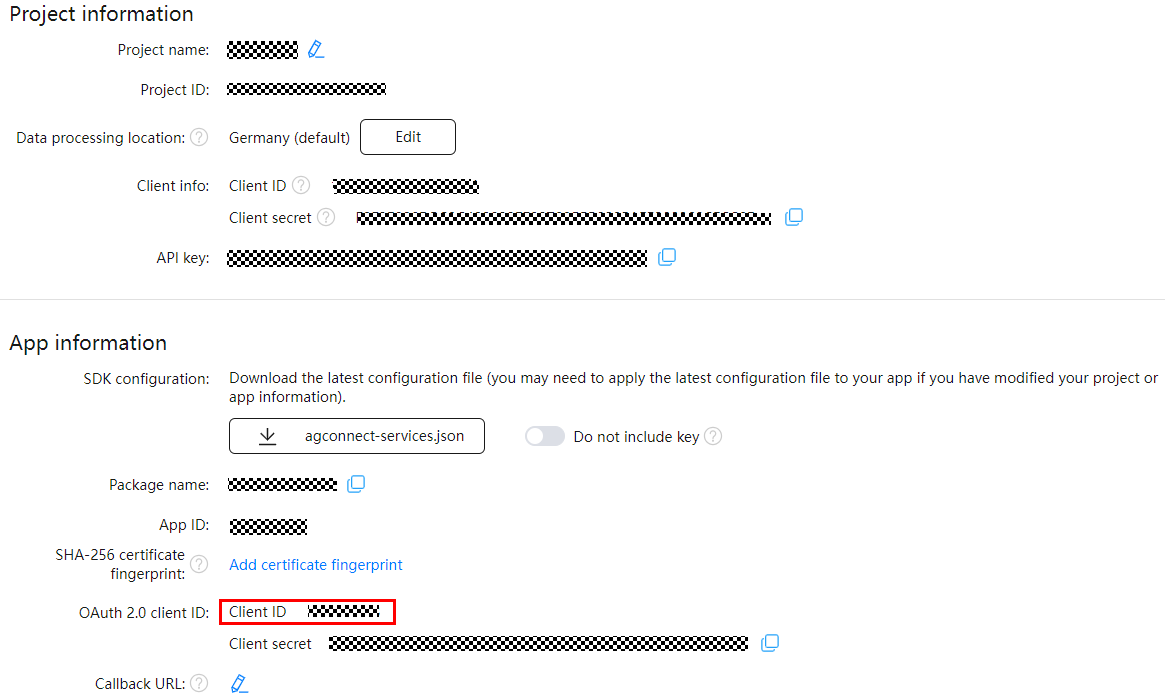
- The value of client_id configured in the module.json5 file of the project is different from that in AppGallery Connect.
- The public key fingerprint in AppGallery Connect is empty or incorrect.
- The identity verification timed out due to poor network connection.
- The configured public key fingerprint has not taken effect yet.
Solution
1. Ensure that the value of client_id configured in the module.json5 file is the same as that in AppGallery Connect.
2. Regenerate a signing certificate fingerprint automatically or manually, and then configure it in AppGallery Connect.
3. Check the network connection and try again.
4. Set the system time of the device one day ahead.
5. If the error persists, submit a ticket online for assistance.
1002600004 Map Kit Not Enabled for the App
Message
The Map permission is not enabled.
Description
This error code is reported when Map Kit is not enabled for the app.
Possible causes
Map Kit has not been enabled for the app.
Solution
Enable Map Kit in AppGallery Connect or submit a ticket online.
1002600005 Unavailable Network
Message
The network is unavailable.
Description
This error code is reported when the network is unavailable.
Possible causes
The network is unavailable.
Solution
Verify the network connection and try again or submit a ticket online.
1002600006 API Call Quota Used Up
Message
The API call times exceed the quota.
Description
This error code is reported when API call quota is used up.
Possible causes
The API call quota is used up.
Solution
Submit a ticket online for assistance.
1002600007 API QPS Quota Used Up
Message
The API QPS exceeds the quota.
Description
This error code is reported when API QPS quota is used up.
Possible causes
The API QPS quota is used up.
Solution
Submit a ticket online for assistance.
1002600008 API in Arrears
Message
The API is in arrears.
Description
This error code is reported when the API is in arrears.
Possible causes
The API is in arrears.
Solution
Submit a ticket online for assistance.
1002600009 No Pay-as-you-go Plan Subscribed for the API
Message
The API has not subscribed to any pay-as-you-go package.
Description
This error code is reported when you have not subscribed to any pay-as-you-go plan for the API.
Possible causes
You have not subscribed to any pay-as-you-go plan.
Solution
Submit a ticket online for assistance.
1002600010 Server Busy
Message
The server is busy. Please wait and try again.
Description
This error code is reported when the server is busy.
Possible causes
The server is busy.
Solution
Try again or submit a ticket online.
1002600011 Server Error
Message
Server error.
Description
This error code is reported when a system internal error occurs.
Possible causes
There is a server error.
Solution
Try again or submit a ticket online.
1002600012 Country/Region Code Error
Message
The country code is not supported.
Description
This error code is reported when the input country/region code is incorrect.
Possible causes
The country/region code is not supported.
Solution
Change the country/region code.
1002600013 Unknown Routing Destination
Message
The current routing location is unknown. Try again later.
Description
The current routing destination is unknown.
Possible causes
Failed to obtain the routing destination of the current device.
Solution
- Verify that the device network connection is normal.
- Try again or submit a ticket online.
1002600999 Unknown Error
Message
Unknown error.
Description
This error code is reported when a system internal error occurs.
Possible causes
Another unknown error occurs.
Solution
Try again or submit a ticket online.
1002601001 Object to Be Operated Does Not Exist
Message
The object to be operated does not exist.
Description
The error code is reported when the object to be operated does not exist.
Possible causes
The object to be operated does not exist.
Solution
Try again or submit a ticket online.
1002601002 Custom Map Style File Does Not Exist
Message
The custom map style file does not exist.
Description
This error code is reported when the custom map style file does not exist.
Possible causes
1. The custom map style file does not exist.
2. The device network is unavailable.
Solution
1. Verify that the style ID exists on Petal Maps Studio.
2. Verify that the device network connection is normal.
3. Try again or submit a ticket online.
1002601004 Incorrect Style Content Format
Message
The style content format is incorrect.
Description
This error code is reported when the style content format is incorrect.
Possible causes
The style content format is incorrect.
Solution
Try again or submit a ticket online.
1002602001 Departure Place or Destination Having No Home Country or Service Error
Message
The start and end points do not have home countries, or a service error occurred.
Description
This error code is reported when the departure place or destination does not have country affiliation or a service error occurs.
Possible causes
Invalid parameter.
Solution
Verify the departure place or destination and try again or submit a ticket online.
1002602002 Cross-Region Route Planning Not Supported
Message
Cross-region route planning is not supported.
Description
This error code is reported when routes across different regions are planned.
Possible causes
Invalid parameter.
Solution
Ensure that the input departure place and destination are in the same region.
1002602003 Number of Departure Places or Destinations Exceeds 100
Message
The number of start points or end points exceed 100.
Description
This error is reported when the number of departure places or destinations exceeds 100.
Possible causes
Invalid parameter.
Solution
Ensure that the number of departure places or destinations in the input parameter does not exceed the upper limit.
1002602004 Linear Distance Between Two Points Exceeds the Upper Limit
Message
The linear distance between the start point and end point exceeds the upper limit.
Description
The linear distance between two points exceeds the upper limit.
Possible causes
Invalid parameter.
Solution
Check the input parameter and ensure that the linear distance between two points does not exceed the upper limit.
1002602005 Departure Place, Destination, or Waypoint Does Not Support Navigation
Message
The start point, end point, or waypoint does not support navigation.
Description
This error code is reported when the departure place, destination, or waypoint does not support navigation.
Possible causes
Invalid parameter.
Solution
Verify the input parameter.
1002602006 Request Points Are Mapped to the Same Point on the Road
Message
The request point is mapped to the same point on the road.
Description
This error code is reported when the request points are mapped to the same point on the road.
Possible causes
Invalid parameter.
Solution
Verify the input parameter.