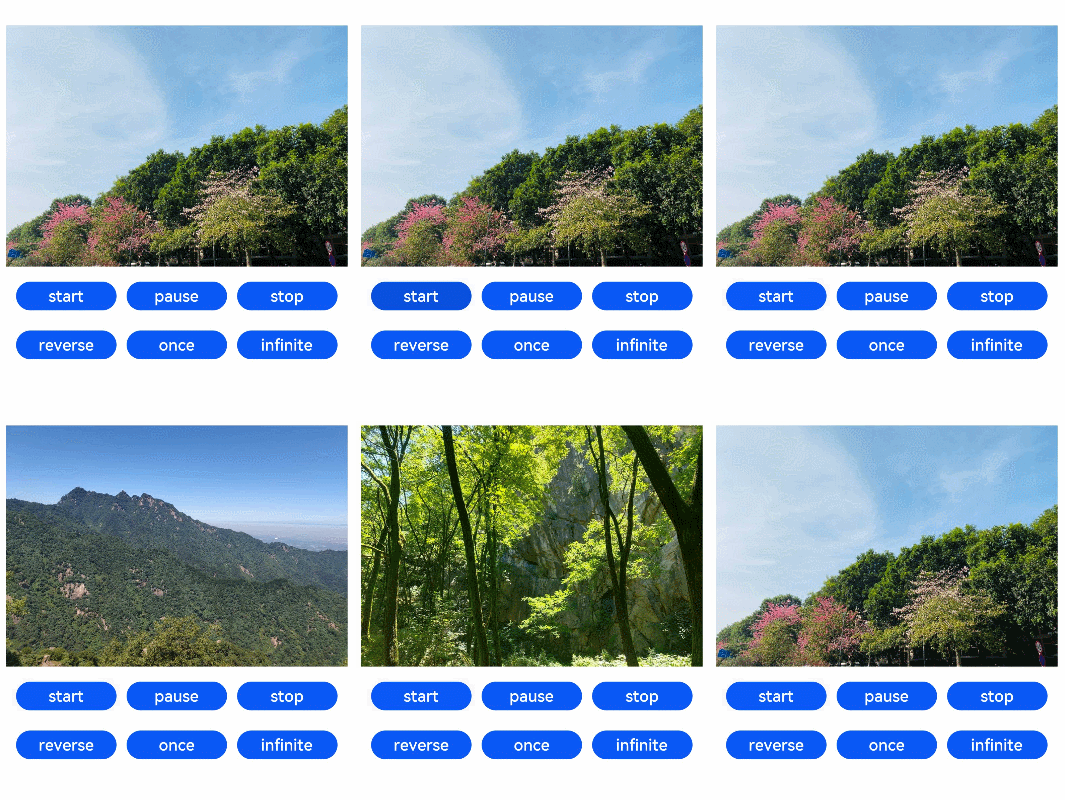
The ImageAnimator component enables images to be played a frame-by-frame basis. The list of images to be played as well as the duration of each image can be configured.

This component is supported since API version 7. Updates will be marked with a superscript to indicate their earliest API version.
APIs
ImageAnimator()
Widget capability: This API can be used in ArkTS widgets since API version 10.
Atomic service API: This API can be used in atomic services since API version 11.
[h2]images
images(value: Array<ImageFrameInfo>)
Sets the image frame information. Dynamic update is not supported.
Widget capability: This API can be used in ArkTS widgets since API version 10.
Atomic service API: This API can be used in atomic services since API version 11.
System capability: SystemCapability.ArkUI.ArkUI.Full
Parameters
| Name | Type | Mandatory | Description |
|---|---|---|---|
| value | Array<ImageFrameInfo> | Yes | Image frame information. The information of each frame includes the image path, image size, image position, and image playback duration. For details, see ImageFrameInfo. Default value: [] |
[h2]state
state(value: AnimationStatus)
Sets the playback state of the animation.
Widget capability: This API can be used in ArkTS widgets since API version 10.
Atomic service API: This API can be used in atomic services since API version 11.
System capability: SystemCapability.ArkUI.ArkUI.Full
Parameters
| Name | Type | Mandatory | Description |
|---|---|---|---|
| value | AnimationStatus | Yes | Playback state of the animation. The default state is Initial. Default value: AnimationStatus.Initial |
[h2]duration
duration(value: number)
Sets the playback duration. This attribute does not take effect when a separate duration is set for any of the image frames.
Widget capability: This API can be used in ArkTS widgets since API version 10.
Atomic service API: This API can be used in atomic services since API version 11.
System capability: SystemCapability.ArkUI.ArkUI.Full
Parameters
| Name | Type | Mandatory | Description |
|---|---|---|---|
| value | number | Yes | Playback duration. If the value is 0, no image is played. The value change takes effect only at the start of the next cycle. Unit: ms Default value: 1000 |
[h2]reverse
reverse(value: boolean)
Sets the playback direction.
Widget capability: This API can be used in ArkTS widgets since API version 10.
Atomic service API: This API can be used in atomic services since API version 11.
System capability: SystemCapability.ArkUI.ArkUI.Full
Parameters
| Name | Type | Mandatory | Description |
|---|---|---|---|
| value | boolean | Yes | Playback direction. The value false indicates that images are played from the first one to the last one, and true indicates that images are played from the last one to the first one. Default value: false |
[h2]fixedSize
fixedSize(value: boolean)
Sets whether the image size is fixed at the component size.
Widget capability: This API can be used in ArkTS widgets since API version 10.
Atomic service API: This API can be used in atomic services since API version 11.
System capability: SystemCapability.ArkUI.ArkUI.Full
Parameters
| Name | Type | Mandatory | Description |
|---|---|---|---|
| value | boolean | Yes | Whether the image size is fixed at the component size. true: The image size is fixed at the component size. In this case, the width, height, top, and left attributes of the image are invalid. false: The width, height, top, and left attributes of each image must be set separately. Default value: true |
[h2]preDecode(deprecated)
preDecode(value: number)
Sets the number of images to be pre-decoded.
This API is deprecated since API version 9.
Widget capability: This API can be used in ArkTS widgets since API version 10.
System capability: SystemCapability.ArkUI.ArkUI.Full
Parameters
| Name | Type | Mandatory | Description |
|---|---|---|---|
| value | number | Yes | Number of images to be pre-decoded. For example, the value 2 indicates that two images following the currently playing one are pre-decoded. Default value: 0 |
[h2]fillMode
fillMode(value: FillMode)
Sets the status before and after execution of the animation in the current playback direction. The status after execution of the animation is jointly determined by the fillMode and reverse attributes. For example, if fillMode is set to Forwards, the target will retain the state defined by the last keyframe encountered during execution. In this case, if reverse is set to false, the target will retain the state defined by the last keyframe encountered in the forward direction, that is, the last image; if reverse is set to true, the target will retain the state defined by the last keyframe encountered in the backward direction, that is, the first image.
Widget capability: This API can be used in ArkTS widgets since API version 10.
Atomic service API: This API can be used in atomic services since API version 11.
System capability: SystemCapability.ArkUI.ArkUI.Full
Parameters
| Name | Type | Mandatory | Description |
|---|---|---|---|
| value | FillMode | Yes | Status before and after execution of the animation in the current playback direction. Default value: FillMode.Forwards |
[h2]iterations
iterations(value: number)
Sets the number of times that the animation is played.
Atomic service API: This API can be used in atomic services since API version 11.
System capability: SystemCapability.ArkUI.ArkUI.Full
Parameters
| Name | Type | Mandatory | Description |
|---|---|---|---|
| value | number | Yes | Number of times that the animation is played. By default, the animation is played once. The value -1 indicates that the animation is played for an unlimited number of times. Default value: 1 |
ImageFrameInfo
Atomic service API: This API can be used in atomic services since API version 11.
| Name | Type | Mandatory | Description |
|---|---|---|---|
| src | string | Resource9+ | PixelMap12+ | Yes | Image path. The image format can be .svg, .png, or .jpg. The Resource type is supported since API version 9, and the PixelMap type is supported since API version 12. Widget capability: This API can be used in ArkTS widgets since API version 10. |
| width | number | string | No | Image width. Default value: 0 Since API version 10, this API is supported in ArkTS widgets. |
| height | number | string | No | Image height. Default value: 0 Since API version 10, this API is supported in ArkTS widgets. |
| top | number | string | No | Vertical coordinate of the image relative to the upper left corner of the widget Default value: 0 Since API version 10, this API is supported in ArkTS widgets. |
| left | number | string | No | Horizontal coordinate of the image relative to the upper left corner of the widget Default value: 0 Since API version 10, this API is supported in ArkTS widgets. |
| duration | number | No | Playback duration of each image frame, in milliseconds. Default value: 0 |
[h2]onStart
onStart(event: () => void)
Triggered when the animation starts to play.
Widget capability: This API can be used in ArkTS widgets since API version 10.
Atomic service API: This API can be used in atomic services since API version 11.
System capability: SystemCapability.ArkUI.ArkUI.Full
[h2]onPause
onPause(event: () => void)
Triggered when the animation playback is paused.
Widget capability: This API can be used in ArkTS widgets since API version 10.
Atomic service API: This API can be used in atomic services since API version 11.
System capability: SystemCapability.ArkUI.ArkUI.Full
[h2]onRepeat
onRepeat(event: () => void)
Triggered when the animation playback is repeated.
Atomic service API: This API can be used in atomic services since API version 11.
System capability: SystemCapability.ArkUI.ArkUI.Full
[h2]onCancel
onCancel(event: () => void)
Triggered when the animation playback returns to the initial state.
Widget capability: This API can be used in ArkTS widgets since API version 10.
Atomic service API: This API can be used in atomic services since API version 11.
System capability: SystemCapability.ArkUI.ArkUI.Full
[h2]onFinish
onFinish(event: () => void)
Triggered when the animation playback is complete or stopped.
Widget capability: This API can be used in ArkTS widgets since API version 10.
Atomic service API: This API can be used in atomic services since API version 11.
System capability: SystemCapability.ArkUI.ArkUI.Full
[h2]Playing an Animation of the Resource Type
// xxx.ets
@Entry
@Component
struct ImageAnimatorExample {
  @State state: AnimationStatus = AnimationStatus.Initial
  @State reverse: boolean = false
  @State iterations: number = 1

  build() {
    Column({ space: 10 }) {
      ImageAnimator()
        .images([
          {
            src: $r('app.media.img1')
          },
          {
            src: $r('app.media.img2')
          },
          {
            src: $r('app.media.img3')
          },
          {
            src: $r('app.media.img4')
          }
        ])
        .duration(2000)
        .state(this.state).reverse(this.reverse)
        .fillMode(FillMode.None).iterations(this.iterations).width(340).height(240)
        .margin({ top: 100 })
        .onStart(() => {
          console.info('Start')
        })
        .onPause(() => {
          console.info('Pause')
        })
        .onRepeat(() => {
          console.info('Repeat')
        })
        .onCancel(() => {
          console.info('Cancel')
        })
        .onFinish(() => {
          console.info('Finish')
          this.state = AnimationStatus.Stopped
        })
      Row() {
        Button('start').width(100).padding(5).onClick(() => {
          this.state = AnimationStatus.Running
        }).margin(5)
        Button('pause').width(100).padding(5).onClick(() => {
          this.state = AnimationStatus.Paused     // Display the image of the current frame.
        }).margin(5)
        Button('stop').width(100).padding(5).onClick(() => {
          this.state = AnimationStatus.Stopped    // Display the image of the initial frame.
        }).margin(5)
      }

      Row() {
        Button('reverse').width(100).padding(5).onClick(() => {
          this.reverse = !this.reverse
        }).margin(5)
        Button('once').width(100).padding(5).onClick(() => {
          this.iterations = 1
        }).margin(5)
        Button('infinite').width(100).padding(5).onClick(() => {
          this.iterations = -1 // The animation is played for an unlimited number of times.
        }).margin(5)
      }
    }.width('100%').height('100%')
  }
}
[h2]Playing an Animation of the PixelMap Type
import { image } from '@kit.ImageKit'

@Entry
@Component
struct ImageAnimatorExample {
  imagePixelMap: Array<PixelMap> = []
  @State state: AnimationStatus = AnimationStatus.Initial
  @State reverse: boolean = false
  @State iterations: number = 1
  @State images:Array<ImageFrameInfo> = []
  async aboutToAppear() {
    this.imagePixelMap.push(await this.getPixmapFromMedia($r('app.media.icon')))
    this.images.push({src:this.imagePixelMap[0]})
  }
  build() {
    Column({ space: 10 }) {
      ImageAnimator()
        .images(this.images)
        .duration(2000)
        .state(this.state).reverse(this.reverse)
        .fillMode(FillMode.None).iterations(this.iterations).width(340).height(240)
        .margin({ top: 100 })
        .onStart(() => {
          console.info('Start')
        })
        .onPause(() => {
          console.info('Pause')
        })
        .onRepeat(() => {
          console.info('Repeat')
        })
        .onCancel(() => {
          console.info('Cancel')
        })
        .onFinish(() => {
          console.info('Finish')
          this.state = AnimationStatus.Stopped
        })
      Row() {
        Button('start').width(100).padding(5).onClick(() => {
          this.state = AnimationStatus.Running
        }).margin(5)
        Button('pause').width(100).padding(5).onClick(() => {
          this.state = AnimationStatus.Paused     // Display the image of the current frame.
        }).margin(5)
        Button('stop').width(100).padding(5).onClick(() => {
          this.state = AnimationStatus.Stopped    // Display the image of the initial frame.
        }).margin(5)
      }
      Row() {
        Button('reverse').width(100).padding(5).onClick(() => {
          this.reverse = !this.reverse
        }).margin(5)
        Button('once').width(100).padding(5).onClick(() => {
          this.iterations = 1
        }).margin(5)
        Button('infinite').width(100).padding(5).onClick(() => {
          this.iterations = -1 // The animation is played for an unlimited number of times.
        }).margin(5)
      }
    }.width('100%').height('100%')
  }

  private async getPixmapFromMedia(resource: Resource) {
    let unit8Array = await getContext(this)?.resourceManager?.getMediaContent({
      bundleName: resource.bundleName,
      moduleName: resource.moduleName,
      id: resource.id
    })
    let imageSource = image.createImageSource(unit8Array.buffer.slice(0, unit8Array.buffer.byteLength))
    let createPixelMap: image.PixelMap = await imageSource.createPixelMap({
      desiredPixelFormat: image.PixelMapFormat.RGBA_8888
    })
    await imageSource.release()
    return createPixelMap
  }
}