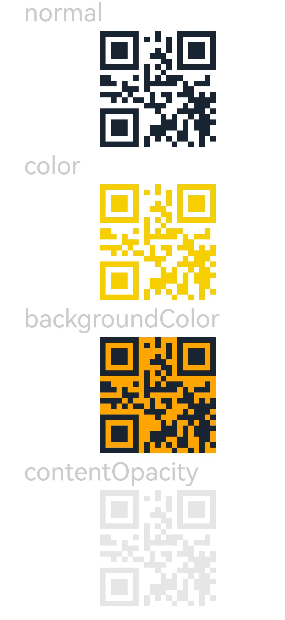
The <QRCode> component is used to display a QR code.

This component is supported since API version 7. Updates will be marked with a superscript to indicate their earliest API version.
The pixel count of the <QRCode> component is subject to the content. If the component size is not large enough, the content may fail to be displayed. In this case, you need to resize the component.
APIs
QRCode(value: string)
Widget capability: This API can be used in ArkTS widgets since API version 9.
Atomic service API: This API can be used in atomic services since API version 11.
Parameters
| Name | Type | Mandatory | Description |
|---|---|---|---|
| value | string | Yes | Content of the QR code. A maximum of 256 characters are supported. If this limit is exceeded, the first 256 characters are used. NOTE The string cannot be null, undefined, or empty. |
[h2]color
color(value: ResourceColor)
Sets the color of the QR code.
Widget capability: This API can be used in ArkTS widgets since API version 9.
Atomic service API: This API can be used in atomic services since API version 11.
System capability: SystemCapability.ArkUI.ArkUI.Full
Parameters
| Name | Type | Mandatory | Description |
|---|---|---|---|
| value | ResourceColor | Yes | QR code color. Default value: '#ff182431' |
[h2]backgroundColor
backgroundColor(value: ResourceColor)
Sets the background color of the QR code.
Widget capability: This API can be used in ArkTS widgets since API version 9.
Atomic service API: This API can be used in atomic services since API version 11.
System capability: SystemCapability.ArkUI.ArkUI.Full
Parameters
| Name | Type | Mandatory | Description |
|---|---|---|---|
| value | ResourceColor | Yes | Background color of the QR code. Default value: Color.White Since API version 11, the default value is changed to '#ffffffff'. |
[h2]contentOpacity11+
contentOpacity(value: number | Resource)
Sets the opacity of the QR code content. The minimum value is 0, and the maximum value is 1.
Atomic service API: This API can be used in atomic services since API version 12.
System capability: SystemCapability.ArkUI.ArkUI.Full
Parameters
| Name | Type | Mandatory | Description |
|---|---|---|---|
| value | number | Resource | Yes | Opacity of the QR code content. Default value: 1 |
Example
// xxx.ets
@Entry
@Component
struct QRCodeExample {
  private value: string = 'hello world'
  build() {
    Column({ space: 5 }) {
      Text('normal').fontSize(9).width('90%').fontColor(0xCCCCCC).fontSize(30)
      QRCode(this.value).width(140).height(140)

      // Set the color for the QR code.
      Text('color').fontSize(9).width('90%').fontColor(0xCCCCCC).fontSize(30)
      QRCode(this.value).color(0xF7CE00).width(140).height(140)

      // Set the background color for the QR code.
      Text('backgroundColor').fontSize(9).width('90%').fontColor(0xCCCCCC).fontSize(30)
      QRCode(this.value).width(140).height(140).backgroundColor(Color.Orange)

      // Set the opacity of QR code content.
      Text('contentOpacity').fontSize(9).width('90%').fontColor(0xCCCCCC).fontSize(30)
      QRCode(this.value).width(140).height(140).color(Color.Black).contentOpacity(0.1)
    }.width('100%').margin({ top: 5 })
  }
}