


智能客服
你问我答,随时在线为你解决问题















密码保险箱可以在用户需要输入一个新密码时,自动生成一个高强度的密码。用户选择使用生成的强密码时可以将这个密码填充到新密码输入框。
触发条件及注意事项:
具体类型请参考输入框类型说明。
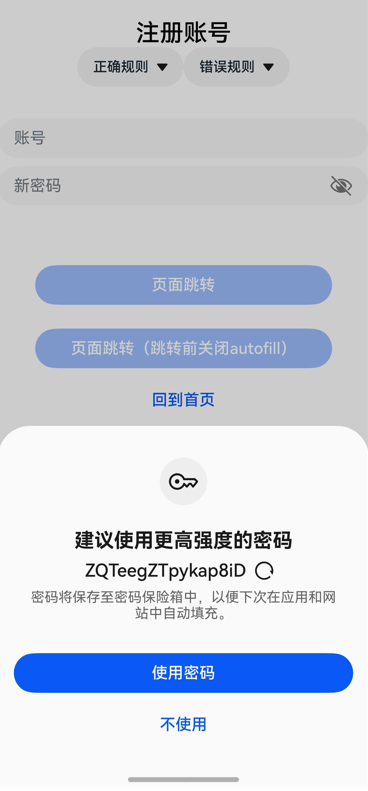
示例代码如下:
- @Entry
- @Component
- struct RegisterExample {
- pathInfos: NavPathStack = new NavPathStack();
- @State ReserveAccount: string = '';
- @State ReservePassword: string = '';
- @State enAbleAutoFill: boolean = true;
-
- onBackPress() {
- // 当非成功登录、返回等页面跳转时将enAbleAutoFill设置为false,密码保险箱不使能
- this.enAbleAutoFill = false;
- return false;
- }
-
- @Builder
- PageMap(name: string) {
- if (name === 'register_result_page') {
- RegisterResultPage()
- }
- }
-
- build() {
- Navigation(this.pathInfos) {
- Column() {
- Text("注册账号")
- .commonTitleStyles()
-
- TextInput({ placeholder: '用户名' })
- .commonInputStyles()
- .type(InputType.USER_NAME) // 账号框使用USER_NAME属性
- .onChange((value: string) => {
- this.ReserveAccount = value;
- })
-
- TextInput({ placeholder: '新密码' })
- .showPasswordIcon(true)
- .commonInputStyles()
- .type(InputType.NEW_PASSWORD) // 密码框使用 new Password 属性,可以触发生成强密码
- .enableAutoFill(this.enAbleAutoFill)
- .passwordRules('begin:[upper],special:[yes],len:[maxlen:32,minlen:12]')
- .onChange((value: string) => {
- this.ReservePassword = value;
- })
-
- Button('页面跳转')
- .commonButtonStyles()
- .enabled((this.ReserveAccount !== '') && (this.ReservePassword !== ''))
- .onClick(() => {
- this.pathInfos.pushPathByName('register_result_page', null)
- })
-
- Button('页面跳转(跳转前关闭autofill)')
- .commonButtonStyles()
- .enabled((this.ReserveAccount !== '') && (this.ReservePassword !== ''))
- .onClick(() => {
- this.enAbleAutoFill = false;
- this.pathInfos.pushPathByName('register_result_page', null)
- })
- }
- }
- .navDestination(this.PageMap)
- .height('100%')
- .width('100%')
- }
- }
-
- @Component
- struct RegisterResultPage {
- pathInfos: NavPathStack = new NavPathStack();
-
- build() {
- NavDestination() {
- Column() {
- Text("Result Page").commonTitleStyles()
- }.width('100%').height('100%')
- }.title("Result Page")
- .onReady((context: NavDestinationContext) => {
- this.pathInfos = context.pathStack;
- })
- }
- }
-
- @Extend(Text)
- function commonTitleStyles() {
- .fontSize(24)
- .fontColor('#000000')
- .fontWeight(FontWeight.Medium)
- .margin({ top: 24, bottom: 16 })
- }
-
- @Extend(TextInput)
- function commonInputStyles() {
- .placeholderColor(0x182431)
- .width('100%')
- .opacity(0.6)
- .placeholderFont({ size: 16, weight: FontWeight.Regular })
- .margin({ top: 16 })
- }
-
- @Extend(Button)
- function commonButtonStyles() {
- .width('100%')
- .height(40)
- .borderRadius(20)
- .margin({ top: 24 })
- }
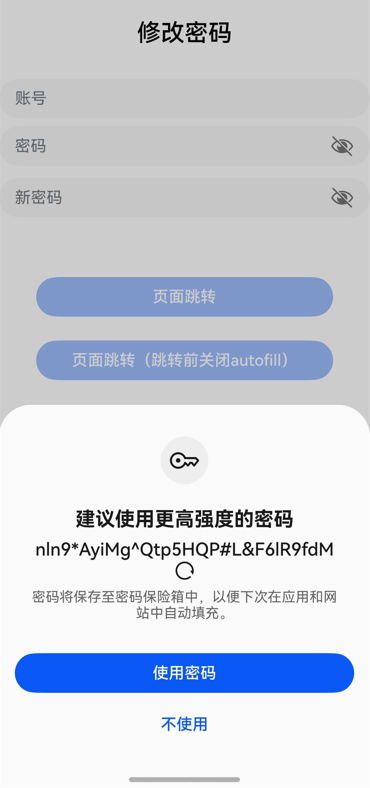
示例代码如下:
- @Component
- struct RegisterExample {
- pathInfos: NavPathStack = new NavPathStack();
- @State ReserveAccount: string = '';
- @State ReservePassword: string = '';
- @State enAbleAutoFill: boolean = true;
-
- onBackPress() {
- // 当非成功登录、返回等页面跳转时将enAbleAutoFill设置为false,密码保险箱不使能
- this.enAbleAutoFill = false;
- return false;
- }
-
- @Builder
- PageMap(name: string) {
- if (name === 'register_result_page') {
- RegisterResultPage()
- }
- }
-
- build() {
- Navigation(this.pathInfos) {
- Column() {
- Text("修改密码")
- .commonTitleStyles()
-
- TextInput({ placeholder: '用户名' })
- .commonInputStyles()
- .type(InputType.USER_NAME) // 账号框使用USER_NAME属性
- .onChange((value: string) => {
- this.ReserveAccount = value;
- })
-
- TextInput({ placeholder: '密码' })
- .showPasswordIcon(true)
- .commonInputStyles()
- .type(InputType.Password)
- .onChange((value: string) => {
- this.ReservePassword = value;
- })
-
- TextInput({ placeholder: '新密码' })
- .showPasswordIcon(true)
- .commonInputStyles()
- .type(InputType.NEW_PASSWORD) // 密码框使用 new Password 属性,可以触发生成强密码
- .enableAutoFill(this.enAbleAutoFill)
- .passwordRules('begin:[upper],special:[yes],len:[maxlen:32,minlen:12]')
- .onChange((value: string) => {
- this.ReservePassword = value;
- })
-
- Button('页面跳转')
- .commonButtonStyles()
- .enabled((this.ReserveAccount !== '') && (this.ReservePassword !== ''))
- .onClick(() => {
- this.pathInfos.pushPathByName('register_result_page', null)
- })
-
- Button('页面跳转(跳转前关闭autofill)')
- .commonButtonStyles()
- .enabled((this.ReserveAccount !== '') && (this.ReservePassword !== ''))
- .onClick(() => {
- this.enAbleAutoFill = false;
- this.pathInfos.pushPathByName('register_result_page', null)
- })
- }
- }
- .navDestination(this.PageMap)
- .height('100%')
- .width('100%')
- }
- }
-
- @Component
- struct RegisterResultPage {
- pathInfos: NavPathStack = new NavPathStack();
-
- build() {
- NavDestination() {
- Column() {
- Text("Result Page").commonTitleStyles()
- }.width('100%').height('100%')
- }.title("Result Page")
- .onReady((context: NavDestinationContext) => {
- this.pathInfos = context.pathStack;
- })
- }
- }
-
- @Extend(Text)
- function commonTitleStyles() {
- .fontSize(24)
- .fontColor('#000000')
- .fontWeight(FontWeight.Medium)
- .margin({ top: 24, bottom: 16 })
- }
-
- @Extend(TextInput)
- function commonInputStyles() {
- .placeholderColor(0x182431)
- .width('100%')
- .opacity(0.6)
- .placeholderFont({ size: 16, weight: FontWeight.Regular })
- .margin({ top: 16 })
- }
-
- @Extend(Button)
- function commonButtonStyles() {
- .width('100%')
- .height(40)
- .borderRadius(20)
- .margin({ top: 24 })
- }
智能客服
你问我答,随时在线为你解决问题
合作咨询
我们的专家服务团队将竭诚为您提供专业的合作咨询服务
解决方案
精准高效的一站式服务支持,助力开发者商业成功