Function
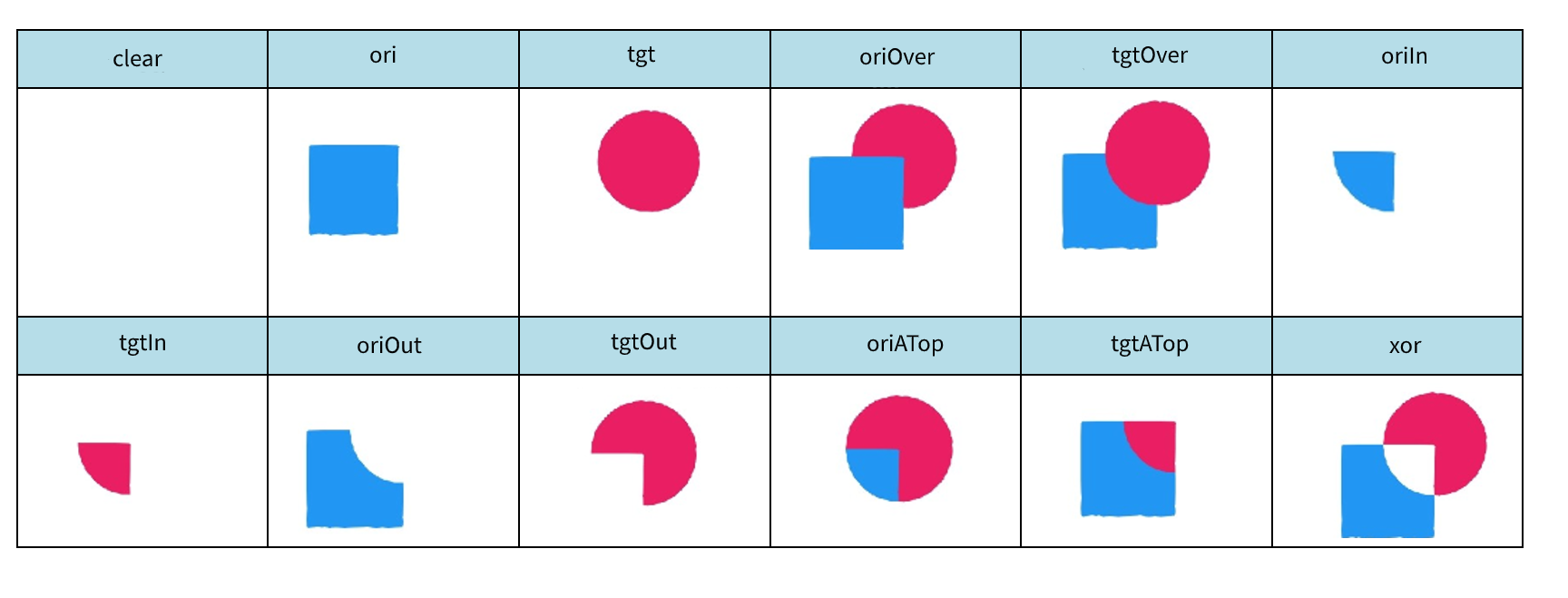
This component needs to be used together with the <Image> component to mix the tgt.png image in <Image> and the ori.png image in <Mask>. 12 mixing modes are supported. For example, the tgt.png image can be tailored according to the ori.png image so that the tgt.png image retains only the area that overlaps the ori.png image. You can set the align parameter to make the tgt.png image move while the ori.png image not.
Scenarios
- Add a mask to an image.
- Mask a part of an image.
- Use a fixed mask to create profile pictures.
Parameters
Parameter | Type | Mandatory | Description |
|---|---|---|---|
src | String | Yes | Source address of the mask image. |
align | String | No | The options are absolute and relative. If this parameter is set to absolute, the ori.png image does not move with the tgt.png image. In this case, the x and y coordinates of the mask are relative to the upper left corner of the screen. If this parameter is set to relative, the ori.png image moves with the tgt.png image. In this case, the x and y coordinates of the mask are relative to the upper left corner of the tgt.png image. The default value is relative. |
hybridMode | String | No | Image mixing mode. The options are clear (0), ori (1), tgt (2), oriOver (3), tgtOver (4), oriIn (5), tgtIn (6), oriOut (7), tgtOut (8), oriATop (9), tgtATop (10), and xor (11). You can enter either a character string or a number. The default value is 6. |
Example of Image Mixing Effects
Examples
Example 1: Select a mixing mode by entering a character string and use the absolute position–based alignment mode so that the mask image does not move with the source image.
<Image x="0" y="#screen_height-92" src="tgt.png">
    <Mask x="0" y="#screen_height-92" src="ori.png" align="absolute" hybridMode="tgtIn"/>
</Image>
Example 2: Select a mixing mode by entering a number and use the relative position–based alignment mode so that the mask image moves with the source image.
<Image x="0" y="#screen_height-92" src="tgt.png">
    <PositionAnimation>
        <Position x="480" y="0" time="1000"/>
        <Position x="480" y="0" time="2000"/>
    </PositionAnimation>
    <Mask x="0" y="#screen_height-92" src="ori.png" align="relative" hybridMode="6"/>
</Image>