Data Categorization
Watch faces support four data categories, each of which can be displayed through specific controls.
Data Category | Category Description | Data Type Example | Applicable Controls |
|---|---|---|---|
Raw data | Signed integers and unsigned integers. | Hour, Minute, Second | Text, arc text, connection text, and combination image |
Text data | Text. | Week Text, Month Text | Text, arc text, and connection text |
Enumerated data | Enumerations. | 28 Weather Types | Selected image, multi-group sequence frame (supported only for time), and selected layer |
Proportion data | Floating points. | Power Ratio | Watch hand, straight line, arc, straight line image, and arc image |
[h2]Time
Data Category | Data Type | Data Type Description | Default Value Displayed |
|---|---|---|---|
Raw data | Hour | Hour clock. It uses either a 24-hour or 12-hour format, depending on system settings. | 10 |
Minute | Minute clock. | 08 | |
Second | Second clock. | 36 | |
Enumerated data | AMPM | AM: morning; PM: afternoon | AM |
Hour High | Tens digit of the hour clock. The clock uses either a 24-hour or 12-hour format, depending on system settings. | 1 | |
Hour Low | Ones digit of the hour clock. The clock uses either a 24-hour or 12-hour format, depending on system settings. | 0 | |
Minute High | Tens digit of the minute clock. | 0 | |
Minute Low | Ones digit of the minute clock. | 8 | |
Second High | Tens digit of the second clock. | 3 | |
Second Low | Ones digit of the second clock. | 6 | |
Proportion data | Hour 12 Ratio | Percentage of the current hour in 12-hour format to 12. If the current hour is 12, the percentage is 100%. | 42.26% |
Hour 24 Ratio | Percentage of the current hour in 24-hour format to 24. If the current hour is 24, the percentage is 100%. | ||
Minute Ratio | Percentage of the current minute to 60. If the current minute is 60, the percentage is 100%. | ||
Second Ratio | Percentage of the current second to 60. If the current second is 60, the percentage is 100%. | ||
Text data | AM/PM Text | Used to display the AM/PM text. | AM |
[h2]Second
Data Category | Data Type | Data Type Description | Default Value Displayed |
|---|---|---|---|
Enumerated data | Previous Second High | Tens digit of the previous second. | 3 |
Previous Second Low | Ones digit of the previous second. | 5 | |
Pre Previous Second High | Tens digit of the second before the previous second. | 3 | |
Pre Previous Second Low | Ones digit of the second before the previous second. | 4 |
[h2]Dual Time Zones
Data Category | Data Type | Data Type Description | Default Value Displayed |
|---|---|---|---|
Raw data | Dual Hour | Hour clock in the non-local time zone. It uses either a 24-hour or 12-hour format, depending on system settings. | 02 |
Dual Minute | Minute clock in the non-local time zone. | 08 | |
Enumerated data | Dual Hour High | Tens digit of the hour clock in the non-local time zone. The clock uses either a 24-hour or 12-hour format, depending on system settings. | 0 |
Dual Hour Low | Ones digit of the hour clock in the non-local time zone. The clock uses either a 24-hour or 12-hour format, depending on system settings. | 2 | |
Dual AM PM | AM (morning) or PM (afternoon) in the non-local time zone. | AM | |
Dual Minute High | Tens digit of the minute clock in the non-local time zone. | 0 | |
Dual Minute Low | Ones digit of the minute clock in the non-local time zone. | 8 | |
Proportion data | Dual Hour 12 | Percentage of the current hour in 12-hour format to 12. If the current hour in the non-local time zone is 12, the percentage is 100%. | 8.93% |
Dual Hour 24 | Percentage of the current hour in 24-hour format to 24. If the current hour in the non-local time zone is 24, the percentage is 100%. | ||
Dual Minute Ratio | Percentage of the current minute to 60. If the current minute in the non-local time zone is 60, the percentage is 100%. | ||
Text data | Dual AM PM Text | AM/PM text in the non-local time zone. | AM |
Dual Zone Text | Time zone abbreviation, for example, LON, which is displayed based on current system settings. | LON | |
Dual Zone Time Text | Hour/Minute text used in the non-local time zone. | LON 02:08 |
[h2]Sunrise and Sunset
Data Category | Data Type | Data Type Description | Default Value Displayed |
|---|---|---|---|
Enumerated data | Sunrise and sunset selection | Selected images for sunrise and sunset. | Sunrise
|
Sunrise/sunset time hour high | Tens digit of the hour clock for displaying sunrise and sunset time. | 0 | |
Sunrise/sunset time hour low | Ones digit of the hour clock for displaying sunrise and sunset time. | 6 | |
Sunrise/sunset time minutes high | Tens digit of the minute clock for displaying sunrise and sunset time. | 0 | |
Sunrise/sunset time minutes low | Ones digit of the minute clock for displaying sunrise and sunset time. | 8 | |
Text data | Sun Rise | Sunrise text. Sunrise time, for example, 7:30. | 6:30 |
Sun Set | Sunset text. Sunset time, for example, 20:00. | 18:30 |

[h2]Moonrise and Moonset
Data Category | Data Type | Data Type Description | Default Value Displayed |
|---|---|---|---|
Text data | Moon Rise | Moonrise text. Moonrise time, for example, 7:30. | 19:30 |
Moon Set | Moonset text. Moonset time, for example, 7:30. | 8:30 |
[h2]Date
Data Category | Data Type | Data Type Description | Default Value Displayed |
|---|---|---|---|
Raw data | Date | Date. | 18 |
Date Yesterday | Date of yesterday. | 17 | |
Date Tomorrow | Date of tomorrow. | 19 | |
Month data | Used to display month data (with Arabic numbers 1 to 12). | 10 | |
Enumerated data | Month | January February March April May June July August September October November December | October
|
Week | Monday Tuesday Wednesday Thursday Friday Saturday Sunday | Friday
| |
Date High | Tens digit of the date. | 1 | |
Date Low | Ones digit of the date. | 8 | |
Date Yesterday High | Tens digit of the date of yesterday. | 1 | |
Date Yesterday Low | Ones digit of the date of yesterday. | 7 | |
Date Tomorrow High | Tens digit of the date of tomorrow. | 1 | |
Date Tomorrow Low | Ones digit of the date of tomorrow. | 9 | |
Twelve Shichen | Twelve Chinese double-hour periods. Each period covers a two-hour interval. For example, Zi Hour spans from 23:00 to 01:00. | Si | |
Moon Phase | New Moon Waxing Crescent First Quarter Waxing Gibbous Full Moon Waning Gibbous Last Quarter Waning Crescent | New Moon
| |
Proportion data | Date Ratio | Percentage of the current date to 31. If the current date is 31, the percentage is 100%. | 51.61% |
Week Ratio | Percentage of the current week day to 7. If the current week day is 7, the percentage is 100%. | 71.43% | |
Text data | Week Text | Week text. | Friday |
Month Text | Month text. | October |


[h2]Lunar Calendar
Data Category | Data Type | Data Type Description | Default Value Displayed |
|---|---|---|---|
Enumerated data | Lunar Month | Month in the lunar calendar. | October
|
Lunar Date High | Tens place of the lunar day. | 十
| |
Lunar Date Low | Ones place of the lunar day. | 八
|


[h2]Power
Data Category | Data Type | Data Type Description | Default Value Displayed |
|---|---|---|---|
Raw data | Power | Battery level. | 80 |
Enumerated data | Power Enum | 0%, 10%, 20%, 30%, 40%, 50%, 60%, 70%, 80%, 90%, 100% | 80%
|
Power State Enum | Enumerated battery levels across two power states. (The first 11 images show the battery levels in a non-charging state, while the latter 11 images show the battery levels during charging.) | 80% | |
Proportion data | Power Ratio | Percentage of the current battery level to 100. If the current battery level is 100, the percentage is 100%. | 80% |

[h2]Steps
Data Category | Data Type | Data Type Description | Default Value Displayed |
|---|---|---|---|
Raw data | Steps | Number of steps. | 7645 |
Enumerated data | Steps One | Ones digit of step count. | 5 |
Steps Two | Tens digit of step count. | 4 | |
Steps Three | Hundreds digit of step count. | 6 | |
Steps Four | Thousands digit of step count. | 7 | |
Steps Five | Ten thousands digit of step count. | 0 | |
Proportion data | Steps Ratio | Percentage of the current step count to the target step count obtained from the app. If the current step count equals or exceeds the target step count, the percentage is 100%. | 76% |
[h2]Calories
Data Category | Data Type | Data Type Description | Default Value Displayed |
|---|---|---|---|
Raw data | Calorie | Number of calories burned. | 328 |
Proportion data | Calorie Ratio | Percentage of the current calorie value to the target calorie value that is calculated based on the target step count obtained from the app. If the current calorie value equals or exceeds the target calorie value, the percentage is 100%. | 0.5% |
[h2]Heart Rate
Data Category | Data Type | Data Type Description | Default Value Displayed |
|---|---|---|---|
Raw data | Heart Rate | Heart rate. | 97 |
Heart Rate Max | Maximum heart rate. | 255 | |
Heart Rate Min | Minimum heart rate. | 1 | |
Enumerated data | Heart Rate Zone | Heart rate zones, including an invalid zone, zone 1, zone 2, zone 3, zone 4, and zone 5. The invalid zone indicates that the device is not being worn or the current heart rate is lower than the minimum heart rate. The other five zones are valid zones, corresponding to five exercise states: warm-up, fat burning, aerobic, anaerobic, and extreme. The meaning of these valid zones varies depending on the exercise type. The heart rate range of each zone is user-defined. For details, see the heart rate zone settings in the Huawei Health app. | Zone 1
|
Proportion data | Heart Rate Ratio | Percentage of the current heart rate to the maximum heart rate (for example, 255). If the current heart rate is 255, the percentage is 100%. | 38.04% |

[h2]Stress
Data Category | Data Type | Data Type Description | Default Value Displayed |
|---|---|---|---|
Raw data | Stress | Stress. | 45 |
Proportion data | Stress Ratio | Percentage of the current stress value to 80. If the current stress value is 80, the percentage is 100%. | 45.45% |
Enumerated data | Stress Level Type | Stress level type. The value range is [0-4]. 0: relaxed 1: normal 2: medium 3: high 4: no data | Relaxed
|

[h2]Moderate- and High-Intensity Exercise Time
Data Category | Data Type | Data Type Description | Default Value Displayed |
|---|---|---|---|
Raw data | Strength Time | Moderate- and high-intensity exercise time. | 26 |
Proportion data | Strength Time Ratio | Percentage of the current time spent in moderate- and high-intensity exercise to the target time (for example, 30). If the current time spent in moderate- and high-intensity exercise equals or exceeds the target time, the percentage is 100%. | 1.81% |
[h2]Standup Times
Data Category | Data Type | Data Type Description | Default Value Displayed |
|---|---|---|---|
Raw data | Standup Times | Number of standup times. | 12 |
Proportion data | Standup Times Ratio | Percentage of the current number of standup times to the target value (for example, 12). If the current number of standup times equals or exceeds the target value, the percentage is 100%. | 0% |
[h2]Maximum Oxygen Uptake
Data Category | Data Type | Data Type Description | Default Value Displayed |
|---|---|---|---|
Raw data | Vo2max | Maximum oxygen uptake. | 58 |
Proportion data | Vo2max Ratio | Percentage of the current maximum oxygen uptake to the maximum allowed (for example, 80). If the current maximum oxygen uptake is 80, the percentage is 100%. | 72.5% |
[h2]Sleep
Data Category | Data Type | Data Type Description | Default Value Displayed |
|---|---|---|---|
Text data
| Sleep Text | Text used to display the sleep duration. | 7h30m |
Sleep Duration | Text used to display the sleep duration in hours. | 8 | |
Proportion data | Sleep Ratio | Percentage of the current sleep duration to the target sleep duration. If the current sleep duration equals or exceeds the target sleep duration, the percentage is 100%. | 0% |
[h2]Weather
Data Category | Data Type | Data Type Description | Default Value Displayed |
|---|---|---|---|
Raw data | Temperature | Temperature. Its type automatically switches between Celsius and Fahrenheit based on system settings. | 24 |
Temperature Max | Maximum temperature. | 36 | |
Temperature Min | Minimum temperature. | -10 | |
Temperature Minus One | Current temperature minus one. | 23 | |
Temperature Plus One | Current temperature plus one. | 25 | |
Text data
| Temperature with Unit | Temperature with a unit. | 24°C |
Temperature in the Next 6 Hours | Temperature in the next 6 hours. | 24 | |
Temperature in the Next 8 Hours | Temperature in the next 8 hours. | 24 | |
Temperature in the Next 10 Hours | Temperature in the next 10 hours. | 24 | |
Temperature in the Next 12 Hours | Temperature in the next 12 hours. | 24 | |
Enumerated data | Temperature Type | Temperature type, which is Celsius (°C) or Fahrenheit (°F). | °C |
28 Weather Types |
| Sunny (daytime)
| |
Weather Type in the Next 6 Hours | |||
Weather Type in the Next 8 Hours | |||
Weather Type in the Next 10 Hours | |||
Weather Type in the Next 12 Hours | |||
11 Weather Types |
| Sunny (daytime)
| |
Proportion data | Temperature Ratio | Percentage of the difference between the current temperature and minimum temperature to the difference between the maximum temperature and minimum temperature. If the first difference equals the second difference, the percentage is 100%. | 50% |


[h2]Atmospheric Pressure
Data Category | Data Type | Data Type Description | Default Value Displayed |
|---|---|---|---|
Raw data | Pressure | Atmospheric pressure. | 742 |
Proportion data | Pressure Ratio | Percentage of the current pressure to the difference between the maximum pressure (which is 1100) and minimum pressure (which is 300). | 0% |
[h2]Altitude
Data Category | Data Type | Data Type Description | Default Value Displayed |
|---|---|---|---|
Raw data | Altitude | Altitude. | 2680 |
Altitude Unsigned | Absolute altitude. | 2680 | |
Enumerated data | Altitude Unit | Altitude unit, which is meter or foot. | Meter |
Proportion data | Altitude Ratio | Percentage of the current altitude to the difference between the maximum altitude (which is 8848) and minimum altitude (which is -800). | 50% |
[h2]Distance
Data Category | Data Type | Data Type Description | Default Value Displayed |
|---|---|---|---|
Text data
| Distance Text | Text used to display distance data, for example, 10.5. | 3.66 |
Distance unit | Unit of the current distance, for example, meter or foot. | m | |
Raw data | Distance | Used to display distance data. | 3660 |
[h2]Tide Times
Data Category | Data Type | Data Type Description | Default Value Displayed |
|---|---|---|---|
Text data | High Tide Time Text | Text used to display the high tide time, for example, 7:30 or 20:00. | 8:30 |
Ebb Time Text | Text used to display the low tide time, for example, 7:30 or 20:00. | 10:30 |
[h2]Emotion
Data Category | Data Type | Data Type Description | Default Value Displayed |
|---|---|---|---|
Enumerated data | Emotion Type | No data Unpleasant Neutral Pleasant You are advised to add emotion-specific text to each selected image: "No data," "Unpleasant," "Neutral," and "Pleasant." | Pleasant
|
Text data | Emotion Capture Time | Time when the emotion is obtained, for example, just now, 1 minute ago, and 1 hour ago. | 1 min ago |

[h2]Music
Data Category | Data Type | Data Type Description | Default Value Displayed |
|---|---|---|---|
Text data | Music Name | Used to display the music name, for example, Poker Face. | Poker Face |
Artist Name | Used to display the name of the performing artist for the music, for example, Lady Gaga. | Lady Gaga |
[h2]Redirection to Apps
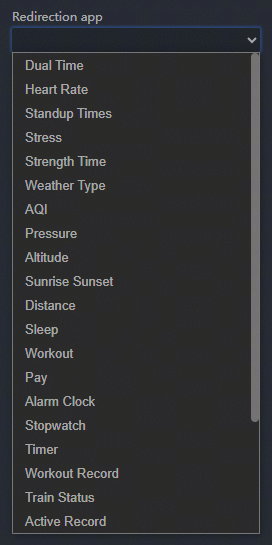
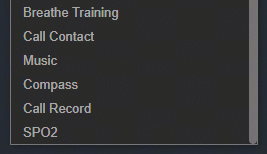
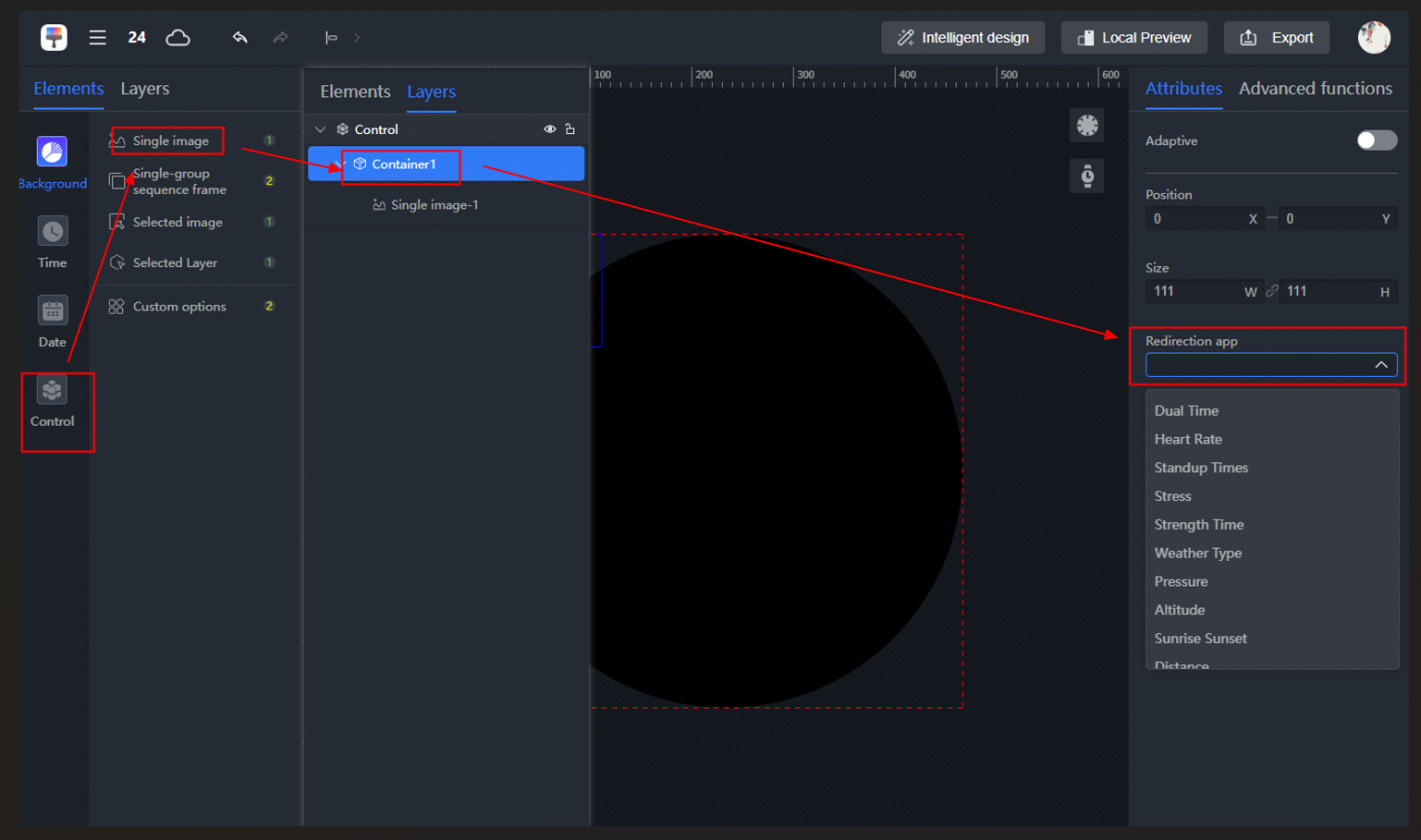
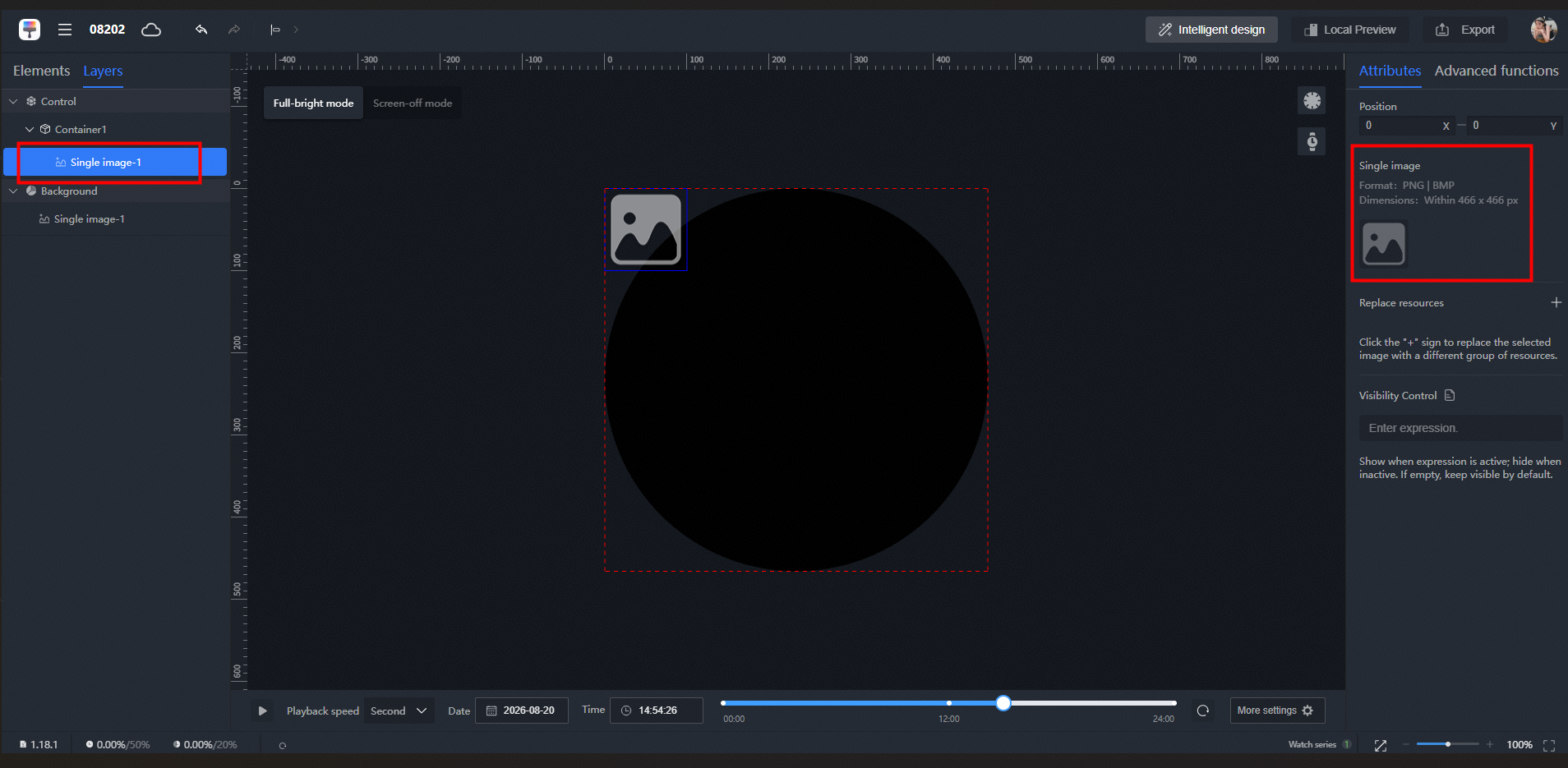
Path: Choose Control > Single image, select a container in the Layers panel, and select the app to be redirected to from the Redirection app drop-down list box in the Attributes panel on the right. Then select the single image in the Layers panel, and set the redirection entry position in the Attributes panel on the right.
Currently supported apps for redirection