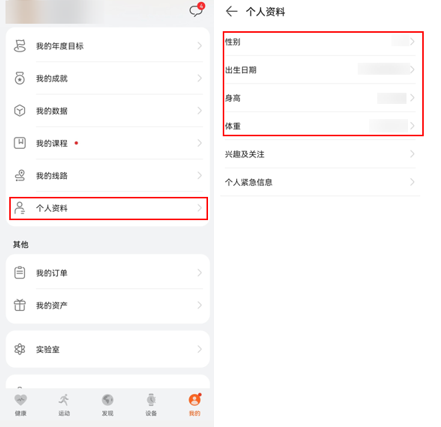
获取华为运动健康App“我的 > 个人资料”中的用户性别、出生日期、身高、体重。

- 目前该功能只在手机上支持,智能表不支持。
- 个人资料中的数据是由用户自己填写的。但如果用户连接了体脂秤,并授权将体脂秤数据同步到个人资料,则体重数据会同步体脂秤数据。
图1 个人资料
使用这4个接口前,需要向华为申请开通权限,并获取用户授权,否则接口将调用失败。
| 数据开放类型 | 查询接口 | 请求用户授权的权限 | 向华为申请开通权限 |
|---|---|---|---|
| 性别 | https://www.huawei.com/healthkit/extend/healthbehavior.read | 个人信息数据读权限 | |
| 出生日期 | |||
| 身高 | |||
| 体重 |
获取性别
调用getGender方法,获取性别,示例代码如下:
import {HMSHealthKit} from '@hw-hmscore/hms-js-health'
HMSHealthKit.getGender().then((result) => {
    console.info("getGender success: " + JSON.stringify(result))
}).catch((error) => {
    console.error("getGender Error: " + JSON.stringify(error));
}); 获取出生日期
调用 getBirthDay方法,获取出生日期,示例代码如下:
import {HMSHealthKit} from '@hw-hmscore/hms-js-health'
HMSHealthKit.getBirthday().then((result) => {
    console.info("getBirthday success: " + JSON.stringify(result))
}).catch((error) => {
    console.error("getBirthday Error: " + JSON.stringify(error));
}); 获取身高
调用getHeight方法,获取身高,示例代码如下:
import {HMSHealthKit} from '@hw-hmscore/hms-js-health'
HMSHealthKit.getHeight().then((result) => {
    console.info("getHeight success: " + JSON.stringify(result))
}).catch((error) => {
    console.error("getHeight Error: " + JSON.stringify(error));
}); 获取体重
调用getWeight方法,获取体重,示例代码如下:
import {HMSHealthKit} from '@hw-hmscore/hms-js-health'
HMSHealthKit.getWeight().then((result) => {
    console.info("getWeight success: " + JSON.stringify(result))
}).catch((error) => {
    console.error("getWeight Error: " + JSON.stringify(error));
});