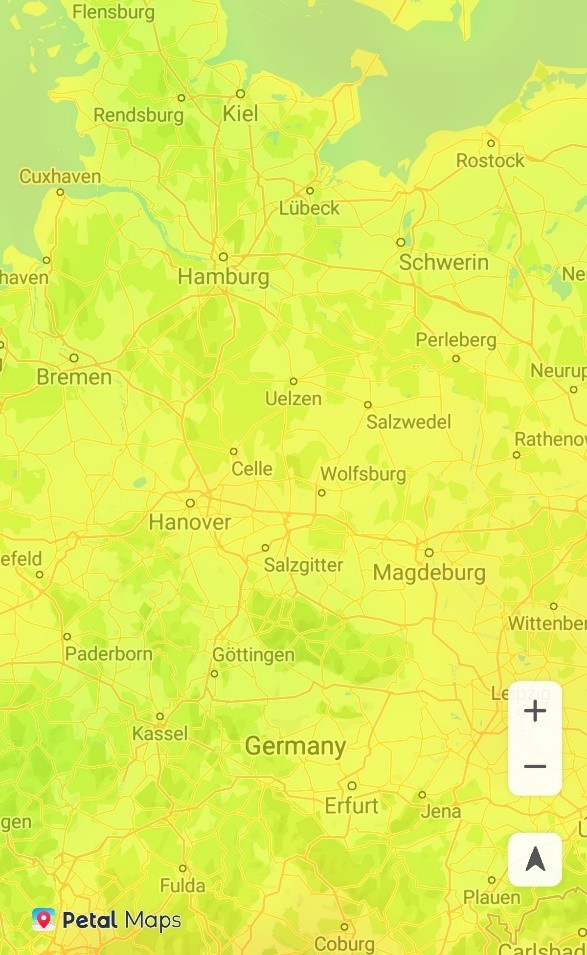
华为MapKit提供温度图层,基于NOAA GFS气象数据,通过线性函数归一化算法将原始数据转换到(0,254)的范围,(255,255)表示nodata。温度图将温度数据可视化,将各地温度值转换为不同颜色的色带展示到地图上。温度图层通过温度值颜色分布差异直观地反映了不同地区的温度高低变化。
温度图数据根据NOAA GFS气象发布的数据实时更新,可展示当前天气及未来36小时的预测天气温度值分布情况。
在地图上添加温度图层实现步骤:
- 构建CustomLayerOption对象,配置图层ID及其属性。
- 构建CustomLayerCallBack对象,设置图层回调函数。
- 调用HuaweiMapEx的addPublicLayer方法,并传入参数:图层类型、CustomLayerOption对象、CustomLayerCallBack对象。
示例代码如下:
“Java”
private CustomLayer layer;
CustomLayerOption option = new CustomLayerOption();
String[] ids = {"w_tmp_22030918"};
option.setLayerIds(ids);
option.setCoverType(CustomLayerOption.CoverType.ON_OVERLAY);
// 温度图层编译层级为3级,其他层级复用3层级
Integer[] reuse = {0, 1, 2, 3, 3, 3, 3, 3, 3, 3, 3, 3, 3, 3, 3, 3, 3, 3, 3, 3, 3, 3};
option.setTierReuses(reuse);
RasterStyleOption rasterStyleOption = new RasterStyleOption();
rasterStyleOption.setChannel(1);
rasterStyleOption.setOpacity(0.5f);
String[] colors = {"0,#8800FF", "42,#0000FF", "85,#007FFF", "127,#00FF00", "170,#FFFF00", "190,#FFA500", "210,#FF0000"};
rasterStyleOption.setColorRamp(colors);
rasterStyleOption.setzIndex(1);
option.setRasterStyle(rasterStyleOption);
CustomLayerCallBack callBack = new CustomLayerCallBack() {
    @Override
    public void onSuccess(CustomLayer customLayer) {
        layer = customLayer;
    }
    @Override
    public void onFailure(String s) {
    }
};
hMapEx.addPublicLayer(1, option, callBack);
“Kotlin”
var layer: CustomLayer? = null
val option = CustomLayerOption()
val ids = arrayOf("w_tmp_22030918")
option.setLayerIds(ids)
option.setCoverType(CustomLayerOption.CoverType.ON_OVERLAY)
// 温度图层编译层级为3级,其他层级复用3层级
val reuse = arrayOf(0, 1, 2, 3, 3, 3, 3, 3, 3, 3, 3, 3, 3, 3, 3, 3, 3, 3, 3, 3, 3, 3)
option.setTierReuses(reuse)
val rasterStyleOption = RasterStyleOption()
rasterStyleOption.setChannel(1)
rasterStyleOption.setOpacity(0.5f)
val colors = arrayOf(
"0,#8800FF",
"42,#0000FF",
"85,#007FFF",
"127,#00FF00",
"170,#FFFF00",
"190,#FFA500",
"210,#FF0000"
)
rasterStyleOption.setColorRamp(colors)
rasterStyleOption.setzIndex(1)
option.setRasterStyle(rasterStyleOption)
val callBack: CustomLayerCallBack = object : CustomLayerCallBack{
override fun onSuccess(customLayer: CustomLayer?) {
layer = customLayer
}
override fun onFailure(s: String?) {}
}
hMapEx?.addPublicLayer(1, option, callBack) 效果展示: