针对Eclipse开发环境,华为提供了下载HMS Core SDK包本地集成的方式。在开始开发前,您需要将HMS Core SDK集成到您的Eclipse开发环境中。
下载SDK
- 下载HMS Base SDK和要集成的服务SDK,并解压zip包。
Eclipse SDK下载地址:游戏服务SDK下载
- 将所有SDK工程导入到您的工作空间。
- 选择菜单,再选择,点击“Next”。
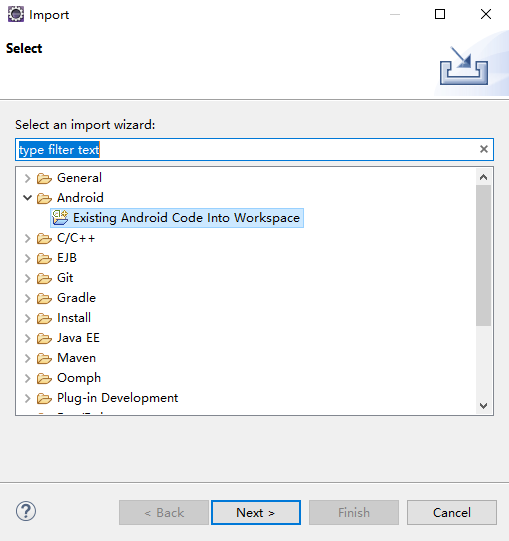
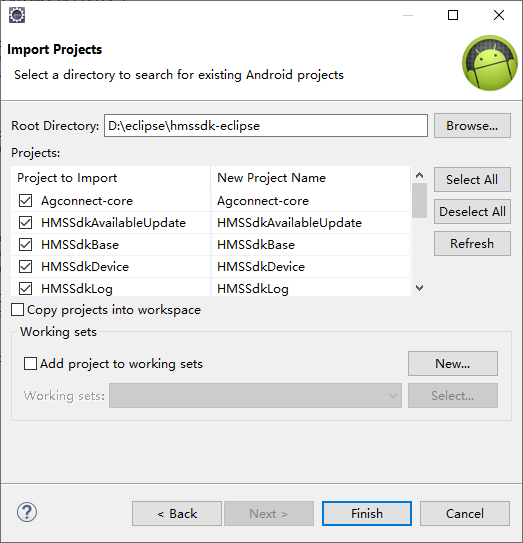
- 点击“Browse”,选择工程所在的文件夹。在“Projects”下显示待导入的工程,默认全部勾选,点击“Finish”。

待导入的工程必须和工作空间在相同的磁盘空间里,例如都在“D:\”。如果不在,您可以选择“Copy projects into workspace”,将工程文件复制到工作空间。
- 选择菜单,再选择,点击“Next”。
添加工程依赖关系
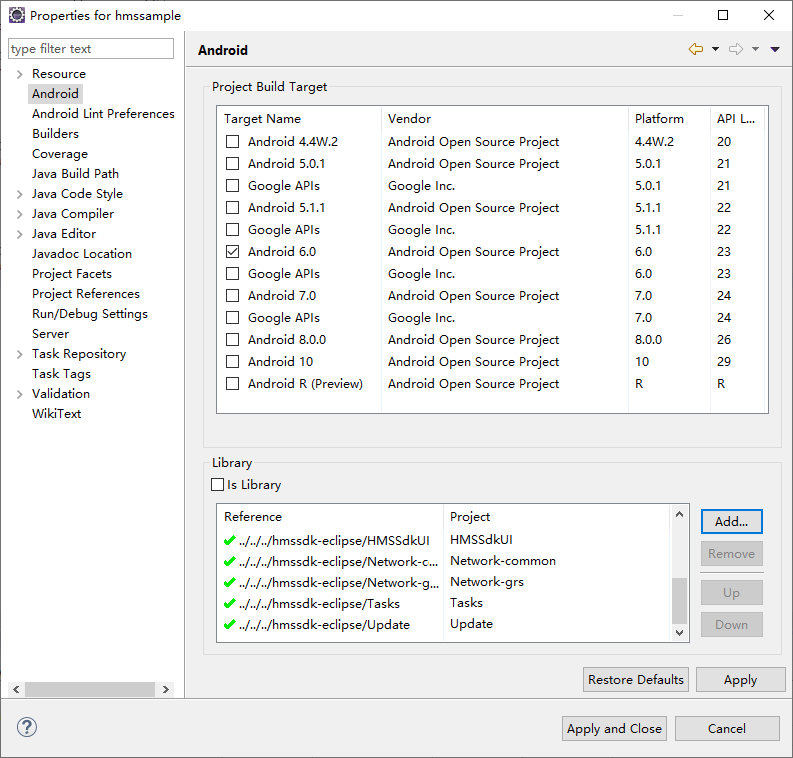
- 右键点击您的工程,选择“Properties”。
- 在左侧选择,点击“Add”,选择已导入空间的工程,点击“Apply and Close”。
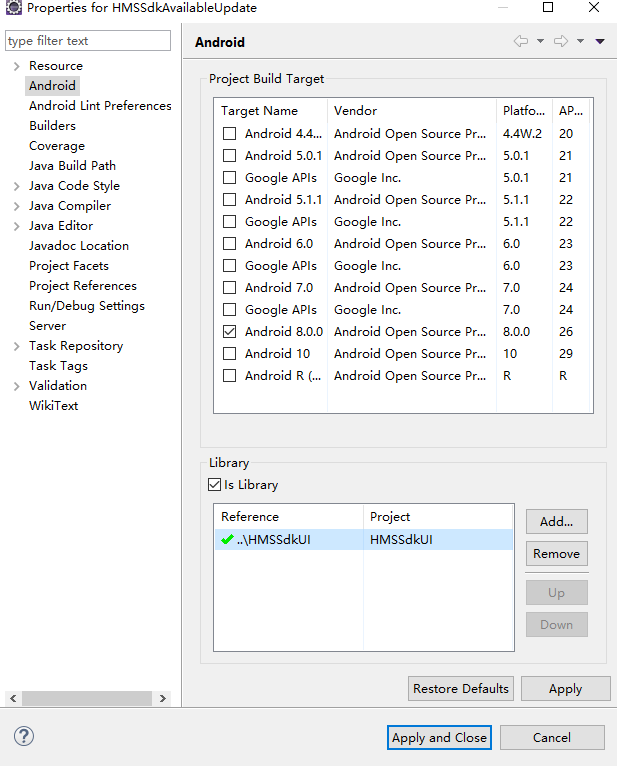
- 右键点击HMSSdkAvailableUpdate工程,选择“Properties”。
- 在左侧选择,点击“Add”,选择HMSSdkUI工程,点击“Apply and Close”。
- 由于Eclipse的xml文件不支持$符号,将Agconnect-core、HMSSdkAvaliableUpdate、HMSSdkDevice和Update工程下AndroidManifest.xml文件中的“${applicationId}”替换成您的应用包名。
<application>
    <provider
        android:name="com.huawei.agconnect.core.provider.AGConnectInitializeProvider"
        android:authorities="${applicationId}.AGCInitializeProvider"
        android:exported="false" />
    <service
        android:name="com.huawei.agconnect.core.ServiceDiscovery"
        android:exported="false" />
</application>
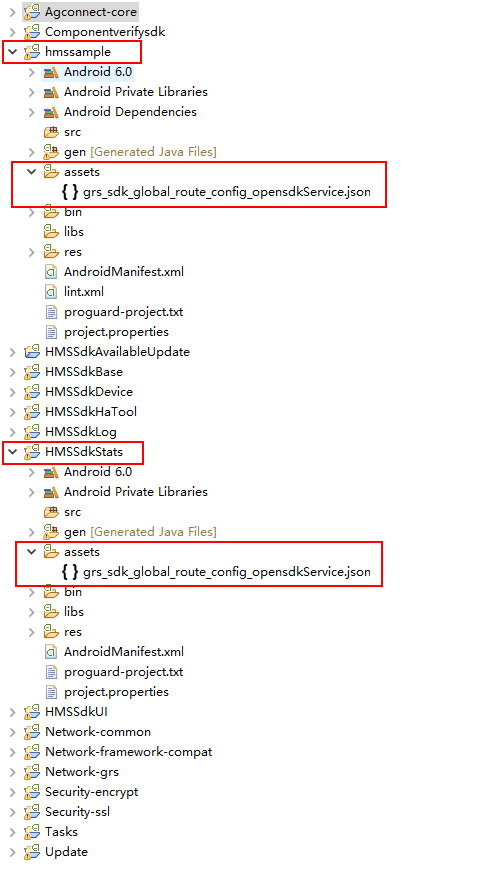
拷贝HMSSdkStats资源文件到您的工程目录
将HMSSdkStats工程中assets目录下的资源文件拷贝到您的工程中assets目录下。

如果依赖其他的Kit资源,还需要复制对应Kit的资源文件到您的工程目录下。
配置工程project.properties文件
打开您的工程的“project.properties”文件,添加如下代码,用于合并子工程中的“Manifest”文件。
manifestmerger.enabled=true

ADT必须是17以上版本。
添加当前应用的配置文件
- 登录HarmonyOS 开发者中心,顶部点击“应用管理”,左上角筛选游戏。
- 左侧导航栏选择“基础信息”后,在右侧页面选择“基本信息”页签,点击“agconnect-services.json”下载配置文件。
- 由于Eclipse不支持插件,您需要将“agconnect-services.json”文件放置到您的工程assets目录下,并且在工程的Application子类中添加如下代码。如果工程没有Application子类,则需要您新建一个从Application继承的子类,例如新建MyApplication类。
// TODO: Import the following classes:
import java.io.IOException;
import java.io.InputStream;
import com.huawei.agconnect.config.AGConnectServicesConfig;
import com.huawei.agconnect.config.LazyInputStream;
import android.app.Application;
import android.content.Context;
import android.util.Log;

public class MyApplication extends Application{
    @Override
    public void onCreate() {
        super.onCreate();
    }
    // TODO: Add the following code:
    @Override
    protected void attachBaseContext(Context context) {
        super.attachBaseContext(context);
        AGConnectServicesConfig config = AGConnectServicesConfig.fromContext(context);
        config.overlayWith(new LazyInputStream(context) {
            public InputStream get(Context context) {
                try {
                    return context.getAssets().open("agconnect-services.json");
                } catch (IOException e) {
                    return null;
                }
            }
        });
    }
    // TODO: End
}
- 打开您的工程“AndroidManifest.xml”文件,在“application”模块中添加Application子类名称,如果已经添加,则跳过此步骤。例如,添加MyApplication类名称。
<application
    android:name=".MyApplication"
    …
    >
…
- 在Eclipse菜单栏中点击“Project”,执行“Clean”操作,即完成SDK集成。
配置混淆脚本
您编译APK前需要配置混淆配置文件,避免混淆HMS Core SDK导致功能异常。
打开混淆配置文件“proguard-project.txt”,加入排除HMS Core SDK的混淆配置脚本。
-ignorewarnings
-keepattributes *Annotation*
-keepattributes Exceptions
-keepattributes InnerClasses
-keepattributes Signature
-keepattributes SourceFile,LineNumberTable
-keep class com.huawei.hianalytics.**{*;}
-keep class com.huawei.updatesdk.**{*;}
-keep class com.huawei.hms.**{*;}