














工具问题
DevEco Studio
DevEco Testing
开发与测试问题
多设备场景
应用质量
应用框架开发
系统开发
媒体开发
图形开发
应用服务开发
AI功能开发
元服务开发
您当前正在浏览新版开发者文档中心,目录分类和层级有所调整。点击左侧当前文档分类名称前的“☰”图标,可切换文档分类。 了解新版目录
问题现象
如何开放UI实现到组件外部,由外部自由定制一个或多个封装好的UI内容,使其可以被跨组件或跨页面调用?
背景知识
- @Builder:@Builder装饰器用于封装可复用的UI结构,通过提取重复的布局代码提高开发效率。
- wrapBuilder:当在一个struct内使用多个全局@Builder函数实现UI的不同效果时,代码维护将变得非常困难,且页面不够整洁。此时,可以使用wrapBuilder封装全局@Builder。
解决方案
实现思路如下:UI内容由全局@Builder自定义构建函数进行封装。通过注册表注册一个WrappedBuilder数组来管理UI,在组件中通过ForEach的方式渲染这个WrappedBuilder数组,这样可以通过管理该WrappedBuilder数组来动态渲染定制的UI内容。
- 采用单例模式管理全局UI组件注册表(EllaBookUIView)。
- 通过IBookUIComponent(书籍UI组件接口)规范组件实现,通过getUIBuilder获取组件构建器实现解耦。收起自动换行深色代码主题复制
- export interface IBookUIComponent {
- // 获取UI构建器
- getUIBuilder: WrappedBuilder<[]>;
- // 组件名称
- componentName?: string;
- }
- 通过全局UI组件注册表(EllaBookUIView)实现动态扩展组件注册机制。收起自动换行深色代码主题复制
- export class EllaBookUIView {
- private static instance: EllaBookUIView | null = null;
- private components: IBookUIComponent[] = [];
- private constructor() {
- }
- // 获取单例
- public static getInstance(): EllaBookUIView {
- if (!EllaBookUIView.instance) {
- EllaBookUIView.instance = new EllaBookUIView();
- }
- return EllaBookUIView.instance;
- }
- // 注册组件
- public registerComponent(component: IBookUIComponent): void {
- this.components.push(component);
- console.info(`[BookUIRegistry] 组件注册成功: ${component.componentName || '未命名组件'}`);
- }
- // 获取所有组件构建器
- public getAllBuilders(): WrappedBuilder<[]>[] {
- return this.components.map(component => component.getUIBuilder);
- }
- // 清除所有组件
- public clearComponents(): void {
- this.components = [];
- console.info('[BookUIRegistry] 所有组件已清除');
- }
- }
- 通过IBookUIComponent(书籍UI组件接口)规范组件实现,通过getUIBuilder获取组件构建器实现解耦。
- 控制组件实现:ControlButtons结构体实现书籍基础控制功能。
- 顶部控制栏:退出按钮+播放/暂停按钮。
- 底部控制栏:翻页按钮组。收起自动换行深色代码主题复制
- @Component
- struct ControlButtons {
- @State isPlaying: boolean = true; // 播放状态
- // 退出书籍
- private exitBook() {
- console.info('退出书籍');
- }
- // 切换播放状态
- private togglePlay() {
- this.isPlaying = !this.isPlaying;
- console.info(this.isPlaying ? '播放中' : '已暂停');
- }
- // 上一页
- private prevPage() {
- console.info('上一页');
- }
- // 下一页
- private nextPage() {
- console.info('下一页');
- }
- build() {
- Stack({ alignContent: Alignment.BottomStart }) {
- // 顶部控制栏
- Row() {
- // 1.顶部最左侧---退出按钮
- Button() {
- Image($r('app.media.xmark'))
- .objectFit(ImageFit.Contain);
- }
- .height(24)
- .width(24)
- .backgroundColor(Color.Transparent)
- .borderRadius(20)
- .onClick(() => {
- // 退出逻辑
- this.exitBook();
- });
- Blank();
- // 2.顶部最右侧---播放/暂停按钮
- Button() {
- if (this.isPlaying) {
- Image($r('app.media.pause'))
- .objectFit(ImageFit.Contain);
- } else {
- Image($r('app.media.play'))
- .objectFit(ImageFit.Contain);
- }
- }
- .height(24)
- .width(24)
- .backgroundColor(Color.Transparent)
- .borderRadius(20)
- .onClick(() => {
- this.togglePlay();
- });
- }
- .width('100%')
- .padding(10)
- .position({ x: 0, y: 0 });
- // 底部控制栏
- Row() {
- // 3.底部最左侧---上一页按钮
- Button() {
- Image($r('app.media.chevron_left'))
- .objectFit(ImageFit.Contain);
- }
- .height(24)
- .width(24)
- .backgroundColor(Color.Transparent)
- .borderRadius(25)
- .onClick(() => {
- this.prevPage();
- });
- Blank();
- // 4.底部最右侧---下一页按钮
- Button() {
- Image($r('app.media.chevron_right'))
- .objectFit(ImageFit.Contain);
- }
- .height(24)
- .width(24)
- .backgroundColor(Color.Transparent)
- .borderRadius(25)
- .onClick(() => {
- this.nextPage();
- });
- }
- .width('100%')
- .padding(10);
- }
- .width('100%')
- .height('100%');
- };
- }
- // 创建UI构建器
- @Builder
- function controlBuilder() {
- ControlButtons();
- }
- BookUIComponents类实现接口规范,将构建器包装为可注册单元。收起自动换行深色代码主题复制
- export class BookUIComponents implements IBookUIComponent {
- componentName: string = '书籍控制组件';
- getUIBuilder: WrappedBuilder<[]> = wrapBuilder(controlBuilder);
- }
- 页面调用:通过ForEach动态渲染注册的构建器,BuilderComponent作为通用容器解析并执行构建器逻辑。收起自动换行深色代码主题复制
- Stack({ alignContent: Alignment.TopStart }) {
- Column({ space: 16 }) {
- Button('打开书籍控制器控件')
- .onClick(() => {
- ellaBookUIView.registerComponent(new BookUIComponents());
- this.uiBuilders = ellaBookUIView.getAllBuilders();
- });
- Button('关闭书籍控制器控件')
- .onClick(() => {
- ellaBookUIView.clearComponents();
- this.uiBuilders = ellaBookUIView.getAllBuilders();
- });
- }.height('100%').width('100%');
- ForEach(this.uiBuilders,
- (builder: WrappedBuilder<[]>) => {
- // 使用公共属性传递索引
- BuilderComponent({ builder: builder })
- .hitTestBehavior(HitTestMode.Transparent);
- }
- );
- };
完整示例如下:
收起
自动换行
深色代码主题
复制
- // 书籍UI组件接口
- export interface IBookUIComponent {
- // 获取UI构建器
- getUIBuilder: WrappedBuilder<[]>;
- // 组件名称
- componentName?: string;
- }
-
- // 全局UI组件注册表
- export class EllaBookUIView {
- private static instance: EllaBookUIView | null = null;
- private components: IBookUIComponent[] = [];
-
- private constructor() {
- }
-
- // 获取单例
- public static getInstance(): EllaBookUIView {
- if (!EllaBookUIView.instance) {
- EllaBookUIView.instance = new EllaBookUIView();
- }
- return EllaBookUIView.instance;
- }
-
- // 注册组件
- public registerComponent(component: IBookUIComponent): void {
- this.components.push(component);
- console.info(`[BookUIRegistry] 组件注册成功: ${component.componentName || '未命名组件'}`);
- }
-
- // 获取所有组件构建器
- public getAllBuilders(): WrappedBuilder<[]>[] {
- return this.components.map(component => component.getUIBuilder);
- }
-
- // 清除所有组件
- public clearComponents(): void {
- this.components = [];
- console.info('[BookUIRegistry] 所有组件已清除');
- }
- }
- // 导出全局单例
- export const ellaBookUIView = EllaBookUIView.getInstance();
-
- @Component
- struct ControlButtons {
- @State isPlaying: boolean = true; // 播放状态
-
- // 退出书籍
- private exitBook() {
- console.info('退出书籍');
- }
-
- // 切换播放状态
- private togglePlay() {
- this.isPlaying = !this.isPlaying;
- console.info(this.isPlaying ? '播放中' : '已暂停');
- }
-
- // 上一页
- private prevPage() {
- console.info('上一页');
- }
-
- // 下一页
- private nextPage() {
- console.info('下一页');
- }
-
- build() {
- Stack({ alignContent: Alignment.BottomStart }) {
- // 顶部控制栏
- Row() {
- // 1.顶部最左侧---退出按钮
- Button() {
- Image($r('app.media.xmark'))
- .objectFit(ImageFit.Contain);
- }
- .height(24)
- .width(24)
- .backgroundColor(Color.Transparent)
- .borderRadius(20)
- .onClick(() => {
- // 退出逻辑
- this.exitBook();
- });
-
- Blank();
- // 2.顶部最右侧---播放/暂停按钮
- Button() {
- if (this.isPlaying) {
- Image($r('app.media.pause'))
- .objectFit(ImageFit.Contain);
- } else {
- Image($r('app.media.play'))
- .objectFit(ImageFit.Contain);
- }
- }
- .height(24)
- .width(24)
- .backgroundColor(Color.Transparent)
- .borderRadius(20)
- .onClick(() => {
- this.togglePlay();
- });
- }
- .width('100%')
- .padding(10)
- .position({ x: 0, y: 0 });
-
- // 底部控制栏
- Row() {
- // 3.底部最左侧---上一页按钮
- Button() {
- Image($r('app.media.chevron_left'))
- .objectFit(ImageFit.Contain);
- }
- .height(24)
- .width(24)
- .backgroundColor(Color.Transparent)
- .borderRadius(25)
- .onClick(() => {
- this.prevPage();
- });
-
- Blank();
- // 4.底部最右侧---下一页按钮
- Button() {
- Image($r('app.media.chevron_right'))
- .objectFit(ImageFit.Contain);
- }
- .height(24)
- .width(24)
- .backgroundColor(Color.Transparent)
- .borderRadius(25)
- .onClick(() => {
- this.nextPage();
- });
- }
- .width('100%')
- .padding(10);
- }
- .width('100%')
- .height('100%');
- };
- }
-
- // 创建UI构建器
- @Builder
- function controlBuilder() {
- ControlButtons();
- }
-
- export class BookUIComponents implements IBookUIComponent {
- componentName: string = '书籍控制组件';
- getUIBuilder: WrappedBuilder<[]> = wrapBuilder(controlBuilder);
- }
-
- @Entry
- @Component
- struct Page {
- @State uiBuilders: WrappedBuilder<[]>[] = [];
-
- build() {
- Column() {
- Stack({ alignContent: Alignment.TopStart }) {
- Column({ space: 16 }) {
- Button('打开书籍控制器控件')
- .onClick(() => {
- ellaBookUIView.registerComponent(new BookUIComponents());
- this.uiBuilders = ellaBookUIView.getAllBuilders();
- });
- Button('关闭书籍控制器控件')
- .onClick(() => {
- ellaBookUIView.clearComponents();
- this.uiBuilders = ellaBookUIView.getAllBuilders();
- });
- }.height('100%').width('100%');
-
- ForEach(this.uiBuilders,
- (builder: WrappedBuilder<[]>) => {
- // 使用公共属性传递索引
- BuilderComponent({ builder: builder })
- .hitTestBehavior(HitTestMode.Transparent);
- }
- );
- };
- };
- }
- }
-
- @Component
- struct BuilderComponent {
- builder?: WrappedBuilder<[]>;
-
- build() {
- if (this.builder) {
- this.builder.builder();
- } else {
- Text('暂无构建');
- }
- }
- }
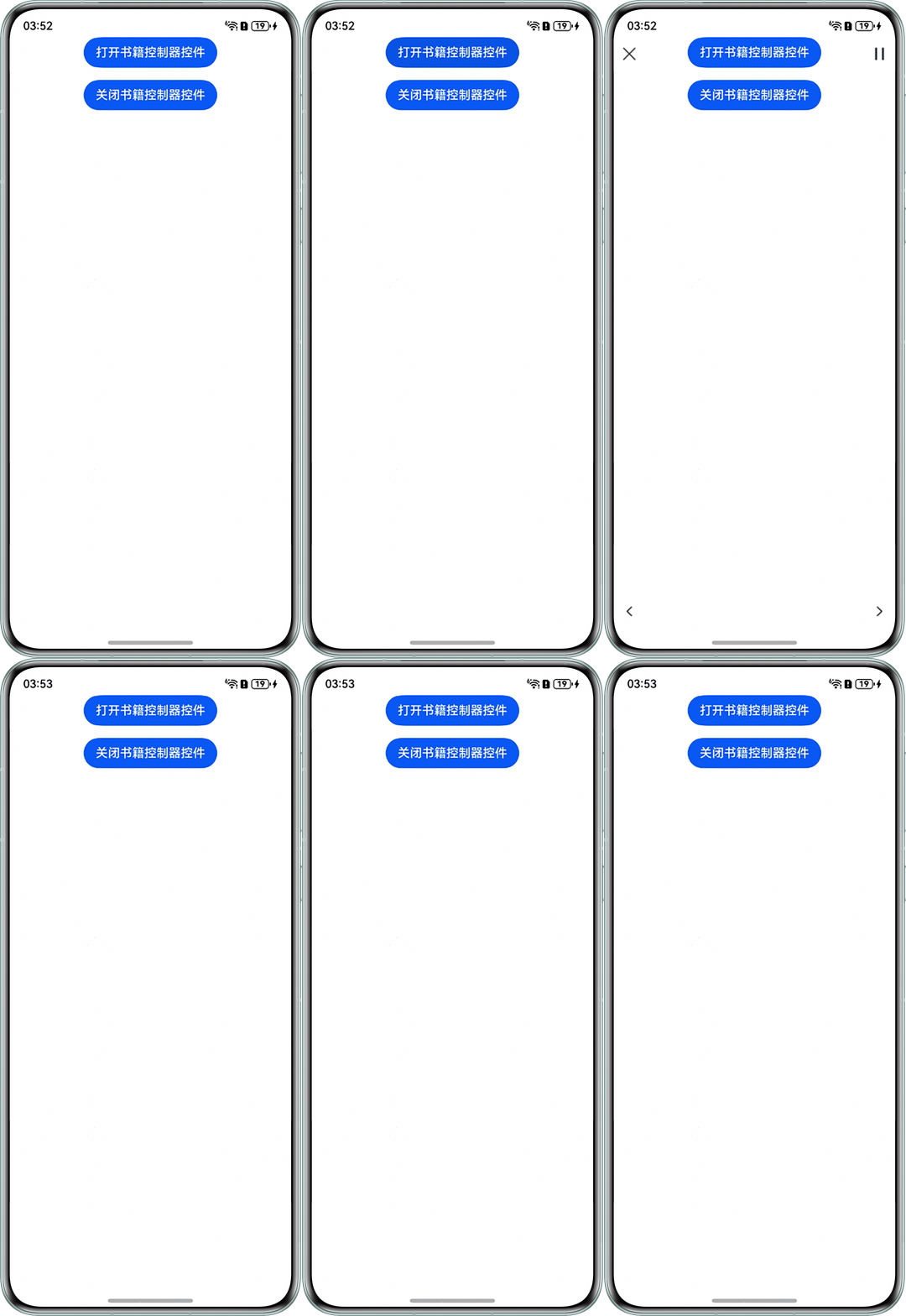
实现效果如下:


华为开发者联盟 版权所有 ©2026