Overview
The countdown element is used to display the remaining time in scenarios such as disabling a promotion activity and sending an SMS verification message. This element has the following capabilities:
- Supports setting the time by the unit of day, hour, minute, and second.
- Supports setting the styles of text, border and delimiters (words and colon).
- Supports delay-triggered countdown.
- Supports triggering the callback event of countdown end.
The layout of the element consists of two parts: numbers and delimiters. Generally, the number indicate the remaining time of day, hour, minute, and second. The delimiter is used to separate numbers. Common delimiters can be words (day, hour, minute, and second) or colon (:). The following figure shows the layout.
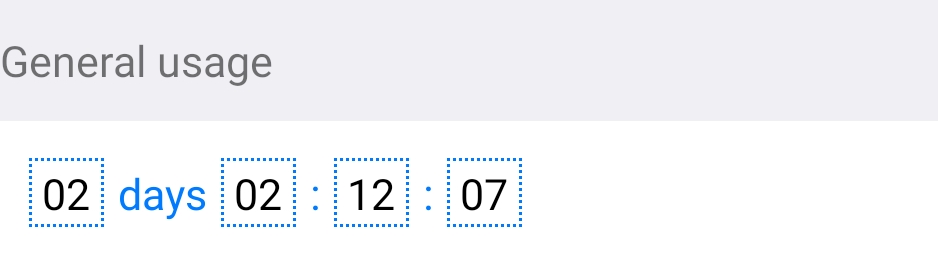
The sample code for the layout is as follows:
<text>General usage</text>
<div class="example-body">
      <countdown class="countdown" day="{{this.day}}" hour="{{this.hour}}" minute="{{this.minute}}" second="{{this.second}}" splitor-color="#007AFF" border-width="{{3}}" border-style="dotted" border-color="#007AFF"></countdown>
</div> [h2]Customizing the Subelements
- Customize the layout.
The countdown UI is universal, but the content layout is not. The content layout cannot be fixed. Otherwise, once the UI of the content part changes, the subelements have to be modified, which violates the open-closed principle in programming.
Therefore, multiple style attributes are supported in countdown.ux for developers to customize the style.<template> <div class="countdown"> <text if="{{this.showDay}}" style="borderColor: {{this.borderColor}}; color: {{this.color}}; backgroundColor: {{this.backgroundColor}};border-width:{{this.borderWidth}};border-style:{{this.borderStyle}};" class="countdown__number">{{ d }}</text> <text if="{{this.showDay}}" style="color: {{this.splitorColor}}" class="countdown__splitor">day</text> <text style="borderColor: {{this.borderColor}}; color: {{this.color}}; backgroundColor: {{this.backgroundColor}};border-width:{{this.borderWidth}};border-style:{{this.borderStyle}}" class="countdown__number">{{ h }}</text> <text style="color: {{this.splitorColor}}" class="countdown__splitor">{{ showColon? ":" : "hour";}}</text> <text style="borderColor: {{this.borderColor}}; color: {{this.color}}; backgroundColor: {{this.backgroundColor}};border-width:{{this.borderWidth}};border-style:{{this.borderStyle}}" class="countdown__number">{{ i }}</text> <text style="color: {{this.splitorColor}}" class="countdown__splitor">{{ showColon? ":" : "minute";}}</text> <text style="borderColor: {{this.borderColor}};color: {{this.color}}; backgroundColor: {{this.backgroundColor}};border-width:{{this.borderWidth}};border-style:{{this.borderStyle}}" class="countdown__number">{{ s }}</text> <text if="{{!showColon}}" style="color: {{this.splitorColor}}" class="countdown__splitor">second</text> </div> </template> - Design the attributes and supported events.Supported attributes
Attribute
Type
Default Value
Description
day
Number
0
Number of remaining days.
hour
Number
0
Number of remaining hours.
minute
Number
0
Number of remaining minutes.
second
Number
0
Number of remaining seconds.
delay
Number
0
Delay trigger time, in seconds.
showDay
Boolean
true
Indicates whether to display the number of days.
showColon
Boolean
true
Indicates whether the colon (:) is used as a delimiter.
color
String
#000000
Text color.
splitorColor
String
#000000
Delimiter color.
backgroundColor
String
#FFFFFF
Background color of the text.
borderWidth
Number
0
Width of the text border.
borderStyle
String
solid
Style of the text border.
borderColor
String
#000000
Color of the text border.
Supported eventEvent
Parameter
Description
timeup
Null
Callback event triggered when the time is up.
[h2]Designing the Overall Layout
.countdown__splitor {
display: flex;
justify-content: center;
line-height: 48px;
padding: 5px;
}
.countdown__number {
display: flex;
justify-content: center;
align-items: center;
width: 52px;
height: 48px;
line-height: 48px;
margin: 5px;
text-align: center;
} [h2]Implementing the Countdown Algorithm
- Convert days, hours, minutes, and seconds to seconds and set the timer to decrease time by 1 every second.
toSeconds(timestamp, day, hours, minutes, seconds) { if (timestamp) { return timestamp - parseInt(new Date().getTime() / 1000, 10) } return day * 60 * 60 * 24 + hours * 60 * 60 + minutes * 60 + seconds }, - Reconvert the seconds and display the days, hours, minutes and seconds in the corresponding position.
countDown() { let seconds = this.seconds let [day, hour, minute, second] = [0, 0, 0, 0] if (seconds > 0) { day = Math.floor(seconds / (60 * 60 * 24)) hour = Math.floor(seconds / (60 * 60)) - (day * 24) minute = Math.floor(seconds / 60) - (day * 24 * 60) - (hour * 60) second = Math.floor(seconds) - (day * 24 * 60 * 60) - (hour * 60 * 60) - (minute * 60) } else { this.timeUp() } if (day < 10) { day = '0' + day } if (hour < 10) { hour = '0' + hour } if (minute < 10) { minute = '0' + minute } if (second < 10) { second = '0' + second } this.d = day this.h = hour this.i = minute this.s = second },
[h2]Implementing Data Communication Between the Parent Element and Subelements
- Define the related attributes in props of the subelements and pass the values when the parent element references the subelements. Call this.$watch('day', 'changeFlag') to listen to the changes of the values and then update and process the values in the subelements.
props: { day: { type: Number, default: 0 }, hour: { type: Number, default: 0 }, minute: { type: Number, default: 0 }, second: { type: Number, default: 0 } }, onInit() { this.$watch('day', 'changeFlag') this.$watch('hour', 'changeFlag') this.$watch('minute', 'changeFlag') this.$watch('second', 'changeFlag') }, - Define the timeup callback event in the parent element and, implement and bind the event.
<text>Trigger the timeup callback event when the time is up.</text> <div class="example-body"> <countdown class="countdown" show-day="{{false}}" second="{{this.second}}" @timeup="timeup"></countdown> </div>timeup() { prompt.showToast({ message: 'Time is up.' }) }, - Trigger the timeup event of the parent element in the subelements.
timeUp() { clearInterval(this.timer) this.$emit('timeup') },
Sample Code
countdown.ux file:
<template>
  <div class="countdown">
    <text if="{{this.showDay}}" style="borderColor: {{this.borderColor}}; color: {{this.color}}; backgroundColor: {{this.backgroundColor}};border-width:{{this.borderWidth}};border-style:{{this.borderStyle}};" class="countdown__number">{{ d }}</text>
    <text if="{{this.showDay}}" style="color: {{this.splitorColor}}" class="countdown__splitor">day</text>
    <text style="borderColor: {{this.borderColor}}; color: {{this.color}}; backgroundColor: {{this.backgroundColor}};border-width:{{this.borderWidth}};border-style:{{this.borderStyle}}" class="countdown__number">{{ h }}</text>
    <text style="color: {{this.splitorColor}}" class="countdown__splitor">{{ showColon? ":" : "hour";}}</text>
    <text style="borderColor: {{this.borderColor}}; color: {{this.color}}; backgroundColor: {{this.backgroundColor}};border-width:{{this.borderWidth}};border-style:{{this.borderStyle}}" class="countdown__number">{{ i }}</text>
    <text style="color: {{this.splitorColor}}" class="countdown__splitor">{{ showColon? ":" : "minute";}}</text>
    <text style="borderColor: {{this.borderColor}};color: {{this.color}}; backgroundColor: {{this.backgroundColor}};border-width:{{this.borderWidth}};border-style:{{this.borderStyle}}" class="countdown__number">{{ s }}</text>
    <text if="{{!showColon}}" style="color: {{this.splitorColor}}" class="countdown__splitor">second</text>
  </div>
</template>
<script>
/**
* Countdown
* @description countdown element.
* @tutorial https://ext.dcloud.net.cn/plugin?id=25
* @property {String} backgroundColor: background color.
* @property {String} color: text color.
* @property {Number} day
* @property {Number} hour
* @property {Number} minute
* @property {Number} second
* @property {Number} timestamp
* @property {Boolean} showDay = [true|false]: indicates whether to display the number of days.
* @property {Boolean} showColon = [true|false]: indicates whether the colon (:) is used as delimiters.
* @property {String} splitorColor: delimiter color.
* @event {Function} timeup: event triggered when the time is up.
* @example <countdown :day="1" :hour="1" :minute="12" :second="40"></countdown>
*/
export default {
props: {
day: {
type: Number,
default: 0
},
hour: {
type: Number,
default: 0
},
minute: {
type: Number,
default: 0
},
second: {
type: Number,
default: 0
},
showDay: {
type: Boolean,
default: true
},
showColon: {
type: Boolean,
default: true
},
delay: {
type: Number,
default: 0
},
backgroundColor: {
type: String,
default: '#FFFFFF'
},
color: {
type: String,
default: '#000000'
},
splitorColor: {
type: String,
default: '#000000'
},
borderWidth: {
type: Number,
default: 0
},
borderStyle: {
type: String,
default: 'solid'
},
borderColor: {
type: String,
default: '#000000'
},
timestamp: {
type: Number,
default: 0
}
},
data: {
timer: null,
syncFlag: true,
d: '00',
h: '00',
i: '00',
s: '00',
leftTime: 0,
seconds: 0
},
onInit() {
this.$watch('day', 'changeFlag')
this.$watch('hour', 'changeFlag')
this.$watch('minute', 'changeFlag')
this.$watch('second', 'changeFlag')
this.$watch('delay', 'delaytChange')
setTimeout(() => {
this.seconds = this.toSeconds(this.timestamp, this.day, this.hour, this.minute, this.second)
this.countDown()
if (this.syncFlag === true) {
this.startData();
this.syncFlag = false
}
}, 50);
setInterval(() => {
if (this.syncFlag === true) {
this.startData();
this.syncFlag = false
}
}, 1000);
},
onDestroy() {
clearInterval(this.timer)
},
toSeconds(timestamp, day, hours, minutes, seconds) {
if (timestamp) {
return timestamp - parseInt(new Date().getTime() / 1000, 10)
}
return day * 60 * 60 * 24 + hours * 60 * 60 + minutes * 60 + seconds
},
timeUp() {
clearInterval(this.timer)
this.$emit('timeup')
},
countDown() {
//console.log("seconds = " + this.seconds)
let seconds = this.seconds
let [day, hour, minute, second] = [0, 0, 0, 0]
if (seconds > 0) {
day = Math.floor(seconds / (60 * 60 * 24))
hour = Math.floor(seconds / (60 * 60)) - (day * 24)
minute = Math.floor(seconds / 60) - (day * 24 * 60) - (hour * 60)
second = Math.floor(seconds) - (day * 24 * 60 * 60) - (hour * 60 * 60) - (minute * 60)
} else {
this.timeUp()
}
if (day < 10) {
day = '0' + day
}
if (hour < 10) {
hour = '0' + hour
}
if (minute < 10) {
minute = '0' + minute
}
if (second < 10) {
second = '0' + second
}
this.d = day
this.h = hour
this.i = minute
this.s = second
},
startData() {
console.log("startData")
this.seconds = this.toSeconds(this.timestamp, this.day, this.hour, this.minute, this.second)
if (this.seconds <= 0) {
return
}
this.countDown()
this.timer = setInterval(() => {
this.seconds--
if (this.seconds < 0) {
this.timeUp()
return
}
this.countDown()
}, 1000)
},
changeFlag() {
console.log("day = " + this.day + ", hour = " + this.hour + ", minute = " + this.minute + ", second = " + this.second);
},
delaytChange(newValue, oldValue) {
console.log("newValue = " + newValue + ", oldValue = " + oldValue)
if (newValue) {
this.syncFlag = false
setTimeout(() => {
this.syncFlag = true
}, (newValue - 1) * 1000);
}
else {
console.error("The delay value must be greater than 0.");
return
}
}
}
</script>
<style>
.countdown {
display: flex;
flex-direction: row;
padding: 2px 0;
height: 50px;
align-items: center;
}
.countdown__splitor {
  display: flex;
  justify-content: center;
  line-height: 48px;
  padding: 5px;
}

.countdown__number {
  display: flex;
  justify-content: center;
  align-items: center;
  width: 52px;
  height: 48px;
  line-height: 48px;
  margin: 5px;
  text-align: center;
}
</style> hello.ux file:
<import name="countdown" src="../Countdown/countdown"></import>
<template>
<div class="container">
<text class="example-info">The countdown element is used to display the remaining time in scenarios such as disabling promotional products and sending an SMS verification message again.
<text>General usage</text>
<div class="example-body">
<countdown class="countdown" day="{{this.day}}" hour="{{this.hour}}" minute="{{this.minute}}" second="{{this.second}}" splitor-color="#007AFF" border-width="{{3}}" border-style="dotted" border-color="#007AFF"></countdown>
</div>
<text>Starts with a delay of 5 seconds</text>
<div class="example-body">
<countdown class="countdown" delay="{{this.delay}}" day="{{this.day}}" hour="{{this.hour}}" minute="{{this.minute}}" second="{{this.second}}"></countdown>
</div>
<text>The number of days and the colon are not displayed.</text>
<div class="example-body">
<countdown class="countdown" show-day="{{false}}" hour="{{this.hour}}" minute="{{this.minute}}" second="{{this.second}}"></countdown>
</div>
<text>Text delimiter</text>
<div class="example-body">
<countdown class="countdown" minute="{{this.minute}}" second="{{this.second}}" show-colon="{{false}}"></countdown>
</div>
<text>Change the background color.</text>
<div class="example-body">
<countdown class="countdown" day="{{this.day}}" hour="{{this.hour}}" minute="{{this.minute}}" second="{{this.second}}" color="#FFFFFF" background-color="#007AFF" border-color="#efeff4"></countdown>
</div>
<text>Trigger the timeup callback event when the time is up.</text>
<div class="example-body">
  <countdown class="countdown" show-day="{{false}}" second="{{this.second}}" @timeup="timeup"></countdown>
</div>
</div>
</template>
<script>
import prompt from '@system.prompt';
export default {
data() {
return {
delay: 0,
day: 0,
hour: 0,
minute: 0,
second: 0,
timestamp: 0
}
},
onShow: function () {
console.log("Start the countdown.");
this.day = 2
this.hour = 2
this.minute = 12
this.second = 10
this.delay = 5
},
timeup() {
  prompt.showToast({
    message: 'Time is up.'
  })
},
}
</script>
<style>
.container {
display: flex;
flex-direction: column;
background-color: #efeff4;
}
text {
font-size: 30px;
line-height: 80px;
}
.example-info {
padding: 15px;
color: #3b4144;
background-color: #ffffff;
}
.example {
padding: 0 15px;
}
.example-body {
flex-direction: column;
padding: 15px;
background-color: #ffffff;
height: 100px;
}
.countdown {
height: 100px;
}
</style>