Cocos Creator
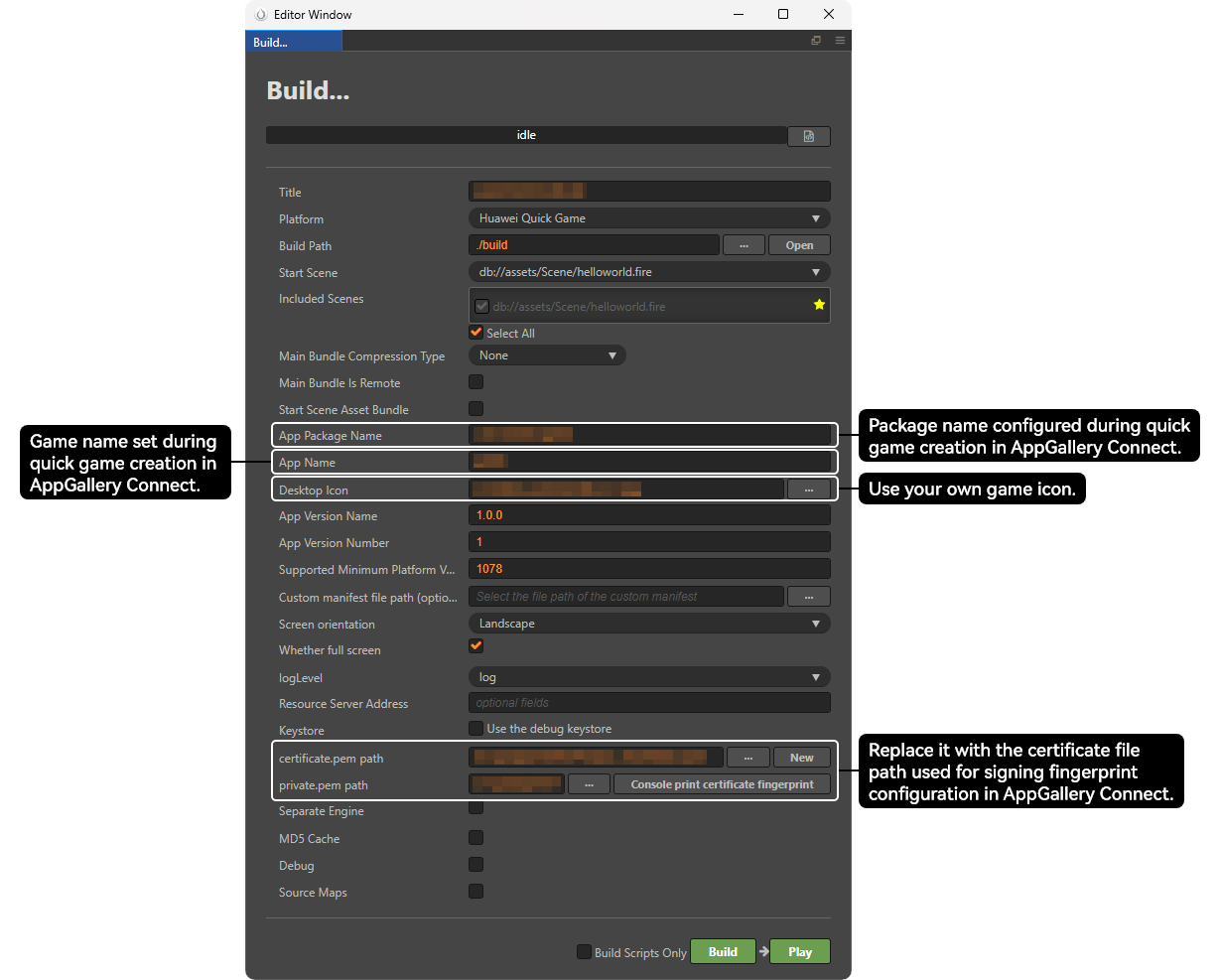
Choose Project > Build. In the Build window, enter the release information and click Build. The RPK file is generated in the \build\huawei\dist directory of the quick game project.
LayaAir of an Early Version

For LayaAir 2.8.0 or later, package your quick game by referring to Huawei Quick Game Access and Release Debugging Guide.
- Download laya_project_demo.zip. It provides two methods for packaging your game into an RPK file.

If Node.js is not installed or the Node.js version is earlier than 6, visit the Node.js official website to download and install it.
- Method 1: Use Node.js commands. Run the following command in the CLI.
// node {signing tool path} {signature directory} {target directory} {package name} {private key} {certificate}
node .\signtool\package\index.js .\web .\dist com.demo .\release\private.pem .\release\certificate.pem
- Method 2: Use the buildrpk.bat script.
- Copy the generated signature file to the release directory generated by Laya.
- Copy the buildrpk.bat script and the signtool directory in laya_project_demo to the release directory released by LayaAir.
- Double-click the buildrpk.bat script. The RPK package is generated in the dist directory.
- Method 1: Use Node.js commands. Run the following command in the CLI.
Egret of an Early Version

If your EgretLauncher is 1.2.1 or later and the engine version is 5.3.9 or later, package your quick game by referring to the packaging guide.
- Download egret_project_demo.zip. It provides two methods for packaging your game into an RPK file.

If Node.js is not installed or the Node.js version is earlier than 6, visit the Node.js official website to download and install it.
- Method 1: Use Node.js commands. Run the following command in the CLI. The signtool directory can be obtained from egret_project_demo.
// node {signing tool path} {signature directory} {target directory} {package name} {private key} {certificate}
node .\signtool\package\index.js .\build .\dist com.demo .\release\private.pem .\release\certificate.pem
- Method 2: Use the buildrpk.bat script.
- Copy the release directory, signtool directory, and buildrpk.bat script in the bin-release\web directory of the local egret_project_demo to the bin-release\web directory of the current Egret project. The three files are at the same level as the build directory.

The save paths of the release directory, signtool directory, and buildrpk.bat script in the current project must be the same as those in local egret_project_demo.
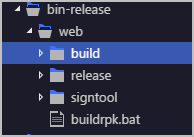
- Double-click the buildrpk.bat script. The RPK package is generated in the dist directory.
- Copy the release directory, signtool directory, and buildrpk.bat script in the bin-release\web directory of the local egret_project_demo to the bin-release\web directory of the current Egret project. The three files are at the same level as the build directory.
- Method 1: Use Node.js commands. Run the following command in the CLI. The signtool directory can be obtained from egret_project_demo.