Overview
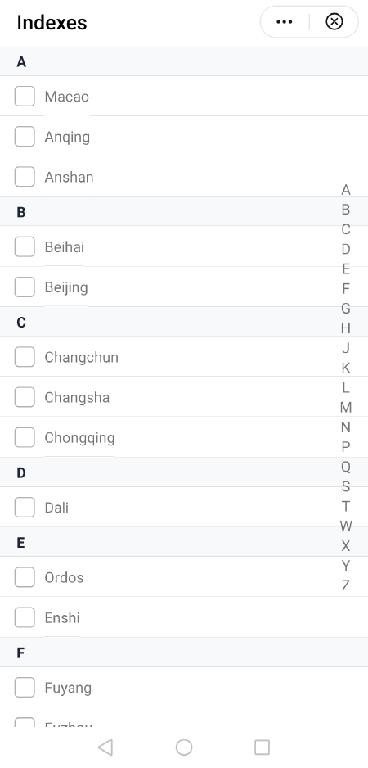
The indexes element is used for displaying lists such as the address book and friend list. It has the following features:
- Both the index names and content can be displayed.
- Indexes can be displayed in check box can be provided for users.
- The navigation bar on the right displays the index names. The users can tap an index name to go to the corresponding position.
- You can customize events that can be triggered, for example, selecting the check box, tapping or long pressing the text.
This element consists of two parts: a navigation bar on the right and a scrollable list that is formed by the index names and index content. You can specify the data parameter to implement the features above. Parameters of data are as follows:
data: [
  {
    index: 'A',
    child: [
      {
        text: 'Macao',
        uri: 'https://www.huawei.com'
      }
    ]
  },
  {
    index: 'B',
    child: [
      {
        text: 'Beihai',
        uri: 'https://www.huawei.com'
      },
      {
        text: 'Beijing',
        uri: 'https://www.huawei.com'
      }
    ]
  },
]
The following figure shows the layout.
The sample code for the layout is as follows:
<template>
  <indexes data="{{data}}" show-select="{{true}}" @handlecheck="handlecheck" @handleclick="handleclick" @handlelongpress="handleLongpress"></indexes>
</template> [h2]Customizing the Subelements
- Design the layout.
The indexes UI is universal, but the content layout is not. During the designing, the content layout cannot be directly fixed. Otherwise, once the UI of the content part changes, the subelements have to be modified, which violates the Open-Closed Principle in the code design.
Therefore, multiple style attributes are opened in indexes.ux for developers to customize the style.
<template> <div class="indexes"> <!-- Navigation bar on the right, which is used to display index names.--> <div style="{{indexScrollStyle}}}" class="indexes-scroll"> <block for="{{compIndexs}}"> <div class="indexes-scroll-item" onclick="handleScroll($idx)"> <text>{{ $item }}</text> </div> </block> </div> <!-- Use the list element to display the list in the indexes element and cyclically create list-item based on the data passed to data. Each list-item should contain the name and all content of an index name. --> <list id="indexes"> <block for="{{data}}"> <list-item type="indexes{{$item.index}}" class="indexes-group"> <!-- Display the index name.--> <text class="indexes-group-index {{indexColor}} {{indexBgColor}}">{{ $item.index }}</text> <div class="indexes-group-child"> <block for="{{$item.child}}"> <div class="indexes-group-child-all" onlongpress="handleLongPress($item.text)"> <!-- Display the check box and index content. --> <input show="{{ this.showSelect }}" type="checkbox" style="{{checkboxStyle}}" onchange="handleCheck($item.text)" /> <text class="{{this.showSelect?'indexes-group-child-textselect':'indexes-group-child-textnoselect'}}" onclick="handleClick($item.text,$item.uri)">{{ $item.text }}</text> </div> </block> </div> </list-item> </block> </list> </div> </template> - Customize the attributes and supported events.Supported attributes
Attribute
Type
Default Value
Description
data
Array
-
Index data.
show-select
Boolean
false
Indicates whether to display the check box.
Parameters of data
Attribute
Type
Example
Description
index
String
A
Index name.
child
Array
-
Index content.
Attributes of child
Attribute
Type
Example
Description
text
String
Dali
Text of the index content.
uri
String
https://www.huawei.com
Redirection link attached to the text.
Supported event
Event
Parameter
Description
handlecheck
evt
The check box is selected.
handleclick
evt
The text is tapped.
handlelongpress
evt
The text is long pressed.
[h2]Implementing Data Communication Between the Parent Element and Subelements
- Define the parameters in props and pass the values when the parent element references the subelements. Call this.xxx in the subelements to obtain the values for further use.
props: { data: {}, indexColor: { default: 'title' }, indexBgColor: { default: 'bg-light' }, showSelect: { default: false }, }, - Create and bind the customized events in the parent element.
<indexes data="{{data}}" show-select="{{true}}" @handlecheck="handlecheck" @handleclick="handleclick" @handlelongpress="handleLongpress"></indexes>// Create the check box selection event. The evt parameter contains the selected text and selecting status. handlecheck: function (evt) { console.log("handlecheck evt.detail : " + JSON.stringify(evt.detail)); if (evt.detail.checked) { prompt.showToast({ message: evt.detail.text +'is selected.', duration: 500, gravity: 'center' }) } else { prompt.showToast({ message: evt.detail.text + ' is deselected.', duration: 500, gravity: 'center' }) } }, // Create the text tapping event. The evt parameter contains the text and URI that are tapped. handleclick(evt) { console.log("handleclick evt.detail : " + JSON.stringify(evt.detail)); prompt.showToast({ message: evt.detail.text + ' is tapped.', duration: 500, gravity: 'center' }) if (evt.detail.uri) { router.push({ uri: evt.detail.uri }); } }, // Create the text long-press event to delete the items. handleLongpress: function (evt) { console.log("handleLongPress evt.detail : " + JSON.stringify(evt.detail)); } - Call this.$emit in the subelements to trigger the customized events in the parent element.
handleCheck(text, evt) {
  console.log("checked: " + text + '; evt: ' + JSON.stringify(evt));
  this.$emit('handlecheck', { text: text, checked: evt.checked })
},
handleClick(text, uri) {
  this.$emit('handleclick', { text: text, uri: uri })
},
handleLongPress(text) {
  this.$emit('handlelongpress', { text: text })
  var that = this;
  prompt.showDialog({
    message: `Are you sure you want to delete ${text}?`,
    buttons: [
      {
        text: 'OK',
        color: '#33dd44'
      },
      {
        text: 'Cancel',
        color: '#33dd44'
      }
    ],
    success: function (data) {
      console.log("handling callback", data);
      if (data.index === 0) {
        var result = []
        var index = []
        for (var i = 0; i < that.data.length; i++) {
          var child = []
          for (var j = 0; j < that.data[i].child.length; j++) {
            if (that.data[i].child[j].text !== text) {
              child.push(that.data[i].child[j])
            }
          }
          if (child.length) {
            console.log('index:' + that.data[i].index + "; child:" + JSON.stringify(child))
            index.push(that.data[i].index)
            result.push({ 'index': that.data[i].index, 'child': child })
          }
        }
        that.compIndexs = index
        that.data = result
      }
    },
    cancel: function () {
      console.log("cancel");
    }
  })
}
[h2]Computing the Style
Use the computed attribute to dynamically compute the parameters of props and return the style data to the element.
computed: {
  checkboxStyle() {
    var res = device.getInfoSync()
    console.log('checkboxStyle windowLogicWidth= ' + res.windowLogicWidth);
    var style = 'width:' + res.windowLogicWidth * 90 / 750 + 'px;'
    console.log("checkboxStyle: " + style)
    return style
  },
  indexScrollStyle() {
    var res = device.getInfoSync()
    console.log("indexScrollStyle  windowLogicWidth= " + res.windowLogicWidth)
    var left = res.windowLogicWidth * 680 / 750
    var right = res.windowLogicWidth * 20 / 750
    var indexScrollStyle = 'left:' + left + 'px;right:' + right + 'px;'
    console.log("indexScrollStyle: " + indexScrollStyle)
    return indexScrollStyle
  },
},
Sample Code
indexes.ux file:
<template>
  <div class="indexes">
    <!-- Navigation bar on the right, which is used to display index names.-->
    <div style="{{indexScrollStyle}}}" class="indexes-scroll">
      <block for="{{compIndexs}}">
        <div class="indexes-scroll-item" onclick="handleScroll($idx)">
          <text>{{ $item }}</text>
        </div>
      </block>
    </div>
    <!-- Use the list element to display the list in the indexes element and cyclically create list-item based on the data passed to data. Each list-item should contain the name and all content of an index name. -->
    <list id="indexes">
      <block for="{{data}}">
        <list-item type="indexes{{$item.index}}" class="indexes-group">
          <!-- Display the index name.-->
          <text class="indexes-group-index {{indexColor}} {{indexBgColor}}">{{ $item.index }}</text>
          <div class="indexes-group-child">
            <block for="{{$item.child}}">
              <div class="indexes-group-child-all" onlongpress="handleLongPress($item.text)">
                <!-- Display the check box and index content. -->
                <input show="{{ this.showSelect }}" type="checkbox" style="{{checkboxStyle}}" onchange="handleCheck($item.text)" />
                <text class="{{this.showSelect?'indexes-group-child-textselect':'indexes-group-child-textnoselect'}}" onclick="handleClick($item.text,$item.uri)">{{ $item.text }}</text>
              </div>
            </block>
          </div>
        </list-item>
      </block>
    </list>
  </div>
</template>

<style lang="less">
  @import "../Common/color.less";
  @import "../Common/bg-color.less";

  .indexes {
    width: 100%;
    &-group {
      flex-direction: column;
      &-index {
        padding-left: 33px;
        font-weight: bold;
        line-height: @font-size-base * 1.8;
        border-color: #cccccc;
        border-bottom-width: 0.5px;
      }
      &-child {
        flex-direction: column;
        &-all {
          background-color: #ffffff;
          border-color: #cccccc;
          border-bottom-width: 0.5px;
        }
        &-textselect {
          background-color: #ffffff;
          line-height: @font-size-base * 2.5;
          border-color: #cccccc;
          border-bottom-width: 0.5px;
        }
        &-textnoselect {
          margin-left: 33px;
          background-color: #ffffff;
          line-height: @font-size-base * 2.5;
          border-color: #cccccc;
          border-bottom-width: 0.5px;
        }
      }
    }
    &-scroll {
      position: fixed;

      width: 50px;
      height: 100%;
      align-items: center;
      justify-content: center;
      flex-direction: column;
      &-item {
        width: 100%;
        height: 40px;
        align-items: center;
        justify-content: center;
      }
    }
  }
</style>

<script>
  import device from '@system.device';
  import prompt from '@system.prompt'
  export default {
    props: {
      data: {},
      indexColor: {
        default: 'title'
      },
      indexBgColor: {
        default: 'bg-light'
      },
      showSelect: {
        default: false
      },
    },
    data: {
      compIndexs: []
    },
    computed: {
      checkboxStyle() {
        var res = device.getInfoSync()
        console.log('checkboxStyle windowLogicWidth= ' + res.windowLogicWidth);
        var style = 'width:' + res.windowLogicWidth * 90 / 750 + 'px;'
        console.log("checkboxStyle: " + style)
        return style
      },
      indexScrollStyle() {
        var res = device.getInfoSync()
        console.log("indexScrollStyle  windowLogicWidth= " + res.windowLogicWidth)
        var left = res.windowLogicWidth * 680 / 750
        var right = res.windowLogicWidth * 20 / 750
        var indexScrollStyle = 'left:' + left + 'px;right:' + right + 'px;'
        console.log("indexScrollStyle: " + indexScrollStyle)
        return indexScrollStyle
      },
    },
    onInit() {
      var arr = []
      for (var i = 0; i < this.data.length; i++) {
        arr.push(this.data[i].index)
      }
      this.compIndexs = arr
    },
    // Tap the content of the navigation bar on the right to go to the specified location.
    handleScroll(index) {
      this.$element('indexes').scrollTo({ index: index, smooth: true })
    },

    handleCheck(text, evt) {
      console.log("checked: " + text + '; evt: ' + JSON.stringify(evt));
      this.$emit('handlecheck', { text: text, checked: evt.checked })
    },
    handleClick(text, uri) {
      this.$emit('handleclick', { text: text, uri: uri })
    },
    handleLongPress(text) {
      this.$emit('handlelongpress', { text: text })
      var that = this;
      prompt.showDialog({
        message: `Are you sure you want to delete ${text}?`,
        buttons: [
          {
            text: 'OK',
            color: '#33dd44'
          },
          {
            text: 'Cancel',
            color: '#33dd44'
          }
        ],
        success: function (data) {
          console.log("handling callback", data);
          if (data.index === 0) {
            var result = []
            var index = []
            for (var i = 0; i < that.data.length; i++) {
              var child = []
              for (var j = 0; j < that.data[i].child.length; j++) {
                if (that.data[i].child[j].text !== text) {
                  child.push(that.data[i].child[j])
                }
              }
              if (child.length) {
                console.log('index:' + that.data[i].index + "; child:" + JSON.stringify(child))
                index.push(that.data[i].index)
                result.push({ 'index': that.data[i].index, 'child': child })
              }
            }
            that.compIndexs = index
            that.data = result
          }
        },
        cancel: function () {
          console.log("cancel");
        }
      })
    }
  }
</script>
hello.ux file:
<import name="indexes" src="../Index/indexes.ux"></import>
<template>
  <indexes data="{{data}}" show-select="{{true}}" @handlecheck="handlecheck" @handleclick="handleclick" @handlelongpress="handleLongpress"></indexes>
</template>

<script>
  import prompt from '@system.prompt'
  import router from '@system.router';
  export default {
    private: {
      data: [
        {
          index: 'A',
          child: [
            {
              text: 'Macao',
              uri: 'https://www.huawei.com'
            },
            {
              text: 'Anqing',
              uri: 'https://www.huawei.com'
            },
            {
              text: 'Anshan',
              uri: 'https://www.huawei.com'
            }
          ]
        },
        {
          index: 'B',
          child: [
            {
              text: 'Beihai',
              uri: 'https://www.huawei.com'
            },
            {
              text: 'Beijing',
              uri: 'https://www.huawei.com'
            }
          ]
        },
        {
          index: 'C',
          child: [
            {
              text: 'Changchun',
              uri: 'https://www.huawei.com'
            },
            {
              text: 'Changsha',
              uri: 'https://www.huawei.com'
            },
            {
              text: 'Chongqing',
              uri: 'https://www.huawei.com'
            }
          ]
        },
        {
          index: 'D',
          child: [
            {
              text: 'Dali',
              uri: 'https://www.huawei.com'
            }
          ]
        },
        {
          index: 'E',
          child: [
            {
              text: 'Ordos',
              uri: 'https://www.huawei.com'
            },
            {
              text: 'Enshi',
              uri: 'https://www.huawei.com'
            }
          ]
        },
        {
          index: 'F',
          child: [
            {
              text: 'Fuyang',
              uri: 'https://www.huawei.com'
            },
            {
              text: 'Fuzhou',
              uri: 'https://www.huawei.com'
            },
            {
              text: 'Foshan',
              uri: 'https://www.huawei.com'
            }
          ]
        },
        {
          index: 'G',
          child: [
            {
              text: 'Guangzhou',
              uri: 'https://www.huawei.com'
            },
            {
              text: 'Guiyang',
              uri: 'https://www.huawei.com'
            },
            {
              text: 'Guilin',
              uri: 'https://www.huawei.com'
            }
          ]
        },
        {
          index: 'H',
          child: [
            {
              text: 'Harbin',
              uri: 'https://www.huawei.com'
            },
            {
              text: 'Haikou',
              uri: 'https://www.huawei.com'
            }
          ]
        },
        {
          index: 'J',
          child: [
            {
              text: 'Jinan',
              uri: 'https://www.huawei.com'
            },
            {
              text: 'Jing Gangshan',
              uri: 'https://www.huawei.com'
            },
            {
              text: 'Jiuzhaigou',
              uri: 'https://www.huawei.com'
            }
          ]
        },
        {
          index: 'K',
          child: [
            {
              text: 'Kangding',
              uri: 'https://www.huawei.com'
            },
            {
              text: 'Kunming',
              uri: 'https://www.huawei.com'
            }
          ]
        },
        {
          index: 'L',
          child: [
            {
              text: 'Lhasa',
              uri: 'https://www.huawei.com'
            },
            {
              text: 'Lijiang',
              uri: 'https://www.huawei.com'
            }
          ]
        },
        {
          index: 'M',
          child: [
            {
              text: 'Mudanjiang',
              uri: 'https://www.huawei.com'
            }
          ]
        },
        {
          index: 'N',
          child: [
            {
              text: 'Nanchang',
              uri: 'https://www.huawei.com'
            },
            {
              text: 'Nanjing',
              uri: 'https://www.huawei.com'
            },
            {
              text: 'Ningbo',
              uri: 'https://www.huawei.com'
            }
          ]
        },
        {
          index: 'P',
          child: [
            {
              text: 'Penghu Islands',
              uri: 'https://www.huawei.com'
            }
          ]
        },
        {
          index: 'Q',
          child: [
            {
              text: 'Qingdao',
              uri: 'https://www.huawei.com'
            },
            {
              text: 'Quanzhou',
              uri: 'https://www.huawei.com'
            }
          ]
        },
        {
          index: 'S',
          child: [
            {
              text: 'Sanya',
              uri: 'https://www.huawei.com'
            },
            {
              text: 'Shanghai',
              uri: 'https://www.huawei.com'
            },
            {
              text: 'Shenzhen',
              uri: 'https://www.huawei.com'
            }
          ]
        },
        {
          index: 'T',
          child: [
            {
              text: 'Taizhou',
              uri: 'https://www.huawei.com'
            },
            {
              text: 'Tangshan',
              uri: 'https://www.huawei.com'
            }
          ]
        },
        {
          index: 'W',
          child: [
            {
              text: 'Wuhan',
              uri: 'https://www.huawei.com'
            },
            {
              text: 'Mount Wuyi',
              uri: 'https://www.huawei.com'
            },
            {
              text: 'Wuxi',
              uri: 'https://www.huawei.com'
            }
          ]
        },
        {
          index: 'X',
          child: [
            {
              text: 'Xuzhou',
              uri: 'https://www.huawei.com'
            },
            {
              text: 'Xiamen',
              uri: 'https://www.huawei.com'
            },
            {
              text: 'Hong Kong',
              uri: 'https://www.huawei.com'
            }
          ]
        },
        {
          index: 'Y',
          child: [
            {
              text: 'Yichun',
              uri: 'https://www.huawei.com'
            },
            {
              text: 'Yangzhou',
              uri: 'https://www.huawei.com'
            },
            {
              text: 'Yueyang',
              uri: 'https://www.huawei.com'
            }
          ]
        },
        {
          index: 'Z',
          child: [
            {
              text: 'Zhanjiang',
              uri: 'https://www.huawei.com'
            },
            {
              text: 'Zhangjiajie',
              uri: 'https://www.huawei.com'
            }
          ]
        }
      ]
    },
    onInit() {
    },
    // Create the check box selection event. The evt parameter contains the selected text and selection status.
    handlecheck: function (evt) {
      console.log("handlecheck evt.detail : " + JSON.stringify(evt.detail));
      if (evt.detail.checked) {
        prompt.showToast({
          message: evt.detail.text +'is selected.',
          duration: 500,
          gravity: 'center'
        })
      }
      else {
        prompt.showToast({
          message: evt.detail.text + ' is deselected.',
          duration: 500,
          gravity: 'center'
        })
      }
    },
    // Create the text tapping event. The evt parameter contains the text and URI that are tapped.
    handleclick(evt) {
      console.log("handleclick evt.detail : " + JSON.stringify(evt.detail));
      prompt.showToast({
          message: evt.detail.text + ' is tapped.',
        duration: 500,
        gravity: 'center'
      })
      if (evt.detail.uri) {
        router.push({
          uri: evt.detail.uri
        });
      }
    },
    // Create the text long-press event to delete the items.
    handleLongpress: function (evt) {
      console.log("handleLongPress evt.detail : " + JSON.stringify(evt.detail));
    }
  }
</script>