Overview
The dateformat element is used to format and display dates or time in a locale-sensitive manner. It has the following features:
- You can use it to display dates in the default format.
- You can set a threshold to display dates in the customized format.
The following figure shows the effect.
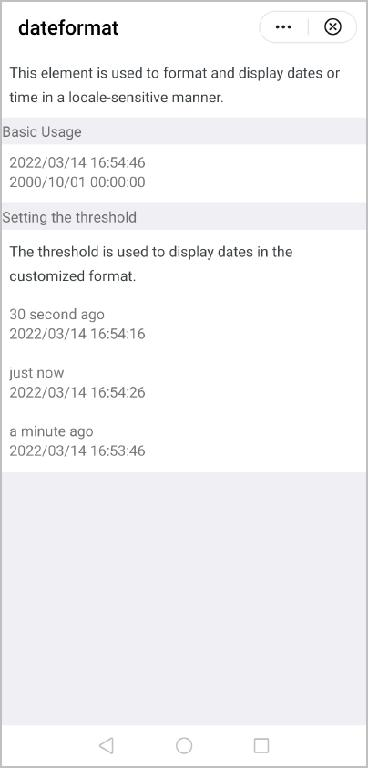
The basic layout code is as follows:
<text>Basic Usage</text>
<div class="example-body" >
  <dateformat date="{{now}}" ></dateformat>
  <dateformat date="2000/10/01 12:30:30"></dateformat>
</div> [h2]Customizing the Subelements
- Design the layout.
The dateformat element consists of the text element.
<template> <text>{{dateShow}}</text> </template> - Customize the attributes and supported events.Supported attributes
Attribute
Type
Default Value
Description
date
Object | String | Number
Date.now()
Date object, date string, or timestamp to be formatted.
threshold
Array
[0,0]
Threshold used to convert dates or time in the customized format.
NOTE:- If the default value is used, dates are not displayed in the customized format.
- The absolute value of the difference between the set time and current time can be recorded as a delta, in milliseconds. When threshold is set to [60000, 3600000], for example:
- If the delta is less than 60000, the set time is displayed with just now or soon (both are customized strings in this document's example).
- If the delta is greater than or equal to 60000 but less than 3600000, the set time is displayed with minutes ago or minutes later (both are customized strings in this document's example).
- If the delta is greater than or equal to 3600000, dates are displayed in the format that you set to format.
- If you do not want to display just now or soon, set threshold to [0,3600000].
format
String
yyyy/MM/dd hh:mm:ss
Date format.
locale
Object
en
Language used for formatting.
[h2]Implementing Data Communication Between the Parent Element and Subelements
- Define parameters in props of the subelements.
props: { date: { type: [Object, String, Number], default() { return Date.now() } }, locale: { type: String, default: 'en', }, threshold: { type: Array, default() { return [0, 0] } }, format: { type: String, default: 'yyyy/MM/dd hh:mm:ss' }, }, - Pass the values from the parent element to the subelements. If the data type is Boolean, you cannot define it in the element directly. Define it in data instead.
<dateformat date="{{now}}" ></dateformat>data() { return { now: Date.now() } },
[h2]Computing Data and Style
Use the computed attribute to dynamically compute the parameters of props and return the data and style to the element.
computed: {
dateShow() {
return friendlyDate(this.date, {
locale: this.locale,
threshold: this.threshold,
format: this.format
})
}
}, Note: friendlyDate() is an example function created in the dateformat.js file.
export function friendlyDate(time, {
locale = 'en',
threshold = [60000, 3600000],
format = 'yyyy/MM/dd hh:mm:ss'
}) Sample Code
dateformat.ux file:
<template>
<text>{{dateShow}}</text>
</template>
<script>
/**
* dateformat
* @description
* @tutorial https://ext.dcloud.net.cn/plugin?id=3279
* @property {Object|String|Number} date
* @property {String} locale
* @value en
* @property {Array} threshold
* @property {String} format
*/
import {
friendlyDate
} from './dateformat.js'
module.exports = {
props: {
date: {
type: [Object, String, Number],
default() {
return Date.now()
}
},
locale: {
type: String,
default: 'en',
},
threshold: {
type: Array,
default() {
return [0, 0]
}
},
format: {
type: String,
default: 'yyyy/MM/dd hh:mm:ss'
},
},
computed: {
dateShow() {
return friendlyDate(this.date, {
locale: this.locale,
threshold: this.threshold,
format: this.format
})
}
},
}
</script> dateformat.js file:
function pad(str, length = 2) {
str += ''
while (str.length < length) {
str = '0' + str
}
return str.slice(-length)
}
const parser = {
yyyy: (dateObj) => {
return pad(dateObj.year, 4)
},
yy: (dateObj) => {
return pad(dateObj.year)
},
MM: (dateObj) => {
return pad(dateObj.month)
},
M: (dateObj) => {
return dateObj.month
},
dd: (dateObj) => {
return pad(dateObj.day)
},
d: (dateObj) => {
return dateObj.day
},
hh: (dateObj) => {
return pad(dateObj.hour)
},
h: (dateObj) => {
return dateObj.hour
},
mm: (dateObj) => {
return pad(dateObj.minute)
},
m: (dateObj) => {
return dateObj.minute
},
ss: (dateObj) => {
return pad(dateObj.second)
},
s: (dateObj) => {
return dateObj.second
},
SSS: (dateObj) => {
return pad(dateObj.millisecond, 3)
},
S: (dateObj) => {
return dateObj.millisecond
},
}
function formatDate(date, format = 'yyyy/MM/dd hh:mm:ss') {
date = new Date(date)
const dateObj = {
year: date.getFullYear(),
month: date.getMonth() + 1,
day: date.getDate(),
hour: date.getHours(),
minute: date.getMinutes(),
second: date.getSeconds(),
millisecond: date.getMilliseconds()
}
const tokenRegExp = /yyyy|yy|MM|M|dd|d|hh|h|mm|m|ss|s|SSS|SS|S/
let flag = true
let result = format
while (flag) {
flag = false
result = result.replace(tokenRegExp, function (matched) {
flag = true
return parser[matched](dateObj)
})
}
return result
}
export function friendlyDate(time, {
locale = 'en',
threshold = [60000, 3600000],
format = 'yyyy/MM/dd hh:mm:ss'
}) {
if (time === '-') {
return time
}
if (!time && time !== 0) {
return ''
}
const localeText = {
en: {
year: 'year',
month: 'month',
day: 'day',
hour: 'hour',
minute: 'minute',
second: 'second',
ago: 'ago',
later: 'later',
justNow: 'just now',
soon: 'soon',
template: '{num} {unit} {suffix}'
}
}
const text = localeText[locale]
let date = new Date(time)
let ms = date.getTime() - Date.now()
let absMs = Math.abs(ms)
if (absMs < threshold[0]) {
return ms < 0 ? text.justNow : text.soon
}
if (absMs >= threshold[1]) {
return formatDate(date, format)
}
let num
let unit
let suffix = text.later
if (ms < 0) {
suffix = text.ago
ms = -ms
}
// Use Math.floor to obtain the largest integer that is less than or equal to the passed parameter.
const seconds = Math.floor((ms) / 1000)
const minutes = Math.floor(seconds / 60)
const hours = Math.floor(minutes / 60)
const days = Math.floor(hours / 24)
const months = Math.floor(days / 30)
const years = Math.floor(months / 12)
switch (true) {
case years > 0:
num = years
unit = text.year
break
case months > 0:
num = months
unit = text.month
break
case days > 0:
num = days
unit = text.day
break
case hours > 0:
num = hours
unit = text.hour
break
case minutes > 0:
num = minutes
unit = text.minute
break
default:
num = seconds
unit = text.second
break
}
if (locale === 'en') {
if (num === 1) {
num = 'a'
}
}
return text.template.replace(/{\s*num\s*}/g, num + '').replace(/{\s*unit\s*}/g, unit).replace(/{\s*suffix\s*}/g,
suffix)
} hello.ux file:
<import name="dateformat" src="../Dateformat/dateformat"></import>
<template>
<div class="container">
<text class="example-info">This element is used to format and display dates or time in a locale-sensitive manner.</text>
<text>Basic Usage</text>
<div class="example-body">
<dateformat date="{{now}}"></dateformat>
<dateformat date="2000/10/01"></dateformat>
</div>
<text>Setting the threshold</text>
<text class="example-info">The threshold is used to display dates in the customized format.</text>
<div class="example-body">
<dateformat date="{{now - 30000}}" threshold="{{[0,3600000]}}" locale="en"></dateformat>
<dateformat date="{{now - 30000}}" threshold="{{[0,0]}}"></dateformat>
</div>
<div class="example-body">
<dateformat date="{{now - 20000}}" threshold="{{[60000,3600000]}}" locale="en"></dateformat>
<dateformat date="{{now - 20000}}" threshold="{{[0,0]}}"></dateformat>
</div>
<div class="example-body">
<dateformat date="{{now - 60000}}" threshold="{{[60000,3600000]}}" locale="en"></dateformat>
<dateformat date="{{now - 60000}}" threshold="{{[0,0]}}"></dateformat>
</div>
</div>
</template>
<script>
export default {
data() {
  return {
    now: Date.now()
  }
},
}
</script>
<style>
.container {
flex-direction: column;
background-color: #efeff4;
}
text {
font-size: 30px;
line-height: 50px;
}
.example-info {
padding: 15px;
color: #3b4144;
background-color: #ffffff;
}
.example-body {
flex-direction: column;
padding: 15px;
background-color: #ffffff;
height: 120px;
}
</style>