We use essential cookies for the website to function, as well as analytics cookies for analyzing and creating statistics of the website performance. To agree to the use of analytics cookies, click "Accept All". You can manage your preferences at any time by clicking "Cookie Settings" on the footer. More Information.

Only Essential Cookies
Accept All
MaterialsConsole
Tools GuidesGraphics ProfilerGraphics Profiler InstructionsFrame Profiler UsageUI ElementsBuffer Viewer

Buffer Viewer

Buffer Viewer is a function based on Resource Inspector. This function allows you to view the vertex input data, all buffers, and the data of a texture, and set the buffer format.

Choose Window > Resource Inspector to open Resource Inspector. In Resource List on the right, select the corresponding Buffer, and then click View Contents. The data buffer view is displayed as follows.
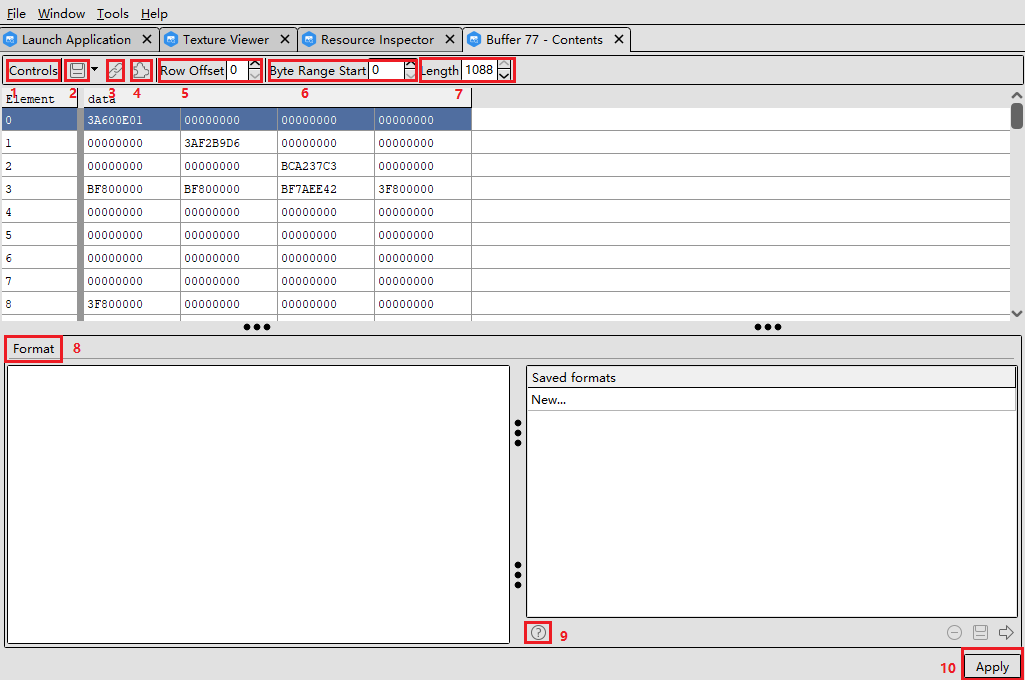
The numbers in the preceding figure indicate the following functions.

Expand

#

Description

1

Sets buffer viewing attributes.

2

Saves buffer data in the csv or bytes format.

3

Hyperlinks to the current buffer in the graphic rendering resource viewer.

4

Configures extended command. Currently, this function is not supported.

5

Sets the buffer offset rows.

6

Sets the buffer offset byte range.

7

Sets the buffer offset length.

8

Resets the buffer format.

9

Displays the information about how to reset the buffer format.

10

Applies the newly configured buffer format.

There are two categories of formats that can be reset.

  • You can set the HLSL types:
    • uint: unsigned 32-bit integer
    • bool: unsigned 32-bit integer (format for HLSL bools)
    • int: signed 32-bit integer
    • ushort: unsigned 16-bit integer
    • short: signed 16-bit integer
    • ubyte: unsigned 8-bit integer
    • byte: signed 8-bit integer
    • double: 64-bit floating point
    • float: 32-bit floating point
    • half: 16-bit floating point
  • You can set non-HLSL types to adapt to data in other formats:
    • unormb: 8-bit unsigned normalized value
    • unormh: 16-bit unsigned normalized value
    • unormf: 32-bit unsigned normalized value
    • snormb: 8-bit signed normalized value
    • snormh: 16-bit signed normalized value
    • snormf: 32-bit signed normalized value
    • uintten: 4-component unsigned integer format, packed as 10:10:10:2
    • unormten: 4-component unsigned normalized format, packed as 10:10:10:2
    • floateleven: 3-component floating point format, packed as 11:11:10
    • xint: hex-formatted 32-bit integer
    • xshort: hex-formatted 16-bit integer
    • xbyte: hex-formatted 8-bit integer