- HarmonyOS: Set adb to the environment variable Path, or specify a folder containing adb in the ADB path field in the Settings window.
- HarmonyOS NEXT: Set hdc to the environment variable Path, or specify a folder containing hdc in the HDC path field in the Settings window.

Only HarmonyOS NEXT 5.0.0.25 or later versions are supported.
For details about how to capture frames on non-rooted devices running HarmonyOS NEXT 6.0 or later, see section 4.6.2.2.
- For HarmonyOS NEXT devices, you need to perform the following operations to repack the HAP:
OpenGL ES applications:
Copy the libsquid.so file in the <installation_folder>/frame_profiler/plugins/ohos/arm64 directory to the libs/arm64-v8a folder of the HAP.
Vulkan applications:
- Copy the libsquid.so file in the <installation_folder>/frame_profiler/plugins/ohos/arm64 directory to the libs/arm64-v8a folder of the HAP.
- Copy the squid.json file in the <installation_folder>/frame_profiler/plugins/ohos/sdk directory to the src/main/resource/rawfile folder of the HAP.
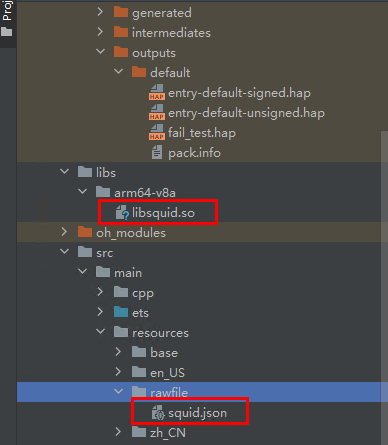
- Copy the JSON file to the sandbox path of the application through the JS layer, because the Vulkan-Loader module cannot directly read the raw file.
// In the Index.ets file:
import fs from '@ohos.file.fs';
uiContext = this.getUIContext();
// ...
aboutToAppear(): void {
    let path = this.uiContext?.getHostContext()?.filesDir;
    let buffer	= this.uiContext?.getHostContext()?.resourceManager.getRawFileContentSync('squid.json') ;
    let file = fs.openSync(path + '/squid.json', fs.OpenMode.READ_WRITE | fs.OpenMode.CREATE);
    fs.writeSync(file.fd, buffer?.buffer);
  }
// ...