


Intelligent Assistant
Chat with our virtual assistant to get answers promptly.
- compileSdkVersion 29
- buildToolsVersion '29.0.2'
- defaultConfig {
- minSdkVersion 19
- targetSdkVersion 29
- }
- implementation 'androidx.appcompat:appcompat:1.1.0'
- implementation 'androidx.recyclerview:recyclerview:1.1.0'
- public class CameraDemoActivity extends androidx.appcompat.app.AppCompatActivity
- implementation 'com.google.android.gms:play-services-base:17.1.0'
- implementation 'com.google.android.gms:play-services-basement:17.1.0'
- compileOptions {sourceCompatibility JavaVersion.VERSION_1_8 targetCompatibility JavaVersion.VERSION_1_8}
After the conversion is complete, case expressions must be constant expression is displayed for some statements selected using switch-case. The case in switch must be an exception expressed in a constant. This method needs to be converted to the if-else format to resolve the switch exception.
Original sample code:
- switch (reason) {
- // REASON_GESTURE: gesture
- case OnCameraMoveStartedListener.REASON_GESTURE:
- currPolylineOptions.color(Color.BLUE);
- reasonText = "GESTURE";
- break;
- //REASON_API_ANIMATION: API animation
- case OnCameraMoveStartedListener.REASON_API_ANIMATION:
- currPolylineOptions.color(Color.RED);
- reasonText = "API_ANIMATION";
- break;
- //REASON_DEVELOPER_ANIMATION: developer animation
- case OnCameraMoveStartedListener.REASON_DEVELOPER_ANIMATION:
- currPolylineOptions.color(Color.GREEN);
- reasonText = "DEVELOPER_ANIMATION";
- break;
- }
Modified sample code:
- if (OnCameraMoveStartedListener.getREASON_GESTURE() == reason) {
- this.currPolylineOptions.color(Color.BLUE);
- reasonText = "GESTURE";
- } else if (OnCameraMoveStartedListener.getREASON_API_ANIMATION() == reason) {
- this.currPolylineOptions.color(Color.RED);
- reasonText = "API_ANIMATION";
- } else if (OnCameraMoveStartedListener.getREASON_DEVELOPER_ANIMATION() == reason) {
- this.currPolylineOptions.color(Color.GREEN);
- reasonText = "DEVELOPER_ANIMATION";
- } else {
- reasonText = "UNKNOWN_REASON";
- }
After the Add HMS API conversion is complete, you can configure the ClassLoader (simple, only resource import and configuration file modification are required) or manually write code (complex, heavy manual conversion workload) to implement the compatibility of Google APIs and HMS for activity displayed in fragment.
Currently, the ClassLoader solution does not support the plug-in or hot fix framework in projects, and does not support ClassLoader customization. If your app has such requirements, manually write the code.
For more information about the ClassLoader solution, please refer to Basic Principles of the XClassLoader Solution.
Currently, the ClassLoader does not support Add HMS API conversion in Library mode. Select the App mode when using the tool for conversion.
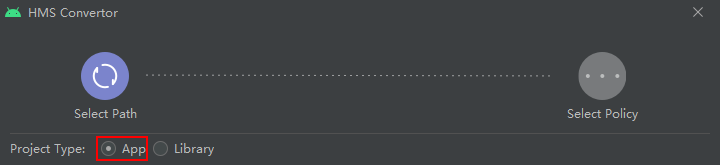
After automatic conversion, manually convert APIs in dummy state in all files through Conversion.
- include ':xmsadapter:xmsaux', 'xmsadapter:xmsaux:xg', 'xmsadapter:xmsaux:xapi'
- include ':xmsadapter:xmsaux', 'xmsadapter:xmsaux:xh', 'xmsadapter:xmsaux:xapi'
- include ':xmsadapter:xmsaux', 'xmsadapter:xmsaux:xg', 'xmsadapter:xmsaux:xh', 'xmsadapter:xmsaux:xapi'
For details about the flavor variants, please refer to Using Convertor to Generate Multiple Variant APKs.
- buildscript {
- dependencies {
- classpath 'com.android.tools.build:gradle:3.5.0'
- }
- }
- distributionUrl=https\://services.gradle.org/distributions/gradle-5.4.1-all.zip
- android.enableD8=false
- android.enableD8.desugaring=false
- public class MyApp extends Application {
- @Override
- public void onCreate() {
- super.onCreate();
- GlobalEnvSetting.init(this,null);
- XLoader.init(this);
- }
- }
- <application
- android:name=".MyApp"
- </application>
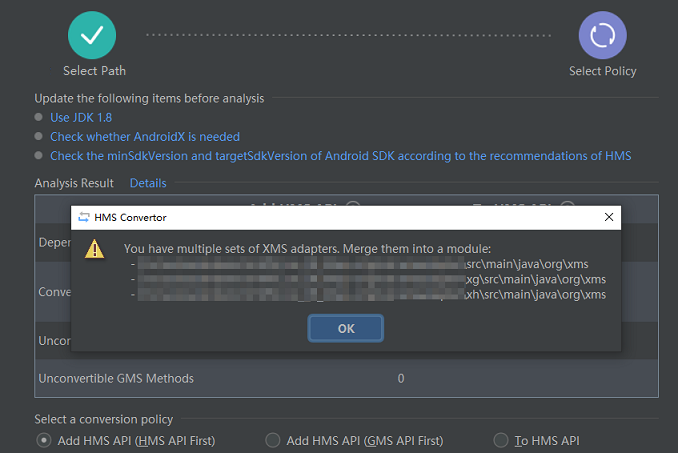
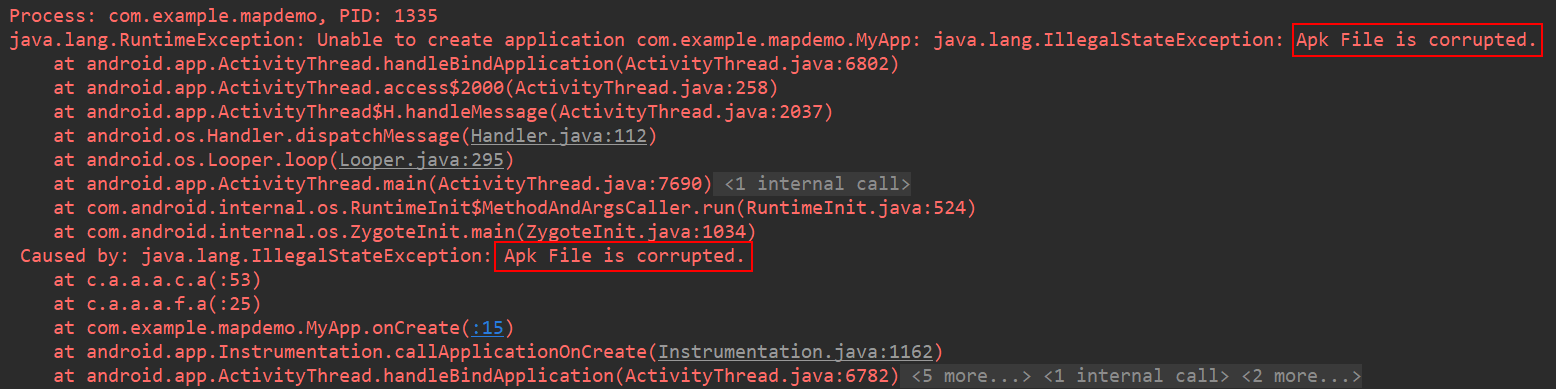
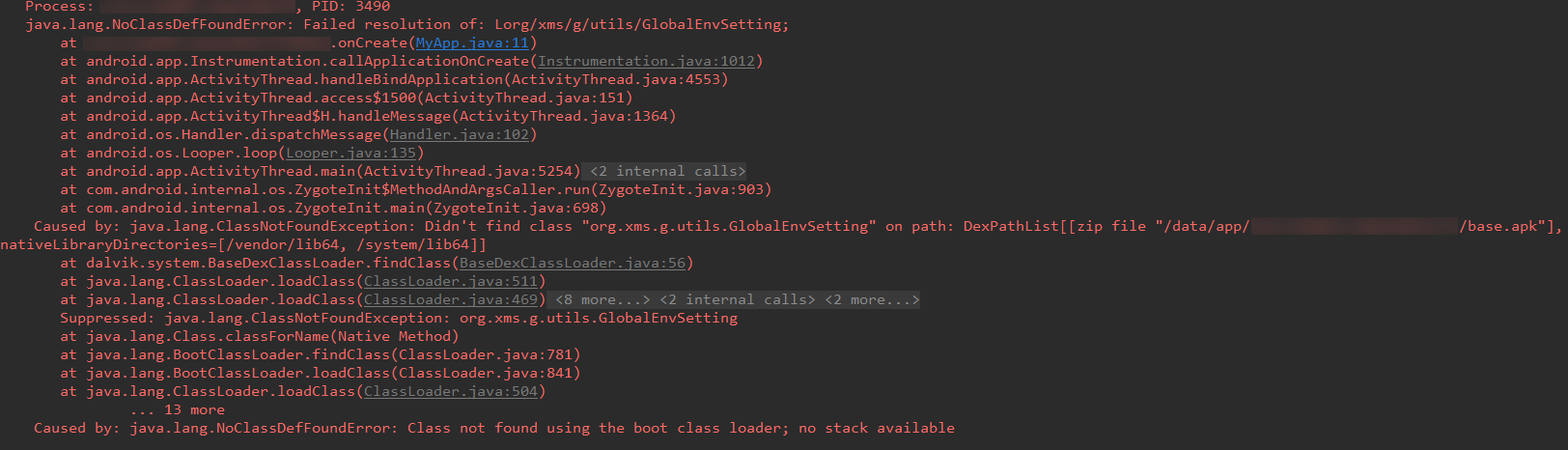
Add the following configuration to app/build.gradle:
- android {
- defaultConfig {
- multiDexEnabled false
- }
- }
In the Add HMS API scenario, Google APIs and HMS need to use independent layout resource files. The <fragment/>class paths in the resource files are different.
Reference for the fragment definition in the HMS layout resource file:
- <fragment
- android:id="@+id/map"
- android:layout_width="match_parent"
- android:layout_height="match_parent"
- class="com.huawei.hms.maps.SupportMapFragment" />
Reference for the fragment definition in the Google API layout resource file:
- <fragment
- android:id="@+id/map"
- android:layout_width="match_parent"
- android:layout_height="match_parent"
- class="com.google.android.gms.maps.SupportMapFragment" />

Each layout resource file must be in duplicate, one for HMS and the other for Google APIs. The files are used together with the code for compatible redirection.
If Fragment is used, you can use if-else in the onCreate() method of activity to make a copy of the code compatible with both HMS and Google APIs. The modification method is as follows:
- protected void onCreate(Bundle savedInstanceState) {
- super.onCreate(savedInstanceState);
- // Configure the GMS resource file.
- setContentView(R.layout.events_demo);
- mTapTextView = (TextView) findViewById(R.id.tap_text);
- mCameraTextView = (TextView) findViewById(R.id.camera_text);
- // Load SupportMapFragment in the onCreate() method of the Activity.
- SupportMapFragment mapFragment =
- (SupportMapFragment) getSupportFragmentManager().findFragmentById(R.id.map);
- // Call getMapAsync() to register a callback.
- mapFragment.getMapAsync(this);
- }
Modified sample code:
- protected void onCreate(Bundle savedInstanceState) {
- super.onCreate(savedInstanceState);
- // Create according to G or H based on the current type.
- if (org.xms.g.utils.GlobalEnvSetting.isHms()) {
- createAsH();
- } else {
- createAsG();
- }
- }
- /**
- * HMS creation process.
- */
- private void createAsH() {
- Log.d(TAG, "create as hms");
- // Set the HMS resource file.
- setContentView(R.layout.events_demo_hms);
- // Initialize the parameter.
- initMember();
- // Obtain the HMS fragment based on the ID.
- com.huawei.hms.maps.SupportMapFragment hMapFragment =
- (com.huawei.hms.maps.SupportMapFragment) this.getSupportFragmentManager().findFragmentById(R.id.map);
- // Load a map.
- hMapFragment.getMapAsync(this.getHInstanceOnMapReadyCallback());
- }
- /**
- * GMS creation process.
- */
- private void createAsG() {
- Log.d(TAG, "create as gms");
- // Configure the GMS resource file.
- setContentView(R.layout.events_demo);
- // Initialize the parameter.
- initMember();
- // Obtain the GMS fragment based on the ID.
- com.google.android.gms.maps.SupportMapFragment gMapFragment =
- (com.google.android.gms.maps.SupportMapFragment) this.getSupportFragmentManager()
- .findFragmentById(R.id.map);
- // Load a map.
- gMapFragment.getMapAsync(this.getGInstanceOnMapReadyCallback());
- }
- /**
- * Initialize member variables and extract them into independent methods.
- */
- private void initMember() {
- this.mTapTextView = (TextView) findViewById(R.id.tap_text);
- this.mCameraTextView = (TextView) findViewById(R.id.camera_text);
- }
After the conversion is complete, please refer to the following table if an exception occurs in the reference of constants. In Google Maps, constants are directly used. However, in the Add HMS API scenario, constants are used in Getter mode. For example:
For BitmapDescriptorFactory.HUE_ORANGE, the new method is to use BitmapDescriptorFactory.getHUE_ORANGE() in Getter mode.
Obtaining Google Maps Constants | Obtaining Add HMS API Constants |
|---|---|
import static com.google.android.gms.maps.GoogleMap.MAP_TYPE_HYBRID (directly used after reference) | ExtensionMap.getMAP_TYPE_NORMAL() |
BitmapDescriptorFactory.HUE_ORANGE | BitmapDescriptorFactory.getHUE_ORANGE() |
HuaweiMap.OnCameraMoveStartedListener.REASON_API_ANIMATION | HuaweiMap.OnCameraMoveStartedListener.getREASON_API_ANIMATION() |
Obtaining Google Maps Constants | Obtaining To HMS API Constants |
|---|---|
import static com.google.android.gms.maps.GoogleMap.MAP_TYPE_HYBRID (directly used after reference) | import static com.huawei.hms.maps.HuaweiMap.MAP_TYPE_HYBRID (directly used after reference) |
Some demos such as Marker implement the OnMapAndViewReadyListener.OnGlobalLayoutAndMapReadyListener API. The Fragment used supports conversion in the OnMapAndViewReadyListener class in the Add HMS API scenario. The modification is as follows.
- public OnMapAndViewReadyListener(
- Fragment mapFragment, OnGlobalLayoutAndMapReadyListener devCallback) {}
- public class OnMapAndViewReadyListener implements OnGlobalLayoutListener, OnMapReadyCallback {
- /**
- * A listener that needs to wait for both the GoogleMap and the View to be initialized.
- */
- public interface OnGlobalLayoutAndMapReadyListener {
- void onMapReady(ExtensionMap googleMap);
- }
- private final View mapView;
- private final OnGlobalLayoutAndMapReadyListener devCallback;
- private boolean isViewReady;
- private boolean isMapReady;
- private ExtensionMap googleMap;
- public OnMapAndViewReadyListener(
- Fragment mapFragment, OnGlobalLayoutAndMapReadyListener devCallback) {
- // HMS processing.
- if (org.xms.g.utils.GlobalEnvSetting.isHms()) {
- com.huawei.hms.maps.SupportMapFragment hMapFragment = (com.huawei.hms.maps.SupportMapFragment) mapFragment;
- mapView = mapFragment.getView();
- this.devCallback = devCallback;
- registerListeners();
- // GoogleMap. Note if the GoogleMap is already ready it will still fire the callback later.
- hMapFragment.getMapAsync(this.getHInstanceOnMapReadyCallback());
- } else {
- // GMS processing.
- com.google.android.gms.maps.SupportMapFragment gMapFragment = (com.google.android.gms.maps.SupportMapFragment) mapFragment;
- mapView = mapFragment.getView();
- this.devCallback = devCallback;
- registerListeners();
- // GoogleMap. Note if the GoogleMap is already ready it will still fire the callback later.
- gMapFragment.getMapAsync(this.getGInstanceOnMapReadyCallback());
- }
- }
- private void registerListeners() {
- isViewReady = false;
- isMapReady = false;
- googleMap = null;
- // View layout.
- if ((mapView.getWidth() != 0) && (mapView.getHeight() != 0)) {
- // View has already completed layout.
- isViewReady = true;
- } else {
- // Map has not undergone layout, register a View observer.
- mapView.getViewTreeObserver().addOnGlobalLayoutListener(this);
- }
- }
- @Override
- public void onMapReady(ExtensionMap googleMap) {
- // NOTE: The GoogleMap API specifies the listener is removed just prior to invocation.
- this.googleMap = googleMap;
- isMapReady = true;
- fireCallbackIfReady();
- }
- @SuppressWarnings("deprecation") // We use the new method when supported
- @SuppressLint("NewApi") // We check which build version we are using.
- @Override
- public void onGlobalLayout() {
- // Remove our listener.
- if (Build.VERSION.SDK_INT < Build.VERSION_CODES.JELLY_BEAN) {
- mapView.getViewTreeObserver().removeGlobalOnLayoutListener(this);
- } else {
- mapView.getViewTreeObserver().removeOnGlobalLayoutListener(this);
- }
- isViewReady = true;
- fireCallbackIfReady();
- }
- private void fireCallbackIfReady() {
- if (isViewReady && isMapReady) {
- devCallback.onMapReady(googleMap);
- }
- }
- }
- @Override
- protected void onCreate(Bundle savedInstanceState) {
- super.onCreate(savedInstanceState);
- // Create according to G or H based on the current type.
- if (org.xms.g.utils.GlobalEnvSetting.isHms()) {
- createAsH();
- } else {
- createAsG();
- }
- }
- private void createAsH() {
- Log.d(TAG, "create as hms");
- setContentView(R.layout.marker_demo_hms);
- // Initialize the parameter.
- initMember();
- // Obtain the HMS fragment based on the ID.
- com.huawei.hms.maps.SupportMapFragment hMapFragment = (com.huawei.hms.maps.SupportMapFragment) getSupportFragmentManager().findFragmentById(R.id.map);
- // Create an OnMapAndViewReadyListener listener.
- new OnMapAndViewReadyListener(hMapFragment, this);
- }
- private void createAsG() {
- Log.d(TAG, "create as gms");
- setContentView(R.layout.marker_demo);
- initMember();
- com.google.android.gms.maps.SupportMapFragment hMapFragment = (com.google.android.gms.maps.SupportMapFragment) getSupportFragmentManager().findFragmentById(R.id.map);
- new OnMapAndViewReadyListener(hMapFragment, this);
- }
- private void initMember() {
- this.mTopText = (TextView) findViewById(R.id.top_text);
- this.mRotationBar = (SeekBar) findViewById(R.id.rotationSeekBar);
- this.mRotationBar.setMax(360);
- this.mRotationBar.setOnSeekBarChangeListener(this);
- this.mFlatBox = (CheckBox) findViewById(R.id.flat);
- this.mOptions = (RadioGroup) findViewById(R.id.custom_info_window_options);
- this.mOptions.setOnCheckedChangeListener(new OnCheckedChangeListener() {
- @Override
- public void onCheckedChanged(RadioGroup group, int checkedId) {
- if (MarkerDemoActivity.this.mLastSelectedMarker != null && MarkerDemoActivity.this.mLastSelectedMarker.isInfoWindowShown()) {
- // Refresh the info window when the info window's content has changed.
- MarkerDemoActivity.this.mLastSelectedMarker.showInfoWindow();
- }
- }
- });
- }
In the Add HMS API scenario, the call method of fragment (please refer to fragment) is slightly different from that of streeViewPanoramaFragment. However, the basic approach is to perform if-else processing based on the system type. The reference is as follows.
Sample code of modifying onCreate in activity
Original sample code:
- protected void onCreate(final Bundle savedInstanceState) {
- super.onCreate(savedInstanceState);
- setContentView(R.layout.street_view_panorama_basic_demo);
- SupportStreetViewPanoramaFragment streetViewPanoramaFragment =
- (SupportStreetViewPanoramaFragment)
- getSupportFragmentManager().findFragmentById(R.id.streetviewpanorama);
- // Set a callback object, which will be triggered when the GoogleMap instance is ready.
- streetViewPanoramaFragment.getStreetViewPanoramaAsync(
- new OnStreetViewPanoramaReadyCallback() {
- // Called when the streetscape panorama is ready.
- @Override
- public void onStreetViewPanoramaReady(StreetViewPanorama panorama) {
- // Only set the panorama to SYDNEY on startup (when no panoramas have been
- // loaded which is when the savedInstanceState is null).
- if (savedInstanceState == null) {
- panorama.setPosition(SYDNEY);
- }
- }
- });
- }
- @Override
- protected void onCreate(final Bundle savedInstanceState) {
- super.onCreate(savedInstanceState);
- if (org.xms.g.utils.GlobalEnvSetting.isHms()) {
- createAsH(savedInstanceState);
- } else {
- createAsG(savedInstanceState);
- }
- }
- private void createAsH(final Bundle savedInstanceState) {
- Log.d(TAG, "create as hms");
- setContentView(R.layout.street_view_panorama_basic_demo_hms);
- initMember();
- com.huawei.hms.maps.SupportStreetViewPanoramaFragment hStreetViewPanoramaFragment =
- (com.huawei.hms.maps.SupportStreetViewPanoramaFragment) getSupportFragmentManager().findFragmentById(R.id.streetviewpanorama);
- hStreetViewPanoramaFragment.getStreetViewPanoramaAsync(panorama -> {
- // Only set the panorama to SYDNEY on startup (when no panoramas have been
- // loaded which is when the savedInstanceState is null).
- // Convert to org.xms for HMS.
- org.xms.g.maps.StreetViewPanorama xmsStreetViewPanorama =
- new org.xms.g.maps.StreetViewPanorama(null, panorama);
- if (savedInstanceState == null) {
- xmsStreetViewPanorama.setPosition(SYDNEY);
- }
- });
- }
- private void createAsG(final Bundle savedInstanceState) {
- Log.d(TAG, "create as gms");
- setContentView(R.layout.street_view_panorama_basic_demo);
- initMember();
- com.google.android.gms.maps.SupportStreetViewPanoramaFragment gStreetViewPanoramaFragment =
- (com.google.android.gms.maps.SupportStreetViewPanoramaFragment) getSupportFragmentManager().findFragmentById(R.id.streetviewpanorama);
- gStreetViewPanoramaFragment.getStreetViewPanoramaAsync(panorama -> {
- // Only set the panorama to SYDNEY on startup (when no panoramas have been
- // loaded which is when the savedInstanceState is null).
- // Convert HMS into org.xms.
- org.xms.g.maps.StreetViewPanorama xmsStreetViewPanorama =
- new org.xms.g.maps.StreetViewPanorama(panorama, null);
- if (savedInstanceState == null) {
- xmsStreetViewPanorama.setPosition(SYDNEY);
- }
- });
- }
- private void initMember() {
- }
For details about how to call streeViewPanoramaFragment, please refer to the sample code to make adjustment.
If Location Kit APIs are used in the To HMS API scenario, the Location dependency needs to be added. For details about the version number in ${version}, please refer to Version Change History of Location Kit.
- implementation 'com.huawei.hms:location:${version}'
To use the Location function, ensure that you have obtained the location permission.
Sample code for obtaining the location permission:
- /**
- * only have permission of location, location function is enable
- **/
- if(enableMyLocation()){
- getMyLocation();
- setOnMyLocationChangeListener();
- }
- /**
- * Request code for location permission request.
- *
- * @see #onRequestPermissionsResult(int, String[], int[])
- */
- private static final int LOCATION_PERMISSION_REQUEST_CODE = 1;
- /**
- * Enables the My Location layer if the fine location permission has been granted.
- */
- private boolean enableMyLocation() {
- // Dynamically apply for the ACCESS_FINE_LOCATION permission.
- if (ContextCompat.checkSelfPermission(this,
- Manifest.permission.ACCESS_FINE_LOCATION) != PackageManager.PERMISSION_GRANTED) {
- // Permission to access the location is missing.
- PermissionUtils.requestPermission(this, LOCATION_PERMISSION_REQUEST_CODE,
- Manifest.permission.ACCESS_FINE_LOCATION, true);
- return false;
- }else {
- return true;
- }
- }
This API can be replaced by the FusedLocationProviderClient.getLastLocation() method of Location Kit. For details about the API function, please refer to the getLastLocation() method in FusedLocationProviderClient of Location Kit.
To HMS API sample code:
- // Current position.
- private android.location.Location myLocation;
- /**
- * this is an Example:
- * using location kit getLastLocation ,replace HuaweiMap.getMylocation() function
- */
- private void getMyLocation(){
- // Call the getLastLocation() method to obtain the last known location.
- com.huawei.hmf.tasks.Task<android.location.Location> locationTask = LocationServices
- .getFusedLocationProviderClient(this).getLastLocation();
- // Define callback for success in requesting location updates.
- locationTask.addOnCompleteListener(param0 -> {
- if (locationTask != null) {
- // Obtain the latitude and longitude.
- myLocation = locationTask.getResult();
- double Lat = myLocation.getLatitude();
- double Lng = myLocation.getLongitude();
- Log.d(TAG, " Lat is : " + Lat +", Lng is : "+Lng);
- }// Define callback for failure in checking the device location settings.
- }).addOnFailureListener(param0 -> Log.d(TAG,"lastLocation is error"));
- }
Add HMS API sample code:
- //current location
- private android.location.Location myLocation;
- /**
- * this is an Example:
- * using location kit getLastLocation ,replace HuaweiMap.getMylocation() function
- */
- private void getMyLocation(){
- // Call the getLastLocation() method to obtain the last known location.
- org.xms.g.tasks.Task<android.location.Location> locationTask = LocationServices
- .getFusedLocationProviderClient(this).getLastLocation();
- // Define callback for success in requesting location updates.
- locationTask.addOnCompleteListener(param0 -> {
- if (locationTask != null) {
- // Obtain the latitude and longitude.
- myLocation = locationTask.getResult();
- double Lat = myLocation.getLatitude();
- double Lng = myLocation.getLongitude();
- Log.d(TAG, " Lat is : " + Lat +", Lng is : "+Lng);
- }// Define callback for failure in checking the device location settings.
- }).addOnFailureListener(param0 -> Log.d(TAG,"lastLocation is error"));
- }
This API can be replaced by the FusedLocationProviderClient.requestLocationUpdates(LocationRequest request, LocationCallback callback, Looper looper) method of Location Kit. For details about the API description, please refer to FusedLocationProviderClient.
To HMS API sample code:
- /**
- * this is an Example
- * using location kit requestLocationUpdates(Request,LocationCallback,Looper) ,replace HuaweiMap.setOnMyLocationChangeListener()
- */
- private void setOnMyLocationChangeListener(){
- // When you construct request parameters, please refer to the development guide of the Location Kit.
- // Set parameters for continuously requesting device locations.
- com.huawei.hms.location.LocationRequest request = new com.huawei.hms.location.LocationRequest();
- // Set the location update interval (in milliseconds).
- request.setInterval(2000);
- // Call requestLocationUpdates() for continuous location.
- LocationServices
- .getFusedLocationProviderClient(this).requestLocationUpdates(request, new LocationCallback() {
- @Override
- public void onLocationResult( com.huawei.hms.location.LocationResult locationResult) {
- if (locationResult != null) {
- // Process the location callback result.
- List<Location> locations = locationResult.getLocations();
- if (!locations.isEmpty()) {
- for (Location location : locations) {
- Log.i(TAG,
- "onLocationResult location[Longitude,Latitude,Accuracy]:"
- + location.getLongitude() + "," + location.getLatitude() + ","
- + location.getAccuracy());
- }
- }
- }
- }
- @Override
- public void onLocationAvailability(LocationAvailability locationAvailability) {
- if (locationAvailability != null) {
- // Check whether the locating is available.
- boolean flag = locationAvailability.isLocationAvailable();
- Log.i(TAG, "onLocationAvailability isLocationAvailable:" + flag);
- }
- }
- }, android.os.Looper.myLooper()).addOnSuccessListener(new OnSuccessListener<Void>() {
- @Override
- public void onSuccess(Void param0) {
- Log.d(TAG,"onSuccess.....");
- }
- });
- }
Add HMS API sample code:
- /**
- * this is an Example
- * using location kit requestLocationUpdates(Request,LocationCallback,Looper) ,replace HuaweiMap.setOnMyLocationChangeListener()
- */
- private void setOnMyLocationChangeListener(){
- // When you construct request parameters, please refer to the development guide of Location Kit.
- org.xms.g.location.LocationRequest request = new org.xms.g.location.LocationRequest();
- // Set the location update interval (in milliseconds).
- request.setInterval(2000);
- // Call requestLocationUpdates() for continuous location.
- LocationServices
- .getFusedLocationProviderClient(this).requestLocationUpdates(request, new LocationCallback() {
- @Override
- public void onLocationResult( org.xms.g.location.LocationResult locationResult) {
- if (locationResult != null) {
- // Process the location callback result.
- List<Location> locations = locationResult.getLocations();
- if (!locations.isEmpty()) {
- for (Location location : locations) {
- Log.i(TAG,
- "onLocationResult location[Longitude,Latitude,Accuracy]:"
- + location.getLongitude() + "," + location.getLatitude() + ","
- + location.getAccuracy());
- }
- }
- }
- }
- @Override
- public void onLocationAvailability(LocationAvailability locationAvailability) {
- if (locationAvailability != null) {
- // Check whether the locating is available.
- boolean flag = locationAvailability.isLocationAvailable();
- Log.i(TAG, "onLocationAvailability isLocationAvailable:" + flag);
- }
- }
- }, android.os.Looper.myLooper()).addOnSuccessListener(new OnSuccessListener<Void>() {
- @Override
- public void onSuccess(Void param0) {
- Log.d(TAG,"onSuccess.....");
- }
- });
- }
This method can be replaced by the setOnCameraMoveStartedListener, setOnCameraMoveListener, and setOnCameraIdleListener methods for listening to the moveCamera event.
The sample code is as follows:
- /**
- * this is an Example
- * using setOnCameraMoveStartedListener, setOnCameraMoveListener, setOnCameraIdleListener to
- * replace to HuaweiMap.setOnCameraChangeListener.
- */
- private void setOnCameraChangeListener() {
- Log.d(TAG, " start addMoveListener...");
- // Set a callback function, which is called when the camera starts to move.
- this.mMap.setOnCameraMoveStartedListener(i -> Log.d(TAG," start camera move..."));
- //Set a callback function to be repeatedly called when the camera is in motion state.
- this.mMap.setOnCameraMoveListener(() -> Log.d(TAG," camera moving..."));
- // Set a callback function called when the camera stops moving.
- this.mMap.setOnCameraIdleListener(() -> {
- Log.d(TAG," idle camera move... ");
- });
- }
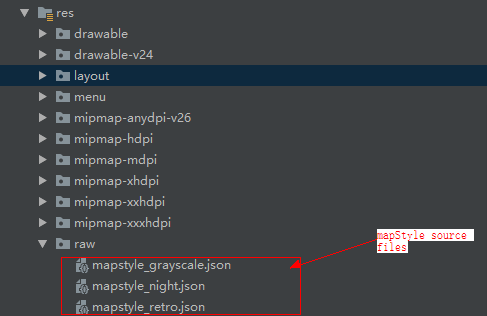
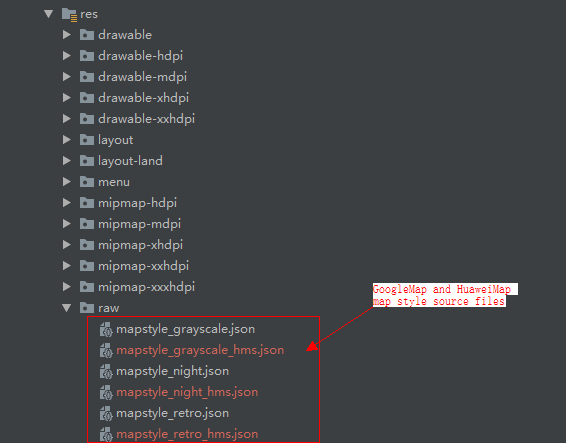
JSON resource files need to be loaded for map style settings (options: retro, night, grayscale, and simple). The JSON file format used by HuaweiMap is different from that used by Google Maps. As a result, they cannot share the same JSON resource file. Compatibility adaptation is required at the service code layer. To download the map style JSON files for HuaweiMap, please visit the download link.
- private void setSelectedStyle() {
- MapStyleOptions style;
- switch (this.mSelectedStyleId) {
- case R.string.style_label_retro:
- // Sets the retro style via raw resource JSON.
- if(GlobalEnvSetting.isHms()){
- style = MapStyleOptions.loadRawResourceStyle(this, R.raw.mapstyle_retro_hms);
- }else{
- style = MapStyleOptions.loadRawResourceStyle(this, R.raw.mapstyle_retro);
- }
- break;
- case R.string.style_label_night:
- // Sets the night style via raw resource JSON.
- if(GlobalEnvSetting.isHms()){
- style = MapStyleOptions.loadRawResourceStyle(this, R.raw.mapstyle_night_hms);
- }else{
- style = MapStyleOptions.loadRawResourceStyle(this, R.raw.mapstyle_night);
- }
- break;
- case R.string.style_label_grayscale:
- // Sets the grayscale style via raw resource JSON.
- if(GlobalEnvSetting.isHms()){
- style = MapStyleOptions.loadRawResourceStyle(this, R.raw.mapstyle_grayscale_hms);
- }else{
- style = MapStyleOptions.loadRawResourceStyle(this, R.raw.mapstyle_grayscale);
- }
- break;
- case R.string.style_label_no_pois_no_transit:
- // Sets the no POIs or transit style via JSON string.
- style = new MapStyleOptions("[" + " {" + " \"featureType\":\"poi.business\","
- + " \"elementType\":\"all\"," + " \"stylers\":[" + " {"
- + " \"visibility\":\"off\"" + " }" + " ]" + " }," + " {"
- + " \"featureType\":\"transit\"," + " \"elementType\":\"all\"," + " \"stylers\":["
- + " {" + " \"visibility\":\"off\"" + " }" + " ]" + " }" + "]");
- break;
- case R.string.style_label_default:
- // Removes previously set style, by setting it to null.
- style = null;
- break;
- default:
- return;
- }
- // Set the basic map style. If this parameter is set to null, the previous customized style is cleared.
- this.mMap.setMapStyle(style);
- }