The barcode image generation capability can convert a string into a barcode image of a custom format.
Use Cases
This capability can convert a string into a 1D code or 2D code of a custom format.
You can use this capability to convert a string into a contact barcode or a phone clone barcode, for example, converting string "HUAWEI" into a barcode.
Constraints
The barcode image generation capability supports phones, tablets, wearables, PCs/2-in-1 devices, and TVs. Specifically, wearables are supported since API version 5.1.0(18), and PCs/2-in-1 devices and TVs are supported since API version 5.1.1(19).
Flowchart
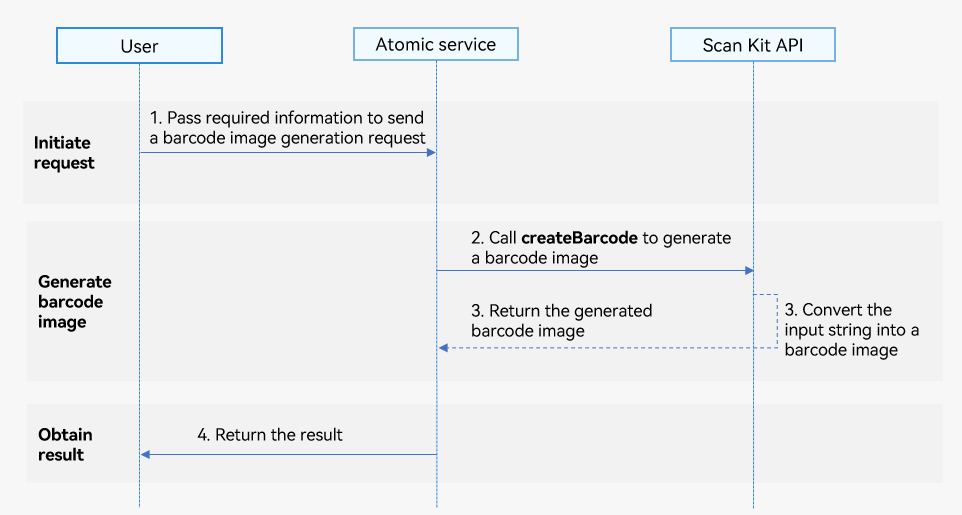
-
A user sends a barcode image generation request to your atomic service and inputs required information, such as the barcode type and the width and height of the barcode image.
-
Your atomic service calls the createBarcode API of Scan Kit to start barcode image generation.
-
Scan Kit converts the input string into a barcode image of the specified format and sends the generated barcode image to your atomic service.
-
Your atomic service sends the barcode image generation result to the user.
API Description
The APIs use either a callback or promise to return the result. The APIs that use a callback provide the same functions as their counterparts that use a promise. For details about the API, please refer to API Reference.
| API | Description |
|---|---|
| createBarcode(content: string, options: CreateOptions): Promise<image.PixelMap> | Generates a barcode image. This API returns the generated barcode image of the image.PixelMap type, which can be rendered as an image using the Image component. This API returns the result asynchronously through a promise. |
| createBarcode(content: string, options: CreateOptions, callback: AsyncCallback<image.PixelMap>): void | Generates a barcode image. This API returns the generated barcode image of the image.PixelMap type, which can be rendered as an image using the Image component. This API returns the result asynchronously through a callback. |
Development Procedure
The barcode image generation capability directly generates the required barcode image based on fixed parameters and optional parameters that are passed.
The following describes how to call the createBarcode API to generate a barcode image:
-
Import the barcode image generation API module. This module provides parameters and methods for generating a barcode image.
// Import the image and error code modules required for generating a barcode image. import { scanCore, generateBarcode } from '@kit.ScanKit'; import { BusinessError } from '@kit.BasicServicesKit'; import { image } from '@kit.ImageKit'; import { hilog } from '@kit.PerformanceAnalysisKit'; -
Call the createBarcode API to generate a barcode image.
- Obtain the generated barcode image using a promise.
@Entry @Component struct Index { @State pixelMap: image.PixelMap | undefined = undefined; build() { Flex({ direction: FlexDirection.Column, alignItems: ItemAlign.Center, justifyContent: FlexAlign.Center }) { Button('generateBarcode Promise').onClick(() => { // The following uses a QR code as an example to describe the parameters for generating a barcode image. this.pixelMap = undefined; let content: string = 'huawei'; let options: generateBarcode.CreateOptions = { scanType: scanCore.ScanType.QR_CODE, height: 400, width: 400 }; try { // Generate a barcode image. If the operation is successful, a PixelMap image is returned. generateBarcode.createBarcode(content, options).then((pixelMap: image.PixelMap) => { this.pixelMap = pixelMap; }).catch((err: BusinessError) => { hilog.error(0x0001, '[generateBarcode]', `Failed to get pixelMap by promise with options. Code: ${err.code}, message: ${err.message}`); }); } catch (err) { hilog.error(0x0001, '[generateBarcode]', `Failed to createBarcode by promise with options. Code: ${err.code}, message: ${err.message}`); } }) // Display the obtained barcode image. if (this.pixelMap) { Image(this.pixelMap).width(300).height(300).objectFit(ImageFit.Contain) } } .width('100%') .height('100%') } } - Obtain the generated barcode image using a callback.
@Entry
@Component
struct Index {
  @State pixelMap: image.PixelMap | undefined = undefined;

  build() {
    Flex({ direction: FlexDirection.Column, alignItems: ItemAlign.Center, justifyContent: FlexAlign.Center }) {
      Button('generateBarcode Callback').onClick(() => {
        // The following uses a QR code as an example to describe the parameters for generating a barcode image.
        let content = 'huawei';
        let options: generateBarcode.CreateOptions = {
          scanType: scanCore.ScanType.QR_CODE,
          height: 400,
          width: 400
        };
        try {
          // Generate a barcode image. If the operation is successful, a PixelMap image is returned.
          generateBarcode.createBarcode(content, options, (err: BusinessError, pixelMap: image.PixelMap) => {
            if (err) {
              hilog.error(0x0001, '[generateBarcode]',
                `Failed to get pixelMap by callback with options. Code: ${err.code}, message: ${err.message}`);
              return;
            }
            this.pixelMap = pixelMap;
          });
        } catch (err) {
          hilog.error(0x0001, '[generateBarcode]',
            `Failed to createBarcode by callback with options. Code: ${err.code}, message: ${err.message}`);
        }
      })
      // Display the obtained barcode image.
      if (this.pixelMap) {
        Image(this.pixelMap).width(300).height(300).objectFit(ImageFit.Contain)
      }
    }
    .width('100%')
    .height('100%')
  }
}
- Obtain the generated barcode image using a promise.