You can import the resources from a mini program to convert it into an ASCF project.
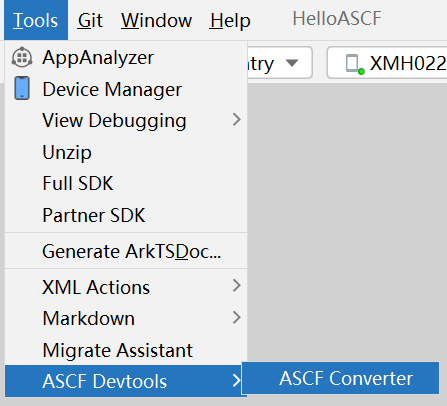
On the top menu bar of DevEco Studio, choose Tools > ASCF Devtools > ASCF Converter.
Select the source code directory and output directory of the atomic service.

Before conversion, ensure that the ascf directory is empty to prevent the existing code from being overwritten.

Configure the advanced settings.
You can set the parameters to control the converter behavior. Currently, the following parameters are supported:
-
Specifies the minimum log level, which can be "debug", "info" (default), "warn", or "error".
-
Ensures no TODO comments are added to the converted source code for unsupported APIs. You are advised to add this parameter to the compressed source code to prevent unnecessary comments.
-
-
Make necessary adjustments to ensure that the features of your original mini program work seamlessly in your atomic service. For details, please refer to the Development Guide.