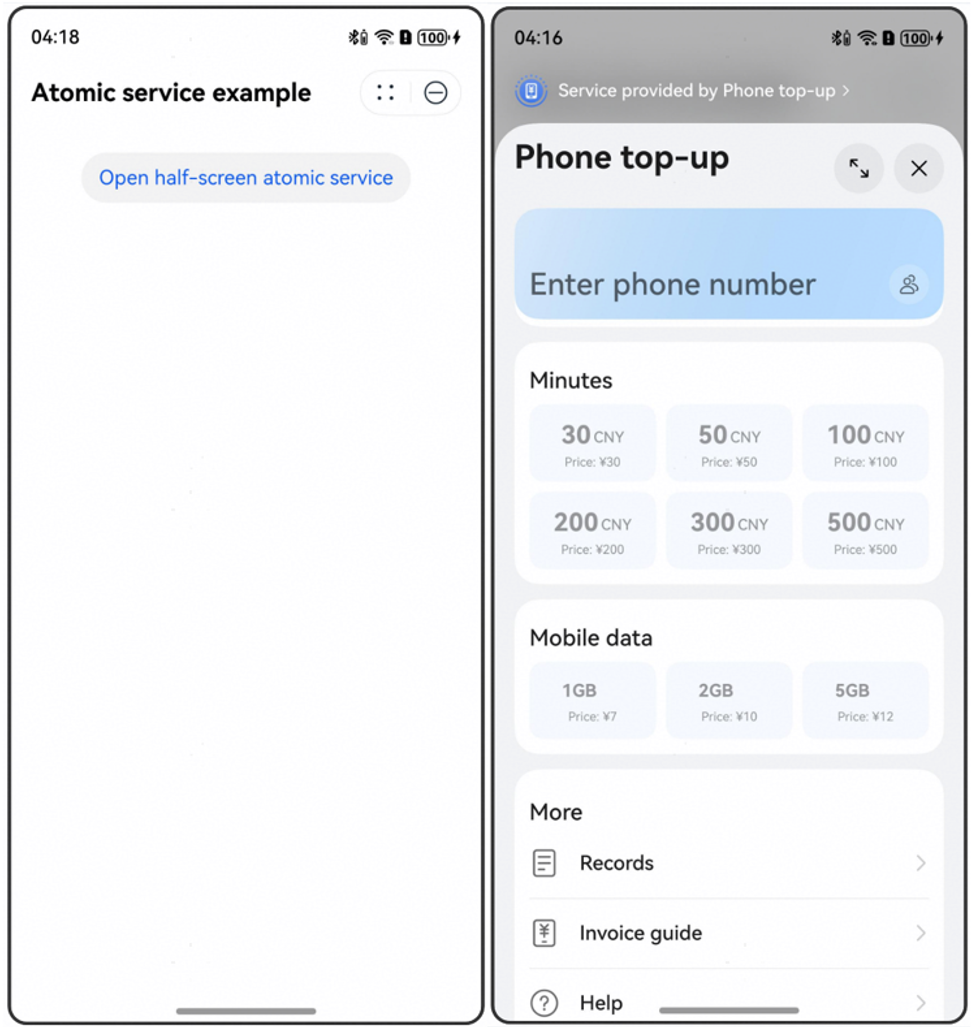
ASCF provides the open-embedded-atomicservice component, which allows an atomic service built on ASCF to start an embedded atomic service in half-screen mode.

You must establish a contractual authorization with the embedded party before embedding and running an atomic service. Currently, this capability is in the beta phase. To use this capability, please contact us via email (atomicservice@huawei.com) to obtain authorization.
The final effect is as follows:
Version restrictions:
-
The open-embedded-atomicservice component is only supported by ASCF runtime versions 1.0.17 and later.
Implementation of the Caller
Add the open-embedded-atomicservice component to the HXML file to start an atomic service built on ASCF or in ArkTS in half-screen mode. Note that the formats for passing parameters of the two types of atomic services are different. For details, see the following examples.
HXML file:
<view class="container">
  <!-- Example 1: Start an embedded atomic service built on ASCF in half-screen mode. -->
  <open-embedded-atomicservice
    appid="{{ascfAppId}}"
    path="{{ascfPath}}"
    want-param="{{ascfWantParam}}"
    binderror="onError"
    bindterminated="onTerminated">
    <view class="service-trigger">
      <image class="service-icon" src="{{imgSrc}}"/>
      <text class="service-label">demoA</text>
    </view>
  </open-embedded-atomicservice>

  <!-- Example 2: Start an embedded atomic service built in ArkTS in half-screen mode. -->
  <open-embedded-atomicservice
    appid="{{arkTsAppId}}"
    want-param="{{arkTsWantParam}}"
    binderror="onError"
    bindterminated="onTerminated">
    <view class="service-trigger">
      <image class="service-icon" src="{{imgSrc}}"/>
      <text class="service-label">demoB</text>
    </view>
  </open-embedded-atomicservice>
</view>
JavaScript file:
Page({
  data: {
    ascfAppId: 'xxx', // Replace this example value with the actual ID of the atomic service that can be opened.
    ascfPath: 'pages/index/index?launcher=demo', // Replace this example value with the actual path of the target page that can be opened.
    ascfWantParam: {
      ascfPara: {
        extraData: {
          developerParameters: 'test'
        }
      }
    },

    arkTsAppId: 'xxx', // Replace this example value with the actual ID of the atomic service that can be opened.
    arkTsWantParam: {
      developerParameters: 'test'
    },

    imgSrc: 'icon.png' // Replace this example value with the actual image address that can be opened.
  },

  onError(err) {
    // This callback is triggered when a runtime exception occurs in the opened atomic service.
    const code = err.detail.errCode;
    const message = err.detail.errMsg;
    console.error(`onError, code is ${code}, message is ${message}`);
  },

  onTerminated(info) {
    // This callback is triggered when the opened atomic service exits normally.
    const params = info.detail?.params;
    console.info(`onTerminated, ${params?.resultMessage}`);
  }
});
CSS file:
.container {
  display: flex;
  justify-content: space-evenly;
  margin-top: 20px;
}
.service-trigger {
  flex-direction: column;
  align-items: center;
  display: flex;
}
.service-icon {
  width: 36px;
  height: 36px;
  margin-bottom: 5px;
}
.service-label {
  font-size: 10px;
}
Implementation of the Target Atomic Service
The target atomic service receives and processes the parameters passed by the caller, exits upon completion of relevant operations, and returns results to the caller. It may be an atomic service developed based on ASCF or ArkTS. The two types of atomic services differ in the ways of receiving parameters and returning results. The following examples show the implementations in the two scenarios.
[h2]Receiving Parameters
If the target atomic service is built on ASCF, it can obtain the parameters passed by the caller in either of the following ways:
-
Query parameters in path: The parameters can be read from the query argument in the onLoad lifecycle of the target page. For example, if the path is page/path/index?launcher=xxx, the value of query.launcher is xxx.
-
Structured data in want-param: Use has.getLaunchOptionsSync to obtain the atomic service launch parameters and extract the referrerInfo.extraData field, which is the service data passed by the caller through want-param.
Page({
  onLoad(query) {
    // 1. Obtain the query parameter carried in the path property of the caller and output it.
    console.info(`Page onLoad, launcher: ${query.launcher}`);
    // 2. Obtain the structured parameters passed by the caller in the want-param property.
    const launchOptions = has.getLaunchOptionsSync(); // Obtain the atomic service launch parameters.
    if (launchOptions && launchOptions.referrerInfo) {
      const extraData = has.getLaunchOptionsSync().referrerInfo.extraData;
      console.info(`Page onLoad, data from launcher: ${extraData.developerParameters}`);
    }
  }
});
If the target atomic service is built in ArkTS, use want in onCreate of the atomic service's UIAbility to obtain the parameters passed by the caller, as shown in the following example:
export default class AtomicServiceHspAbility extends UIAbility {
  onCreate(want: Want, launchParam: AbilityConstant.LaunchParam): void {
    console.info(`onCreate, data from launcher: ${want.parameters?.developerParameters}`);
  }
}
[h2]Exiting and Returning Results
If the target atomic service is built on ASCF, call has.terminateSelf to exit the atomic service and return the result to the caller.
terminateSelf() {
  has.terminateSelf({
    resultCode: 100, // Customize the result code returned to the caller.
    params: {
      resultMessage: 'aabb' // Customize the information returned to the caller.
    },
    success: () => {
      console.info('terminate success');
    },
    fail: (err) => {
      console.error(`terminate fail, code is ${err.errCode}, message is ${err.errMsg}`);
    },
    complete: () => {
      console.info('terminate complete');
    }
  })
}
If the target atomic service is built in ArkTS, call terminateSelfWithResult to exit the atomic service and return the result to the caller.
import { common } from '@kit.AbilityKit';
import { BusinessError } from '@kit.BasicServicesKit';

@Entry
@Component
struct Index {
  private uiContext = this.getUIContext();
  private context: common.UIAbilityContext = this.uiContext?.getHostContext() as common.UIAbilityContext;
  build() {
    Column() {
      Button('Exit and return data')
        .onClick(() => {
          const abilityResult: common.AbilityResult = {
            resultCode: 100, // Customize the result code returned to the caller.
            want: {
              parameters: {
                resultMessage: 'aabb' // Customize the information returned to the caller.
              }
            }
          };
          try {
            this.context.terminateSelfWithResult(abilityResult)
              .then(() => {
                console.info('terminateSelfWithResult succeed');
              })
              .catch((err: BusinessError) => {
                console.error(`terminateSelfWithResult failed, code is ${err.code}, message is ${err.message}`);
              });
          } catch (err) {
            console.error(`terminateSelfWithResult failed, code is ${err.code}, message is ${err.message}`);
          }
        })
    }.height('100%').width('100%').justifyContent(FlexAlign.Center)
  }
}
Compatibility Design
The open-embedded-atomicservice component is unavailable if the host SDK version is earlier than 5.1.0(18). To ensure functionality availability and prevent user experience interruption, you can call the has.navigateToAtomicService API to start the target atomic service in full-screen mode.
Sample code:
HXML file:
<div class="container">
  <div has:if="{{!isEmbeddedSupported}}">
    <button bindtap="navigateToService">Airtime top-up</button>
  </div>
  <div has:else>
    <open-embedded-atomicservice appid="{{appid}}">
      <button>Proceed</button>
    </open-embedded-atomicservice>
  </div>
</div>
JavaScript file:
Page({
  data: {
    appid: 'xxx', // Replace this example value with the actual ID of the atomic service that can be opened.
    isEmbeddedSupported: false, // Indicates whether an embedded atomic service can be opened.
  },

  onLoad() {
    const apiVersion = has.getSystemInfoSync().OSApiVersion;
    this.setData({
      isEmbeddedSupported: apiVersion >= 18, // When the API version is 18 or later, an embedded atomic service can be opened in half-screen mode.
    });
    console.info('onLoad -> get API version:', apiVersion);
  },

  navigateToService() {
    has.navigateToAtomicService({
      appId: this.data.appid,
      success: () => {
        console.info('Navigation to service successful');
      },
      fail: (res) => {
        console.error('Failed to navigate to service:', res);
      },
      complete: () => {
        console.info('Navigation to service completed');
      }
    })
  }
});
CSS file:
.container {
  display: flex;
  flex-direction: column;
  align-items: center;
  padding: 20px;
}
Debugging
By default, you need to request permissions for using the capability of running an embedded atomic service. If you need to debug an embedded atomic service, you can access Developer options and enable Waive restrictions for services under development to request the temporary permission.
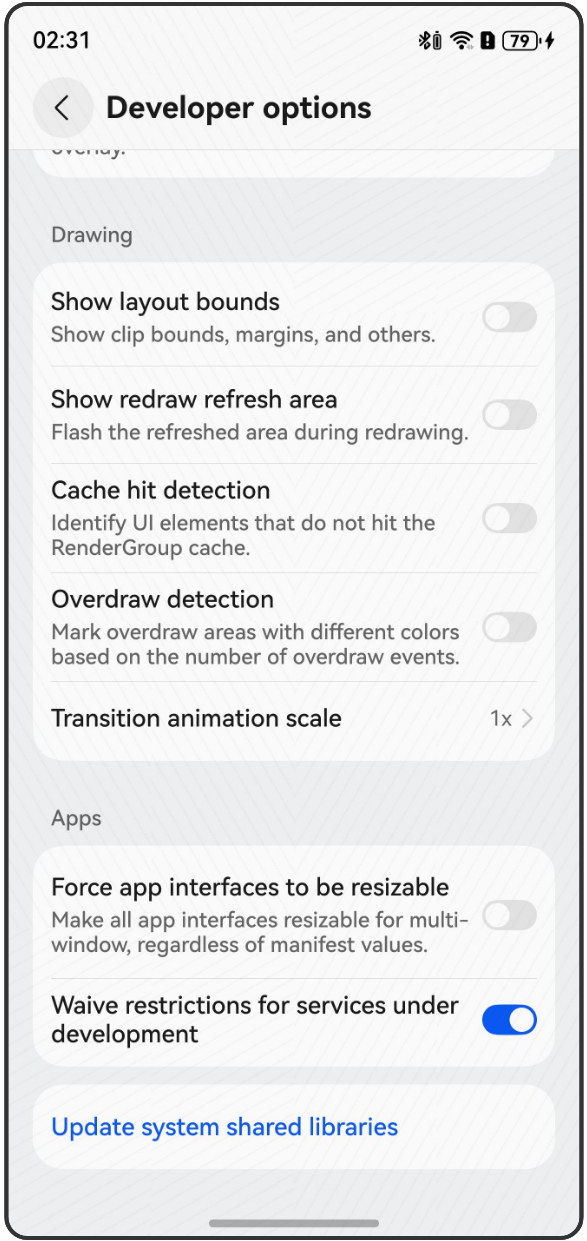

The Waive restrictions for services under development switch can be enabled only when the following requirements are met:
-
At least one of the caller or target atomic service uses a debug signature.
-
If the embedded atomic service to be debugged has been released, you need to manually search for and download the atomic service on Assistant·TODAY and then test the atomic service. Currently, the embedded atomic service must be installed during debugging.