Click the run button in the upper-right corner to automatically compile and run the atomic service. The atomic service is recompiled during rebuild.

ASCF Build Artifacts
During the ASCF build process, the content of the ascf/ascf_src directory is compiled into entry/src/main/resources/rawfile, while any subpackages are compiled into the ascf_build directory.
The project is then built using hvigor: In release mode, the project is built into a .app package (default save path: build/outputs/default/AscfTodo-default-signed.app); in debug mode, the project is built into a HAP or an HSP (if subpackages exist, the main package is saved in entry/build by default while the subpackages are saved in ascf_build/subPkgName/build as HAP/HSP files).
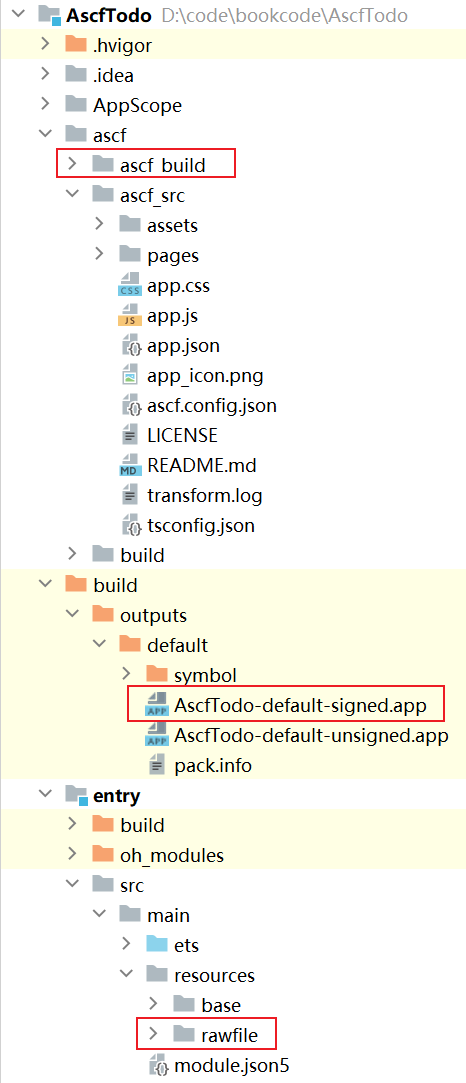

ASCF build artifacts are HAP files, HSP files, or .app packages for HarmonyOS atomic services. These artifacts must comply with relevant specifications of HarmonyOS.
Ensure code security. The ascf/ascf_src directory is packaged into the rawfile. Since the build artifact contains JS source code, never store sensitive information in this directory.
JS source maps are included by default in packages built in debug mode. This feature can be disabled using the devtool command-line option. Do not distribute debug packages to untrusted parties to prevent source code leakage.
You can add configuration options in the ascfPlugin method under the plugins field in the hvigorfile.ts file in the root directory of the project to control the compilation of the atomic service.

For details about the configuration options, please refer to Command Options.

compilerOptions indicates the compilation mode, which can be babel (default) or swc.
skipAscfCompile can be enabled to skip the compilation of the hvigor plugin to prevent the command line compilation result from being overwritten.