After you release a new version of an atomic service, the system checks for available updates for the user-installed version at multiple time points, and attempts to download the latest atomic service package.

Due to the update mechanism, a running atomic service may not be the latest version. You can use Blocking Update to prompt users to update it to the latest version.
Silent Update
AppGallery provides automatic update for atomic services. You can instruct users to enable this feature by toggling Auto-update apps through Me > Settings > Network settings on AppGallery. Once the feature is enabled, AppGallery will automatically download and update the atomic service in the background during off-peak hours whenever a new version is available.
Asynchronous Update
If an atomic service is not updated for a long time, the system asynchronously checks whether its new version is available when the atomic service is started. If the new version is found, the atomic service package will be asynchronously downloaded and updated when the atomic service is launched again.

This update mode cannot ensure that the atomic service running on the user's device is always the latest version. The user might be using an older version on the current device, and the updated version will only become available after the next cold start.
Blocking update
Use this update mode if you want to trigger an immediate version update while the user is actively using the atomic service. You can call the updateManager.on('updateChange') API to check whether a version update is available. If an update is available, call the atomic service restart API to trigger the update.

The blocking update API is supported by atomic services since HarmonyOS 6.0.0(20).
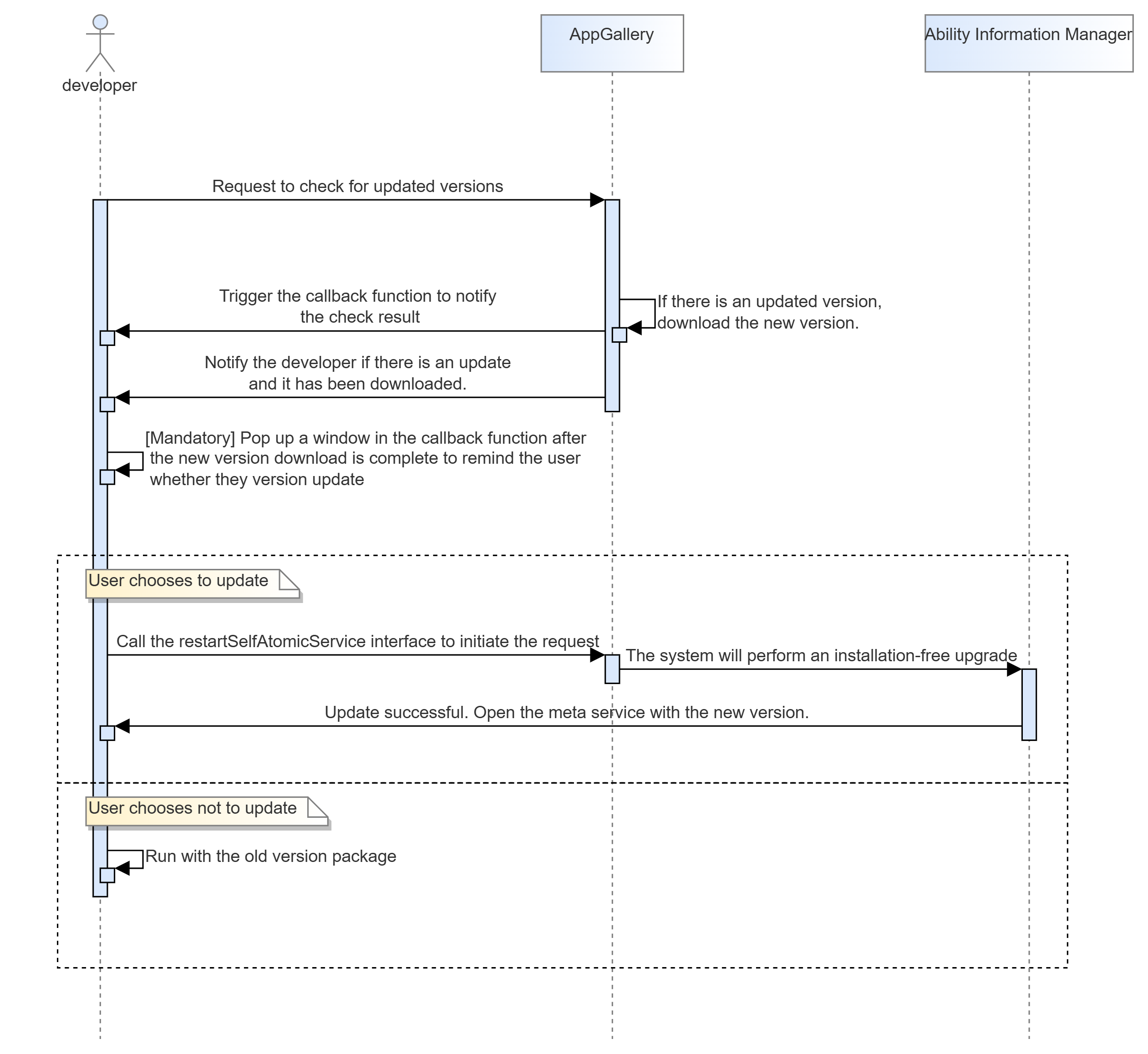
- You can call the updateManager.on('updateChange') API to check whether an atomic service has an available update.
- If the atomic service has an available update, AppGallery will send a callback notification and attempt to download the latest atomic service package.
- After receiving the available update, you need to implement a dialog box to remind the user of the update.
- If the user chooses to update the atomic service, you can call the abilityManager.restartSelfAtomicService method to restart the atomic service. The system will update the atomic service without requiring manual installation, and launch the new version after the update is successful.
If the user chooses not to update the atomic service, it will still launch with the old version.

- After the update check API is called and an available update is detected, you need to display a dialog box to remind the user of the update. If no dialog box is displayed, the atomic service cannot run properly.
- The title of the dialog box must clearly prompt users to confirm the update.
- The update will proceed only after the user confirms it.

import { updateManager } from '@kit.AppGalleryKit';
import { abilityManager, common } from '@kit.AbilityKit';
import { hilog } from '@kit.PerformanceAnalysisKit';

@Entry
@Component
struct Index {
  @State message: string = 'CheckUpdate'

  build() {
    Row() {
      Column() {
        Text(this.message)
          .fontSize(50)
          .fontWeight(FontWeight.Bold)
          .onClick(() => this.callOn)
      }
      .width('100%')
    }
    .height('100%')
  }

  private callOn() {
    let callback = (state: updateManager.UpdateSessionState) => {
      if (state.code === updateManager.RequestErrorCode.NO_UPGRADE) {
        hilog.info (0, 'TAG', `on success, no need update`);
        updateManager.off('updateChange');
      } else if (state.code === updateManager.RequestErrorCode.NEED_UPGRADE) {
        hilog.info (0, 'TAG', `on success, need update`);
      } else if (state.code === updateManager.RequestErrorCode.DOWNLOADED) {
        hilog.info (0, 'TAG', `on success, need update and download success`);
        updateManager.off('updateChange');
        abilityManager.restartSelfAtomicService(this.getUIContext().getHostContext() as common.Context);
      }
    };
    try {
      updateManager.on('updateChange', callback, 20);
    } catch (error) {
      hilog.error(0, 'TAG', `on Error.code is ${error.code}, message is ${error.message}`);
    }
  }
} 
- Blocking updates require you to implement a dialog that explicitly asks the user to confirm the update. The update is only triggered upon user confirmation.
- For the same atomic service, calls to the atomic service update listening API are limited to 6 times per day, with no more than 1 call allowed every 30 minutes.
- Call the API for canceling the update check in a timely manner. If the listening duration exceeds the allowed limit, the listening will be automatically terminated.
- The interval between two calls to the atomic service restart API must be at least 3 seconds.