Implementation
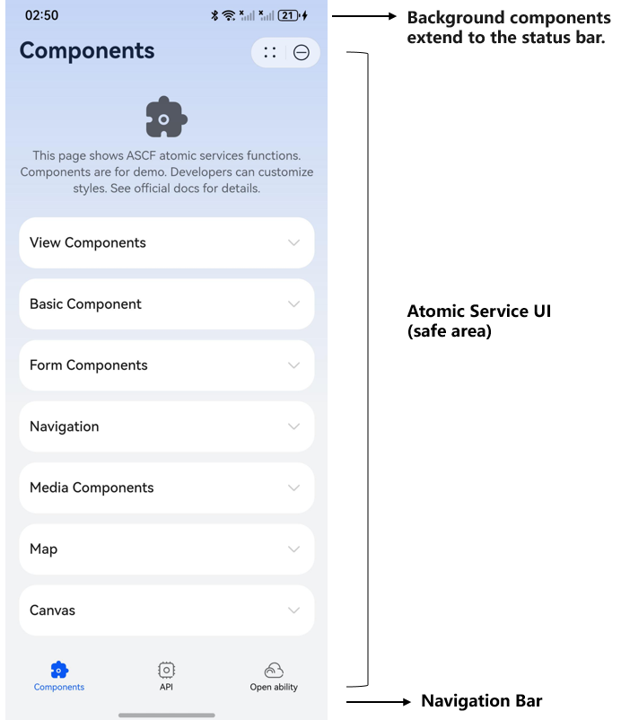
The immersive page of an atomic service is divided into three parts:
The immersive experience is achieved by extending an atomic service page to the status bar and navigation bar while maintaining their full functionality and preventing conflicts with the page content. Specifically, an area that allows for operations in the atomic-service is defined as a safe area, and content is properly adapted to avoid overlapping with the status bar and navigation bar to achieve immersive rendering.
Global Configuration
Before customizing the status bar and navigation bar, change the value of navigationStyle in the app.json file to custom.
{
  "pages": ["page/index/index"],
  "window": {
    "navigationStyle": "custom"
  }
}
Avoidance for Safe Area

The TabBar component automatically avoids overlapping with the navigation bar at the bottom.
[h2]Solution 2: Using the env() Function
You can use the env() function for adaptation with the following four predefined variables:
safe-area-inset-top: distance from the safe area to the top edge
safe-area-inset-bottom: distance from the safe area to the bottom edge
safe-area-inset-left: distance from the safe area to the left edge
safe-area-inset-right: distance from the safe area to the right edge
.css_body {
  padding-bottom: env(safe-area-inset-bottom);
  padding-top: env(safe-area-inset-top);
}