[h2]How to Obtain
Click here to download the ASCF plugin.
Manually install the plugin in DevEco Studio.
In the top menu bar of DevEco Studio, choose File > Setting. In the settings box displayed, choose Plugins. On the Plugins tab page, click the gear icon
 at the top and choose Install Plugin from Disk... to manually install the plugin in DevEco Studio.

Install the downloaded .zip file directly without decompressing it. When downloading with Safari, disable automatic decompression.
For details about the new features and changes of ASCF, please refer to Version Change History.
[h2]Automatically Upgrading the ASCF Plugin
When a new ASCF plugin version is released, DevEco Studio will automatically check for updates and prompt you to upgrade. Ensure that the internet connection is stable and functional.
[h2]Upgrading the ASCF Runtime Version of an Existing Project
Modify "@atomicservice/ascfapi": "^1.0.0" in entry/oh-package.json5 to the @atomicservice/ascfapi version in the latest released ohpm.
[h2]Upgrading the ASCF Toolkit of an Existing Project
Case 1: The current version is 1.0.1 and needs to be upgraded to 1.0.2.
Manually modify the dependencies setting in the hvigor/hvigor-config.json5 file to @atomicservice/ascf-toolkit-hvigor-plugin": "~1.0.2".
Case 2: The current version is 1.0.1 and needs to be upgraded to 1.0.1-beta.1.
Manually modify the dependencies setting in the hvigor/hvigor-config.json5 file to "@atomicservice/ascf-toolkit-hvigor-plugin": "~1.0.1-beta.1".
[h2]How to Obtain
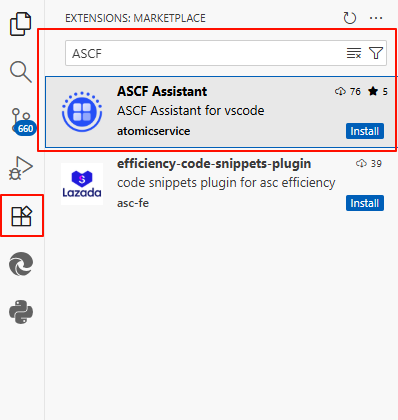
In VS Code, click Extensions. Search for "ASCF Assistant" in the Marketplace and click Install.
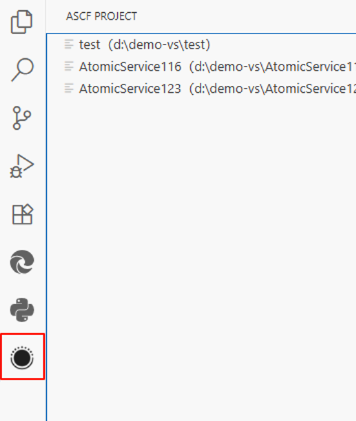
A successful installation is indicated by the appearance of the atomic service icon  in the sidebar.
[h2]Supported Devices
| Platform | OS Version | SDK Version | ASCF Toolkit Version | Quick App Loader Version |
|---|---|---|---|---|
| HarmonyOS | HarmonyOS 4 and earlier | HMSCore 6.11.0.300 and later | 1.0.15 and later | 16.0.1 and later |
| HarmonyOS | HarmonyOS 5.0 and later | ASCF 1.0.0 and later | 1.0.0 and later | N/A |
For devices running HarmonyOS 4 or earlier, you need to use Quick App Loader for debugging and running. If you use ASCF Assistant for running, Quick App Loader will be automatically installed. You can also manually download Quick App Loader and install it.
For details about how to use Huawei Quick App Loader to debug a quick app, please refer to Using Huawei Quick App IDE.
After Quick App Loader is installed, you can manually load the .app package of the atomic service for running.
You can disable control to temporarily bypass domain name control and sensitive permission control, thereby facilitating local debugging. To do so, go to Quick App Loader, tap the icon  in the upper right corner, choose Settings, and enable Waive restrictions.