ASCF allows development of atomic services, which are similar to mini programs and can be quickly accessed and used without the need for installation. For details, see Overview of ASCF. Before development, ensure that you have installed the ASCF plugin.
ASCF allows you to reuse the code assets of mini programs. You can use the ASCF tool to convert a mini program into an atomic service or use a third-party framework like uni-app and Taro to build an atomic service from a mini program. Whichever approach you take, it is necessary to tailor and modify the platform-related functionalities and features.
[h2]Process
The following figure shows the process of converting a mini program into an ASCF atomic service.

After the mini program is converted to the ASCF atomic service, you need to process the converted project files.
Register the atomic service in AppGallery Connect. For details about how to configure domain names and permissions, see Preparing for Atomic Service Development.
Convert the unique APIs of the mini program platform, such as the sign-in and payment APIs, to the atomic service ecosystem APIs. If the atomic service does not have an alternative API, delete related functions from the code. For details, see Adaptation of the Mini Program After Conversion.
If cloud services are involved, integrate the atomic service open capabilities. For details, see Adaptation to Platform Functionalities and Requirements.
After that, the mini program project and the ASCF atomic service project must be maintained and evolved independently without affecting each other.
[h2]Adaptation of the Mini Program After Conversion
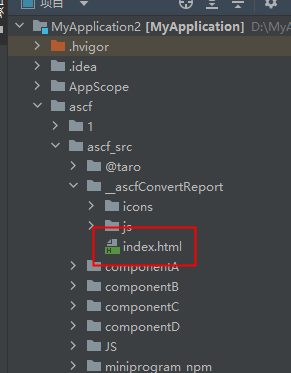
The ASCF converter automatically replaces files and supported APIs with those supported by ASCF. The unsupported APIs are marked with TODO in the code comments. The ascf/ascf_src/transform.log (conversion log) and ascf/ascf_src/_ascfConvertReport/index.html (conversion report) files are generated. The conversion log file describes the locations of unsupported APIs. The conversion report can be directly opened using a browser. The report describes the support for APIs and components after the conversion, helping you adapt to atomic service APIs based on platform differences.
Figure 1 Conversion report location
For details about the framework, components, and APIs, see API Reference. After processing the prompts in the transform.log file, make the following adjustments:
Adjust the syntax differences based on the IDE error messages. Examples include scope of let, usage of undeclared variables, "function" and "package" keywords, and variables starting with v.
Change the px values from non-integers to integers. For example, change 0.5 px to 1 px. Otherwise, the rendering effect will be different.
Change the features specific to the mini program to the capabilities provided by Huawei. For details, see Adaptation to Platform Functionalities and Requirements. The plugins specific to the mini program and cloud development features will no longer be available and should be replaced with custom components.
To convert an Alipay mini program, perform the following operations:
By default, custom components in the Alipay mini program can directly use the page style, but this is not the case in ASCF, which may lead to styling differences. To use the page style, declare options: {styleIsolation: 'isolated'} in the custom component.
If the custom component uses a slot, note that the class declared in the slot will work in Alipay, but it will not work in ASCF, which is consistent with WeChat. Please handle the style separately.
ASCF does not support the $page and $slots attributes for custom components. If they are used, valid values may fail to be obtained, causing service problems. In this case, delete them and modify related logic.

If the project depends on open-source libraries such as vant-weapp in node_modules, copy the mini program source code in node_modules to the source code directory so that the conversion tool can perform conversion.
ASCF Toolkit provides a method for you to copy and convert the source code. For details, see Using npm Packages.
If obfuscated files in the project also need to be converted, add the --notaddtodo parameter and do not modify the JS file to avoid code disorder.
Building an Atomic Service from a Mini Program Using a Third-Party Framework
The following figure shows the process of building an atomic service from a mini program based on the framework adaptation of a third-party platform.
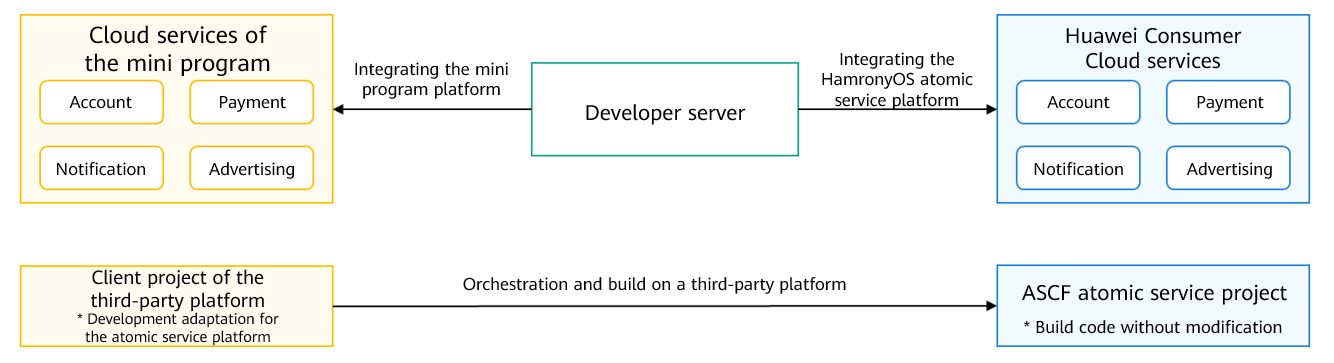
The third-party platform code needs to be exported and converted to the ASCF source code. This process is usually handled by the third-party platform.
You still need to perform the following steps to adapt to the functionalities and requirements of the platform:
Register the atomic service in AppGallery Connect. For details about how to configure domain names and permissions, see Preparing for Atomic Service Development.
Isolate the atomic service from other platform code via conditional compilation. If cloud services are involved, integrate the atomic service open capabilities. For details, see Adaptation to Platform Functionalities and Requirements.
[h2]Building an Atomic Service from a Mini Program Using uni-app
For details, see the HarmonyOS atomic service guide on the official website of uni-app.
You are advised to adapt your project to an atomic service by following the instructions below:
Understand the project code, familiarize yourself with the current page layout and features, review the API calls and page processing logic, and sort out a list of components and APIs.
Use the MP-HARMONY conditional compilation mode to adapt the project to an atomic service.
Follow the instructions in Development Guide to implement necessary adaptations. Then build the project into the ASCF paradigm, copy the build artifact dist/build/mp-harmony to the ascf/ascf_src directory, and debug and run the project by referring to the Hello ASCF project.
The following is an example of uni-app conditional compilation:
// #ifdef WEB
console.info('The code runs only on the web.');
// #endif

// #ifdef MP-HARMONY
console.info('The code runs only on ASCF.');
// #endif
[h2]Taro Support for ASCF Adaptation
Taro supports adaptation to ASCF starting from version 4.1.5. For details, see the official documentation.
Example of Taro conditional compilation:
/** Source code */
if (process.env.TARO_ENV === 'ascf') {
  require('path/to/ascf/name')
} else if (process.env.TARO_ENV === 'h5') {
  require('path/to/h5/name')
}

/** After compilation (ASCF atomic service) */
if (true) {
  require('path/to/ascf/name')
}
/** After compilation (HTML5) */
if (true) {
  require('path/to/h5/name')
}
After that, you only need to maintain the third-party platform's device code. The ASCF project is generated by the tool, and all you need to do is configuring basic information and performing packaging and verification on the project files. For details, see Building a Project into the ASCF Paradigm Using a Third-Party Framework.
Adaptation to Platform Functionalities and Requirements
To use ASCF to develop atomic services, integrate the following functions and comply with related requirements to provide better user experience.
[h2]Complying with Design Specifications
Atomic services must use icons that comply with relevant specifications. Use the atomic service icon generation tool to generate an icon.
When an atomic service is launched, splash ads and pop-up ads are not allowed, as they interrupt the normal use of users.
When a user swipes from the screen edge on the level-1 page of an atomic service, the service must respond properly to the gesture and exit to the background. It is not allowed to interrupt the user's exit operation in any form, such as displaying a pop-up.
In an atomic service, words such as "Sign in" must not appear on the service UI. If an account system is available, the HUAWEI ID sign-in API must be called in a standard manner for silent sign-in with a HUAWEI ID. The atomic service's own account can be linked to a HUAWEI ID using a mobile number. For details, see Best Design Practices - Account.
The atomic service design must comply with the platform's design specifications, including but not limited to the top navigation bar, menubar, and bottom tabs. For details, see the UX design principles.
Navigation should provide clear paths. Level-1 and non-level-1 pages shall be distinguished. Secondary pages shall provide a back button, whose unified interaction behavior is to return to the previous level rather than return to the previous UI.
Content in an atomic service shall avoid overlapping with the menubar to prevent occlusion.
The top navigation bar and bottom navigation bar should match the page background to achieve an immersive effect and avoid visual separation. For details, see Developing an Immersive Page.
The page loading and refreshing processes should be simple. Avoid multiple loading statuses in the same scenario.
[h2]Complying with Basic Operations Specifications
An atomic service shall provide complete core functions. It is recommended that its common functions be consistent with those on other platforms.
The main process of order fulfillment in an atomic service must not have service breakpoints, such as order payment failures or order information viewing failures.
Atomic services can use the system redirection capability to redirect users to an app of an associated entity certified by Huawei. The target app must integrate the Huawei Pay checkout service. Browser-type apps are excluded. In this scenario, a dialog is displayed for each redirection, and redirection can proceed only after user consent is obtained.
In an atomic service, prompting or inducing users to redirect to apps or mini programs for conversion or order placement is prohibited. It is advised to keep the whole service flow closed within the atomic service.
Guiding descriptions and behaviors such as "Better experience in the app", "Go to the app to access this feature", or "Scan the QR code using the app" are not allowed.