


Intelligent Assistant
Chat with our virtual assistant to get answers promptly.
The security of an application is the key to its success.
HarmonyOS provides three levels of security capabilities: system security, DevEco Studio tool security, and application ecosystem security.
The following describes sensitive data storage and user privacy protection at the application security ecosystem level.
HarmonyOS builds a secure application ecosystem based on hierarchical security, including the security level classification of devices and data.
Device security levels are classified into SL1 to SL5 based on devices' security capabilities, for example, whether a TEE or a secure storage chip is available. The intelligent wearable is usually a low-security SL1 device, and the mobile phone and the tablet are usually high-security devices.
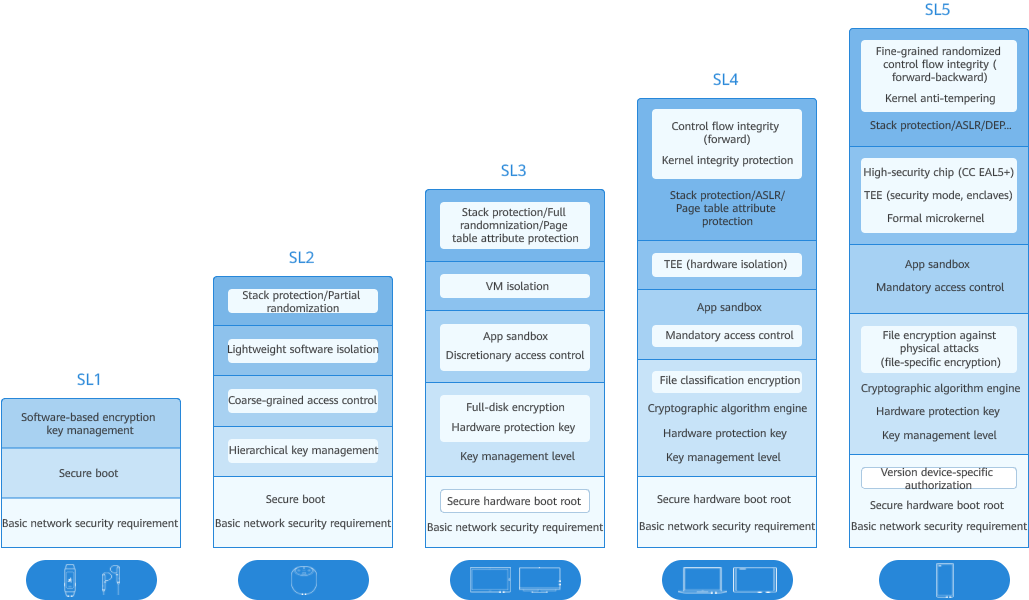
From SL1 to SL5, the security capability requirements corresponding to integrity protection, encryption and data protection, permission and access control, trusted execution environment, and vulnerability anti-exploitation are gradually improved.
Sensitive data classification helps you identify and classify data based on the sensitivity, value, and potential impact of data leakage. You need to understand different types of data and how they are used, classify the data, and develop appropriate security measures and controls based on the classification to protect the data and ensure compliance with relevant laws and standards. The following table illustrates the personal data classification.
Personal Data Classification | Data Grading | Example | |
|---|---|---|---|
Sensitive/Personal data | Asset data | Critical | Password, authentication token, and the answer to security question. |
Personal racial data | Ethnicity. | ||
Authoritative social ID | High | ID card number, military officer card, social/insurance security number (social number), driver's license, passport number, and visa authorization number. | |
Negative reputation data | Criminal records (criminal, civil, and litigation records), prison records, and disciplinary records. | ||
Health data | Health data (height, weight, body fat, blood pressure, blood sugar, and heart rate), and medical records. | ||
Home control data | Home control, car reverse control, and reverse control after phone projection. | ||
Age and birth data | Medium | Age and date of birth. | |
Virtual network ID | HUAWEI ID, broadband account, and other network accounts (phone number and email address). | ||
General social ID | Name. | ||
Personal multimedia data | Photo, video, recording, text, calendar event, and note. | ||
General registration information | Low | Nickname, profile picture, gender, nationality, place of birth, education level, and professional background. | |
Positive reputation data | Professional achievement. | ||
Non-personal data | Non-personal data | Public | Anonymized personal data. |
Non-personal data | Publicly released data in system and device information, such as the version information of the TCB module, integrity measurement value, integrity measurement value of the access control policy data, and policy data. | ||
In addition to content-based data classification, you must comply with laws and regulations, such as the General Data Protection Regulation (GDPR) and Personal Information Protection Law (PIPL), to protect user privacy and data security. Figure 1 shows the data classification.
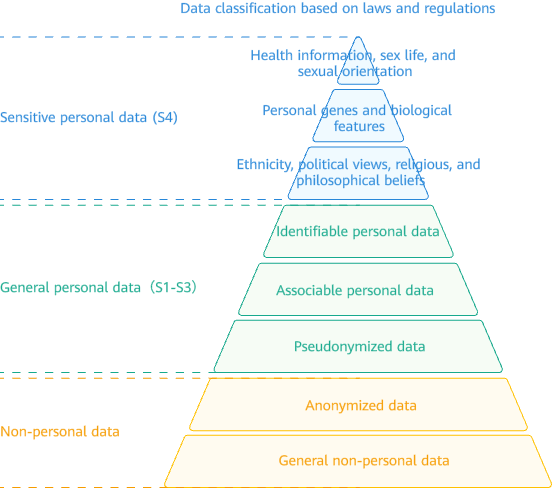
The data can be rated into four security levels: S1, S2, S3, and S4.
Risk Level | Risk Criteria | Definition | Example |
|---|---|---|---|
Critical | S4 | Special data types defined by industry laws and regulations, involving the most private individual information or data that may cause severe adverse impact on an individual or group once disclosed, tampered with, corrupted, or destroyed. | Political opinion, religious and philosophical belief, trade union membership, genetic data, biological information, health and sexual life status, sexual orientation, device authentication, and personal credit card information. |
High | S3 | Data that may cause severe adverse impact on an individual or group once disclosed, tampered with, corrupted, or destroyed. | Personal real-time precise positioning information and workout routes. |
Medium | S2 | Data that may cause severe adverse impact on an individual or group once disclosed, tampered with, corrupted, or destroyed. | Detailed personal address, name, and nickname. |
Low | S1 | Data that may cause minor adverse impact on an individual or group once disclosed, tampered with, corrupted, or destroyed. | Gender, nationality, and user application record. |
A higher data security label and level indicate stricter encryption and access control measures and higher data security.
In cross-device data sync, data access is controlled based on the device security level and data security labels. In principle, data can be synced only to the devices whose data security labels are not higher than the device's security level. The access control matrix is as follows:
Device Security Level | Data Security Labels of the Synchronizable Device |
|---|---|
SL1 | S1 |
SL2 | S1 to S2 |
SL3 | S1 to S3 |
SL4 | S1 to S4 |
SL5 | S1 to S4 |
The watch is an SL1 device with a low security level. The database with data security label S1 can be synced with devices, but the databases with database labels S2 to S4 cannot.
Different file paths have different attributes and features. The application sandbox protects hierarchical data to prevent malicious path traversal access. In the application file directory, different directories are distinguished based on file encryption types.
Unless otherwise required, application data is placed in the el2 directory for security purposes. The data that needs to be accessed before the screen is unlocked (such as the clock, alarm, and wallpaper data) is placed in the el1 directory. For details, see Obtaining and Modifying Encryption Levels.
For details about the application file directory, see Application File Directory and Application File Path.
The hierarchical data file path is the common file path of the application. The code for obtaining the path is as follows:
- getEl2Path(): void {
- let context = this.getUIContext().getHostContext() as common.UIAbilityContext;
- context.area = contextConstant.AreaMode.EL2;
- let filePath = context.filesDir + '/health_data.txt';
- this.message = filePath;
- }
To obtain the el1 path, modify AreaMode. The sample code is as follows:
- getEl1Path(): void {
- let context = this.getUIContext().getHostContext() as common.UIAbilityContext;
- context.area = contextConstant.AreaMode.EL1;
- let filePath = context.filesDir + '/health_data.txt';
- this.message = filePath;
- }
Unless otherwise required, application data is placed in the el2 directory for security purposes.
The system provides four file-level encryption types to protect files. The application can save files to the corresponding data directories as required. The following table lists the hierarchical encryption policies.
Encryption Level | Policy |
|---|---|
el4 | 10 seconds after the user locks the device, the decrypted data protection key is discarded from the memory. All such data cannot be accessed unless the user enters the password again or uses the fingerprint or face to unlock the device. |
el3 | After a user locks a device, if a file has been opened, the file can still be accessed. Once the file is closed (lock screen), the file cannot be accessed again unless the user enters the password again or uses the fingerprint or face to unlock the device. |
el2 | After the user unlocks the device for the first time after power-on, the user can access the file. This is the default data protection class for all third-party application data that is not allocated to the data protection class. |
el1 | Files can be accessed in direct startup mode or after the device is unlocked. |
OpenHarmony Universal KeyStore (HUKS) provides platform-level key management for services, including key generation, import, destruction, attestation, agreement, derivation, encryption/decryption, signature/signature verification, and access control. HUKS is the basic security capability of the system. Services can securely and conveniently use the key lifecycle management capability provided by HUKS without implementing complex cryptographic algorithms and key access control models, ensuring the security of sensitive service data.
For details, see Introduction to Universal Keystore Kit.
Health data is common sensitive data in daily life and is widely used in HarmonyOS devices, such as mobile phones and watches. The following describes how to store and protect health check reports.
Health check data is classified as high-risk data based on data classification rules. Therefore, in a program design process, in addition to a protection measure of hierarchical data encryption, secondary encryption needs to be performed to enhance data security. Specifically, the data may be first encrypted once, and then the encrypted data is processed by using a hierarchical data encryption method. This is to improve data confidentiality and integrity and effectively prevent potential data leakage and unauthorized access. With such multi-level encryption measures, health check data can be stored and transmitted more securely and reliably.
The program scenarios consist of the health checklist page, data entry page, and data details page, as shown in the following figure.
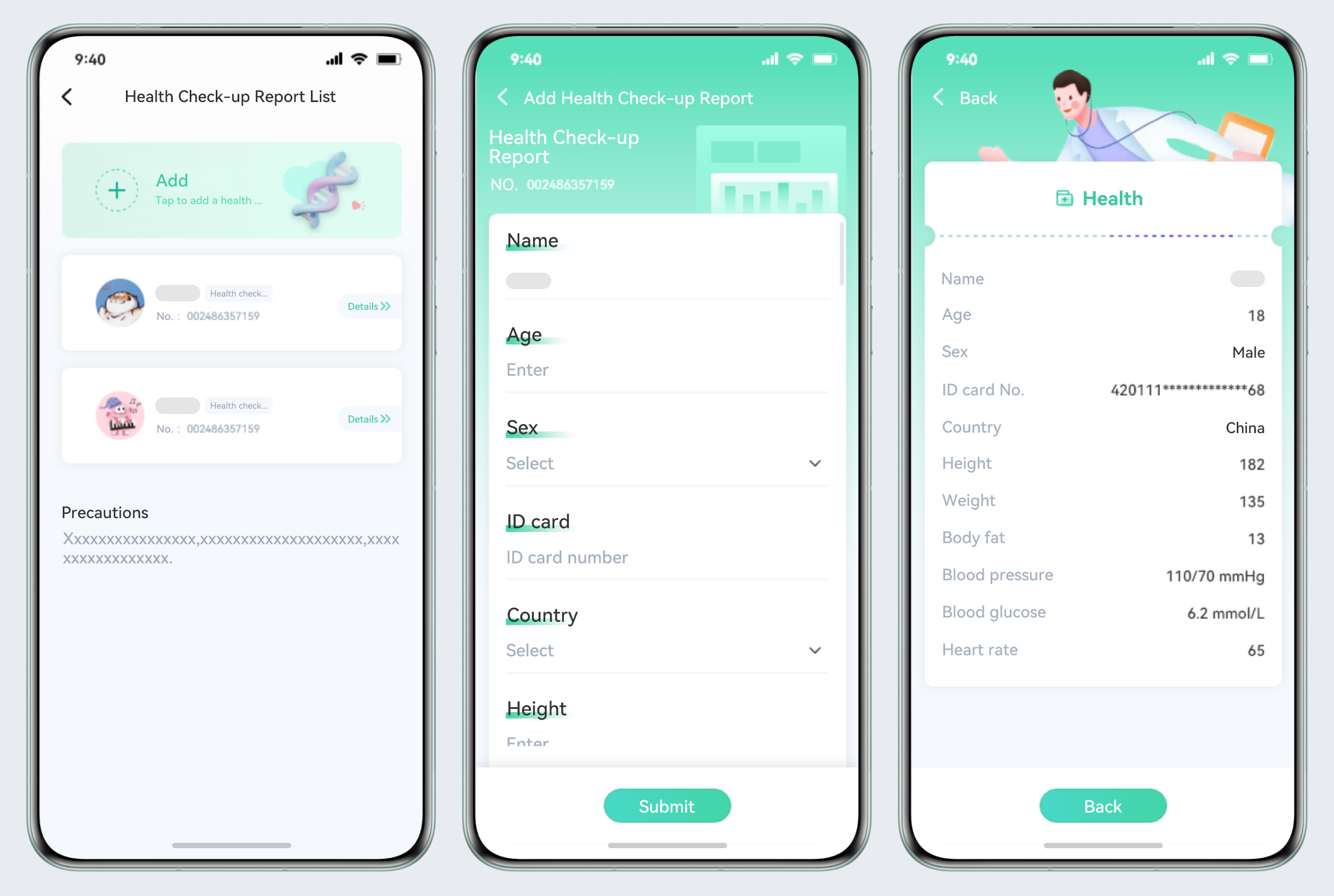
In actual development, data encryption and decryption often coexist. This scenario consists of two sub-scenarios: data entry and data details. The following describes specific implementations of the two sub-scenarios respectively.
After obtaining the data path by referring to the code in Hierarchical Data Protection, read and write files as normal. The code is as follows:
- function writeFile(filePath: string, data: string): void {
- try {
- let file = fileIo.openSync(filePath, fileIo.OpenMode.READ_WRITE | fileIo.OpenMode.CREATE);
- let writeLen = fileIo.writeSync(file.fd, data);
- hilog.info(0x0000, 'AppDataSecurity', 'The length of str is: ' + writeLen);
- fileIo.closeSync(file);
- } catch (error) {
- hilog.error(0x0000, 'AppDataSecurity', `writeFile error ${JSON.stringify(error)}`);
- }
- }
-
- function readFile(filePath: string): string {
- try {
- let file = fileIo.openSync(filePath, fileIo.OpenMode.READ_WRITE | fileIo.OpenMode.CREATE);
- let arrayBuffer = new ArrayBuffer(1024);
-
- class Option {
- public offset: number = 0;
- public length: number = 0;
- }
-
- let option = new Option();
- option.length = arrayBuffer.byteLength;
- let readLen = fileIo.readSync(file.fd, arrayBuffer, option);
- let buf = buffer.from(arrayBuffer, 0, readLen);
- hilog.info(0x0000, 'AppDataSecurity', `The length of of file: ${readLen}`);
- fileIo.closeSync(file);
- return buf.toString();
- } catch (error) {
- hilog.error(0x0000, 'AppDataSecurity', `readFile error ${JSON.stringify(error)}`);
- }
- return '';
- }
Before using HUKS, configure the specifications of the encryption algorithm. In this case, the AES algorithm with the key length of 128 is selected. Before using the crypto algorithms, generate the algorithm key. The following shows the code for algorithm configuration and algorithm key generation.
The algorithm type HUKS_ALG_AES, key size, and key usage must be specified in the configuration function for generating the algorithm key.
- function GetAesGenerateProperties(): Array<huks.HuksParam> {
- let properties: Array<huks.HuksParam> = [{
- tag: huks.HuksTag.HUKS_TAG_ALGORITHM,
- value: huks.HuksKeyAlg.HUKS_ALG_AES
- }, {
- tag: huks.HuksTag.HUKS_TAG_KEY_SIZE,
- value: huks.HuksKeySize.HUKS_AES_KEY_SIZE_128
- }, {
- tag: huks.HuksTag.HUKS_TAG_PURPOSE,
- value: huks.HuksKeyPurpose.HUKS_KEY_PURPOSE_ENCRYPT |
- huks.HuksKeyPurpose.HUKS_KEY_PURPOSE_DECRYPT
- }];
- return properties;
- }
The algorithm specifications configured for the encryption function must be the same as those for generating the algorithm key.
HUKS_TAG_PADDING has three padding modes:
HUKS_TAG_BLOCK_MODE has seven block modes. For CBC, CTR, OFB, and CFB modes, only HUKS_TAG_IV is used. For GCM and CCM modes, set HUKS_TAG_NONCE, HUKS_TAG_ASSOCIATED_DATA, and HUKS_TAG_IV.
- function GetAesEncryptProperties(): Array<huks.HuksParam> {
- let properties: Array<huks.HuksParam> = [{
- tag: huks.HuksTag.HUKS_TAG_ALGORITHM,
- value: huks.HuksKeyAlg.HUKS_ALG_AES
- }, {
- tag: huks.HuksTag.HUKS_TAG_KEY_SIZE,
- value: huks.HuksKeySize.HUKS_AES_KEY_SIZE_128
- }, {
- tag: huks.HuksTag.HUKS_TAG_PURPOSE,
- value: huks.HuksKeyPurpose.HUKS_KEY_PURPOSE_ENCRYPT
- }, {
- tag: huks.HuksTag.HUKS_TAG_PADDING,
- value: huks.HuksKeyPadding.HUKS_PADDING_PKCS7
- }, {
- tag: huks.HuksTag.HUKS_TAG_BLOCK_MODE,
- value: huks.HuksCipherMode.HUKS_MODE_CBC
- }, {
- tag: huks.HuksTag.HUKS_TAG_IV,
- value: StringToUint8Array(IV)
- }];
- return properties;
- }
The algorithm specifications of the decryption function must be the same as those of the encryption algorithm, but the key usage must be set to decryption.
- function GetAesDecryptProperties(): Array<huks.HuksParam> {
- let properties: Array<huks.HuksParam> = [{
- tag: huks.HuksTag.HUKS_TAG_ALGORITHM,
- value: huks.HuksKeyAlg.HUKS_ALG_AES
- }, {
- tag: huks.HuksTag.HUKS_TAG_KEY_SIZE,
- value: huks.HuksKeySize.HUKS_AES_KEY_SIZE_128
- }, {
- tag: huks.HuksTag.HUKS_TAG_PURPOSE,
- value: huks.HuksKeyPurpose.HUKS_KEY_PURPOSE_DECRYPT
- }, {
- tag: huks.HuksTag.HUKS_TAG_PADDING,
- value: huks.HuksKeyPadding.HUKS_PADDING_PKCS7
- }, {
- tag: huks.HuksTag.HUKS_TAG_BLOCK_MODE,
- value: huks.HuksCipherMode.HUKS_MODE_CBC
- }, {
- tag: huks.HuksTag.HUKS_TAG_IV,
- value: StringToUint8Array(IV)
- }];
- return properties;
- }
After the preceding configuration is complete, call the function for generating the algorithm key.
- async function GenerateAesKey(): Promise<void> {
- let genProperties = GetAesGenerateProperties();
- let options: huks.HuksOptions = {
- properties: genProperties
- };
-
- await huks.generateKeyItem(aesKeyAlias, options)
- .then((data) => {
- hilog.info(0x0000, 'AppDataSecurity', `promise: generate AES Key success, data = ${JSON.stringify(data)}`);
- }).catch((error: Error) => {
- hilog.error(0x0000, 'AppDataSecurity', `promise: generate AES Key failed, ${JSON.stringify(error)}`);
- })
- }
After the algorithm key is generated, encryption and decryption can be performed. During encryption and decryption, obtain the corresponding configuration and then call initSession and finishSession to complete the operation.
- async function EncryptData(): Promise<void> {
- let encryptProperties = GetAesEncryptProperties();
- let options: huks.HuksOptions = {
- properties: encryptProperties,
- inData: StringToUint8Array(plainText)
- };
-
- await huks.initSession(aesKeyAlias, options)
- .then((data) => {
- handle = data.handle;
- }).catch((error: Error) => {
- hilog.error(0x0000, 'AppDataSecurity', `promise: init EncryptData failed, ${JSON.stringify(error)}`);
- })
-
- await huks.finishSession(handle, options)
- .then((data) => {
- hilog.info(0x0000, 'AppDataSecurity',
- `promise: encrypt data success, data is ` + Uint8ArrayToString(data.outData as Uint8Array));
- cipherData = data.outData as Uint8Array;
- }).catch((error: Error) => {
- hilog.error(0x0000, 'AppDataSecurity', `promise: encrypt data failed, ${JSON.stringify(error)}`);
- })
- }
-
- async function DecryptData(): Promise<void> {
- let decryptOptions = GetAesDecryptProperties()
- let options: huks.HuksOptions = {
- properties: decryptOptions,
- inData: cipherData
- };
-
- await huks.initSession(aesKeyAlias, options)
- .then((data) => {
- handle = data.handle;
- }).catch((error: Error) => {
- hilog.error(0x0000, 'AppDataSecurity', `promise: init DecryptData failed, ${JSON.stringify(error)}`);
- })
-
- await huks.finishSession(handle, options)
- .then((data) => {
- hilog.info(0x0000, 'AppDataSecurity',
- `promise: decrypt data success, data is ` + Uint8ArrayToString(data.outData as Uint8Array));
- }).catch((error: Error) => {
- hilog.error(0x0000, 'AppDataSecurity', `promise: decrypt data failed, ${JSON.stringify(error)}`);
- })
- }
Sensitive data exists in the health check report. Therefore, secondary encryption and hierarchical encryption are required. The decryption process is the reverse of the encryption process. The data encrypted in hierarchical mode is read first, and then decrypted. When sensitive data of different security levels is involved, the data can be encapsulated and serialized by security level to prevent high-security data from being leaked to low-security devices during data flow.
To facilitate log printing and output, Base64 transcoding is performed on the encrypted data. This step can be omitted during application development.
Data security is critical to application development and must be considered in analysis, evaluation, design, and development phases.
In this document, security levels of data in the health check report are classified and corresponding encryption is performed.
In actual application development, you need to pay attention to data security and continuously improve data security protection measures to ensure that user data security and privacy are effectively protected.