Overview
The waterfall layout is widely adopted in application development. It uses the container layout rules to arrange elements, forming a multi-column and unaligned UI where the content cascades down like a waterfall. The waterfall layout is suitable for displaying various types of data such as images, shopping products, and live videos. When you scroll up and down in a waterfall mode, a large amount of data can be displayed with the infinite loading feature. Subelements of different sizes bring performance consumption during measurement and drawing.
Performance optimization is crucial in high-frequency waterfall scenarios, focusing on accelerating rendering speed, improving scrolling frame rates, and reducing memory usage, all of which significantly enhance application smoothness and user experience. You can use the ScrollComponents library to create a smooth waterfall. The library provides optimization capabilities such as component reuse, lazy loading, and reuse pool sharing, and supports pre-creation and preloading, greatly reducing the performance optimization cost. For details about the implementation and best practices, see Implementing the Waterfall Layout Based on ScrollComponents.
This topic describes lazy loading, data caching, component reuse, infinite scrolling, and optimization of waterfall scrolling in fixed width and height.
LazyForEach
The following sample code shows the basic usage of waterfall in the component.
build() {
  Column({ space: 2 }) {
    WaterFlow({ footer: this.itemFoot() }) {
      LazyForEach(this.dataSource, (item: number) => {
        FlowItem() {
          Column() {
            Text("N" + item).fontSize(12).height('16')
            Image('res/waterFlowTest(' + item % 5 + ').jpg')
              .objectFit(ImageFit.Fill)
              .width('100%')
              .layoutWeight(1)
          }
        }
        .width('100%')
        .height(this.itemHeightArray[item % 100])
        .backgroundColor(this.colors[item % 5])
      }, (item: string) => item)
    }
    .columnsTemplate("1fr 1fr")
    .columnsGap(10)
    .rowsGap(5)
    .backgroundColor(0xFAEEE0)
    .width('100%')
    .height('100%')
  }
}
In the sample code, LazyForEach is used for lazy loading. During the layout of the WaterFlow component, the FlowItem components are created as needed; those that extend beyond the viewpoint are reclaimed to release the memory.
Waterfall development is also a scenario for loading a long list. For details about the principles and performance analysis of LazyForEach, see Lazy Loading.
Caching Data Items
You can set cachedCount parameters to specify the number of LazyForEach components to be cached. After cachedCount is set, in addition to the Item components displayed on the screen, a specified amount of data outside the viewport of the screen is pre-cached. When you scroll down again after the data of a screen is loaded, the data requested last time is loaded first. After the loading is complete, the data requested this time is loaded.
For details about the principles and performance analysis, see Cache list items.
Reusing Components
In the scrolling scenario, FlowItem and its child components are frequently created and destroyed. You can encapsulate the components in FlowItem into custom components and use @Reusable to reduce the overhead of repeatedly creating and destroying nodes in the ArkUI framework.
The @Reusable decorator reuses components in the parent component only. To support global component reuse, you can use the third-party library of the global component reuse pool.
For details about the component reuse principle and performance analysis, see Component reuse.
Third-party library of the global component reuse pool: nodepool
In actual development, waterfall layout data is not loaded at a time. Instead, a fixed amount of data is loaded each time. When the application is scrolled, data is continuously loaded. To ensure timely supplementation of cached data, lazy loading and caching list items are utilized when new data is loaded during scrolling. Therefore, this feature allows for seamless scrolling without users noticing data loading, creating an infinite scrolling experience. (For details, see the practice summary.) Loading data in advance helps prevent the simultaneous creation of numerous components, thereby reducing frame loss.
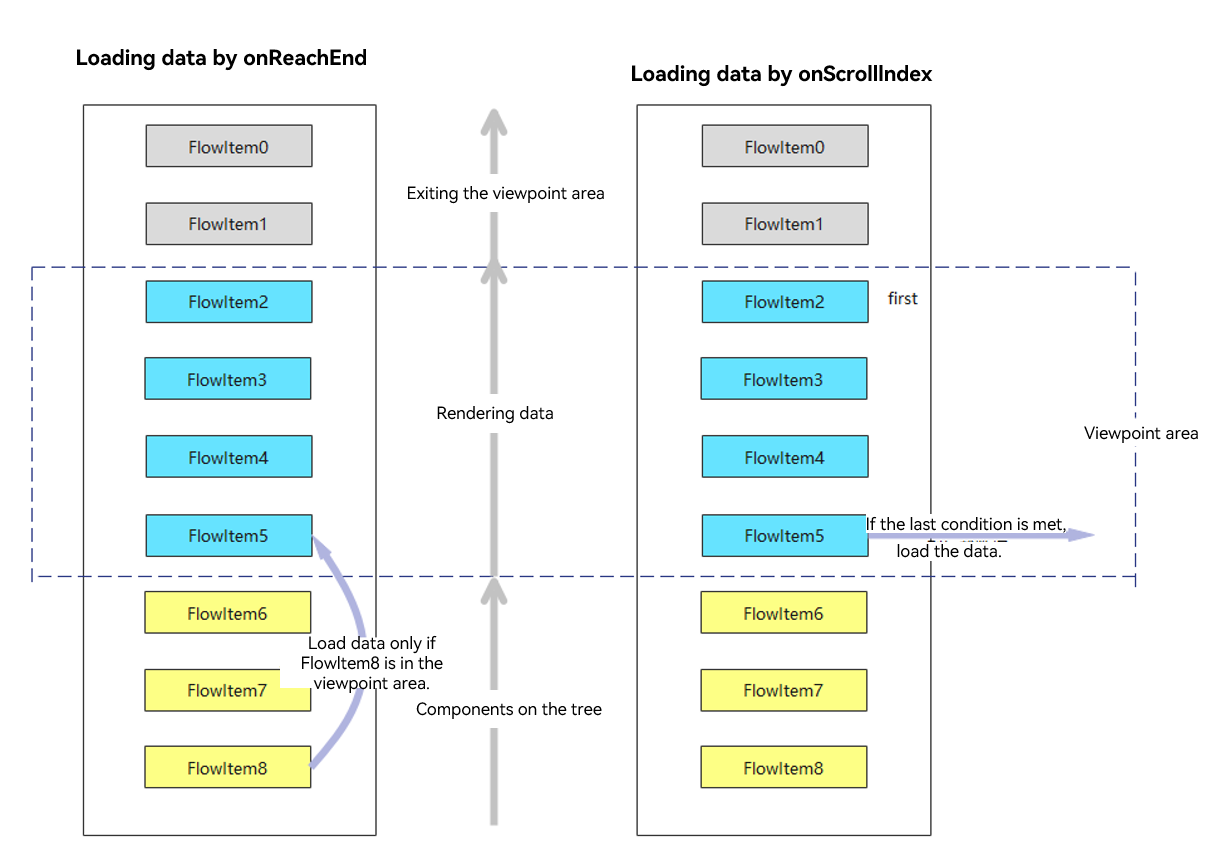
In this scenario, data must be loaded through events to realize infinite scrolling. For example, you can use the onReachEnd() and onScrollIndex() methods.
- Loading data in onReachEnd(): The application loads new data only after all current items in the data source have finished rendering. In this way, an obvious loading animation is displayed. You can browse the waterfall only after the new data is loaded.
- Loading data in onScrollIndex(): New data loads when the viewport index changes during scrolling. This requires setting a threshold to control the trigger condition for data loading. For example, data is loaded only when the index of the last component in the current viewport plus 20 is equal to the number of data sources. This avoids data loading each time the index changes. For a smoother experience, implement loading in onScrollIndex(). By loading data before the waterfall reaches the bottom, you can make the process seamless and imperceptible to users.
The process is outlined as follows.
Loading waterfall components
The sample code is as follows:
WaterFlow({ footer: this.footStyle, scroller: this.waterFlowScroller }) {
  LazyForEach(this.waterFlowListData.getData(), (item: WaterFlowData, index: number) => {
    FlowItem() {
      // ...
    }
    .height(item.waterFlowHead.height / item.waterFlowHead.width * this.waterFlowItemWidth +
    this.getTitleHeight(item.waterFlowDescription.title))
    .backgroundColor(Color.White)
    // ...
  }, (item: WaterFlowData) => {
    return item.waterFlowDescription.index.toString();
  });
}
.edgeEffect(EdgeEffect.Spring)
.flingSpeedLimit(4800)
.onReachEnd(() => {
  if (this.netConnectState === NetConnectionState.FAIL_STATE) {
    this.getUIContext().getPromptAction().showToast({
      message: $r('app.string.net_connection_description'),
      bottom: CommonConstants.TOAST_SHOW_MARGIN_BOTTOM,
      duration: CommonConstants.TOAST_SHOW_TIME
    });
  }
  if (this.waterFlowListData.dataSource.totalCount() < CommonConstants.WATER_FLOW_MAX_COUNT) {
    // There are only 500 analog data, so the limit here is pageNo less than 25
    this.pageNo = this.pageNo + 1 > 25 ? this.pageNo - 24 : this.pageNo + 1;
    this.waterFlowListData.addData(CommonConstants.MOCK_INTERFACE_WATER_FLOW_FILE_NAME, this.pageNo,
      this.pageSize);
  }
  this.listDataCount = this.waterFlowListData.dataSource.totalCount();
}) The height of each card in the waterfall layout is different in comparison with a long list, which poses a new challenge to waterfall layout drawing. The height of a waterfall card is obtained by adapting to the width of the waterfall card. Therefore, the card height cannot be directly specified. As a result, the height obtained after the card is rendered is inconsistent with the height of the placeholder, causing the card to flicker.
After the width and height are fixed, the width and height of the component can be specified in the UI description. If a component has fixed width and height, it does not undergo measurement during layout, and the size information is stored in the node. Performance is enhanced by avoiding extensive calculations when there is a large amount of content in the waterfall.
The Image component is loaded asynchronously. The height of FlowItem is set in advance to prevent the layout from being refreshed after the image height changes.
For details, see Reducing Layout Calculation by Using Layout Boundaries.
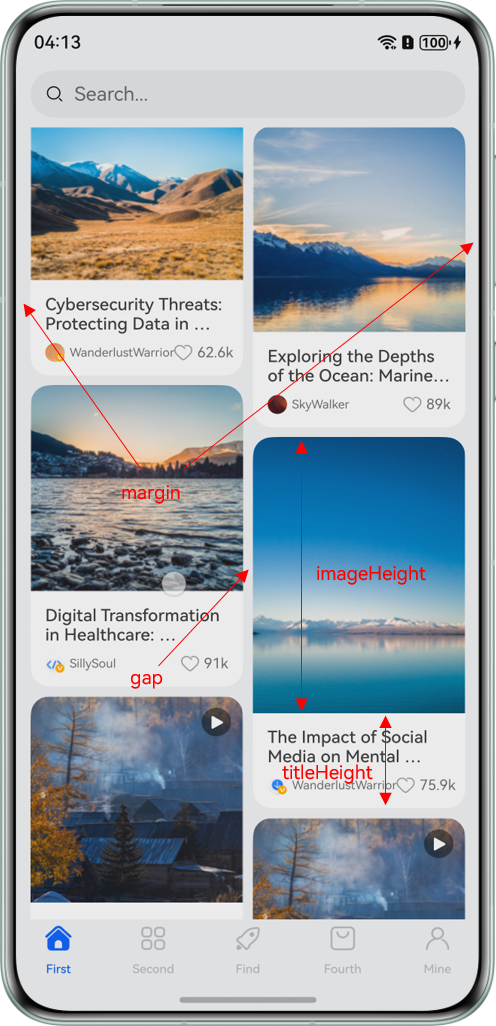
As shown in the preceding figure, the card width in the two-column waterfall is calculated as follows: Card width = (Screen width - 2 × Margin of the component - Gap of the waterfall component)/2.
Image height in the waterfall card (imageHeight) = Original image height/Original image width × Waterfall card width.
The description height (titleHeight) in the waterfall card needs to be set based on the title length. The calculation logic is as follows:
getTitleHeight(title: string) {
  let textWidth: number = this.getUIContext().getMeasureUtils().measureText({
    textContent: title,
    fontSize: 14
  });
  return textWidth > (this.waterFlowItemWidth - CommonConstants.DESCRIPTION_MARGIN_LEFT * 2) ?
    CommonConstants.DESCRIPTION_THREE_LINES_HEIGHT : CommonConstants.DESCRIPTION_TWO_LINES_HEIGHT;
}
Height of a waterfall card = Value of imageHeight + Value of titleHeight.
This section explains how to achieve smooth page scrolling in the waterfall scenario through optimization methods. The page contains the SearchBar, Swiper, WaterFlow, and bottom navigation bar. The top functionality area is implemented by the Grid component nested in Swiper. The WaterFlow component is used for the waterfall. The FlowItem content includes images, videos, and live broadcast cards. The same UI structure is reused to avoid unnecessary nesting.
Overall effect

The following table lists the data obtained by loading and rendering 500 data records through network requests. (The data is tested from left to right.)
| Performance Metrics | ForEach | LazyForEach | Caching Data Items | Reusing Components | Fixed Width and Height |
|---|---|---|---|---|---|
| First rendering duration | 1346 ms | 756 ms | 752 ms | 760 ms | 761 ms |
| Frame loss rate | 2.20% | 1.00% | 0.50% | 0.2% | 0.00% |
| Exclusive memory | 485 MB | 122 MB | 136.6 MB | 106.8 MB | 103.3 MB |
The test results indicate that LazyForEach significantly improves performance metrics, especially in memory usage and initial rendering time. Other optimization methods can further reduce the frame loss rate during scrolling, thereby improving the interaction experience. Cached data items impact the first rendering time as they are not shown on the first screen, requiring additional data to be loaded and thus increasing memory usage. The memory usage is significantly reduced due to UI component reuse.
The waterfall performance optimization methods are similar to the methods for long list optimization. They can use the lazy loading, caching list items, dynamic preloading, component reuse, and layout optimization methods to optimize performance. As a unique performance optimization method of the waterfall model, the fixed width and height can further improve the performance of the waterfall model and avoid the "flickering" problem caused by the instant refresh of newly loaded elements. Loading data during swiping can avoid frame loss caused by creating a large number of components at the same time. The following table lists the technical summary.
| Technology | Application Scenario | Reference |
|---|---|---|
| LazyForEach | It is used in waterfall scenarios to solve the performance bottleneck caused by loading and rendering a large amount of data at a time. | Performance Optimization for Loading a Long List, |
| Cache list item | It applies to scenarios where a request for loading list item data is time-consuming. For example, the waterfall list contains resources with a large amount of data, such as short videos and HD images. | |
| Reusing Components | It applies to scenarios where performance bottlenecks occur because a large number of components with the same structure are frequently created and destroyed in a waterfall. | Component Reuse |
| Fixed width and height | This method applies to scenarios where the heights of components on the waterfall page are different. | |
| Layout optimization | Incorrect layout may cause excessive component trees and nesting layers, resulting in high performance overhead during creation and layout drawing. Therefore, you can optimize the layout to improve performance. | |
| State management | During ArkUI development, if a proper decorator is not selected or the state update range is not properly controlled, unnecessary UI view refresh may occur, resulting in performance waste. |