Overview
In a large-scale software project, multiple teams are involved in development and weakly coupled. APIs between services delivered by the teams are defined in a contractual form so that services can be developed independently without affecting each other and evolve rapidly. Service modularization is one of the core principles of modern software projects. It improves system maintainability and scalability by disassembling a large, complex system into functional modules that are smaller, and easier to manage and understand. Each functional module is an independent unit with clearly defined APIs and responsibilities and can interact with other modules to complete complex tasks.
In HarmonyOS app development, modularization is not only a design principle, but also a development practice. It requires that an app be split into multiple functional modules with each module responsible for a specific function or feature. These modules can be independently developed, compiled, and deployed, or flexibly combined and called on different devices.
Application Package Structure Concept
During modular design, you should consider the HarmonyOS app package structure, which defines how the app is organized. By examining the package formats at the development, compilation, and release stages, you can understand the specific use cases and rules for different package types. For details, see Application Package Structure in Stage Model.
UIAbility Design
The service logic of HarmonyOS apps is carried by the UIAbility. Therefore, you need to select and design proper abilities based on service devices and requirements. When you use multiple devices, an app is not necessarily in a single-task single-window form on a conventional mobile device, but in a multi-task multi-window form that can improve user experience and efficiency.
For example, on a mobile phone:
- A note-taking app allows users to copy information from one page to another.
- A document editing app allows users to open and edit multiple documents at the same time and copy or move content from one document to another.
- A navigation or ride-hailing app allows navigation to run in the background and allows users to return to the home screen to find new location information or other information.
- A temporary customer service page for shopping allows users to quickly switch from the product browsing page to the customer service session page through task management, preventing users from opening the page layer by layer.
- An app payment/login page allows users to switch to another page to search for and copy related information.
On a large-screen device, multiple tasks can exist in multiple windows, and a user can use different functions of the app in parallel.
- A video player app allows users to browse the list of other videos that may be of interest during watching.
- An email app allows users to view the list of received emails while writing emails.
- An address book app allows users to compare the contact information of multiple individuals at the same time.
- A reading app allows users to open multiple articles for reading after viewing all title summaries.
Each task of this type corresponds to a UIAbility component instance and can be displayed in an independent window. Users can switch between different tasks of the same app, like using independent apps. In addition, app windows can be independently moved, resized, displayed, and hidden on large-screen devices. Therefore, during functional design, you need to consider whether the app supports multiple tasks and windows, as this may affect the modular structure of the entire project.
- For a single ability, use a single-window app or multi-task app implemented by multiple or specified instances, such as a game app. In this case, you are advised to deploy UIAbility in a single HAP.
- For multiple abilities, there are two scenarios:
- For a multi-window app, each window corresponds to a different function, which is carried by a different UIAbility. For example, in a navigation or ride-hailing app, the navigation page and home screen serve distinct functions and are presented to users as two separate tasks. The module in question can be hosted by a feature HAP to carry the corresponding UIAbility components.
- For extended features of an app, such as widgets and sharing capabilities, these features do not run as standalone tasks or in the window mode. Since these features are relatively independent and hosted by the system-provided ExtensionAbility components, it is recommended that feature HAPs be used to host separate ExtensionAbility components for better service decomposition.
Module Type Selection
The app architecture implements the services from the technical perspective, while the modular technology for code projects is determined based on the technical architecture, which involves how to implement the technology in specific code projects. A well-chosen technical model for code projects can achieve an optimal comprehensive performance in terms of package size, performance, product deployment, and other aspects.
Services are generally divided into modules. For example, a shopping app has several service modules such as home page navigation, product details, shopping cart, payment, orders, and user profile. From a technical architecture perspective, these service modules are represented as highly cohesive and low-coupled modules. In module type selection, since exactly one entry HAP module is required for a project, the primary module types to consider are the following: feature HAP, HAR, and HSP.
To select the appropriate module types, a comprehensive assessment must be conducted based on multiple factors, including service characteristics and module functions. Drawing from common app modularization models, the following scenarios may be encountered in real-world service contexts:
- Shared module: A functional module (service or capability module) needs to share its code logic and resources among multiple apps.
- On-demand module: A functional module is dynamically downloaded and installed from AppGallery at a time determined by users.
- Impact of multiple HAPs or HSPs referencing the same HAR: For performance purposes, minimize concurrent HAR references from multiple HAPs/HSPs.
[h2]Shared Module
For large-scale software projects developed by multiple teams, each responsible for distinct services or basic capabilities, code repository isolation is essential. When a team owns one or more HAR modules that require this isolation, they can develop these HAR modules as independent projects. They can then publish the build products to the company's private ohpm repository, making the modules available for other teams to integrate as dependencies. This process is illustrated in the following figure.
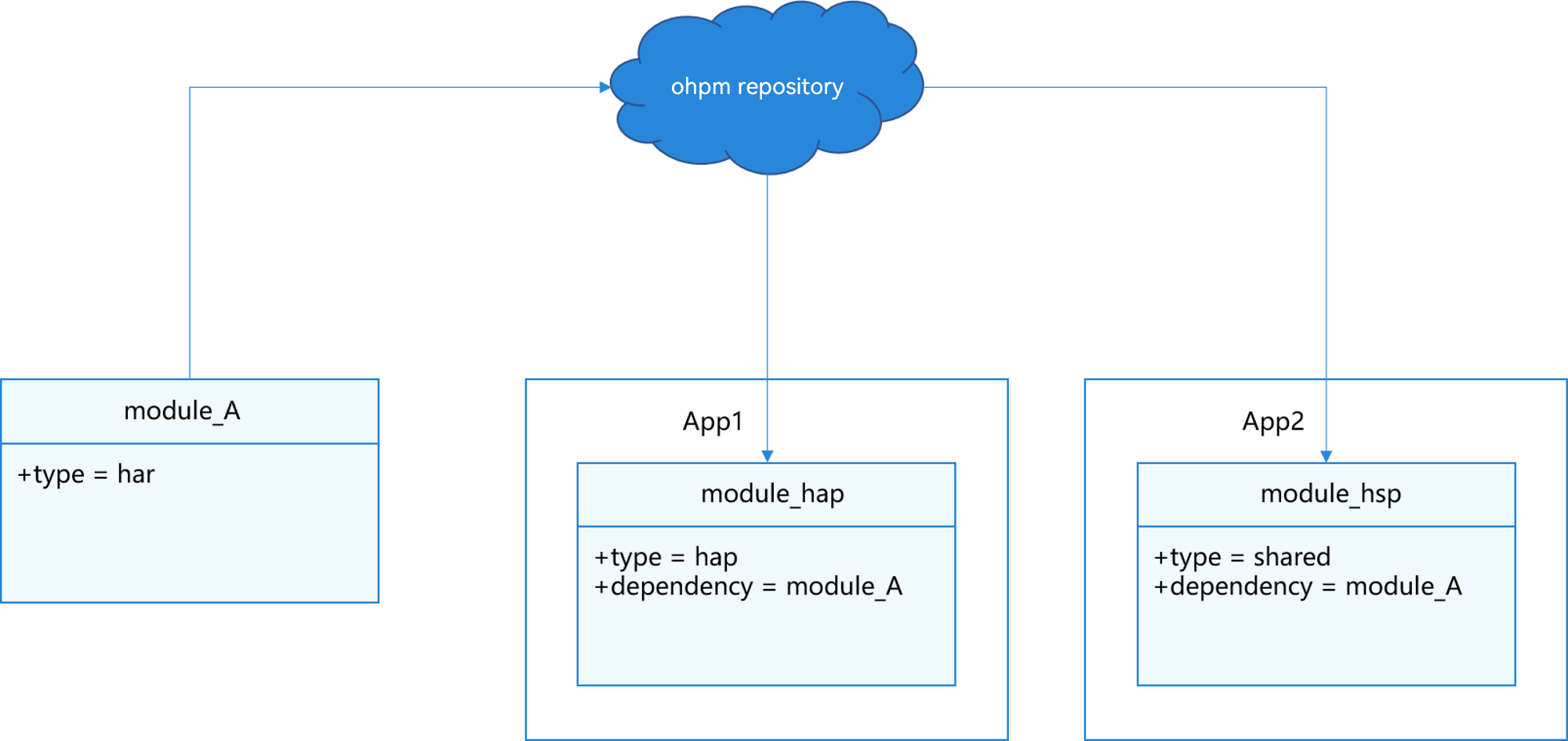
Modules that are published to the ohpm repository are called shared modules, which enable sharing of common capabilities across multiple apps. For example, a network library developed as a shared module can be used by multiple apps within the company. The common capabilities can also be encapsulated into libraries and contributed to the open-source community so that external apps can integrate them as well. However, in this case, the module must be a HAR module.
[h2]On-Demand Module
As apps evolve and expand their services, the number of features they offer continues to grow. However, not all features are used frequently by users. For low-engagement features identified in user analytics reports, you can implement them as on-demand modules. This way, users can download them later on demand after they have already installed the essential parts of your app from AppGallery (initial app installation).
On-demand modules offer the following benefits:
- Smaller package size: By excluding on-demand modules from the initial app download package on AppGallery, you can significantly reduce the package size and shorten the download and installation time.
- Fewer system resources: By loading modules on demand, apps require less storage space (ROM) for installation and less memory footprint (RAM) during startup.
- Easier architectural evolution: On-demand modules enforce clean feature boundaries and explicit coupling relationships, facilitating long-term architectural evolution and scalability.
If a feature is designed as an on-demand module, it can be implemented as a feature HAP or feature HSP. While both allow for on-demand loading, the feature HAP stands out by being able to include UIAbility. Based on the UIAbility Design and whether on-demand loading is required, the following two scenarios are involved:
- Single HAP: If your app uses only one UIAbility component (even with multiple or specified UIAbility instances) and does not require the ExtensionAbility, single HAP (entry HAP) is recommended. You can choose between an HSP or HAR based on whether on-demand loading is needed.
- Multiple HAPs: If your app involves multiple tasks using multiple UIAbility components or requires the ExtensionAbility components to implement extended functions, develop multiple HAPs (one entry HAP and several feature HAPs), with each HAP containing one UIAbility or ExtensionAbility. Choose the appropriate module types based on whether capabilities need to be shared across modules.
The design of app components determines whether to adopt a single-HAP or a multi-HAP modular design. In the initial design phase, evaluate your app's task structure to select the appropriate modular structure. For details about on-demand loading, see the API description for on-demand distribution of product features.
[h2]Impact of Multiple HAPs or HSPs Referencing the Same HAR
During app development, you can integrate modules of the same type into an HSP or HAR to enable the sharing of ArkUI components and resources across multiple modules or projects.
When multiple HAPs or HSPs reference the same HAR, differences between dynamic and static packages may cause the singleton in the HAR to become invalid, potentially affecting the cold start performance of the app.
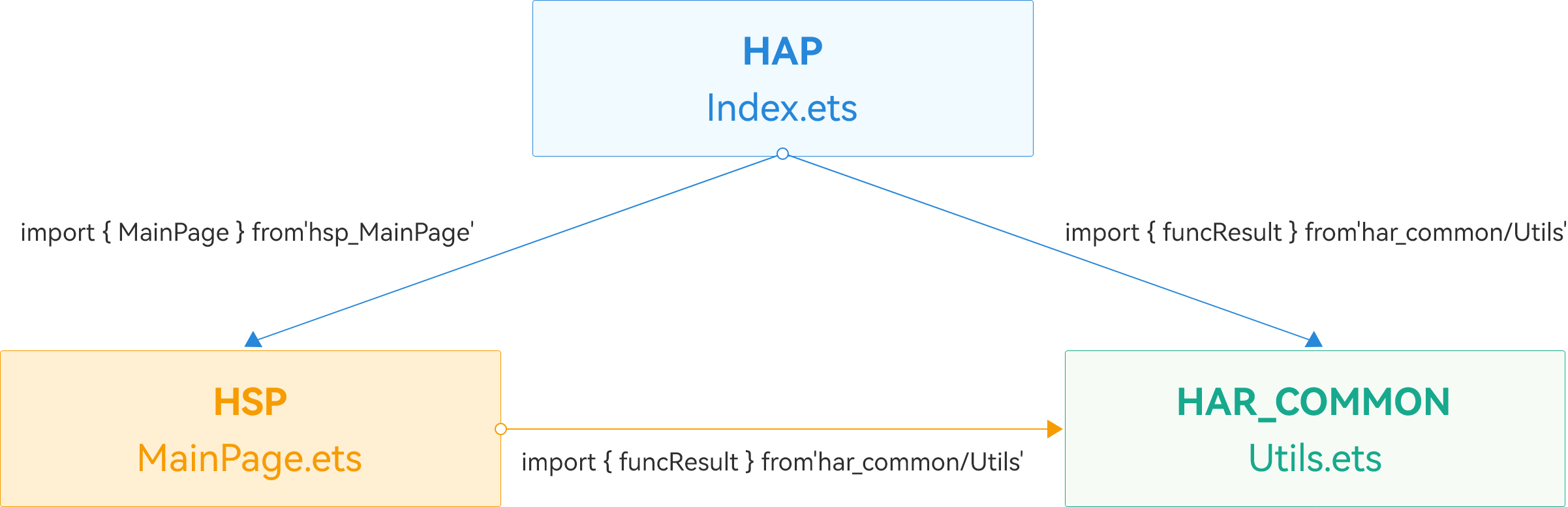
In the project structure shown in the preceding figure, there are three modules in the project. The HAP is the main entry module, the HSP is the main UI display module, and the HAR_COMMON module integrates all common utility classes. funcResult is the execution result of the func method.
When both the HAP and HSP reference the HAR_COMMON module, the singleton pattern in the HAR will be damaged. Therefore, when the HAP and HSP modules import funcResult from the HAR_COMMON module, the func method is executed each time the two modules are loaded, which increases the execution time.
To optimize cold start performance, consider the following approach.
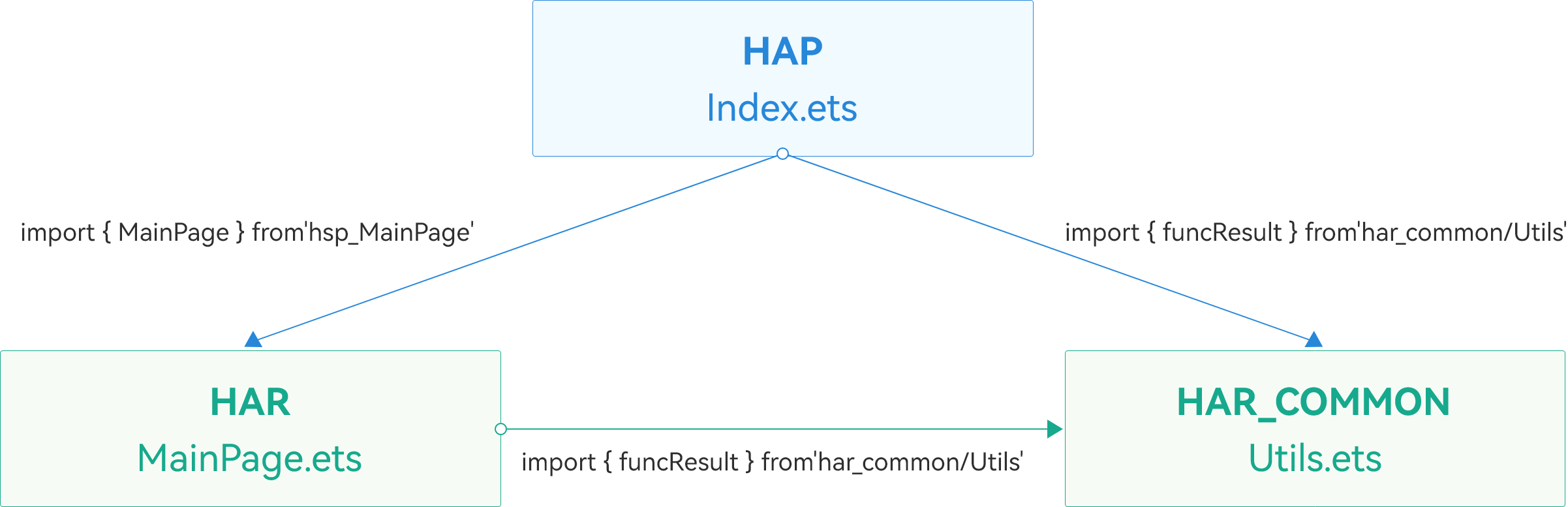

- If using only the HSP and HAR meets service requirements, replace HSPs with HARs to prevent concurrent HAR references from multiple HAPs and HSPs.
- If the integrated HSP is used, no optimization is required.
- Define the func function in the HAR_COMMON module.
// har_common/src/main/ets/utils/Utils.ets const LARGE_NUMBER = 100000000; function func(): number { let count = 0; while (count < LARGE_NUMBER) { count++; } return count; } export let funcResult = func(); - Compare performance with different reference patterns.
- Use the HAP and HSP to reference the function in the HAR_COMMON module.
The HAP imports funcResult from HAR_COMMON.
// entry/src/main/ets/pages/Index.ets
import { MainPage } from 'har_library';
import { funcResult } from 'har_common';
The HSP imports funcResult from HAR_COMMON.// har_library/src/main/ets/pages/MainPage.ets import { funcResult } from 'har_common'; - Use the HAP and HAR to reference the function in HAR_COMMON.
The HAP imports funcResult from HAR_COMMON.
// entry/src/main/ets/pages/Index.ets
import { MainPage } from 'har_library';
import { funcResult } from 'har_common';
The HAR imports funcResult from HAR_COMMON.// har_library/src/main/ets/pages/MainPage.ets import { funcResult } from 'har_common';
- Use the HAP and HSP to reference the function in the HAR_COMMON module.
Use the Launch template to compare the startup performance before and after optimization.
The analysis starts when the ability is started (the start point of H:void OHOS::AppExecFwk::MainThread::HandleLaunchAbility), and ends when the app receives VSync for the first time (the start point of H:ReceiveVsync dataCount:24Bytes now:timestamp expectedEnd:timestamp vsyncId:int).


The following table shows the comparison before and after optimization.
Solution | Phase Duration (ms) |
|---|---|
Before optimization: using the HSP | 3125 |
After optimization: using the HAR | 853.9 |

- To highlight the difference, the number of loop executions of the func function is 100,000,000.
- The preceding data is obtained after the test package is manually changed to an HSP or a HAR in the test environment. The actual benefits vary depending on the version and device. You need to perform the test based on the actual situation.
The test data shows that replacing the HSP with a HAR significantly reduces the app startup duration.
Single-HAP Project
A single-window app project contains only one entry HAP. Depending on whether on-demand loading is required, you can use HAR or HSP modules.
[h2]Without On-Demand Loading
For apps that include only one entry HAP and do not require on-demand loading, it is recommended that you use HAR modules for development and design. The project structure for this approach is illustrated in the following figure.

"One entry HAP" here refers to one entry HAP per device type. The .app file may include additional HAPs for other device types (such as watches and smart TVs) to support multi-device deployment.
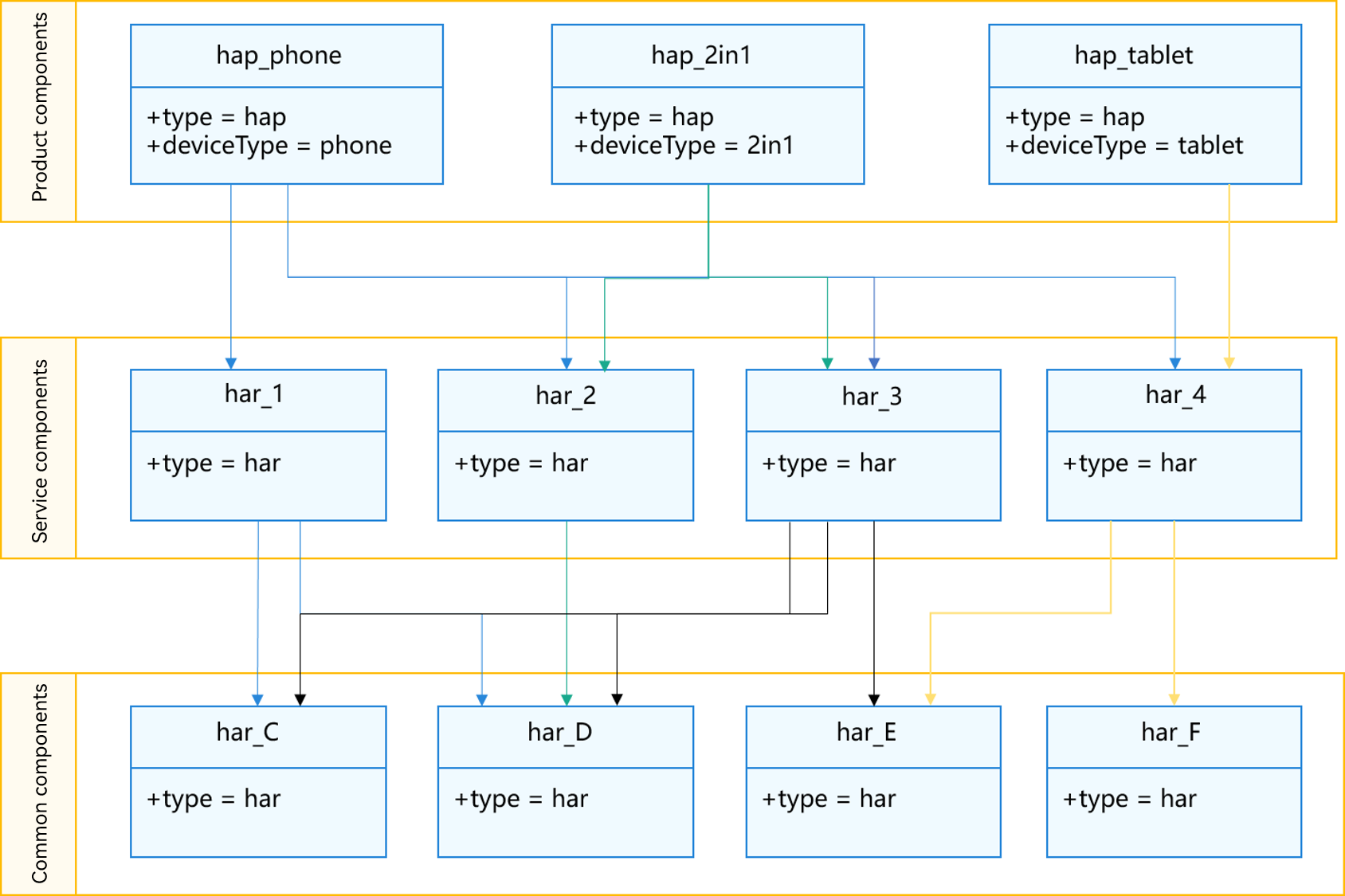
In the project structure shown above, except the device-specific HAPs at the product module layer, all modules are HARs. These HARs are dependencies of HAPs and will ultimately be compiled into HAPs.
Using HARs offers the following advantages:
- No additional installation or loading costs associated with HSPs are involved.
- The language features and compiler functions of ArkTS are available during HAR-to-HAP compilation for type inference and compilation optimization.
- The code engineering architecture is simple, allowing for flexible evolution.
[h2]With On-Demand Loading
For single-HAP projects that require on-demand loading, implement the on-demand modules as HSPs. However, this approach requires careful consideration of the trade-off between app size and startup performance. The HAR is a static shared library. If multiple HAPs or HSPs depend on the same HAR, it will be stored redundantly within the app. In contrast, the HSP is a dynamic shared library, whose installation and loading incur performance costs. Excessive use of HSPs may reduce installation efficiency and app startup performance. During modular design, assess app storage constraints and performance sensitivity to balance the app size and startup performance based on service requirements.

The app size mentioned here refers to the total size of the app after the on-demand modules are installed.
App Size First
For scenarios prioritizing the app size, consider encapsulating common module dependencies into an HSP, as shown in the figure below.
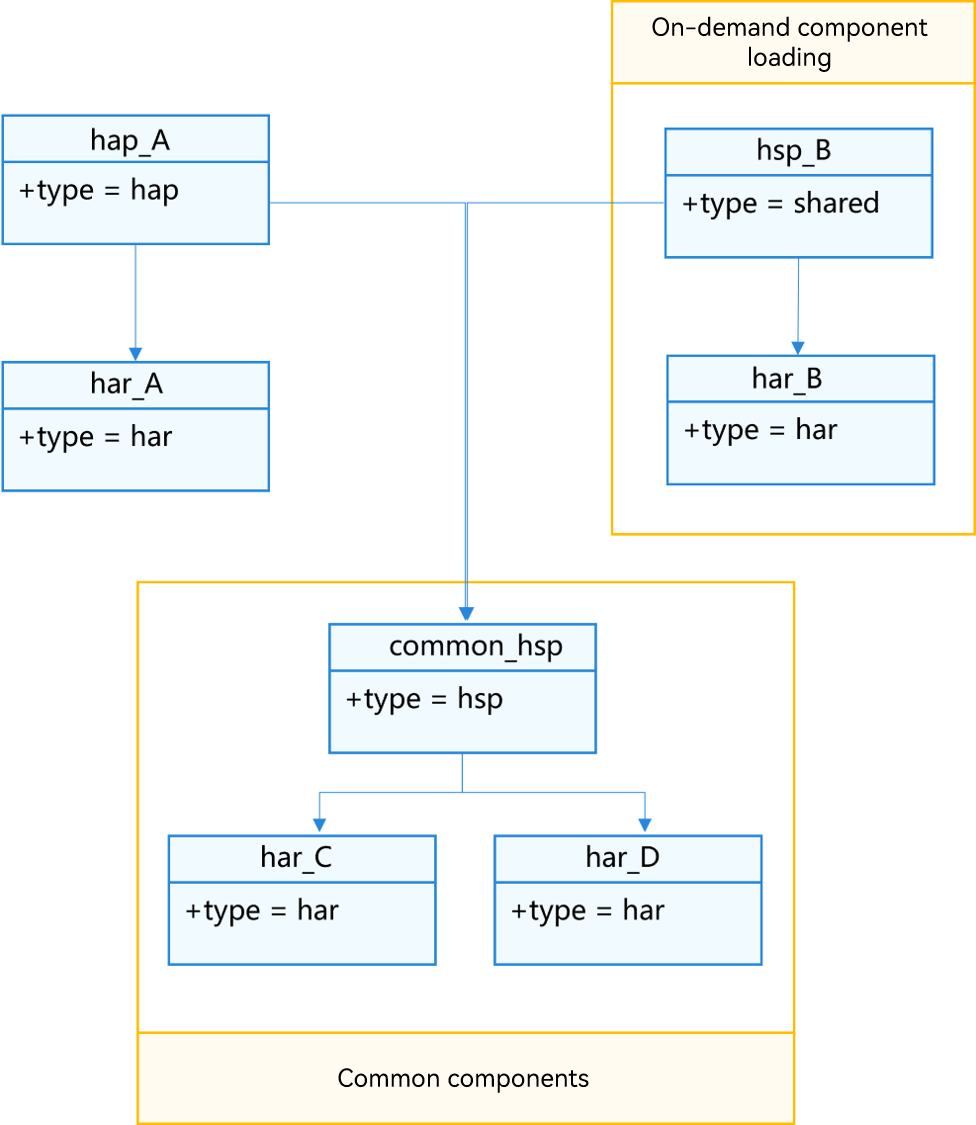
hap_A depends on the exclusive shared library har_A, as well as har_C and har_D. The on-demand module hsp_B depends on the exclusive shared library har_B, along with har_C and har_D.

The shared libraries har_A, har_B, har_C, and har_D may not be local projects and may be downloaded from the ohpm repository.
The hap_A and hsp_B depend on har_C and har_D. Therefore, to reduce app size, you can encapsulate har_C and har_D into the common_hsp module to expose the har_C and har_D APIs, package har_C and har_D into common_hsp, and make hap_A and hsp_B depend on common_hsp project. The common_hsp project is meaningless. It is only a module shell used to minimize the app size.
Performance First
For scenarios prioritizing performance, there is no need to encapsulate a common HSP module. Instead, directly depend on the common HAR package, as shown in the figure below.
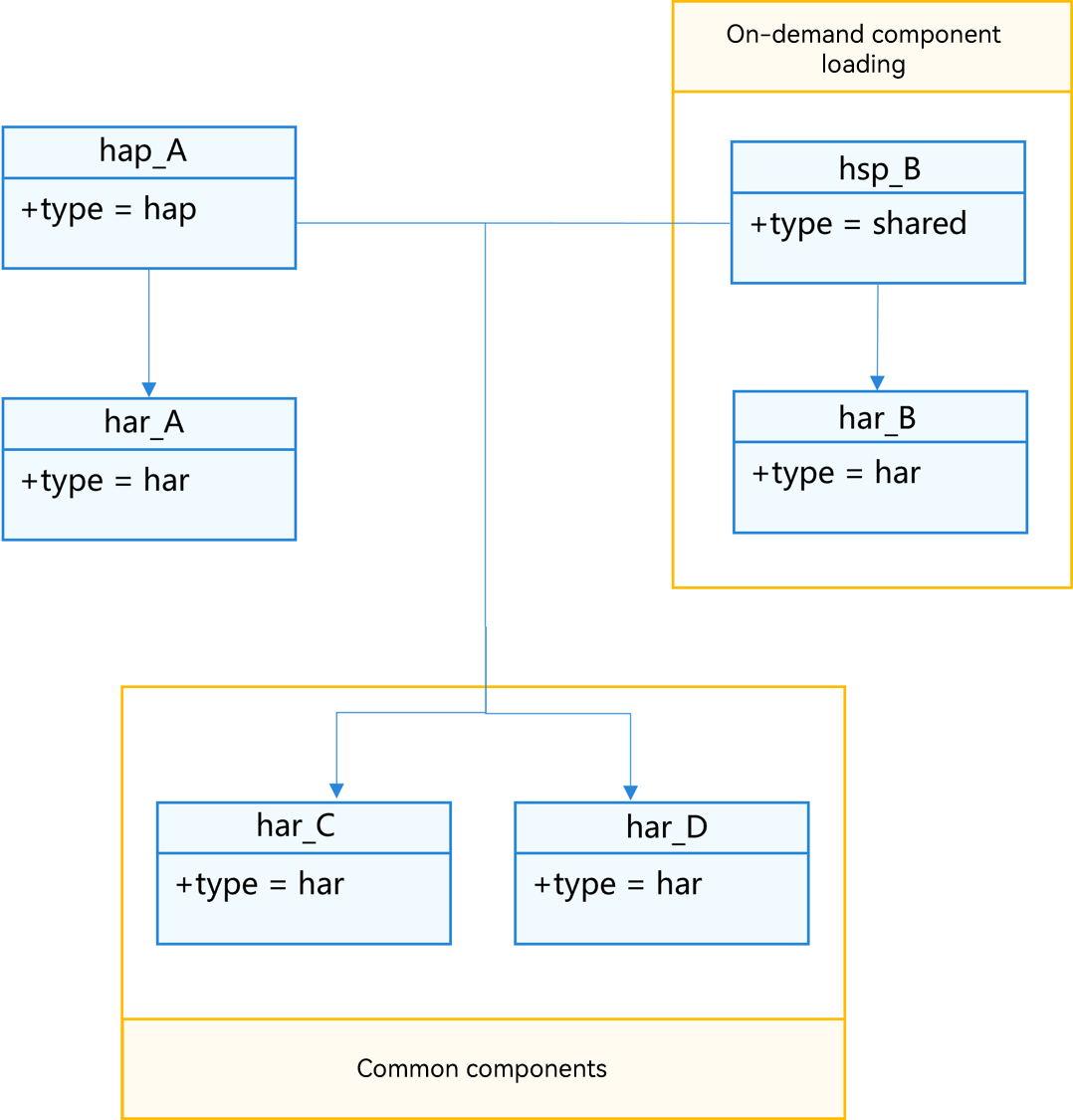
The common HSP needs to be installed and loaded, which causes performance loss. For performance-sensitive apps, hap_A and hsp_B depend on har_C and har_D. There are two final compilation products: hap_A.hap and hsp_B.hsp. Both of them contain har_C and har_D and their app size is larger than that of the common HSP model.
Multi-HAP Project
For a single device type, if different independent functional modules and function features with independent entries need to be implemented, you are advised to use independent feature HAPs that enable on-demand downloading. In this case, an app package contains multiple HAPs, including only one entry HAP and one or more feature HAPs. Although HAPs work independently, they may share service capabilities. Therefore, during modular design, you must select HAPs based on whether sharing of common capabilities is needed.
[h2]With Common Capability Modules
When common capabilities are involved, balancing the app size and startup performance is critical.
Performance First
In a typical multi-HAP project structure, as shown below, HAPs are used only as device-specific modules, and all other modules are implemented as HARs.
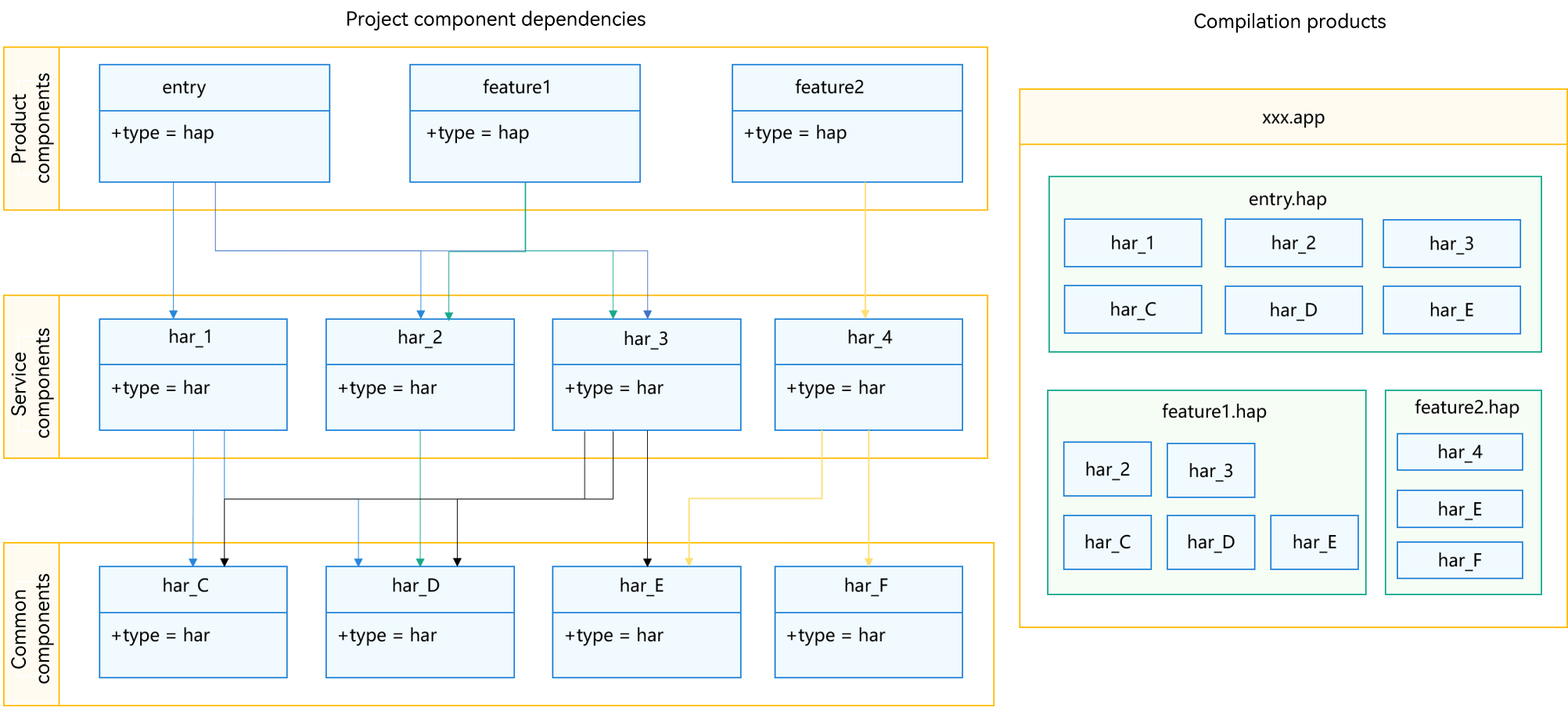
In the build product, identical HARs (for example, har_2, har_3, har_C, har_D, and har_E) may exist across multiple HAPs. This increases the app size, but reduces the performance overhead of dynamic HSP loading. To sum up, this performance-first approach is suitable if the app size is not a critical concern, or if the HAR modules are small such that they do not significantly impact the total package size.
App Size First
To minimize the app size and reduce redundant compilation and packaging of HARs, consider encapsulating shared HARs into a common HSP. This approach is illustrated in the figure below.
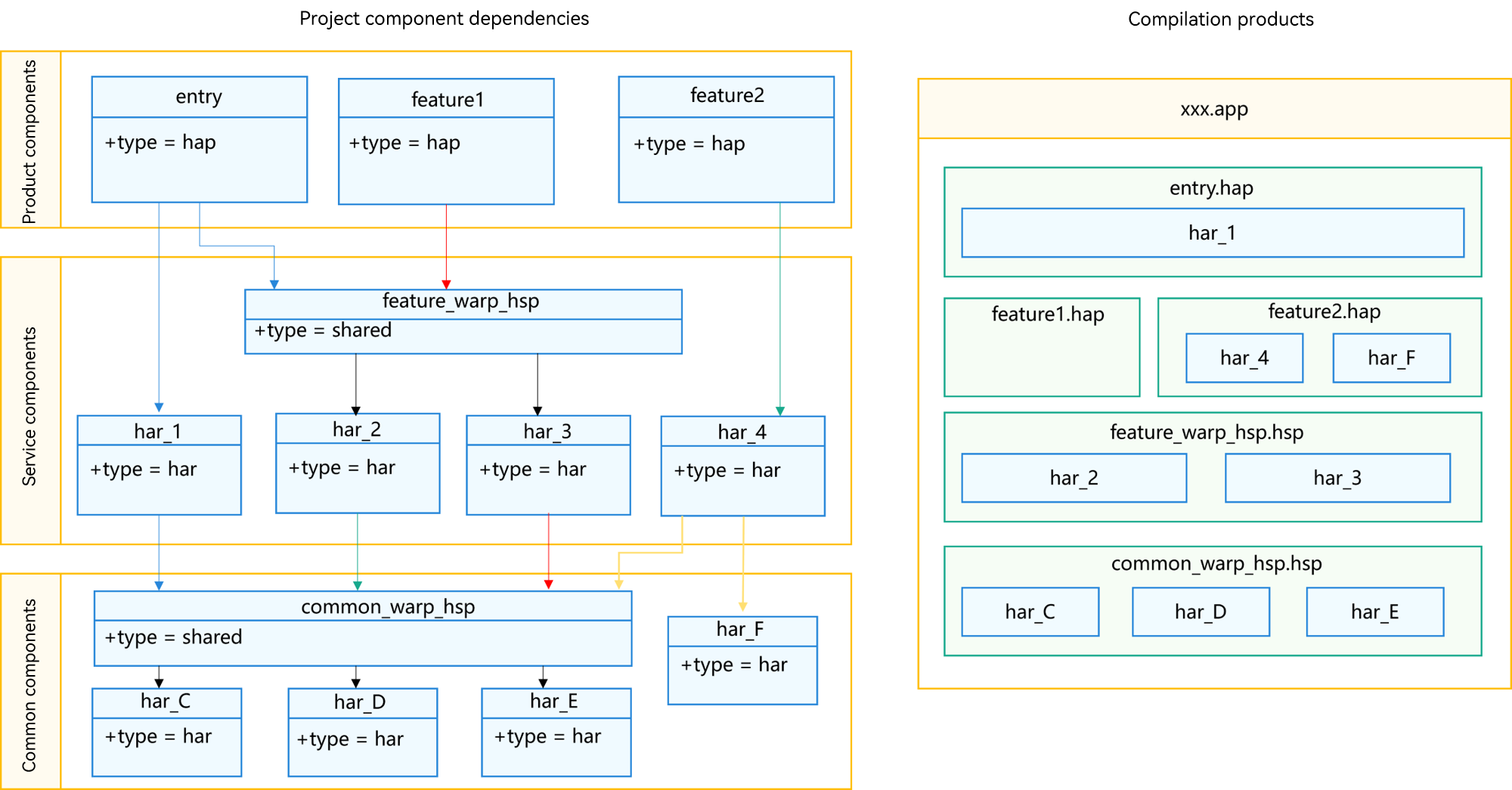

It should be noted that HARs shared between apps are not allowed to depend on HSPs because HSPs are app-specific and bound to bundle names. Once a HAR depends on the HSP in an app, it cannot be shared.
In the project structure shown in the preceding figure, there are three HAPs: one entry and two feature HAPs. The shared HARs are encapsulated into HSPs, such as common_wrap_hsp and feature_wrap_hsp. Strictly speaking, these HSPs are not modules—they do not provide module functionality and cannot be shared across apps. Instead, they are module shells that control how HARs are placed in the build products, and modules depending on these shells cannot be shared across apps either.
Using the HSP shells ensures each HAR appears only once in the final build products, thereby reducing the app size. However, the number of such shells should be limited, as excessive shells may reduce the installation speed and startup performance.
Keep in mind that both the app-first and performance-first approaches presented here are idealized. In real-world scenarios, a hybrid approach is often preferred. For example, small, performance-critical modules, such as a logging module, can be compiled into each product, while other larger shared modules can be encapsulated into HSPs, balancing performance and package size.
[h2]Without Common Capability Modules
Apps without common capability modules are rare and usually small. For such app, you can follow the single-HAP project structure.
Summary
You must select the appropriate modular project model based on the technical architecture. These models should evolve with service needs and technical architecture, choosing between HAPs, HARs, and HSPs according to specific requirements.
For modules that can run and be installed independently, store them in the app as feature HAPs. For modules that do not have independent features and are seldom used by users, store them in the app as HSP on-demand modules. For modules that need to be shared, use HARs and share them with other projects through the ohpm repository. As the HAR is a static shared library, in the multi-HAP or on-demand loading scenario, multiple HARs may exist physically after compilation. Therefore, you need to properly use the common HSP module shell to minimize the app size.