Overview
Users are using two or more devices to experience an all-scenario, multi-device lifestyle. Each type of device has its unique advantages and disadvantages specific to scenarios. For example, a watch facilitates instant information viewing, and a TV provides an immersive video watching experience, while typing text on a TV is frustrating because it is much more difficult than on a mobile device. If multiple devices can sense each other through a distributed OS and together form a Super Device, the strengths of each device can be fully leveraged, thereby providing a more natural and smoother distributed experience for users.
Hopping allows distributed operations across devices that run HarmonyOS. It includes cross-device migration and multi-device collaboration.
Basic Concepts
- Hopping
Hopping allows distributed operations across multiple devices that run HarmonyOS. It breaks boundaries of devices and enables multi-device collaboration, enabling user apps to be split, combined, and seamlessly migrated. For example, a user can edit the same email, carry out fitness, or play a game across devices. Hopping provides broad application scenarios, innovative product perspectives, enhanced product advantages, and superior experience. It includes cross-device migration and multi-device collaboration.
- Cross-device migration
When the environment changes, for example, when a user walks from indoors to outdoors or when a more suitable device becomes available, the user can migrate an ongoing mission to another device for better experience. The app on the original device can automatically exit as required.
A typical cross-device migration scenario is as follows: The user migrates a video playback task from a tablet to a smart TV. The video app on the tablet exits.
From the perspective of app development, cross-device migration enables the UIAbility component running on device A to migrate to device B. After the migration is complete, the UIAbility component on device B continues the mission, whereas that on device A automatically exits as required.
- Multi-device collaboration
Multi-device collaboration allows multiple devices owned by a user to work together as a whole, providing a more efficient and immersive experience than a single device.
Multi-device collaboration is used in the following typical scenarios:
Scenario 1: The user opens the same note on devices A and B. On device A, the user selects images from the local Gallery, inserts them to the note, and edits them. On device B, the user edits the text.
Scenario 2: The user is chatting with a customer on device A, and the customer asks for a file, which is stored on device B. The user can use the chat software to open the file app on device B, select the required file, and send it back to device A. Then, the user uses the chat software to send it to the customer.
From the perspective of app development, multi-device collaboration enables different UIAbility or ServiceExtensionAbility components to run simultaneously or alternately on multiple devices to provide a complete service, or enables the same UIAbility and ServiceExtensionAbility component to run simultaneously on multiple devices to provide a complete service.
[h2]Framework
Hopping depends on the distributed runtime environment provided by HarmonyOS. The underlying layer relies on DSoftBus to enable device discovery, connection, and networking, and to streamline the 1+8+N interconnection capabilities. It provides cross-device access capabilities in terms of hardware, data, and apps. By following the framework and adapting to the specified APIs provided by the app layer, you can implement cross-device migration and multi-device collaboration between devices.
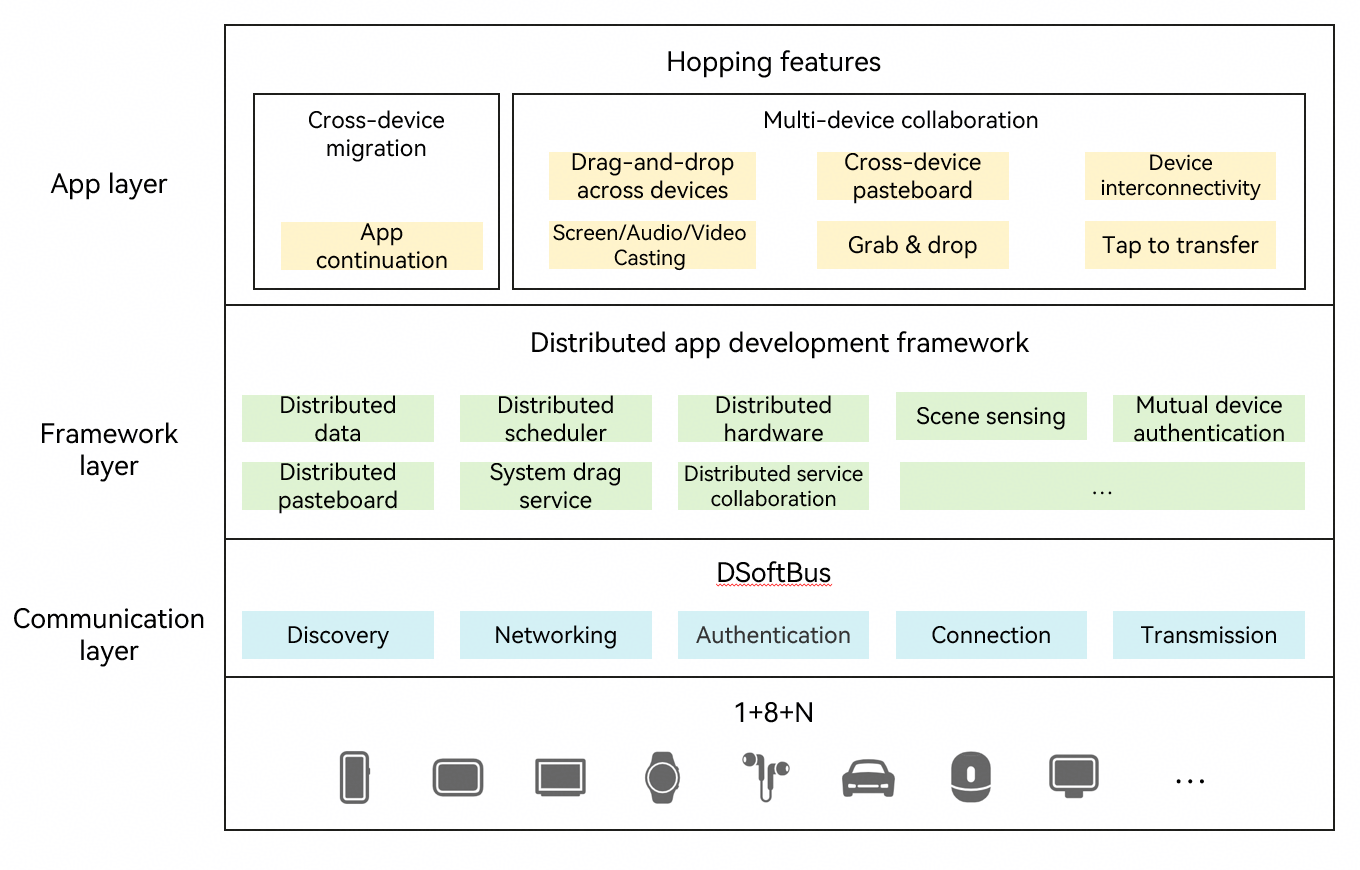
Feature | Description | Development References | |
|---|---|---|---|
Cross-device migration | App continuation | Allows the operations being performed by a user on one device to be quickly switched and seamlessly continued in the same app on another device. | For details, see App Continuation Overview. |
Multi-device collaboration | Drag-and-drop across devices | Allows the keyboard and mouse to be shared across devices. Files and texts can be dragged and dropped between tablets or any 2-in-1 devices. | This feature can be implemented by accessing the drag and drop capability. For details, see Unified Drag-and-Drop. The effect is similar to that of Drag-and-Drop Across Devices. |
Cross-device pasteboard | Enables the user to copy a piece of text in the app of device A and paste it to the app of device B, achieving efficient content sharing across devices. | This feature can be implemented by accessing the pasteboard. For details, see Cross-Device Pasteboard. | |
Device interconnectivity | Enables a tablet or 2-in-1 device to use the camera, scanning, gallery, and other functions of a phone. | For details, see Introduction to Device Interconnectivity. | |
Screen casting | Enables the user to obtain the screen casting device information after system screen mirroring, implementing casting in extended screen mode and dual-screen collaboration. | For details, see Extended Screen Casting Development. | |
Audio/Video casting | Enables the user to seamlessly cast audio to other HarmonyOS devices using the media controller. For example, the user can continue playback on a 2-in-1 device after starting it on a smartphone. | For details about how to implement audio casting, see Audio Casting. For details about how to implement video casting, see Video Casting. | |
Grab & drop | Introduced by Share Kit, it allows users to transfer content across devices by simply grabbing and dropping it. | For details, see Grab & Drop. | |
Tap to transfer | Introduced by Share Kit, it allows users to initiate cross-device sharing simply by tapping the tops of the sending and receiving devices together. This feature enables image transfer, Wi-Fi sharing, and more. | For details about how to implement tap to transfer for sharing notes, shopping information, and long or short videos, or for setting up a game team, see Tap to Transfer for Links. For details about how to implement tap to transfer for sending or receiving files, see Tap to Transfer for Files. |