Multi Thread Check
In the JavaScript runtime environment, the safety of multi-threading is an important consideration. Since JavaScript is a single-threaded language, any JavaScript object can only be operated on the thread where it is created. Violating this rule can lead to multi-threading safety issues. Here are some detailed explanations on how to determine and handle these issues. Enabling multi-thread check will cause significant performance loss. Enable it as needed.
[h2]Technical Overview
- Single-threaded execution
JavaScript is a single-threaded language, which means that it can only execute code on one thread at a time. Any JavaScript object can only be operated on the thread where it is created.
- Node-API
The Node-API is directly involved in the operation of JavaScript objects. The vast majority (about 95%) of Node-APIs can only be called on the JavaScript thread that created these objects.
- Multi thread check mechanism
The multi thread check mechanism detects whether the current thread is consistent with the JavaScript thread ID in the JavaScript virtual machine environment (vm/env) being used. If they are not consistent, it indicates that the virtual machine environment is being used across threads, and there is a multithreading safety issue.
[h2]Common Multithreading Safety Issues
- Non-JavaScript thread using Node-API
A non-JavaScript thread attempting to call the Node-API may lead to undefined behavior or crashes.
// Index.ets
Text(this.message)
  .fontSize($r('app.float.page_text_font_size'))
  .fontWeight(FontWeight.Bold)
  .onClick(() => {
    testNapi.multiCheck();
  })
// napi_init.cpp static napi_value MultiCheck(napi_env env, napi_callback_info info) { std::thread([](napi_env env) { napi_value obj = nullptr; napi_create_object(env, &obj); }, env).join(); return nullptr; }
- Node-API using another thread's env
A thread attempting to use a JavaScript environment (env) created by another thread can also lead to multithreading safety issues.
// Index.ets
Text(this.message)
  .fontSize($r('app.float.page_text_font_size'))
  .fontWeight(FontWeight.Bold)
  .onClick(() => {
    testNapi.saveEnv();
    const task = new taskpool.Task(createObject);
    taskpool.execute(task);
  })
// napi_init.cpp napi_env env_ = nullptr; static napi_value SaveEnv(napi_env env, napi_callback_info info) { env_ = env; return nullptr; } static napi_value CreateObject(napi_env env, napi_callback_info info) { napi_value obj = nullptr; napi_create_object(env_, &obj); return nullptr; }
Identifying Multithreading Safety Issues
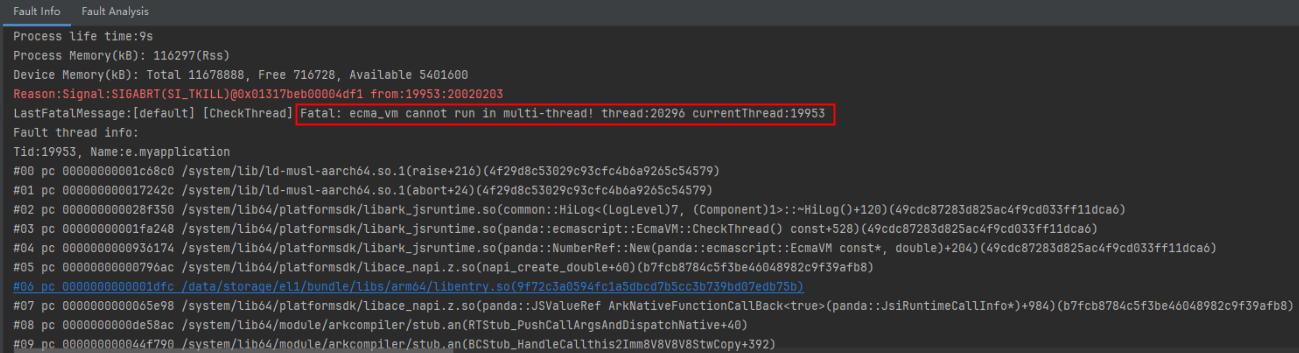
If you encounter the following fatal error message during runtime, it means a multithreading safety issue has occurred:
Fatal: ecma_vm cannot run in multi-thread! thread:3096 currentThread:3550
The current thread number is 3550, and the JavaScript environment used is created by thread 3096. This indicates that the virtual machine environment (vm/env) is being used across threads, leading to a multithreading safety issue.

If multi-thread check is not enabled, an error may not be reported in runtime even if there is an incorrect multi-thread implementation.
[h2]Enabling Multi Thread Check
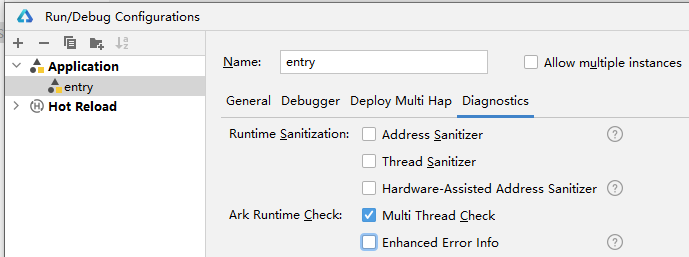
You can enable multi thread check in either of the following ways:
- Method 1
Choose Run > Edit Configurations > Diagnostics and select Multi Thread Check.
- Method 2
Run the following command:
hdc shell aa start -a {abilityName} -b {bundleName} -R
[h2]Using Multi Thread Check
- Run or debug the app.
- When a multithreading safety issue occurs, the crash log message will be displayed. You can click the link provided in the message to navigate to the code that causes the issue.
[h2]ArkCompiler Error Codes
The fatal message "Fatal: ecma_vm cannot run in multi-thread! thread:20296 currentThread:19953" indicates a multithreading safety issue. It means that the current thread (ID: 19953) uses a JavaScript environment created by thread 20296, resulting in cross-thread VM access.