


Intelligent Assistant
Chat with our virtual assistant to get answers promptly.
Add the following configuration to the features attribute in the manifest.json file:
- {"name": "system.package"}
Add the following configuration to the script element on the page where the API will be called:
- import pkg from '@system.package'
Or
- var pkg = require("@system.package")
Item | Description |
|---|---|
Applicable devices | Mobile phones, tablets, Vision products, and telematics devices |
Applicable regions | Global |
API | Description |
|---|---|
Checks whether a native or quick app has been installed. A quick app is considered installed only when a home screen icon has been created for it. | |
Goes to the app details page on AppGallery for the user to install the native app. This API does not check whether the installation is successful. | |
Obtains the version name and version code of an app. | |
Obtains app signature digests. |
Description
Checks whether a native or quick app has been installed. A quick app is considered installed only when a home screen icon has been created for it.
OBJECT parameters
Parameter | Type | Mandatory | Description |
|---|---|---|---|
package | string | Yes | App package name. |
success | function | No | Callback upon success. |
fail | function | No | Callback upon failure. |
complete | function | No | Callback upon completion. |
Parameters returned by success
Parameter | Type | Description |
|---|---|---|
result | boolean | Indicates whether the app exists. |
Sample code
- pkg.hasInstalled({
- package: 'com.hap.app',
- success: function(data) {
- console.log("handling success: " + data.result);
- },
- fail: function(data, code) {
- console.log("handling fail, code=" + code);
- }
- })
Description
Goes to the app details page on AppGallery for the user to install the native app. This API does not check whether the installation is successful.
OBJECT parameters
Parameter | Type | Mandatory | Description |
|---|---|---|---|
package | string | Yes | App package name. |
success | function | No | Callback upon success. |
fail | function | No | Callback upon failure. |
complete | function | No | Callback upon completion. |
Parameters returned by success
Parameter | Type | Description |
|---|---|---|
result | boolean | Indicates whether the app details page on AppGallery is displayed. |
Sample code
- pkg.install({
- package: 'com.hap.app',
- success: function(data) {
- console.log("handling success: " + data.result);
- },
- fail: function(data, code) {
- console.log("handling fail, code=" + code);
- }
- })
Description
Obtains the version numbers and version names of the native app and the quick app.
For a card, only the information about the installed native app can be obtained.
OBJECT parameters
Parameter | Type | Mandatory | Description |
|---|---|---|---|
package | string | Yes | App package name. |
success | function | No | Callback upon success. |
fail | function | No | Callback upon failure. |
complete | function | No | Callback upon completion. |
Parameters returned by success
Parameter | Type | Description |
|---|---|---|
versionCode | number | Version code mapping the queried package name. |
versionName | string | Version name mapping the queried package name. |
Result codes returned by fail
Result Code | Description |
|---|---|
202 | Invalid parameter. |
1000 | No apps found. |
Sample code
- pkg.getInfo({
- package: 'com.sina.news',
- success: function (data) {
- console.log(`handling success: ${data.versionCode}, ${data.versionName}`)
- },
- fail: function (data, code) {
- console.log(`handling fail, code = ${code}`)
- }
- })
Description
Obtains the signature digest of the native app and quick app.
For a card, only the information about the installed native app can be obtained.
OBJECT parameters
Parameter | Type | Mandatory | Description |
|---|---|---|---|
package | string | Yes | App package name. |
success | function | No | Callback upon success. |
fail | function | No | Callback upon failure. |
complete | function | No | Callback upon completion. |
Parameters returned by success
Parameter | Type | Description |
|---|---|---|
signatureDigests | array | List of signatures encrypted using the SHA-256 algorithm. |
Result codes returned by fail
Result Code | Description |
|---|---|
202 | Invalid parameter. |
1000 | No apps found. |
Sample code
- pkg.getSignatureDigests({
- package: 'com.sina.news',
- success: function (data) {
- data.signatureDigests.map(function (item) {
- console.log(`handling success: signatureDigests = ${item}`)
- })
- },
- fail: function (data, code) {
- console.log(`handling fail, code = ${code}`)
- }
- })
- <template>
- <div class="container">
-
- <div class="item-container">
- <text>{{hasInstalled}}</text>
- <input type="button" class="btn" onclick="pkgHasInstalled" value="pkgHasInstalled" />
- </div>
-
- <div class="item-container">
- <input type="button" class="btn" onclick="pkgInstall" value="installPkg" />
- </div>
- <div class="item-container">
- <text>{{versionInfo}}</text>
- <input type="button" class="btn" onclick="pkgGetInfo" value="getPkgInfo" />
- </div>
-
- <div class="item-container">
- <text>{{signatures}}</text>
- <input type="button" class="btn" onclick="pkgGetSignatureDigests" value="getPkgSignatureDigests" />
- </div>
- </div>
- </template>
-
- <style>
- .container{
- flex: 1;
- flex-direction: column;
- }
- .item-container {
- margin-top: 50px;
- margin-right: 60px;
- margin-left: 60px;
- flex-direction: column;
- }
- .btn {
- height: 80px;
- text-align: center;
- border-radius: 5px;
- margin-right: 60px;
- margin-left: 60px;
- margin-bottom: 50px;
- color: #ffffff;
- font-size: 30px;
- background-color: #0faeff;
- }
- </style>
-
- <script>
- import pkg from '@system.package'
- import prompt from '@system.prompt'
-
- export default {
- data: {
- versionInfo: '',
- signatures: '',
- hasInstalled:''
- },
- onInit: function () {
- this.$page.setTitleBar({ text: 'package' })
- },
- pkgHasInstalled: function () {
- let that = this
- pkg.hasInstalled({
- package: 'com.huawei.appmarket',
- success: function (data) {
- console.log('handling success: ' + data.result);
- that.hasInstalled = data.result;
- prompt.showToast({
- message: 'result---' + data.result
- })
- },
- fail: function (erromsg, errocode) {
- prompt.showToast({ message: "hasInstalled fail" + errocode + ': ' + erromsg })
- },
- complete: function () {
- console.log('complete')
- }
- })
- },
- pkgInstall: function () {
- pkg.install({
- package: 'com.sina.news',
- success: function (data) {
- console.log('handling success: ' + data.result)
- prompt.showToast({
- message: 'success'
- })
- },
- fail: function (data, code) {
- console.log('handling fail, code=' + code)
- prompt.showToast({
- message: 'fail'
- })
- },
- complete: function () {
- console.log('pkg install complete')
- }
- })
- },
- pkgGetInfo: function () {
- var that = this
- pkg.getInfo({
- package: 'com.huawei.appmarket',
- success: function (ret) {
- console.log('getInfo succ data:' + JSON.stringify(ret))
- that.versionInfo = JSON.stringify(ret)
- prompt.showToast({
- message: 'succ! versionCode:' + ret.versionCode + '\n versionName:' + ret.versionName
- })
- },
- fail: function (erromsg, errocode) {
- that.versionInfo = errocode + ': ' + erromsg
- prompt.showToast({ message: "get pkginfo fail" + errocode + ': ' + erromsg })
- },
- complete: function () {
- console.log('complete')
- }
- })
- },
- pkgGetSignatureDigests: function () {
- var that = this
- pkg.getSignatureDigests({
- package: 'com.huawei.appmarket',
- success: function (ret) {
- console.log('getSignatureDigests succ data:' + JSON.stringify(ret))
- that.signatures = JSON.stringify(ret)
- prompt.showToast({
- message: 'succ!' + 'sing:\n' + ret.signatures
- })
- },
- fail: function (erromsg, errocode) {
- that.signatures = errocode + ': ' + erromsg
- prompt.showToast({ message: "GetSignatureDigests fail" + errocode + ': ' + erromsg })
- },
- complete: function () {
- console.log('complete')
- }
- })
- }
- }
- </script>
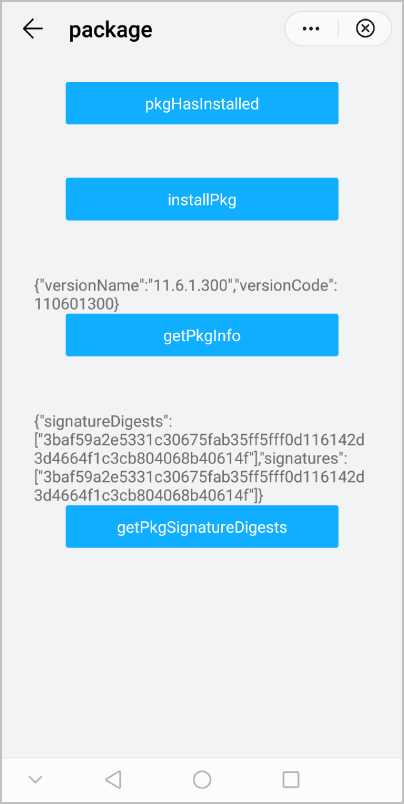
The following figure shows the final effect.
Version | Date | Description |
|---|---|---|
1070 | 2020-05-19 |
|