
Data processed by the quick app APIs may be read by other apps when being used on a PC. Therefore, you are not advised to store sensitive data.
API Declaration
Add the following configuration to the features attribute in the manifest.json file:
{"name": "system.storage"} Module Import
Add the following configuration to the script element on the page where the API will be called:
import storage from '@system.storage'
Or
var storage = require("@system.storage") Application Scope
Item | Description |
|---|---|
Applicable devices | Mobile phones, tablets, Vision products, and telematics devices |
Applicable regions | Global |
Definition
API | Description |
|---|---|
Reads the content stored in the app database. | |
Modifies the content stored in the app database. | |
Clears the content stored in the app database. | |
Deletes the content stored in the app database. | |
Returns the key name of an index in the storage. |
[h2]storage.get(OBJECT)
Description
Reads the content stored in the app database.
OBJECT parameters
Parameter | Type | Mandatory | Description |
|---|---|---|---|
key | string | Yes | Index. |
default | string | No | If key does not exist, default is returned. If default is not specified, an empty string whose size is zero is returned. |
success | function | No | Callback upon success. The returned value is the stored content corresponding to key. |
fail | function | No | Callback upon failure. |
complete | function | No | Callback upon completion. |
Sample code
storage.get({
  key: 'A1',
  success:function(data){console.log("handling success");},
  fail: function(data, code) {
    console.log("handling fail, code=" + code);
  }
})
[h2]storage.set(OBJECT)
Description
Modifies the content stored in the app database.
OBJECT parameters
Parameter | Type | Mandatory | Description |
|---|---|---|---|
key | string | Yes | Index. |
value | string | No | New value. The total size of values cannot exceed 2 MB. If the new value is an empty string whose size is zero, the data item with the key as its index will be deleted. |
success | function | No | Callback upon success. NOTE: If the value of minPlatformVersion is greater than or equal to 1035, the value of data is success. If the value of minPlatformVersion is smaller than 1035, an empty value is returned for data. |
fail | function | No | Callback upon failure. |
complete | function | No | Callback upon completion. |
Sample code
storage.set({
  key: 'A1',
  value: 'V1',
  success:function(data){console.log("handling success");},
  fail: function(data, code) {
    console.log("handling fail, code=" + code);
  }
})
[h2]storage.clear(OBJECT)
Description
Clears the content stored in the app database.
OBJECT parameters
Parameter | Type | Mandatory | Description |
|---|---|---|---|
success | function | No | Callback upon success. NOTE: If the value of minPlatformVersion is greater than or equal to 1035, the value of data is success. If the value of minPlatformVersion is smaller than 1035, an empty value is returned for data. |
fail | function | No | Callback upon failure. |
complete | function | No | Callback upon completion. |
Sample code
storage.clear({
  success:function(data){console.log("handling success");},
  fail: function(data, code) {
    console.log("handling fail, code=" + code);
  }
})
[h2]storage.delete(OBJECT)
Description
Deletes the content stored in the app database.
OBJECT parameters
Parameter | Type | Mandatory | Description |
|---|---|---|---|
key | string | Yes | Index. |
success | function | No | Callback upon success. NOTE: If the value of minPlatformVersion is greater than or equal to 1035, the value of data is success. If the value of minPlatformVersion is smaller than 1035, an empty value is returned for data. |
fail | function | No | Callback upon failure. |
complete | function | No | Callback upon completion. |
Sample code
storage.delete({
  key: 'A1',
  success:function(data){console.log("handling success");},
  fail: function(data, code) {
    console.log("handling fail, code=" + code);
  }
})
[h2]storage.key(OBJECT) (1050+)
Description
Returns the key name of an index in the storage.
OBJECT parameters
Parameter | Type | Mandatory | Description |
|---|---|---|---|
index | number | Yes | Index of the key to be queried. |
success | function | No | Callback upon success. |
fail | function | No | Callback upon failure. |
complete | function | No | Callback upon completion. |
Sample code
storage.key({
    index: parseIndex,
    success: function (ret) {
        console.info('storage.key(): ', JSON.stringify(ret))
        prompt.showToast({message: 'key: ' + ret,})
    },
    fail: function (erromsg, errocode) {
        prompt.showToast({ message: 'get fail --- ' + errocode + ':' + erromsg });
        console.info('get fail --- ' + errocode + ':' + erromsg)
    },
    complete: function () {
        console.info('get complete  ')
    }
})
Attributes (1050+)
Attribute | Type | Readable | Writable | Description |
|---|---|---|---|---|
length | number | Yes | No | Number of data items in the storage. |
Demo
<template>
  <div class="container">
    <div class="item-container">
      <div class="item-content">
        <div class="item-content-detail">
          <text class="txt">key:</text>
          <input class="input" placeholder="Please input key"  value="{{storageKey}}" onchange="keyFn" />
        </div>
        <div class="item-content-detail">
          <text class="txt">value:</text>
          <input class="input" placeholder="Please input value"
            value="{{storageValue}}" onchange="valueFn" />
        </div>
        <div class="item-content-detail">
          <text class="txt">index:</text>
          <input class="input" placeholder="Please input index" value="{{index}}" onchange="indexFn" />
        </div>
      </div>
      <input type="button" class="btn" onclick="setStorage" value="Set storage" />
      <input type="button" class="btn" onclick="getStorage"  value="Get storage" />
      <input type="button" class="btn" onclick="getKey" value="Get keyname an index" />
      <input type="button" class="btn" onclick="getLength" value="Get length in the storage" />
      <input type="button" class="btn" onclick="clearStorage" value="Clear storage" />
      <input type="button" class="btn" onclick="deleteStorage"  value="Delete storage" />
    </div>
  </div>
</template>

<style>
  .container{
    flex: 1;
    flex-direction: column;
  }
  .item-container {
    margin-bottom: 50px;
    margin-right: 60px;
    margin-left: 60px;
    flex-direction: column;
  }

  .item-content {
    flex-direction: column;
    background-color: #ffffff;
    padding-left: 30px;
    padding-right: 30px;
    padding-top: 15px;
    padding-bottom: 15px;
    margin-bottom: 100px;
  }

  .item-content-detail {
    align-items: center;
  }

  .input {
    flex: 1;
    font-size: 30px;
    padding-left: 20px;
  }

  .txt {
    width: 100px;
    padding-top: 15px;
    padding-bottom: 15px;
    text-align: right;
  }
  .btn {
  height: 80px;
  text-align: center;
  border-radius: 5px;
  margin-right: 60px;
  margin-left: 60px;
  margin-bottom: 50px;
  color: #ffffff;
  font-size: 30px;
  background-color: #0faeff;
}
</style>

<script>
  import storage from '@system.storage'
  import prompt from '@system.prompt'
  export default {
    data: {
      componentName: 'storage',
      componentData: {},
      storageKey: '',
      storageValue: '',
      storageShow: '',
      inputKey: '',
      inputValue: '',
      index: 0,
    },
    onInit: function () {
      this.$page.setTitleBar({ text: 'storage' })
    },
    keyFn: function (e) {
      this.storageKey = e.text
    },
    valueFn: function (e) {
      this.storageValue = e.text
    },
    indexFn: function (e) {
      this.index = e.text
    },
    setStorage: function () {
      var that = this
      if (this.storageKey && this.storageValue) {
        storage.set({
          key: this.storageKey,
          value: this.storageValue,
          success: function (ret) {
            prompt.showToast({
              message: '{key:' + that.storageKey + ',value:' + that.storageValue + '}',
            })
          },
          fail: function (erromsg, errocode) {
            prompt.showToast({ message: 'set fail --- ' + errocode + ':' + erromsg })
            console.info('set fail --- ' + errocode + ':' + erromsg)
          },
          complete: function () {
           // prompt.showToast({ message: 'set complete' })
            console.info('set complete  ')
          }
        })
      } else {
        prompt.showToast({
          message: "Please input key and value"
        })
      }
    },
    getStorage: function () {
      var that = this
      storage.get({
        key: this.storageKey,
        default: 'default value',
        success: function (ret) {
          console.info('storage.get(): ', JSON.stringify(ret))
          that.storageShow = ret
          prompt.showToast({
            message: 'value: ' + ret,
          })
        },
        fail: function (erromsg, errocode) {
          prompt.showToast({ message: 'get fail --- ' + errocode + ':' + erromsg })
          console.info('get fail --- ' + errocode + ':' + erromsg)
        },
        complete: function () {
          console.info('get complete  ')
        }
      })
    },
    getKey: function () {
      var that = this
      const parseIndex = that.index
      storage.key({
        index: parseIndex,
        success: function (ret) {
          console.info('storage.key(): ', JSON.stringify(ret))
          prompt.showToast({ message: 'key: ' + ret, })
        },
        fail: function (erromsg, errocode) {
          prompt.showToast({ message: 'get fail --- ' + errocode + ':' + erromsg })
          console.info('get fail --- ' + errocode + ':' + erromsg)
        },
        complete: function () {
          console.info('get complete  ')
        }
      })
    },
    getLength: function () {
      const length = storage.length
      console.log('storage.length = ' + length)
      prompt.showToast({ message: 'storage.length : ' + length })
    },
    deleteStorage: function () {
      var that = this
      storage.delete({
        key: this.storageKey,
        success: function () {
          that.storageKey = '' // Delete the value in the variable
          that.storageValue = ''// Delete the value in the variable
          that.inputKey = ''// Delete the value displayed by input
          that.inputValue = '' // Delete the value displayed by input
          prompt.showToast({
            message: 'success',
          })
        },
        fail: function (erromsg, errocode) {
          prompt.showToast({ message: 'get fail --- ' + errocode + ':' + erromsg })
          console.info('get fail --- ' + errocode + ':' + erromsg)
        },
        complete: function () {
          console.info('get complete  ')
        }
      })
    },
    clearStorage: function () {
      var that = this
      storage.clear({
        success: function () {
          that.storageKey = '' // Delete the value in the variable
          that.storageValue = ''// Delete the value in the variable
          that.inputKey = ''// Delete the value displayed by input
          that.inputValue = '' // Delete the value displayed by input
          prompt.showToast({
            message: 'success',
          })
        },
        fail: function (erromsg, errocode) {
          prompt.showToast({ message: 'clear fail --- ' + errocode + ':' + erromsg })
          console.info('clear fail --- ' + errocode + ':' + erromsg)
        },
        complete: function () {
          prompt.showToast({ message: 'clear complete' })
          console.info('clear complete  ')
        }
      })
    }
  }
</script>
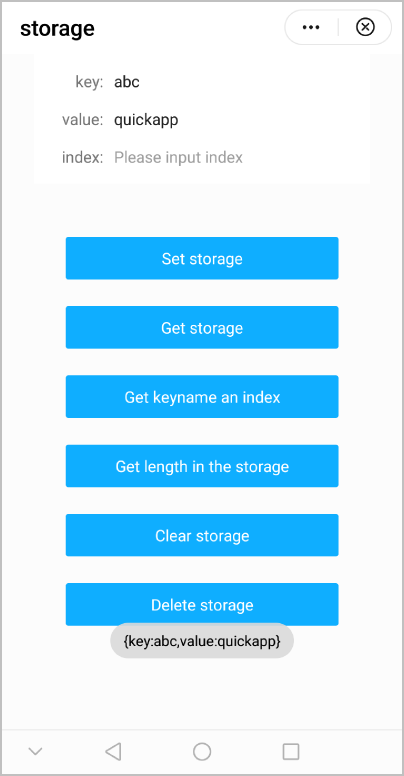
The following figure shows the final effect.
Version Change History
Version | Date | Description |
|---|---|---|
1050 | 2019-09-20 | Added the key method to obtain the key name corresponding to an index. |
1040 | 2019-06-24 | Changed the value of data to success for the success callback of the storage.set, storage.clear, and storage.delete APIs in 1040 and later versions. |
[h2]FAQs
- Is the storage mechanism of the storage API the same as that of the file API?
- When I call the data storage API on a quick app downloaded from AppGallery or a local RPK of the quick app, is the data the same?
- What can I do if "code: 200: the key is invalid" or "performGetItem: this key is invalid, can not find this key in storage" is returned after the storage.delete API is called?
- Can the storage API be called synchronously?
- Can I use databases such as MySQL for a quick app?