


Intelligent Assistant
Chat with our virtual assistant to get answers promptly.
No declaration is required.
Add the following configuration to the script element on the page where the API will be called:
- import app from '@system.app'
Or
- var app = require("@system.app")
Item | Description |
|---|---|
Applicable devices | Mobile phones, tablets, Vision products, and telematics devices |
Applicable regions | Global |
API | Description |
|---|---|
Obtains current app information. | |
Obtains information about a local app. In a quick app scenario, this API can obtain information about both the local native app and quick app. In a card scenario, this API can obtain only information about the native app. | |
Generates a QR code of the current quick app. | |
Obtains an UpdateManager object. | |
Forcibly restarts the quick app and uses its new version. | |
Listens to the quick app update check results. | |
Called when the new version is downloaded successfully. | |
Called when the new version fails to be downloaded. |
Description
Obtains current app information.
Returns
Parameter | Type | Description |
|---|---|---|
name | string | Name of an app. |
versionName | string | Name of an app version. |
versionCode | number | Version code of an app. |
logLevel | string | Log level. |
source | object | App source. |
icon (1045+) | string | Path of an app icon, which is configured in the manifest file. An example is /common/logo.png. |
packageName (1045+) | string | App package name. |
source parameters
Parameter | Type | Description |
|---|---|---|
packageName | string | Package name of the source app. This is the level-1 source. |
type | string | Source type. The options are as follows:
|
extra | object | Other source information, which varies with type. When type is set to shortcut, the options of extra are as follows:
|
The values of packageName and type will not be returned during app tests on Huawei Quick App Loader. They will be displayed after the app is officially released.
Sample code
- console.log("App getInfo:"+ JSON.stringify(app.getInfo()));
The output is as follows:
- App getInfo:{
- "versionName":"1.0.0",
- "icon":"/Common/logo.png",
- "source":{
- "type":"unknown",
- "packageName":"unknown"
- },
- "versionCode":1,
- "logLevel":"debug",
- "name":"HelloWorld"
- }
Description
Obtains information about a local app. In a quick app scenario, this API can obtain information about both the local native app and quick app. In a card scenario, this API can obtain only information about the native app.
OBJECT
Parameter | Type | Mandatory | Description |
|---|---|---|---|
packageName | string | Yes | Package name of the quick app or native app to be queried. |
success | function | No | Callback upon success. |
fail | function | No | Callback upon failure. |
complete | function | No | Callback upon completion. |
Parameters returned by success
Parameter | Type | Description |
|---|---|---|
versionName | string | Name of an app version. |
versionCode | number | Version code of an app. |
signatures | list<string> | App signature list. The signature belongs to the data publisher and is encrypted using SHA-256. |
Result codes returned by fail
Result Code | Description |
|---|---|
200 | Common error. |
202 | Invalid parameter. |
1000 | The app is not installed. |
Description
Generates a QR code of the current quick app.
OBJECT
Parameter | Type | Mandatory | Description |
|---|---|---|---|
path | string | No | Path to the page that supports carrying parameters. |
success | function | No | Callback upon success. |
fail | function | No | Callback upon failure. |
complete | function | No | Callback upon completion. |
Parameters returned by success
Parameter | Type | Description |
|---|---|---|
uri | string | URI of the QR code file. |
Result codes returned by fail
Result Code | Description |
|---|---|
200 | Common error. |
Sample code
- app.createQuickAppQRCode({
- path: '/interface/basic/router/detail',
- success: (data) => {
- this.packageInfo = JSON.stringify(data)
- this.srcUrl = data.uri;
- console.info('createQuickAppQRCode success', JSON.stringify(data))
- },
- fail: (errormsg, errorcode) => {
- this.packageInfo = 'get fail --- ' + errorcode + ':' + errormsg
- console.info('get fail --- ' + errorcode + ':' + errormsg)
- },
- complete: () => {
- console.info('get complete.')
- }
- })
- <template>
- <!-- Only one root node is allowed in template. -->
- <div class="container">
- <div class="item-container">
- <input type="button" class="btn" onclick="test_getappinfo" value="getAppInfo" />
- </div>
- <div class="item-container">
- <input type="button" class="btn" onclick="test_getpackageinfo" value="getPackageInfo" />
- </div>
- <div class="item-container" if="{{info}}">
- <text class="content">{{info}}</text>
- </div>
- </div>
- </template>
- <style>
- .container {
- flex-direction: column;
- justify-content: center;
- align-items: center;
- }
- .item-container {
- margin-top: 50px;
- margin-right: 30px;
- margin-left: 30px;
- flex-direction: column;
- }
- .btn {
- background-color: #0faeff;
- color: #ffffff;
- width:400px;
- height: 100px;
- font-size: 50px;
- border-radius:15px;
- }
- .content {
- border: 2px ;
- border-radius: 10px;
- text-align: center;
- }
- </style>
- <script>
- import app from '@system.app'
- module.exports = {
- data: {
- componentData: {},
- info:'',
- get_success:'',
- get_fail:''
- },
- onInit() {
- this.$page.setTitleBar({
- text: 'App Context',
- textColor: '#ffffff',
- backgroundColor: '#007DFF',
- backgroundOpacity: 0.5,
- menu: true
- });
- },
- test_getappinfo() {
- var that = this;
- // app.getInfo();
- var appinfo = JSON.stringify(app.getInfo());
- console.log("App getInfo:"+ appinfo);
- that.info = appinfo;
- that.get_success = appinfo;
- },
- test_getpackageinfo() {
- var that = this;
- app.getPackageInfo({
- packageName:'com.fast.rounter.app.huawei',
- success:function(data) {
- console.log("APP getPackageInfo is : "+data);
- that.info = data;
- that.get_success = data;
- },
- fail:function (data,code) {
- console.log(" get package info failed! " + code);
- console.log("get package info failed! "+data);
- that.info = data;
- that.get_fail = data;
- },
- complete:function(data) {
- console.log("complete!");
- that.info = data;
- }
- })
- }
- }
- </script>
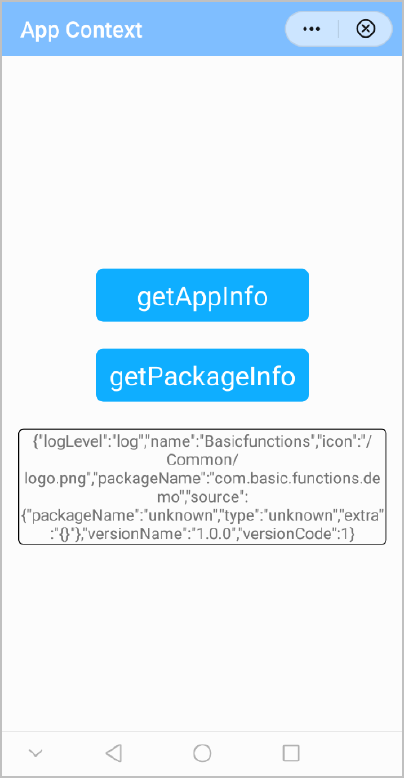
The following figure shows the final effect.
Version | Date | Description |
|---|---|---|
1090 | 2022-05-19 | Added the app.createQuickAppQRCode API to generate the QR code of the current quick app. |
1050 | 2019-09-20 |
|