


Intelligent Assistant
Chat with our virtual assistant to get answers promptly.
To standardize notification messages for a better experience, Push Kit will be fully updated from May 19, 2023 for quick apps.
During the update, the push capability will be unavailable. That is, push messages and notification messages cannot reach users in quick apps. We apologize for any inconvenience caused to you.
The service update is expected to be completed in the fourth quarter of 2023. We will notify you by email after that. If you have any questions, please send an email to developer@huawei.com. Thank you for your support.
Add the following configuration to the features attribute in the manifest.json file:
- {"name": "system.notification"}
Add the following configuration to the script element on the page where the API will be called:
- import notification from '@system.notification'
Or
- var notification = require("@system.notification")
Item | Description |
|---|---|
Applicable devices | Mobile phones and tablets |
Applicable regions | Chinese mainland |
API | Description |
|---|---|
Displays notifications. | |
Displays notifications with a delay. | |
Cancels displaying notifications with a delay. |
Description
Displays notifications.
OBJECT parameters
Parameter | Type | Mandatory | Description |
|---|---|---|---|
contentTitle | string | No | Title. If the notification permission is not assigned, no notification will be displayed. If the notification permission is assigned, this parameter cannot be left empty. Otherwise, notifications cannot be displayed. |
contentText | string | No | Content. If the notification permission is not assigned, no notification will be displayed. If the notification permission is assigned, this parameter cannot be left empty. Otherwise, notifications cannot be displayed. |
clickAction | object | No | Action triggered when a notification is tapped. |
clickAction parameters
Parameter | Type | Mandatory | Description |
|---|---|---|---|
uri | string | Yes | URI of the page that is displayed after a notification is tapped. The following formats are supported:
You can use "?param1=value1" to add a parameter. Then you can use this parameter on a page using this.param1. |
Sample code
- notification.show({
- contentTitle:'title',
- clickAction: {
- uri:'/index.html?index=1'
- }
- })
Description
Displays notifications with a delay.
A notification will be displayed only if the process of the quick app sending this notification is running. Otherwise, notifications cannot be displayed.
OBJECT parameters
Parameter | Type | Mandatory | Description |
|---|---|---|---|
message | object | Yes | Notification details. |
buildInfo | object | Yes | Delay settings. |
success | function | No | Callback upon success. |
fail | function | No | Callback upon failure. |
complete | function | No | Callback upon completion. |
message parameters
Parameter | Type | Mandatory | Description |
|---|---|---|---|
contentTitle | string | No | Title. If the notification permission is not assigned, no notification will be displayed. If the notification permission is assigned, this parameter cannot be left empty. Otherwise, notifications cannot be displayed. |
contentText | string | No | Content. If the notification permission is not assigned, no notification will be displayed. If the notification permission is assigned, this parameter cannot be left empty. Otherwise, notifications cannot be displayed. |
clickAction | object | No | Action triggered when a notification is tapped. |
buildInfo parameters
Parameter | Type | Mandatory | Description |
|---|---|---|---|
latencyTime | long | Yes | Delay time, in seconds. |
isPersisted | boolean | Yes | Indicates whether notifications are persisted even when a mobile phone is restarted. This setting takes effect after you enable auto launch on Huawei Quick App Center. |
Parameters returned by success
Parameter | Type | Description |
|---|---|---|
jobId | int | ID of a delayed message. This ID can be used to cancel a notification delay task. |
Sample code
- notification.postDelayedShow({
- message:{
- contentTitle: 'title',
- clickAction: {
- uri: '/index.html?index=1'
- }
- },
- buildInfo:{
- latencyTime: 1*60, // 1 minute
- isPersisted:false
- },
- success:function(params){
- console.info("success, id is "+ params.jobId)
- }
- })
Description
Cancels displaying notifications with a delay.
OBJECT parameters
Parameter | Type | Mandatory | Description |
|---|---|---|---|
jobId | int | Yes | ID of a delayed message. |
success | function | No | Callback upon success. |
fail | function | No | Callback upon failure. |
complete | function | No | Callback upon completion. |
Sample code
- notification.cancelDelayedShow({
- jobId:12,
- success:function(params){
- console.info("success")
- }
- })
- <template>
- <div class="container">
- <div class="item-container">
- <div class="item-content">
- <div class="item-content-detail">
- <text class="txt">Title:</text>
- <input class="input" placeholder="Please input title" onchange="titleFn" />
- </div>
- <div class="item-content-detail">
- <text class="txt">Content:</text>
- <input class="input" placeholder="Please input content" onchange="contentFn" />
- </div>
- </div>
- <input type="button" class="btn" value="Send a notification" onclick="show" />
- <input type="button" class="btn" value="Post delayed show" onclick="delayedshow" />
- <input type="button" class="btn" value="Cancel delayed show" onclick="canceldelayedshow" />
- </div>
- </div>
- </template>
- <style>
- .container{
- flex: 1;
- flex-direction: column;
- }
- .item-container {
- margin-top: 50px;
- margin-right: 60px;
- margin-left: 60px;
- flex-direction: column;
- }
- .item-content {
- flex-direction: column;
- background-color: #ffffff;
- padding-left: 30px;
- padding-right: 30px;
- padding-top: 15px;
- padding-bottom: 15px;
- margin-bottom: 100px;
- }
- .item-content-detail {
- align-items: center;
- }
- .input {
- flex: 1;
- font-size: 30px;
- padding-left: 20px;
- }
- .txt {
- width: 150px;
- padding-top: 15px;
- padding-bottom: 15px;
- text-align: right;
- }
- .btn {
- height: 80px;
- text-align: center;
- border-radius: 5px;
- margin-right: 60px;
- margin-left: 60px;
- margin-bottom: 50px;
- color: #ffffff;
- font-size: 30px;
- background-color: #0faeff;
- }
- </style>
- <script>
- import prompt from '@system.prompt'
- import notification from '@system.notification'
- export default {
- data: {
- componentData: {},
- inputTitle: 'title',
- inputContent: 'content',
- testjobId:''
- },
- onInit: function () {
- this.$page.setTitleBar({ text: 'notification' })
- },
- show: function () {
- var that = this
- prompt.showToast({
- message: 'Message whose title is "' + that.inputTitle + ' "has been sent. Check it in the notification bar.',
- })
- notification.show({
- contentTitle: that.inputTitle,
- contentText: that.inputContent,
- clickAction: {
- uri: '/Hello'
- }
- })
- },
- titleFn: function (e) {
- this.inputTitle = e.text
- },
- contentFn: function (e) {
- this.inputContent = e.text
- },
- delayedshow: function () {
- var that = this;
- notification.postDelayedShow({
- message:{
- contentTitle: 'title',
- contentText:'post delayed show',
- clickAction: {
- uri: '/Hello'
- }
- },
- buildInfo:{
- latencyTime: 1*60, // 1 minute
- isPersisted:false
- },
- success:function(params){
- console.info("success, id is "+ params.jobId);
- that.testjobId = params.jobId;
- },
- fail:function(code) {
- console.log("failed, code is "+ code);
- },
- complete:function(data) {
- console.log("delayed show complete!");
- }
- })
- },
- canceldelayedshow:function () {
- notification.cancelDelayedShow({
- jobId:this.testjobId,
- success:function(params){
- console.info("success cancel delayed show")
- },
- fail:function(code) {
- console.log("cancel delayed show failed! code is "+code)
- },
- complete:function() {
- console.log("cancel delayed show complete!")
- }
- })
- }
- }
- </script>
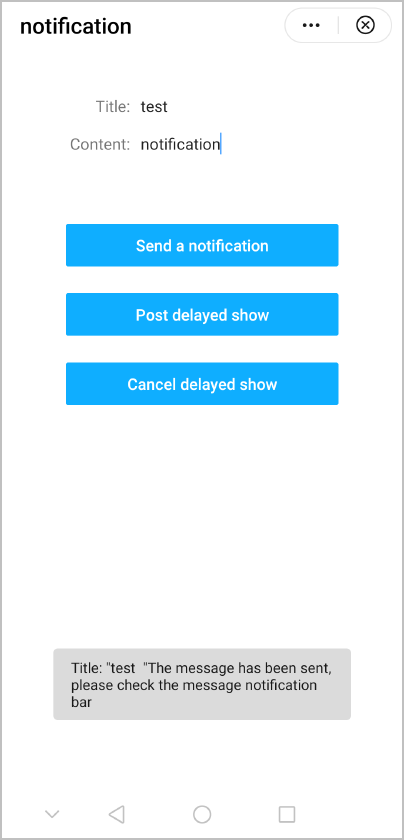
The following figure shows the final effect.
Version | Date | Description |
|---|---|---|
1070 | 2020-05-19 |
|