API Declaration
Add the following configuration to the features attribute in the manifest.json file:
{"name": "system.sensor"} Module Import
Add the following configuration to the script element on the page where the API will be called:
import sensor from '@system.sensor'
Or
var sensor = require("@system.sensor") Application Scope
Item | Description |
|---|---|
Applicable devices | Mobile phones and tablets |
Applicable regions | Global |
Definition
API | Description |
|---|---|
Listens to gravity sensor data. If this API is called multiple times, only the last call takes effect. | |
Cancels listening to gravity sensor data. | |
Listens to compass data. If this API is called multiple times, only the last call takes effect. | |
Cancels listening to compass data. | |
Listens to distance sensor data. If this API is called multiple times, only the last call takes effect. | |
Cancels listening to distance sensor data. | |
Listens to light sensor data. If this API is called multiple times, only the last call takes effect. | |
Cancels listening to light sensor data. | |
Listens to pedometer sensor data. If this API is called multiple times, only the last call takes effect. | |
Cancels listening to pedometer sensor data. If this API is not called, listening will also automatically stop when a user exits your quick app. |
[h2]sensor.subscribeAccelerometer(OBJECT)
Description
Listens to gravity sensor data. If this API is called multiple times, only the last call takes effect.
OBJECT parameters
Parameter | Type | Mandatory | Description |
|---|---|---|---|
interval(1060+) | string | No | Frequency for executing the listener callback function. The default value is normal.
|
callback | function | Yes | Function called back after gravity sensor data changes. This function is called back for five times per second. |
Returns
Parameter | Type | Description |
|---|---|---|
x | Number | X coordinate. |
y | Number | Y coordinate. |
z | Number | Z coordinate. |
Sample code
sensor.subscribeAccelerometer({
  interval:"normal",
  callback:function(ret){console.log("handling callback");}
})
[h2]sensor.unsubscribeAccelerometer()
Description
Cancels listening to gravity sensor data.
Sample code
sensor.unsubscribeAccelerometer()
[h2]sensor.subscribeCompass(OBJECT)
Description
Listens to compass data. If this API is called multiple times, only the last call takes effect.
OBJECT parameters
Parameter | Type | Mandatory | Description |
|---|---|---|---|
callback | function | Yes | Function called back after compass data changes. |
Returns
Parameter | Type | Description |
|---|---|---|
direction | float | Direction in degrees. |
accuracy (1070+) | number | Current precision of the sensor.
|
Sample code
sensor.subscribeCompass({
    callback:function(ret){console.log("handling callback");}
})
[h2]sensor.unsubscribeCompass()
Description
Cancels listening to compass data.
Sample code
sensor.unsubscribeCompass()
[h2]sensor.subscribeProximity(OBJECT)
Description
Listens to distance sensor data. If this API is called multiple times, only the last call takes effect.
OBJECT parameters
Parameter | Type | Mandatory | Description |
|---|---|---|---|
callback | function | Yes | Function called back after distance sensor data changes. |
Returns
Parameter | Type | Description |
|---|---|---|
distance | number | Mobile phone distance, in cm. |
Sample code
sensor.subscribeProximity({
  callback:function(ret){console.log("handling callback");}
})
[h2]sensor.unsubscribeProximity()
Description
Cancels listening to distance sensor data.
Sample code
sensor.unsubscribeProximity()
[h2]sensor.subscribeLight(OBJECT)
Description
Listens to light sensor data. If this API is called multiple times, only the last call takes effect.
OBJECT parameters
Parameter | Type | Mandatory | Description |
|---|---|---|---|
callback | function | Yes | Function called back after light sensor data changes. |
Returns
Parameter | Type | Description |
|---|---|---|
intensity | number | Light intensity, in lux. |
Sample code
sensor.subscribeLight({
  callback:function(ret){console.log("handling callback");}
})
[h2]sensor.unsubscribeLight()
Description
Cancels listening to light sensor data.
Sample code
sensor.unsubscribeLight()
[h2]sensor.subscribeStepCounter(OBJECT)(1045+)
Description
Listens to pedometer sensor data. If this API is called multiple times, only the last call takes effect.
OBJECT parameters
Parameter | Type | Mandatory | Description |
|---|---|---|---|
callback | function | Yes | Function called back after pedometer sensor data changes. |
Returns
Parameter | Type | Description |
|---|---|---|
steps | integer | Number of steps counted by the sensor. Each time the device restarts, the value is reset to 0. |
Sample code
sensor.subscribeStepCounter({
    callback: function (ret) {
        console.error(ret.steps);
    }
})
[h2]sensor.unsubscribeStepCounter()(1045+)
Description
Cancels listening to pedometer sensor data. If this API is not called, listening will also automatically stop when a user exits your quick app.
Sample code
sensor.unsubscribeStepCounter()
Demo
<template>
  <!-- Only one root node is allowed in template. -->
  <div class="container">
    <div class="case-title mt-item">
      <text class="title">gravity sensor data</text>
    </div>
    <div class="info-container">
      <div class="info-item border-bottom-1">
        <text class="title">X</text>
        <div class="result">
          <text>{{accelerometerGetted ? accelerometerData.x : 'please get X coordinate'}}</text>
        </div>
      </div>
      <div class="info-item border-bottom-1">
        <text class="title">Y</text>
        <div class="result">
          <text>{{accelerometerGetted ? accelerometerData.y : 'please get Y coordinate'}}</text>
        </div>
      </div>
      <div class="info-item">
        <text class="title">Z</text>
        <div class="result">
          <text class="result">{{accelerometerGetted ? accelerometerData.z :'please get Z coordinate'}}</text>
        </div>
      </div>
    </div>
    <div class="mt-btn row-center">
      <text class="btn-transparent" onclick="startAccelerometer">Listens to gravity sensor data</text>
    </div>
    <div class="mt-btn row-center">
      <text class="btn-transparent" onclick="stopAccelerometer">Cancels listening to gravity sensor data</text>
    </div>
    <div class="case-title mt-item">
      <text class="title">compass data</text>
    </div>
    <div class="info-container">
      <div class="info-item">
        <text class="title">Direction</text>
        <div class="result">
          <text>{{compassGetted ? compassData.direction : 'please get direction '}}</text>
        </div>
      </div>
      <div class="info-item">
        <text class="title">Accuracy</text>
        <div class="result">
          <text>{{compassGetted ? compassData.accuracy : 'please get accuracy '}}</text>
        </div>
      </div>
    </div>
    <div class="mt-btn row-center">
      <text class="btn-transparent" onclick="startCompass">Listens to compass data</text>
    </div>
    <div class="mt-btn row-center">
      <text class="btn-transparent" onclick="stopCompass">Cancels listening to compass data</text>
    </div>
    <div class="case-title mt-item">
      <text class="title">light sensor data</text>
    </div>
    <div class="info-container">
      <div class="info-item">
        <text class="title">Light intensity</text>
        <div class="result">
          <text>{{lightGetted ? lightData : 'please get light intensity'}}</text>
        </div>
      </div>
    </div>
    <div class="mt-btn row-center">
      <text class="btn-transparent" onclick="startLight">Listens to light sensor data</text>
    </div>
    <div class="mt-btn row-center">
      <text class="btn-transparent" onclick="stopLight">Cancels listening to light sensor data</text>
    </div>
    <div class="case-title mt-item">
      <text class="title">step count</text>
    </div>
    <div class="info-container">
      <div class="info-item">
        <text class="title">Step Count</text>
        <div class="result">
          <text>{{stepGetted ? stepData : 'please get number of steps'}}</text>
        </div>
      </div>
    </div>
    <div class="mt-btn row-center">
      <text class="btn-transparent" onclick="startStepCounter">Listens to pedometer sensor data</text>
    </div>
    <div class="mt-btn row-center">
      <text class="btn-transparent" onclick="stopStepCounter">Cancels listening to pedometer sensor data</text>
    </div>
     <div class="case-title mt-item">
      <text class="title">distance sensor data</text>
    </div>
    <div class="info-container">
      <div class="info-item">
        <text class="title">distance</text>
        <div class="result">
          <text>{{distanceGetted ? distanceData : 'please get mobile phone distance'}}</text>
        </div>
      </div>
    </div>
    <div class="mt-btn row-center">
      <text class="btn-transparent" onclick="startProximity">Listens to distance sensor data</text>
    </div>
    <div class="mt-btn row-center">
      <text class="btn-transparent" onclick="stopProximity">Cancels listening to distance sensor data</text>
    </div>
  </div>
</template>

<style lang="sass">
.container {
  flex-direction: column;
  padding-bottom: 50px;
}
.case-title {
  margin-left: 32px;
  margin-right: 32px;
  margin-bottom: 20px;
  flex-direction: column;
}
.mt-item {
  margin-top: 40px;
}
.info-container {
  margin-left: 32px;
  margin-right: 32px;
  padding-right: 20px;
  padding-left: 20px;
  background-color: #fff;
  border-radius: 32px;
  flex-direction: column;
}
.border-bottom-1{
  border-bottom-width: 1px;
}
.info-container .info-item {
  height: 120px;
  border-bottom-color: rgba(0, 0, 0, 0.05);;
}
.info-container .info-item .title {
  flex-shrink: 0;
  font-size: 32px;
  color: rgba(0, 0, 0, 0.9);
}
.info-container .info-item .result {
  width: 100%;
  justify-content: flex-end;
  text-align: right;
  color: #999;
}
.mt-btn {
  margin-top: 32px;
}
.row-center {
  justify-content: center;
}
  .btn-transparent{
    height: 80px;
    color: #0a59f7;
    font-size: 32px;
    font-weight: 500;
  }
</style>

<script>
  import sensor from '@system.sensor';
  module.exports = {
    public: {
        accelerometerData:{
          x:'',
          y:'',
          z:''
        },
        compassData:{
          direction:'',
          accuracy:''
        },
        lightData:'',
        stepData:'',
        distanceData:'',
        accelerometerGetted:false,
        compassGetted:false,
        lightGetted:false,
        stepGetted:false,
        distanceGetted:false
    },
    onInit: function () {
      this.$page.setTitleBar({ text: 'sensor' });
    },
    startAccelerometer(){
      let that = this;
      sensor.subscribeAccelerometer({
        interval:"normal",
        callback: function (ret) {
          that.accelerometerData = ret;
          that.accelerometerGetted = true;
        }
      })
    },
    stopAccelerometer(){
      sensor.unsubscribeAccelerometer();
    },
    startCompass(){
      let that = this;
      sensor.subscribeCompass({
        callback: function (ret) {
          that.compassData = ret;
          that.compassGetted = true;
        }
      })
    },
    stopCompass(){
      sensor.unsubscribeCompass();
    },
    startLight(){
      let that = this;
      sensor.subscribeLight({
        callback: function (ret) {
          that.lightData = ret.intensity;
          that.lightGetted = true;
        }
      })
    },
    stopLight(){
      sensor.unsubscribeLight();
    },
    startStepCounter(){
      let that = this;
      sensor.subscribeStepCounter({
        callback: function (ret) {
          that.stepData = ret.steps;
          that.stepGetted = true;
        }
      })
    },
    stopStepCounter(){
      sensor.unsubscribeStepCounter();
    },
    startProximity(){
      var that = this;
      sensor.subscribeProximity({
      callback:function(ret){
        console.log("handling callback");
        that.distanceData = ret.distance;
        that.distanceGetted = true;
        }
    })
    },
    stopProximity(){
      sensor.unsubscribeProximity()
    }
  }
</script>
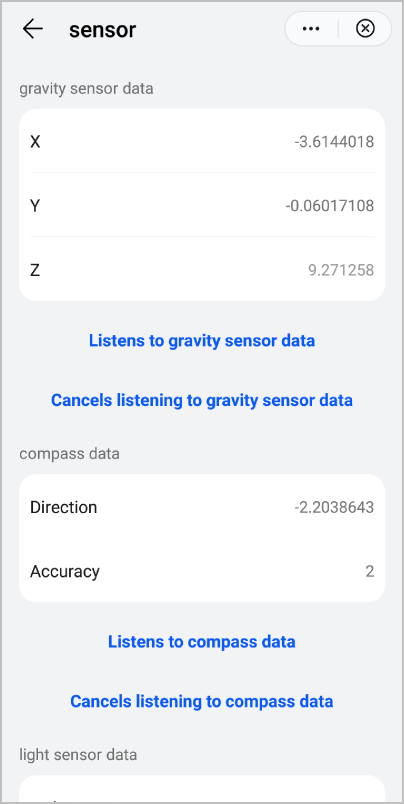
The following figure shows the final effect.
Version Change History
Version | Date | Description |
|---|---|---|
1070 | 2020-05-19 | Added the accuracy parameter to the sensor.subscribeCompass API to obtain the sensor precision. |
1060 | 2019-12-10 | Added the interval parameter to the sensor.subscribeAccelerometer API to set the execution frequency of the callback function for listening to acceleration sensor data. |
1050 | 2019-09-20 | Added the sensor.subscribeStepCounter and sensor.unsubscribeStepCounter APIs to listen to and cancel listening to pedometer sensor data respectively. |