API Declaration
Add the following configuration to the features attribute in the manifest.json file:
{"name": "system.volume"} Module Import
Add the following configuration to the script element on the page where the API will be called:
import volume from '@system.volume'
Or
var volume = require("@system.volume") Application Scope
Item | Description |
|---|---|
Applicable devices | Mobile phones, tablets, Vision products, and telematics devices |
Applicable regions | Global |
[h2]volume.getMediaValue(OBJECT)
Description
Obtains the current multi-media volume.
OBJECT parameters
Parameter | Type | Mandatory | Description |
|---|---|---|---|
success | function | No | Callback upon success. |
fail | function | No | Callback upon failure. |
complete | function | No | Callback upon completion. |
Parameters returned by success
Parameter | Type | Description |
|---|---|---|
value | number | Current multi-media volume of the system, ranging from 0.0 to 1.0. |
[h2]volume.setMediaValue(OBJECT)
Description
Sets the multi-media volume.
OBJECT parameters
Parameter | Type | Mandatory | Description |
|---|---|---|---|
value (1077+) | number | Yes | Volume ranging from 0.0 to 1.0. |
success | function | No | Callback upon success. |
fail | function | No | Callback upon failure. |
complete | function | No | Callback upon completion. |
Result codes returned by fail
Result Code | Description |
|---|---|
200 | Common error. |
202 | Invalid parameter. |
Demo
<template>
  <!-- Only one root node is allowed in template. -->
  <div class="container">
    <div class="case-title">
      <text class="title">setMediaVolume:{{volumeNum}}</text>
    </div>
    <div class="mlr-container">
      <slider class="slider" id="slider" min="0" value="{{volumeNum}}" max="100" step="1" onchange="updateVolume"></slider>
    </div>

     <div class="case-title ">
      <text class="title">getMediaVolume:{{getvolumeNum}}</text>
     </div>


     <div class="item-container">
      <input onclick="getMediaVolume" type="button" value="Get Media Volume" class="btn-blue" />
    </div>

  </div>
</template>

<style lang="sass">
.container {
   flex: 1;
  flex-direction: column;
}
.case-title {
  margin-left: 32px;
  margin-right: 32px;
  margin-bottom: 20px;
  flex-direction: column;
  margin-top: 40px;
}
.title {
  color: rgba(0, 0, 0, 0.6);
  font-size: 28px;
  font-weight: 500;
}
.slider {
  color: rgba(0, 0, 0, 0.1);
  selected-color: #0faeff;
  block-color: #0faeff;
  padding-left: 0;
  padding-right: 0;
}
.mlr-container {
  flex-direction: column;
  margin-right: 32px;
  margin-left: 32px;
}
.btn-blue {
    background-color: #0faeff;
    color: #ffffff;
    width:400px;
    height: 70px;
    font-size: 40px;
    border-radius:15px;
    align-items: center;
    margin-right: 60px;
    margin-left: 60px;
  }
  .item-container {
    margin-bottom: 50px;
    margin-right: 60px;
    margin-left: 60px;
    flex-direction: column;
    align-items: center;
  }
</style>

<script>
  import volume from '@system.volume';
  import prompt from '@system.prompt';
  module.exports = {
    public: {
      volumeNum: 0,
      valumeInted:false,
      getvolumeNum:''
    },
    onInit: function () {
      this.$page.setTitleBar({ text: 'system volume' });

      let that = this;
      volume.getMediaValue({
        success: function (ret) {
          that.volumeNum = ret.value * 100;
          setTimeout(() => {
            that.valumeInted = true;
          },500);
        }
      })
    },
    updateVolume({ progress }) {
      if(!this.valumeInted)
      {
        return;
      }
      this.volumeNum = progress;
      volume.setMediaValue({
        volume: progress / 100,
        success: function (data) {
        },
        fail: function (data, code) {
          prompt.showToast({
            message: 'fail',
            duration: 2000,
            gravity: 'bottom'
          })
        }
      })
    },
    getMediaVolume:function() {
      let that = this;
      volume.getMediaValue({
        success: function (ret) {
          that.getvolumeNum = ret.value * 100;
          setTimeout(() => {
            that.valumeInted = true;
          },500);
        }
      })
    }
  }
</script>
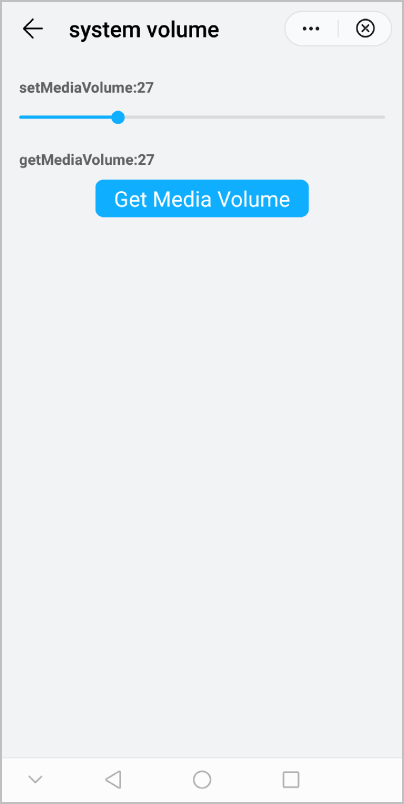
The following figure shows the final effect.